Cms: New entries "saved as draft" should appear on main content overview
Description
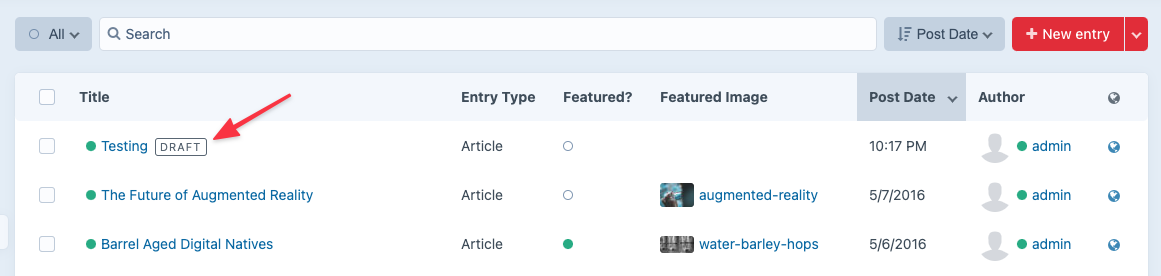
In Craft 3.6, the primary action for new entries is to "Save draft". However, this leads to confusion upon then returning the entries listing, as Drafts are not shown in this by default, and it's not immediately clear where it went (it took me some time to figure out I needed to change the filters on top of the page).
I have a couple of suggestions to improve this behaviour;
- When an entry is saved as draft and the user is redirected to the entries list, redirect them to the drafts listing instead
- More prominently show the filters for Published / Draft / Trashed directly above the entries list, for example as tabs, and also indicate how many entries are in that filter (esp for draft/trashed).
- Include drafts in the "default" entries view (eg the "All" filter currently) with a clear visual distinction from other entries
 FreekVR
All 6 comments
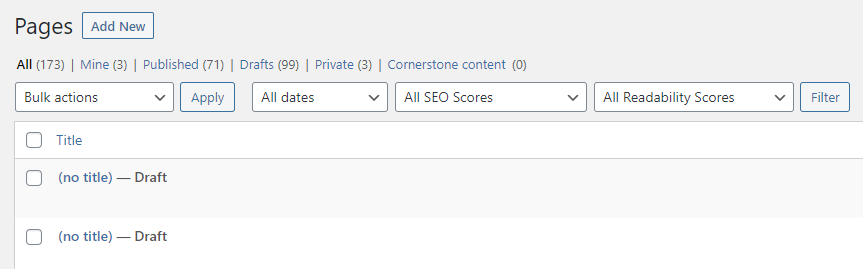
Essentially I'm suggesting an approach similar to Wordpress, which has the filters with counters on top (which are much more clearly visible and not hidden in muted dropdowns) as well as drafts also appearing in the "All" view (with a clear visual draft suffix)
FreekVR
on 20 Jan 2021
Just implemented this for the next release. Thanks for the suggestion!
 brandonkelly
on 29 Jan 2021
brandonkelly
on 29 Jan 2021
Craft 3.6.3 is out now with that change ✨
brandonkelly
on 3 Feb 2021
@brandonkelly Perhaps I'm misunderstanding, but does it make sense for unpublished drafts to appear with a green dot and to show up when I filter to show only "Live" entries? I'm referring to new entries that have never been published, but have a draft.

 Mosnar
on 4 Feb 2021
Mosnar
on 4 Feb 2021
@Mosnar I debated that a bit, but decided it’s best to show the actual draft status color, and use the DRAFT badge to clarify that it’s not actually live.
brandonkelly
on 4 Feb 2021
@Mosnar Ended up changing them to white circles after a discussion about it in Discord. (c6c27c27bb0737d122636467c7f81edf7f049251)
brandonkelly
on 5 Feb 2021
Related issues
 mattstein
·
3Comments
mattstein
·
3Comments
 RitterKnightCreative
·
3Comments
RitterKnightCreative
·
3Comments
 rynpsc
·
3Comments
rynpsc
·
3Comments
 angrybrad
·
3Comments
angrybrad
·
3Comments
 lukebailey
·
3Comments
lukebailey
·
3Comments
Most helpful comment
Just implemented this for the next release. Thanks for the suggestion!