Cms: Some Arabic locales use the uncommon Eastern Arabic Numerals
Description
Using the Arabic locale results in showing numbers in Eastern Arabic Numerals i.e. ٠١٢٣٤٥٦٧٨٩, notably with date & time formatting and entries pagination in control panel. See examples:
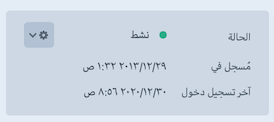

That's also affecting the date & time formatting at front end.
It's acceptable to see this behavior for locales such as ar-SA, ar-EG, ar-AE where in those countries, the official numbering system is the Eastern Arabic, however, the majority of websites operated by those countries, including official websites, use the Western Arabic Numerals or western digits for short i.e 0123456789.
I believe it's also the same case for Persian locale, however, I've not tested it fully.
Steps to reproduce
- Change the users's formatting locale to
العربية, to test the control panel formatting of date & time - Change site's language to
ar – Arabic, to test the front end formatting of date & time
Additional info
- Craft version: 3.5.17.1
- PHP version: 7.4.13
Suggested Fix:
A quick and simpler workaround for date & time formatting, is just to override the formatter config in config/app.php to be as the following:
return [
    'components' => [
        'formatter' => function() {
            $formatter = Craft::$app->getLocale()->getFormatter();
            // Use western digits for Arabic locales
            // https://www.unicode.org/reports/tr35/tr35-numbers.html#otherNumberingSystems
            if (Craft::$app->getLocale()->getLanguageID() === 'ar') {
                $formatter->locale = 'ar-u-nu-latn';
            }
            return $formatter;
        },
    ],
];
But still I don't know how to override the d3-format locale config to fix the pagination format.
Is it possible that we have a config variable e.g. setD3FormatLocale to override the default one set on D3 asset bundle.
 dralshehri
All 7 comments
Hey @dralshehri, I’m not sure Craft should be tampering with the locale ID, and will have to do more research before making a call here.
I just made a small change that will make it possible for you to achieve the locale ID change without modifying Craft’s code, using Yii’s dependency injection container.
Once you’re on the next release, you can create a module with this in its init() method:
\Craft::$container->set(
    \craft\i18n\Formatter::class,
    function($container, $params, $config) {
        // ar => ar-u-nu-latn
        if (isset($config['locale']) && $config['locale'] === 'ar') {
            $config['locale'] = 'ar-u-nu-latn';
        }

        return new \craft\i18n\Formatter($config);
    }
);
 brandonkelly
on 7 Jan 2021
brandonkelly
on 7 Jan 2021
That's great @brandonkelly
How about the d3-format locale?
Is there any way to override it?
e.g. using a different locale from the d3-formate locales, or having a new custom one.
dralshehri
on 8 Jan 2021
I haven’t had a chance to look into that yet. Is this for the New Users widget / Commerce chart widgets?
brandonkelly
on 13 Jan 2021
It affects the pagination at the bottom of elements index.
dralshehri
on 15 Jan 2021
Ahh, gotcha. I forgot we were using D3 for all JS-based number formatting.
I’ve just resolved this for the next Craft 3.6 release. Now we are dynamically generating the D3 locale definition based on info pulled from the application formatter, so if you have told the formatter to use ar-u-nu-latn, then that will also affect D3 now.
To get the fix early, change your craftcms/cms requirement in composer.json to:
"require": {
  "craftcms/cms": "3.6.x-dev as 3.6.0-RC3",
  "...": "..."
}
Then run composer update.
Note I’ve updated the previous code snippet to fix a couple bugs, so make sure you re-copy that into your module as well.
brandonkelly
on 15 Jan 2021
Craft 3.6.0-RC4 is out now with those changes ✨
brandonkelly
on 19 Jan 2021
Craft 3.6 has now been officially released ✨
brandonkelly
on 27 Jan 2021
Related issues
 leigeber
·
3Comments
leigeber
·
3Comments
 davist11
·
3Comments
davist11
·
3Comments
 rynpsc
·
3Comments
rynpsc
·
3Comments
 bitboxfw
·
3Comments
bitboxfw
·
3Comments
 angrybrad
·
3Comments
angrybrad
·
3Comments