Cms: `multisite` command fails w/ 'undefined offset' error
Bug Description
Created a brand new site, no content (only the default home page), then did php please multisite and got an error (see below.
Maybe exit with an explanation if pro isn't enabled?
How to Reproduce
- create site w/
statamic new multi-site - create user
- run
php please multisite
Extra Detail
[2020-11-05 01:00:46] local.ERROR: Undefined offset: 1 {"exception":"[object] (ErrorException(code: 0): Undefined offset: 1 at /Users/erin/Sites/multi-site/vendor/statamic/cms/src/Stache/Stores/CollectionEntriesStore.php:103)
[stacktrace]
#0 /Users/erin/Sites/multi-site/vendor/statamic/cms/src/Stache/Stores/CollectionEntriesStore.php(103): Illuminate\\Foundation\\Bootstrap\\HandleExceptions->handleError(8, 'Undefined offse...', '/Users/erin/Sit...', 103, Array)
#1 /Users/erin/Sites/multi-site/vendor/statamic/cms/src/Stache/Stores/CollectionEntriesStore.php(121): Statamic\\Stache\\Stores\\CollectionEntriesStore->extractAttributesFromPath('/Users/erin/Sit...')
#2 /Users/erin/Sites/multi-site/vendor/statamic/cms/src/Stache/Stores/Store.php(223): Statamic\\Stache\\Stores\\CollectionEntriesStore->handleDeletedItem('/Users/erin/Sit...', 'home')
#3 /Users/erin/Sites/multi-site/vendor/laravel/framework/src/Illuminate/Collections/Traits/EnumeratesValues.php(234): Statamic\\Stache\\Stores\\Store->Statamic\\Stache\\Stores\\{closure}('/Users/erin/Sit...', 0)
#4 /Users/erin/Sites/multi-site/vendor/statamic/cms/src/Stache/Stores/Store.php(225): Illuminate\\Support\\Collection->each(Object(Closure))
#5 /Users/erin/Sites/multi-site/vendor/statamic/cms/src/Stache/Stores/Store.php(38): Statamic\\Stache\\Stores\\Store->handleFileChanges()
#6 /Users/erin/Sites/multi-site/vendor/statamic/cms/src/Stache/Stores/CollectionsStore.php(81): Statamic\\Stache\\Stores\\Store->index('uri')
#7 /Users/erin/Sites/multi-site/vendor/statamic/cms/src/Stache/Repositories/CollectionRepository.php(83): Statamic\\Stache\\Stores\\CollectionsStore->updateEntryUris(Object(Statamic\\Entries\\Collection))
#8 /Users/erin/Sites/multi-site/vendor/laravel/framework/src/Illuminate/Support/Facades/Facade.php(261): Statamic\\Stache\\Repositories\\CollectionRepository->updateEntryUris(Object(Statamic\\Entries\\Collection))
#9 /Users/erin/Sites/multi-site/vendor/statamic/cms/src/Entries/Collection.php(337): Illuminate\\Support\\Facades\\Facade::__callStatic('updateEntryUris', Array)
#10 /Users/erin/Sites/multi-site/vendor/statamic/cms/src/Entries/Collection.php(327): Statamic\\Entries\\Collection->updateEntryUris()
#11 /Users/erin/Sites/multi-site/vendor/statamic/cms/src/Console/Commands/Multisite.php(112): Statamic\\Entries\\Collection->save()
#12 /Users/erin/Sites/multi-site/vendor/statamic/cms/src/Console/Commands/Multisite.php(50): Statamic\\Console\\Commands\\Multisite->updateCollection(Object(Statamic\\Entries\\Collection))
#13 /Users/erin/Sites/multi-site/vendor/laravel/framework/src/Illuminate/Collections/Traits/EnumeratesValues.php(234): Statamic\\Console\\Commands\\Multisite->Statamic\\Console\\Commands\\{closure}(Object(Statamic\\Entries\\Collection), 0)
#14 /Users/erin/Sites/multi-site/vendor/statamic/cms/src/Console/Commands/Multisite.php(52): Illuminate\\Support\\Collection->each(Object(Closure))
#15 /Users/erin/Sites/multi-site/vendor/laravel/framework/src/Illuminate/Container/BoundMethod.php(36): Statamic\\Console\\Commands\\Multisite->handle()
#16 /Users/erin/Sites/multi-site/vendor/laravel/framework/src/Illuminate/Container/Util.php(40): Illuminate\\Container\\BoundMethod::Illuminate\\Container\\{closure}()
#17 /Users/erin/Sites/multi-site/vendor/laravel/framework/src/Illuminate/Container/BoundMethod.php(93): Illuminate\\Container\\Util::unwrapIfClosure(Object(Closure))
#18 /Users/erin/Sites/multi-site/vendor/laravel/framework/src/Illuminate/Container/BoundMethod.php(37): Illuminate\\Container\\BoundMethod::callBoundMethod(Object(Illuminate\\Foundation\\Application), Array, Object(Closure))
#19 /Users/erin/Sites/multi-site/vendor/laravel/framework/src/Illuminate/Container/Container.php(596): Illuminate\\Container\\BoundMethod::call(Object(Illuminate\\Foundation\\Application), Array, Array, NULL)
#20 /Users/erin/Sites/multi-site/vendor/laravel/framework/src/Illuminate/Console/Command.php(136): Illuminate\\Container\\Container->call(Array)
#21 /Users/erin/Sites/multi-site/vendor/symfony/console/Command/Command.php(258): Illuminate\\Console\\Command->execute(Object(Symfony\\Component\\Console\\Input\\ArgvInput), Object(Illuminate\\Console\\OutputStyle))
#22 /Users/erin/Sites/multi-site/vendor/laravel/framework/src/Illuminate/Console/Command.php(121): Symfony\\Component\\Console\\Command\\Command->run(Object(Symfony\\Component\\Console\\Input\\ArgvInput), Object(Illuminate\\Console\\OutputStyle))
#23 /Users/erin/Sites/multi-site/vendor/statamic/cms/src/Console/EnhancesCommands.php(15): Illuminate\\Console\\Command->run(Object(Symfony\\Component\\Console\\Input\\ArgvInput), Object(Symfony\\Component\\Console\\Output\\ConsoleOutput))
#24 /Users/erin/Sites/multi-site/vendor/symfony/console/Application.php(920): Statamic\\Console\\Commands\\Multisite->run(Object(Symfony\\Component\\Console\\Input\\ArgvInput), Object(Symfony\\Component\\Console\\Output\\ConsoleOutput))
#25 /Users/erin/Sites/multi-site/vendor/symfony/console/Application.php(266): Symfony\\Component\\Console\\Application->doRunCommand(Object(Statamic\\Console\\Commands\\Multisite), Object(Symfony\\Component\\Console\\Input\\ArgvInput), Object(Symfony\\Component\\Console\\Output\\ConsoleOutput))
#26 /Users/erin/Sites/multi-site/vendor/symfony/console/Application.php(142): Symfony\\Component\\Console\\Application->doRun(Object(Symfony\\Component\\Console\\Input\\ArgvInput), Object(Symfony\\Component\\Console\\Output\\ConsoleOutput))
#27 /Users/erin/Sites/multi-site/vendor/laravel/framework/src/Illuminate/Console/Application.php(93): Symfony\\Component\\Console\\Application->run(Object(Symfony\\Component\\Console\\Input\\ArgvInput), Object(Symfony\\Component\\Console\\Output\\ConsoleOutput))
#28 /Users/erin/Sites/multi-site/vendor/laravel/framework/src/Illuminate/Foundation/Console/Kernel.php(129): Illuminate\\Console\\Application->run(Object(Symfony\\Component\\Console\\Input\\ArgvInput), Object(Symfony\\Component\\Console\\Output\\ConsoleOutput))
#29 /Users/erin/Sites/multi-site/please(37): Illuminate\\Foundation\\Console\\Kernel->handle(Object(Symfony\\Component\\Console\\Input\\ArgvInput), Object(Symfony\\Component\\Console\\Output\\ConsoleOutput))
#30 {main}
"}
Statamic 3.0.24 Solo
Laravel 8.13.0
PHP 7.4.12
No addons installed
```
Environment
Statamic 3.0.24 Solo
Laravel 8.13.0
PHP 7.4.12
No addons installed
 edalzell
All 21 comments
I had the same error just now, but pro was enabled, so it might be something else
 riasvdv
on 5 Nov 2020
riasvdv
on 5 Nov 2020
You don't need php please multisite to make your site multisite.
It's a tool, no more.
It should work if you set the config/statamic/sites.php correctly
This is mine:
'sites' => [
'en' => [
'name' => 'en',
'locale' => 'en_US',
'url' => '/',
],
'fr' => [
'name' => 'fr',
'locale' => 'fr_FR',
'url' => '/fr/',
],
'nl' => [
'name' => 'nl',
'locale' => 'nl_NL',
'url' => '/nl/',
],
 cgrisar
on 8 Nov 2020
cgrisar
on 8 Nov 2020
Hmm, I just tried to re-create this on a fresh site, with a single user and running the php please multisite command, the command worked properly and gave me the expected output (the updated sites config, see below).
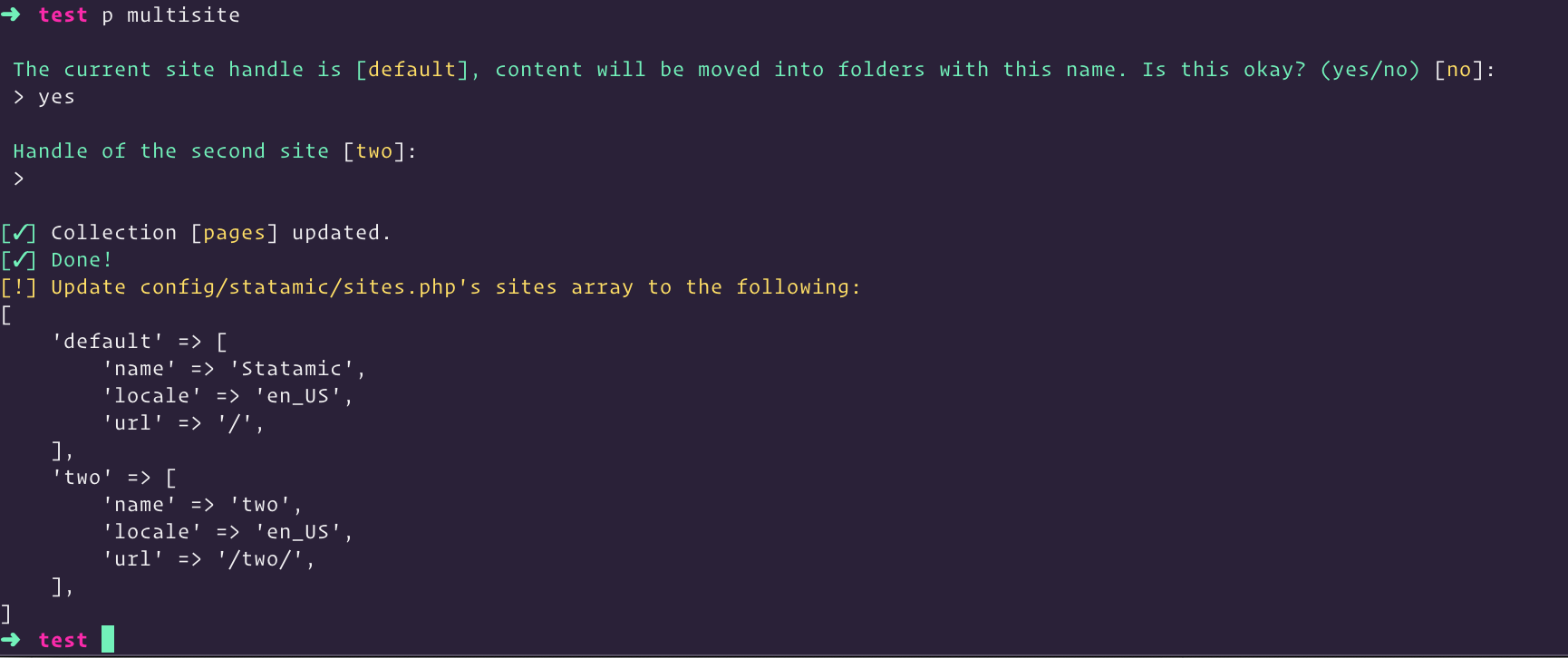
And when I update the sites config in the file, and try and open my site in a browser, I get the expected Statamic Pro is required error, along with the Ignition solution.
Is there anything else you might be doing that might be causing the issue?
 duncanmcclean
on 11 Nov 2020
duncanmcclean
on 11 Nov 2020
hit this again on an existing site with content, pro is true
edalzell
on 12 Nov 2020
ok, think I may have found the issue; if you have updated the sites config, in my case to change the 'url' to env('APP_URL') it doesn't work and you get that error.
Changing it back to '/' makes it work.
@riasvdv had you changed that file?
edalzell
on 12 Nov 2020
Can't remember unfortunately
riasvdv
on 13 Nov 2020
I had the same issue. Problem was that the site handles "en", etc. are not allowed. Not even newsite_en is working. No special chars and no lang abbreviations are allowed as far as I can tell.
Go with "english", "frensh", etc.
 gefangenimnetz
on 26 Nov 2020
gefangenimnetz
on 26 Nov 2020
@gefangenimnetz I can work with handles "en", "fr", "nl"
cgrisar
on 6 Dec 2020
When will this be fixed?!
 dwainscheeren
on 16 Dec 2020
dwainscheeren
on 16 Dec 2020
When will this be fixed?!
@dwainscheeren did you see this: https://github.com/statamic/cms/issues/2802#issuecomment-726385101?
edalzell
on 16 Dec 2020
Yes, but my sites already has the / @edalzell
dwainscheeren
on 20 Dec 2020
I tried php please multisite on a fresh install of Statamic and it failed:
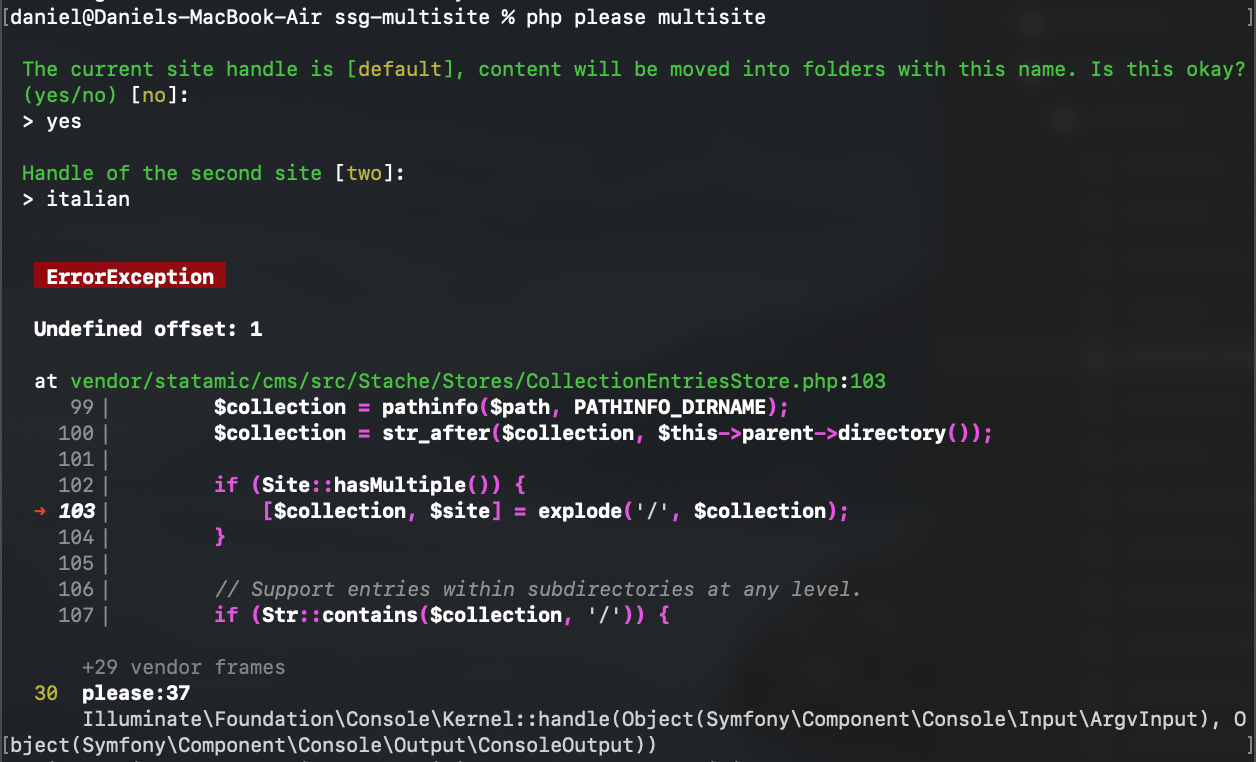
I used Italian as my second site because I thought it was asking me for the name to populate the config file... but I hadn't edited my config yet as the Statamic docs start with the instructions to just run the multisite command.
 tao
on 1 Jan 2021
tao
on 1 Jan 2021
I tried
php please multisiteon a fresh install of Statamic and it failed:
I used
Italianas my second site because I thought it was asking me for the name to populate the config file... but I hadn't edited my config yet as the Statamic docs start with the instructions to just run the multisite command.
What does your config/statamic/sites.php file currently look like?
duncanmcclean
on 1 Jan 2021
Have you done anything weird like changing where entries are stored?
We can't recreate this using a stock installation.
If someone continues to run into this issue, it would be really helpful you zip your site in the state before running the multisite command and send it to [email protected]
 jasonvarga
on 7 Jan 2021
jasonvarga
on 7 Jan 2021
I've run this again and encountered the same error, I'll email over a zip.
The steps to re-create it are:
statamic new multisite-pleasecd multisite-pleasephp please multisite
If you leave "Handle of the second site" blank then it works fine and uses the default two.
The current site handle is [default], content will be moved into folders with this name. Is this okay? (yes/no) [no]:
> yes
Handle of the second site [two]:
>
[✓] Collection [pages] updated.
[✓] Done!
[!] Update config/statamic/sites.php's sites array to the following:
[
'default' => [
'name' => 'Statamic',
'locale' => 'en_US',
'url' => '/',
],
'two' => [
'name' => 'two',
'locale' => 'en_US',
'url' => '/two/',
],
]
If you enter a custom handle it fails.
The current site handle is [default], content will be moved into folders with this name. Is this okay? (yes/no) [no]:
> yes
Handle of the second site [two]:
> italian
ErrorException
Undefined offset: 1
at vendor/statamic/cms/src/Stache/Stores/CollectionEntriesStore.php:103
99▕ $collection = pathinfo($path, PATHINFO_DIRNAME);
100▕ $collection = str_after($collection, $this->parent->directory());
101▕
102▕ if (Site::hasMultiple()) {
➜ 103▕ [$collection, $site] = explode('/', $collection);
104▕ }
105▕
106▕ // Support entries within subdirectories at any level.
107▕ if (Str::contains($collection, '/')) {
+29 vendor frames
30 please:37
Illuminate\Foundation\Console\Kernel::handle(Object(Symfony\Component\Console\Input\ArgvInput), Object(Symfony\Component\Console\Output\ConsoleOutput))
The error logged starts as follows:
[2021-01-07 18:40:32] local.ERROR: Undefined offset: 1 {"exception":"[object] (ErrorException(code: 0): Undefined offset: 1 at /Users/daniel/Code/statamic/multisite-please/vendor/statamic/cms/src/Stache/Stores/CollectionEntriesStore.php:103)
[stacktrace]
#0 /Users/daniel/Code/statamic/multisite-please/vendor/statamic/cms/src/Stache/Stores/CollectionEntriesStore.php(103): Illuminate\\Foundation\\Bootstrap\\HandleExceptions->handleError(8, 'Undefined offse...', '/Users/daniel/C...', 103, Array)
#1 /Users/daniel/Code/statamic/multisite-please/vendor/statamic/cms/src/Stache/Stores/CollectionEntriesStore.php(121): Statamic\\Stache\\Stores\\CollectionEntriesStore->extractAttributesFromPath('/Users/daniel/C...')
+1 just stumbled across this error aswell (existing site, statamic v3.0.37).
it is working fine when "Handle of the second site" is left blank.
edit: "english" also seems to be working as a site handle
 mnlmaier
on 8 Jan 2021
mnlmaier
on 8 Jan 2021
I'm getting the feeling that the handle doesn't matter. Feels like a red herring.
jasonvarga
on 8 Jan 2021
ok, think I may have found the issue; if you have updated the
sitesconfig, in my case to change the 'url' toenv('APP_URL')it doesn't work and you get that error.Changing it back to
'/'makes it work.
This is not true, have a site that won't convert and pro is true and url is '/'
edalzell
on 17 Jan 2021
I am also experiencing this problem on a clean installation of Statamic.
Steps to reproduce:
- Install Statamic via composer.
- Change config/statamic/editions.php to set
'pro' => true. - Run
php please multisite. - Choose "yes" for using the name "default".
- Leave the second site handle as "two".

- Statamic 3.0.38 Pro
- Laravel 8.22.1
- PHP 7.4.13
- No addons installed
Any ideas on how this can be avoided, whether there is a potential fix? About to embark on a large multi-site build and this is causing me to fall at the first hurdle.
 jegardiner
on 17 Jan 2021
jegardiner
on 17 Jan 2021
I also got this on the Butik Starter kit installation. I install the starter kit https://www.butik.dev/installation/installation/starter-kit then enable pro and t hen run the command and got the same error.
dwainscheeren
on 18 Jan 2021
I'm now able to replicate this issue on a fresh install. But only if you've opened site at least once so the cache gets built.
If you run the multisite command, you'll see the issue.
If you literally do statamic new mysite and then php please multisite, it works.
So, a workaround for now is to clear your cache before running the command.
php artisan cache:clear
php please multisite
Related issues
 andrewying
·
4Comments
andrewying
·
4Comments
 jelleroorda
·
3Comments
jelleroorda
·
3Comments
 mattrothenberg
·
3Comments
mattrothenberg
·
3Comments
 ReneWeCode
·
3Comments
ReneWeCode
·
3Comments
 wm-simon
·
3Comments
wm-simon
·
3Comments
Most helpful comment
I'm now able to replicate this issue on a fresh install. But only if you've opened site at least once so the cache gets built.
If you run the
multisitecommand, you'll see the issue.If you literally do
statamic new mysiteand thenphp please multisite, it works.So, a workaround for now is to clear your cache before running the command.