Cms: Date field always saves date including time
Bug Description
The date field always saves time which is weird, because we're saving a date. Not date and time. At least when you turned off the time picker.
Having the time there makes a lot of stuff more complicated. Also it's not correct when just handling with dates.
Bonus: It would be really really nice if you could save dates in whatever format you want. 🎉
Environment
Statamic 3.0.11 Pro
Laravel 7.28.3
PHP 7.4.6
 robdekort
All 26 comments
Maybe this is already possible but I just couldn't figure it out.
robdekort
on 22 Sep 2020
Regarding Date Format, there are at least 2 opened issues
 ebeauchamps
on 22 Sep 2020
ebeauchamps
on 22 Sep 2020
Couldn't find one searching for 'date_format'.
robdekort
on 22 Sep 2020
1310 #2019 #2053 are issues regarding date formatting.
ebeauchamps
on 22 Sep 2020
Ah yeah, thanks, I saw those, don't think they're related tbh. My issue is about the date fieldtype always saving the time when you've disabled the time picker.
robdekort
on 23 Sep 2020
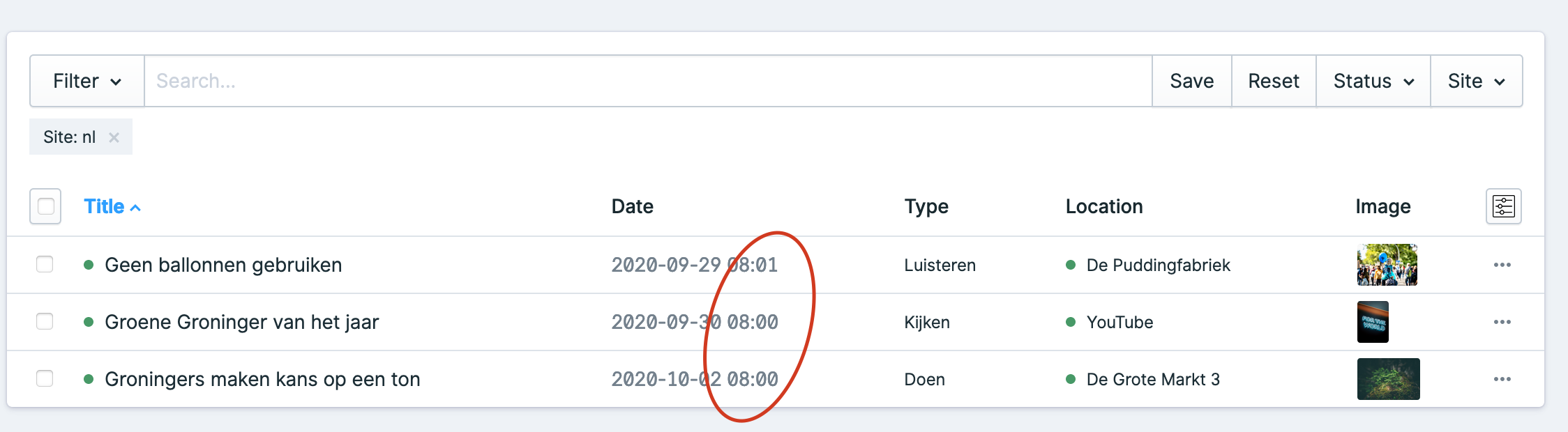
Here's an explanation for why this behaviour is unwanted and confusing. Say you have an events collection and each event has a date field. You'd ideally want to show this date in the column listing but now it includes the time of when you saved your event. This might suggest the event starts at that time.
robdekort
on 29 Sep 2020
The Date field in your screenshot: is that the standard date field? ie. It's in the filename of your entry?
 jasonvarga
on 30 Sep 2020
jasonvarga
on 30 Sep 2020
Nope, it not called date, but something_date.
New info: today I saw one of those posts saved the date _without_ the time.
The field originally had time enabled. I turned it off later. Cache has been cleared a thousand times since.
robdekort
on 30 Sep 2020
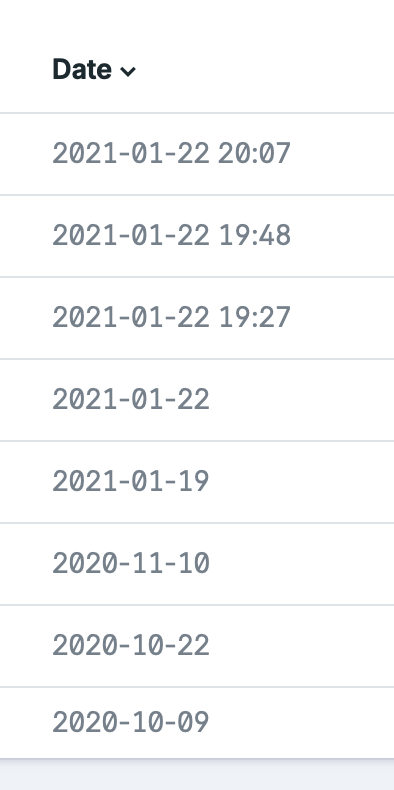
Some more info. Some save with, some save without time for some reason:
robdekort
on 8 Oct 2020
Hey @jasonvarga, do you know of any workaround for this issue? I'm facing it again with some other thing. The date field does not seem reliable since sometimes it saves with and sometimes without time. That way I can't do comparisons.
robdekort
on 20 Nov 2020
_Some more info:_ It seems to save without time initially. If you go back to edit your entry it will load up the date field with time included. If you then save the time get's appended. There's no visual indication however. When you select the data again and save it will remove the time.
robdekort
on 23 Nov 2020
I'm experiencing this as well.
Can confirm date fields setup without time required, end up having having document updated time appended to the value.
 simonkincaidkintronix
on 27 Nov 2020
simonkincaidkintronix
on 27 Nov 2020
@robdekort did you ever find a way around this? I've got a system where date is mandatory (for all day events) but time is optional; and having same issue as you. I was thinking maybe I could put some sort of logic on the front-end to detect if the time is 00:00, and then just assume it's an all day event, but I don't seem to be able to get it to work.
 sjclark
on 10 Jan 2021
sjclark
on 10 Jan 2021
Just as a sidenote; I've also stumbled across weird issues with clearing the time. To remove a date you can just backspace / delete all the text, which then removes the date completely and reverts back to the "Add Date" text. However if you try to backspace within a time field, you usually get aN entered into the field (assume is probably NaN being parsed weirdly). Although maybe I should file this as a separate bug?
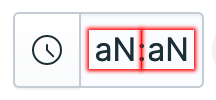
Probably something to do with missing a check before being parsed by Moment?
sjclark
on 10 Jan 2021
@sjclark Not really, I parse it with Carbon so I can compare on a date level, with or without time.
robdekort
on 10 Jan 2021
I now realise this issue also creates problems when you query and order stuff by date. This is a serious issue imo.
robdekort
on 15 Jan 2021
I now realise this issue also creates problems when you query and order stuff by date. This is a serious issue imo.
@robdekort I also think this is pretty major bug (or series of bugs around the date field) - I spent hours trying to find hacky ways around this and while I made some minor progress in my specific usecase, but I've largely just put in the too hard / later box 🤷♂️
sjclark
on 15 Jan 2021
Yes, I've got events listed that _can't_ be sorted properly it turns out now due to this. I can't think of another workaround.
robdekort
on 15 Jan 2021
Same boat - building a site for a festival of around 100+ events over 12 days - some all day, some with start times, some with end times, some repeating. Really every permutation that would be covered by date/time start + date/time end. Without a proper date/time field I'm pretty limited.
Haven't really been able to cobble something together that works consistently. To be honest I'm think about just back-porting the whole site to v2 at this stage.
sjclark
on 15 Jan 2021
Not an option here, events start next week. I had hoped issues raised in september would've been fixed sooner.
robdekort
on 15 Jan 2021
Found a workaround in the end. Not using:
$this->results = $query
    ->orderBy('event_date', 'asc')
    ->orderBy('time_start', 'asc');
But this after ->get()
->sortBy(function($entry) {
    return Carbon::parse($entry->value('event_date'))->format('d-m-y') . ' ' . $entry->value('time_start');
})
Hope it helps someone.
robdekort
on 15 Jan 2021
Nice fix Duncan! Thanks. Let's hope this gets merged soon.
robdekort
on 17 Jan 2021
🥰
robdekort
on 19 Jan 2021
Rock on!
 duncanmcclean
on 19 Jan 2021
duncanmcclean
on 19 Jan 2021
Unfortunately still having this issue as per https://github.com/statamic/cms/pull/3118#issuecomment-767300132
sjclark
on 26 Jan 2021
Can you please open a separate issue saying that the time is saved when its enabled but you haven't set it.
This issue is about the time always being saved, even when time is completely disabled. That part, at least, has been solved.
jasonvarga
on 26 Jan 2021
Related issues
 sandervanh
·
4Comments
sandervanh
·
4Comments
 wm-simon
·
3Comments
wm-simon
·
3Comments
 austenc
·
3Comments
austenc
·
3Comments
 jelleroorda
·
3Comments
jelleroorda
·
3Comments
 dakisan
·
4Comments
dakisan
·
4Comments