Cms: Prune-revisions doesn't remove revisions from database
Description
When running ./craft utils/prune-revisions and set as max revisions 0 or 1 (0 because I tried to remove ALL versions to cleanup everything including the current version and 1 to just keep the current version. Also tried 2, but that doesn't work either), Craft goes through the list of entries and shows how many revisions there are when passing through them and says 'done' to all them in the terminal.
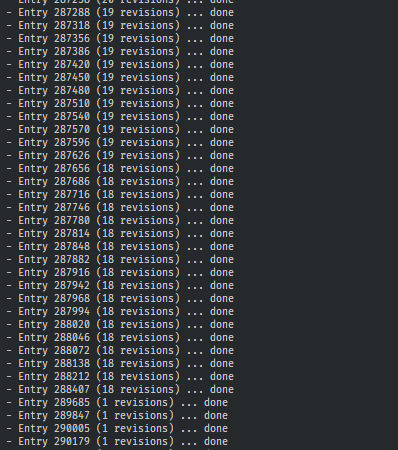
But when running again directly after it it shows exactly the same revision-counts (like '2 revisions' or '10 revisions') for all these entries. I would expect the second time all revisions to be either 0 or 1, not 10 or 15.
Looking into the revisions table in the database (which I assume host all revisions) shows a count of 6316 revisions here. And stays 6316 no matter how much or with what revision-number I execute the prune-revisions command.
The terminal command doesn't show any error nor warning, says 'done' to every line and ends with 'Finished pruning revisions'.
But it's not doing anything to the revisions table and keeps throwing the same revision counts during the process.
This most probably also is the reason why this Craft database is so huuuuuuuge, and enormously bigger then the previous CMS I was using with the exact same pages. Even if I remove all entries from within the CP it's still huge. The database is so huge I needed to find another workflow to upload the database to the server while developing other then doing it via phpmyadmin import, as it couldn't even import the large file. Bet it's these revisions making the db so huge.
It would be appreciated if prune-revisions could be fixed in order to keep cleaning up the database!
Steps to reproduce
- Run command while having entries with revisions and look at the revision counts for each entry
- Run command again directly after it and look again at the revision counts for each entry
Screenshot after running the second time (directly after the first time):
Additional info
- Craft version: 3.4.29.1
- PHP version: 7.1.16
- Database driver & version: MariaDb 10.4.10
 Friksel
All 12 comments
Working on my end:
$ ./craft utils/prune-revisions --max-revisions 0
Finding elements with too many revisions ... done

Pruning revisions ...
- Entry 2 (2 revisions) ... done
- Entry 74 (2 revisions) ... done
- Entry 81 (2 revisions) ... done
- Entry 233 (2 revisions) ... done
- Entry 234 (2 revisions) ... done

Finished pruning revisions

$ ./craft utils/prune-revisions --max-revisions 0
Finding elements with too many revisions ... done

Nothing to prune
Usually when we see issues like this, it turns out it’s because some data had been deleted manually from the DB at some point (likely from the entries table), which is preventing the element query from working properly.
 brandonkelly
on 23 Jul 2020
brandonkelly
on 23 Jul 2020
@brandonkelly I never changed anything in the database. Not myself nor by code. I'm very dissapointed by your reaction. You just close an issue that's definitely there, just because you happen to not being able to replicate it? If all issues people take the time to tell you about are handled like this I'm starting to understand why I'm facing so many nasty issues with this CMS.
Even when I would have deleted entries, which I didn't, don't you think it's part of the job of developers to throw a warning or an errormessage instead of showing 'done' and 'finished'? That alone is wrong and should trigger you guys to look at it.
Very dissapointed. And I'm starting to feel stupid by trusting this CMS as a goto and convert a big project to this. I'm having issues with this Control Panel constantly without doing anything weird or outragious.
Very dissapointing.
Friksel
on 23 Jul 2020
@Friksel Closed it because, as reported, there doesn’t seem to be an actual Craft bug here, and per your other recent issues, it seems like there is something fundamentally broken either with your database or your infrastructure. We’d be happy to help you look further into it if you email [email protected], and patch Craft if any actual bugs do surface.
brandonkelly
on 23 Jul 2020
There IS an actual Craft bug here and it's obvious, but you are blaming your customers with all kinds of shit in stead of taking your responsibility as a developer and 1) Test things before putting it out and 2) Fix bugs yourself without asking stupid questions like asking for logs with all data in there that is not a customer to send.
I'm a developer for over 20 years. I developed windows software, been a backend developer for years and am a senior front end developer for last years, learning everyday. My system is totally fine and never had an issue with it with all project I did, including the last CMS I used. But with Craft everything is a mess in the CP and you are blaming me as a customer instead of taking your responsibility to fix your issues? You should be glad that I even took the time to report these, as these are so basic it's silly these are even in there. It's just wrong.
You tell me the database is corrupt and put that blame on me? Did it ever come to your mind that Craft is the only software talking to this database? So where do you think the issue is? Again: Craft. Another issue with Craft.
Hey man, everytime you react the same, to a customer that was willing to help you fix this shit by taking the time to report all these (and this is not even all issues I'm facing with Craft):
- We don't see any issue
- You're the only one having these issues
- Send me the logs with all your data
- It's something on your system/environment that's wrong
- Send us a mail
Wait? Send you a mail? Like what I send you already here? Come on man, that's just moving the discussion to mail, that you already blocked here. You even closed an existing issue, which is nothing more then putting your head in the sand and leaving a customer in the cold because you feel to good to just acknowledge the fact that there's actually something wrong in your code.
But don't you think it's time you test your software before it's shipped and take responsibility for issues instead of blaming customers and ask them to send data to you so you're off it as you put the ball to your customers instead of doing what you're suppose to do?
I'm done with Craft already. I'm going to search for another CMS now that IS capable of developing and creating a CMS that works and tested and not full of bugs in basic functionality and not even showing an indication on the error to the user so he's working blindfolded. And not has a log so full of shit and what's getting so big it's poluting the server.
This is taking me forever now to work around them as you obviously aren't even capable of or even try to fix these and we can't let customers work with this. We can't say to customers: press this, then wait, don't press anything now, wait till that round shape dissapears... yeah, sometimes it stays there for a while and sometimes it even never goes away. Then the queue is stuck and you need to call us to take a look at it to get it running again. That happens 'sometimes'.
Come on man. Stop acting like an amature if you're asking money for this shit.
Friksel
on 25 Jul 2020
I never said there _isn’t_ a Craft bug – just that it’s working on my end and it _doesn’t seem_ like there’s a bug here. There’s no need to get hostile… I’m not _blaming_ you for anything. I just know that the vast majority of the times people run into issues like this, the culprit ends up being a DB integrity issue, either caused by manual tampering or a plugin/module. And since we can’t reproduce this on our end, we’re at a standstill unless you can either provide steps to reproduce that we are able to follow and get the same result as you, or you get in touch with us over email so that we can either gain access to the environment this is happening on, or obtain a database backup + Composer files that let us attempt to reproduce the bug with your DB on our end.
Sorry you’re having a bad experience, but this is just the way it has to go with extensible, self-hosted software like Craft, where there are millions of ways things can go wrong, and we have very little control over any of it.
brandonkelly
on 25 Jul 2020
We just released Craft 3.6.6 with some improvements to garbage collection, including a fix for this issue. Now when GC is run, it will look for any assets/entries/etc. which have a row in the elements table, but are missing their required rows in the other tables (assets/entries/etc., and content), and will delete their primary elements table row.
You can kick off garbage collection by running the following command:
> php craft gc
@brandonkelly i'm experience this same issue. I noticed our database being very big and 80% of the database size to be inentryversions. So I set maxRevisions to 1 and ran ./craft utils/prune-revisions. The database shrank for 5% but nothing more. The size of entryversions still the biggest factor.
Are there only revisions in there, or the main entries as well? Because i could also empty the table one time and see how it goes from there. Thanks in advance.
ps. I already ran php craft gc in 3.6.6.
 remcoov
on 10 Mar 2021
remcoov
on 10 Mar 2021
@remcoov Can you send a database backup into [email protected]? We can see whether there’s some other data missing that is preventing the gc changes from clearing out partial revisions.
brandonkelly
on 10 Mar 2021
@remcoov’s issue ended up being a bunch of old rows in the entryrevisions table, which are no longer needed.
As of the next release, the gc command will start checking a few deprecated tables to see if they have any data, and if so, prompt to clear them out. (738723006e12d8d0b415eb472c5c806abdb51544)
brandonkelly
on 12 Mar 2021
Thank you @brandonkelly and team for checking this out. Will wait for the next release ;-)
remcoov
on 12 Mar 2021
Craft 3.6.11 is out now with that change to the gc command.
brandonkelly
on 23 Mar 2021
Hi @brandonkelly, can confirm that indeed this was the fix. Awesome, thnx!
remcoov
on 24 Mar 2021
Related issues
 lukebailey
·
3Comments
lukebailey
·
3Comments
 michel-o
·
3Comments
michel-o
·
3Comments
 davist11
·
3Comments
davist11
·
3Comments
 bitboxfw
·
3Comments
brandonkelly
·
3Comments
bitboxfw
·
3Comments
brandonkelly
·
3Comments