Cms: prevent "foldername" already exists on the volume for some cases
Description
i have two volumes -for example vol1 and vol2- with same system path.
if i create a folder for vol2 and that folder is already available for vol1, i got an error '"foldername" already exist on the volume'.
i know that this is expected alert when we create folder in /admin/assets page because folder already exists.
but i am wondering if with craft we can create asset in a folder which his parent is another volume?
my use case:
i'm trying to import some assets via feedme:
http://domainname/202007/1.txt // from old cms to vol1 in craft http://domainname/202007/1.txt
http://domainname/202007/1.pdf //from old cms to vol2 in craft http://domainname/202007/1.pdf
i used two different volumes to separate permissions and allowed kind but volumes have same system path -@ webroot to keep Url of files same as source-
in this case i got the mentioned error and asset is not imported because "202007" folder is already created for vol1.
i want to know if it is possible to skip creation of that folder silently for vol2 and asset is created in that folder anyway.
 vnali
vnali
All 6 comments
As of the next release, that exception will no longer be thrown.
 brandonkelly
on 16 Jul 2020
brandonkelly
on 16 Jul 2020
Craft 3.4.28 is out now with this change.
brandonkelly
on 16 Jul 2020
thanks @brandonkelly
but i got an error something like craft\web\log() not found when i tried that -sorry, i couldn't test it completely because my local environment currently has a db service problem and i can't remember the error, try create same folder for second volume in admin/assets page please.
i have a second thoughts as well.
does sharing same path and or same folder for two different volumes is good idea anyway? what happen when parent volume is deleted? assets for second volume and shared folder are deleted or kept?
sorry, i am going to test it again ASAP.
vnali
on 16 Jul 2020
but i got an error something like craft\web\log() not found when i tried that
Sorry about that, just released 3.4.28.1 with a fix for that.
does sharing same path and or same folder for two different volumes is good idea anyway? what happen when parent volume is deleted? assets for second volume and shared folder are deleted or kept?
No, definitely not a good idea. If you delete/move/rename a file in one volume, the other volume’s indexes will become out of date.
brandonkelly
on 16 Jul 2020
@brandonkelly thanks
now in asset page, i can create same folder for two volumes but renaming or deleting that folder for one volume, make another volume asset's inconsistent or broken.
maybe it is better idea that before folder rename/delete, craft shows a confirmation message to user that another volume depends on that folder and if user confirms that, rename/delete apply to another volume's folder record too.
i really hope that my request doesn't broke intended craft behavior.
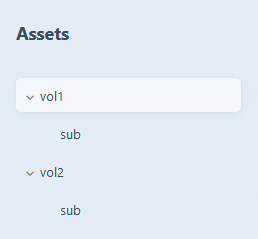
after changing vol1 folder name to 'subfolder', vol2 folder record remains 'sub' and vol2 assets is broken now.

vnali
on 16 Jul 2020
Right, those are expected. As said earlier, I would definitely not recommend this approach.
brandonkelly
on 16 Jul 2020
Related issues
 angrybrad
·
3Comments
angrybrad
·
3Comments
 mccombs
·
3Comments
mccombs
·
3Comments
 bitboxfw
·
3Comments
bitboxfw
·
3Comments
 benface
·
3Comments
benface
·
3Comments
 richhayler
·
3Comments
richhayler
·
3Comments