Cms: Setting for date/timeformat in CP seperate from language
Description
To my surprise there currently the only way to set a different date/timeformat in the Control Panel is by switching the language. But living in The Netherlands I'd like to have all interfaces in English (because Dutch language is just weird with technology and in most info on Google is in English), but like to have a time-notation using 24h system and a date like day-month-year, as we use in The Netherlands. Unfortunately that's not possible at the moment.
For some weird reason it IS possible to switch a Week Start Day though, so why not make it possible to switch date and timeformat also?
I'm not the only one having this request, according to this thread: https://craftcms.stackexchange.com/questions/25748/control-panel-date-format
Please make it possible to set the date- and timeformat per user seperate from the language!
Thanks in advance!
 Friksel
All 9 comments
I think this is a valid feature request and have wanted the same thing for a while.
Quick tip though: If you set the Control Panel language to English (United Kingdom) (that's 'en-GB' if you use the defaultCpLanguage config setting), date fields will render using the 24 hour system and the d-m-Y date formatting.
 mmikkel
on 12 Jul 2020
mmikkel
on 12 Jul 2020
The defaultCpLanguage setting is only used for user accounts that haven’t saved their own account settings yet (which will set their preferred language).
If en-GB is giving you the desired result, then I’m not sure what else we could do? Date/time formats are determined by the locale, and the Language preference determines which locale should be used.
 brandonkelly
on 13 Jul 2020
brandonkelly
on 13 Jul 2020
(Keep in mind that “Language” here is used loosely – that preference would be more accurately called “Locale”.)
brandonkelly
on 13 Jul 2020
I would actually prefer to have a system wide setting for date/time formats in the CP. This would make it possible to configure formats common in the country the CMS owner is based. Changing language for the user account (e.g. from German to English) doesn’t necessarily mean I am used to that locale’s date/time formats.
The en-GB locale is unfortunatelly using d/m/Y for short dates. I tried to override formatters via app.php but couldn’t achieve d.m.Y. in combination with English for the translations.
 carlcs
on 15 Jul 2020
carlcs
on 15 Jul 2020
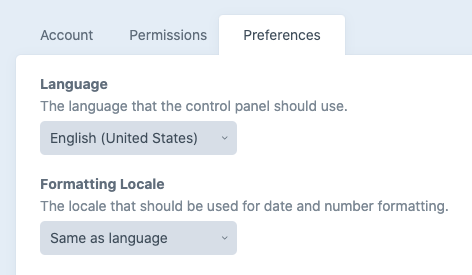
Alright, just added a new “Formatting Locale” user preference, which determines which locale should be used for date & number formatting. By default it’s set to “Same as language”, so you only need to set it if you need it set to something besides your language selection.
brandonkelly
on 16 Jul 2020
Thank you Brandon, this is great. I may be asking for too much now, but it’d be nice if there was a defaultCpFormattingLocale setting.
carlcs
on 16 Jul 2020
Done. It only applies to users that don’t have a preferred language set yet though – erring on the side that they are happy with their date/number formats matching their preferred language.
brandonkelly
on 16 Jul 2020
(Called it defaultCpLocale, not defaultCpFormattingLocale.)
brandonkelly
on 16 Jul 2020
Thanks @brandonkelly ! Looks like a nice solution for everybody like this
Friksel
on 17 Jul 2020
Related issues
 rynpsc
·
3Comments
rynpsc
·
3Comments
 michaelhue
·
3Comments
michaelhue
·
3Comments
 lukebailey
·
3Comments
lukebailey
·
3Comments
 bitboxfw
·
3Comments
bitboxfw
·
3Comments
 timkelty
·
3Comments
timkelty
·
3Comments
Most helpful comment
(Called it
defaultCpLocale, notdefaultCpFormattingLocale.)