Cms: GraphQL: Empty result for asset query in matrix block within referenced entry in entries field
Description
When an asset/image field is queried within a matrix block of a referenced entry in an entries field the result is empty and an empty array is returned.
Entry -> Entries field -> Entry -> Matrix -> Matrix Block -> Asset
Steps to reproduce
- Create a section "B" with a matrix field and a block which contains an image
- In another section "A" reference an entry of the section "B" via the entries field
- Query section "A" and its nested section "B" and the matrixblock and image within
Example:
query getCaseEntry($site: [String], $slug: [String]) {
  case: entries(section: ["cases"], site: $site, slug: $slug) {
    ... on cases_cases_Entry {
      embeds {
        ... on embeds_gallery_BlockType {
          reference {
            ... on galleries_galleries_Entry {
              gallery {
                ... on gallery_image_BlockType {
                  image {
                    id
                  }
                  caption
                }
              }
            }
          }
        }
      }
    }
  }
}
Result:
{
  "data": {
    "case": [
      {
        "embeds": [
          {},
          {
            "reference": [
              {
                "gallery": [
                  {
                    "image": [],
                    "caption": "Caption 1"
                  },
                  {
                    "image": [],
                    "caption": "Caption 2"
                  }
                ]
              }
            ]
          }
        ]
      }
    ]
  }
}
Additional info
- Craft version: 3.4.1
- PHP version: 7.3.8
- Database driver & version: MySQL 5.5.5
- Plugins & versions:
Redactor | 2.5.0
Typed link field | 1.0.19
Solution
In src/gql/resolvers/elements/Asset.php line 33 if 'getFieldValue' is used the asset object seems to be correctly fetched and returned.
        // If this is the beginning of a resolver chain, start fresh
        if ($source === null) {
            $query = AssetElement::find();
            // If not, get the prepared element query
        } else {
            // WON'T WORK: empty result for matrixblock within referenced entry in entries field
            $query = $source->$fieldName;
            // WORKS:
            //$query = $source->getFieldValue($fieldName);
        }
 rocknrolaf
All 8 comments
I'm unable to reproduce this locally. Can you try clearing the caches?
 andris-sevcenko
on 31 Jan 2020
andris-sevcenko
on 31 Jan 2020
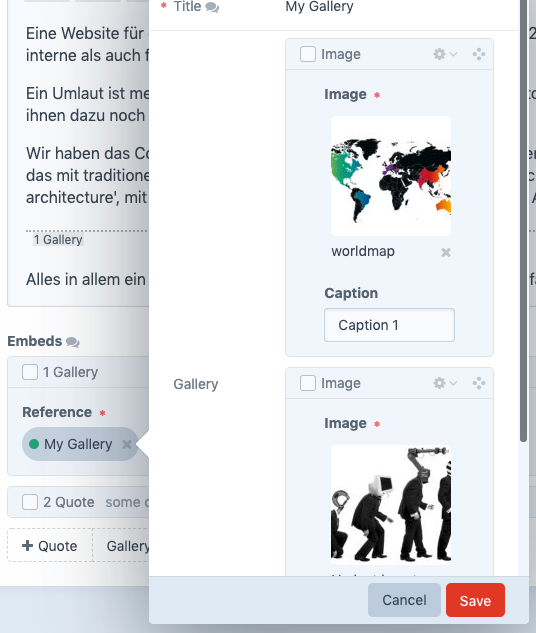
Thanks for looking into it! I cleared the cache already. I also disabled caching via 'enableGraphQlCaching' setting to debug into it via xdebug. I forgot to mention that is a multisite/multilanguage setup. Maybe a screenshot of the structure helps:
rocknrolaf
on 31 Jan 2020
Is the linked entry from the same site?
andris-sevcenko
on 31 Jan 2020
Yes both are enabled for the same site. Also the direct query for the gallery seems to deliver the image data fine. Only via the entries reference there is no image data returned.
rocknrolaf
on 31 Jan 2020
@rocknrolaf any chance you can send your DB dump, composer.json, and the composer.lock files over to [email protected] and reference this issue in the email?
andris-sevcenko
on 3 Feb 2020
@andris-sevcenko i sent it over to you
rocknrolaf
on 5 Feb 2020
Thanks for that! Ended up being a bug in the logic how Craft creates the eager loading parameter array when analyzing the GraphQL query.
To get the fix early, change your craftcms/cms requirement in composer.json to:
"require": {
  "craftcms/cms": "dev-develop#6b51bf14f7b1f5fecf42f1b8cfc8de7060e35bc7",
  "...": "..."
}
Then run composer update.
andris-sevcenko
on 8 Feb 2020
Craft 3.4.6 is out now with this change.
 brandonkelly
on 18 Feb 2020
brandonkelly
on 18 Feb 2020
Related issues
 rynpsc
·
3Comments
rynpsc
·
3Comments
 darylknight
·
3Comments
darylknight
·
3Comments
 richhayler
·
3Comments
richhayler
·
3Comments
 angrybrad
·
3Comments
angrybrad
·
3Comments
angrybrad
·
3Comments
angrybrad
·
3Comments
Most helpful comment
Thanks for that! Ended up being a bug in the logic how Craft creates the eager loading parameter array when analyzing the GraphQL query.
To get the fix early, change your
craftcms/cmsrequirement in composer.json to:Then run
composer update.