Description
After upgrading to 3.4, I'm facing this issue. It's similar to #5014
2020-01-29 16:41:25 [-][1][jn2lalrtblm1vm3k0un961ap4d][error][RuntimeException] yii\base\ErrorException: Undefined index: value in /home/coursierjob-staging/webapps/coursierjob-staging/vendor/craftcms/cms/src/fields/BaseOptionsField.php:427
Steps to reproduce
- Update to Craft 3.4
- Open an entry with a dropdown field
Additional info
- Craft version: 3.4.0.2
- PHP version: 7.3.13
- Database driver & version: MySQL 5.5.5
- Plugins & versions:
{
    "aelvan/imager": "v2.3.1",
    "aelvan/preparse-field": "v1.1.0",
    "codemonauts/craft-redactor-nofollow": "1.0.0",
    "craftcms/anchors": "2.2.0",
    "craftcms/cms": "3.4.0.2",
    "craftcms/redactor": "2.5.0",
    "craftsnippets/table-of-contents": "1.0.2",
    "doublesecretagency/craft-upvote": "2.0.4",
    "ether/simplemap": "3.7.7",
    "jalendport/craft-readtime": "1.6.0",
    "mmikkel/retcon": "2.0.12",
    "nesbot/carbon": "^2.23.1",
    "nystudio107/craft-disqus": "1.1.2",
    "nystudio107/craft-eagerbeaver": "1.0.4",
    "nystudio107/craft-emptycoalesce": "1.0.6",
    "nystudio107/craft-minify": "1.2.9",
    "nystudio107/craft-retour": "3.1.33",
    "nystudio107/craft-seomatic": "3.2.39",
    "nystudio107/craft-templatecomments": "1.1.2",
    "nystudio107/craft-typogrify": "^1.1",
    "putyourlightson/craft-blitz": "3.1.1",
    "topshelfcraft/supersort": "3.0.1",
    "verbb/field-manager": "2.1.1",
    "verbb/image-resizer": "2.0.6",
    "verbb/super-table": "2.4.0",
    "vlucas/phpdotenv": "^3.6",
    "wrav/oembed": "1.1.8"
}
 LouisCuvelier
All 25 comments
Can you please send a database backup from before updating to Craft 3.4, plus your composer.json and composer.lock files, over to [email protected] , and reference this issue URL + where the error is occurring?
 brandonkelly
on 29 Jan 2020
brandonkelly
on 29 Jan 2020
Done 😊
LouisCuvelier
on 30 Jan 2020
Ok with the help of @olivierbon, I found a solution.
I don't know why, but after updating to 3.4, the folder /storage/config-deltas was pushed on the git server even with the .gitignore.
So all my dropdown fields were empty on my staging and prod server.
Removing config-deltas from git, rebuilding project config and pushing again fix the whole thing.
Thanks for your help 😊
LouisCuvelier
on 31 Jan 2020
Glad you got it sorted!
brandonkelly
on 31 Jan 2020
I've encountered the same problem. I've tried doing the rebuild and still have an error.
In BaseOptionsField.php line 427:
if (!isset($option['optgroup']) && (string)$option['value'] === $value) {
The code is looking for $option['value'], however $option looks like this:
array (
  '__assoc__' =>
  array (
    0 =>
    array (
      0 => 'label',
      1 => 'Default',
    ),
    1 =>
    array (
      0 => 'value',
      1 => 'default',
    ),
    2 =>
    array (
      0 => 'default',
      1 => '1',
    ),
  ),
)
 henrypenny
on 5 Feb 2020
henrypenny
on 5 Feb 2020
@henrypenny same request to you, then: https://github.com/craftcms/cms/issues/5533#issuecomment-579915799
brandonkelly
on 5 Feb 2020
I've sent those to support.
Thanks.
henrypenny
on 5 Feb 2020
I had the same error today (after messing around with Craft 3.3 > 3.4 + project.yml).
Removing the QuickPostWidget from the widgets table solved it.
 ostark
on 19 Feb 2020
ostark
on 19 Feb 2020
@ostark do you happen to have a DB backup from before you deleted the widget? If not, are you able to reproduce the error again if you re-add the widget with the same settings?
brandonkelly
on 26 Jun 2020
@brandonkelly looks like I have a DB backup (after update, before removing the widget).
ostark
on 1 Jul 2020
I was able to reproduce this with @ostark’s backup. Somehow, some of the associative arrays within the project config got double-packed as __assoc__ arrays.
I’ve added a guard against that, so associative arrays that already contain an __assoc__ key won’t get double-packed, and I’ve added a new utils/repair/project-config command that you can run to clean up any existing double-packed arrays.
brandonkelly
on 2 Jul 2020
@brandonkelly
When I run utils/repair/project-config my Project Config do changes like this:
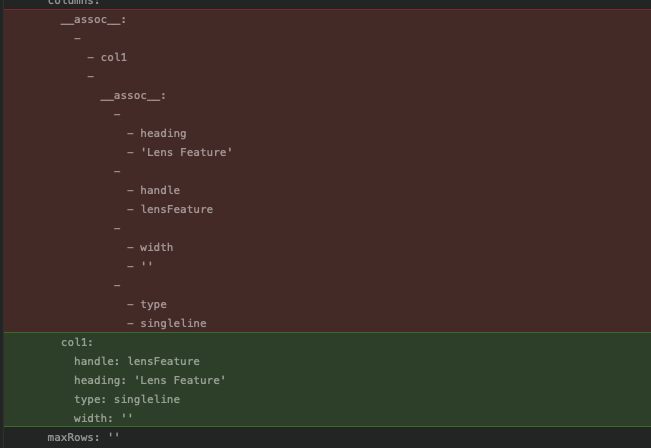
But when I run project-config/rebuild it becomes reversed?

 davidhellmann
on 4 Jul 2020
davidhellmann
on 4 Jul 2020
@davidhellmann there was a bug in 3.4.26 which was fixed in 3.4.27. Sorry about that.
brandonkelly
on 4 Jul 2020
@brandonkelly yes, I'm on 3.4.27 and the screens are created with this version :)
davidhellmann
on 4 Jul 2020
@brandonkelly
I'm still seeing the same behaviour when running
utils/repair/project-config
and then
project-config/rebuild
on 3.4.28.1
 peimansh
on 21 Jul 2020
peimansh
on 21 Jul 2020
@davidhellmann @peimansh Can you both please send your composer.json and composer.lock files, and a database backup, over to [email protected] ?
brandonkelly
on 21 Jul 2020
@brandonkelly Done !
I even updated and tried on 3.4.29 but still no luck.
peimansh
on 22 Jul 2020
I can confirm that the same error as @davidhellmann still occurs on craft 3.5.4, meaning:
./craft project-config/rebuildadds__assoc__stuff./craft utils/repair/project-configcleans it up
 ricricucit
on 20 Aug 2020
ricricucit
on 20 Aug 2020
@ricricucit What plugins do you have installed?
brandonkelly
on 21 Aug 2020
|Plugin|Version|
|--|--|
| Amazon S3 | 1.2.9 |
| Asset Usage | 2.1.0 |
| Embedded Assets | 2.3.3 |
| inxmail | 0.1.0 |
| Migration Assistant | 3.1.8 |
| Navigation | 1.3.26 |
| Publication Orders | 1.0.0 |
| Redactor | 2.7.1 |
| Redactor Custom Styles | 3.0.4 |
| Related | 1.1.3 |
| Retour | 3.1.41 |
| Search | 1.0.0 |
| Tags | 1.0.7 |
| Translations | 2.3.2 |
ricricucit
on 21 Aug 2020
I remember hearing that there‘s a plugin that is still causing the double-packed arrays, but none of those are ringing a bell. If you run project-config/rebuild immediately after utils/repair/project-config, do they show up again? If not, please try to determine what exactly is adding the double-packed arrays, by running project-config/rebuild each time something changes.
brandonkelly
on 21 Aug 2020
In my case it is the "Linkit" plugin
peimansh
on 24 Aug 2020
I cannot uninstall plugins, but yes: I keep runnign utils/repair/project-config, which helps.
ricricucit
on 24 Aug 2020
Any fixes being baked ? @brandonkelly
I'm still experiencing the issue and with every change my project.yaml structure gets back to the old duplicated model and I have to run ./craft utils/repair/project-config to fix it.
it even happens when I rebuild project.yaml
peimansh
on 24 Sep 2020
@peimansh Please send your Composer files and a database backup into [email protected], and give us an example of something we can change that will cause the issue.
brandonkelly
on 24 Sep 2020
Related issues
 rynpsc
·
3Comments
rynpsc
·
3Comments
 darylknight
·
3Comments
brandonkelly
·
3Comments
darylknight
·
3Comments
brandonkelly
·
3Comments
 Mosnar
·
3Comments
Mosnar
·
3Comments
 timkelty
·
3Comments
timkelty
·
3Comments