Cms: [3.4] Assets not showing up for asset fields
Description
Related to #5516
Updated from 3.4.0-RC3. Ran migrate/all and project-config/sync Attempted to add an asset through an asset field but nothing showed up. Re-indexed assets and tried again but still running into the same issue.
Javascript error when attempting to add a new asset:
TypeError: t is null Craft.js:3510:12
If I attempt to switch what I'm sorting by I get the following JS error:
uncaught exception: View mode "null" not supported. Craft.js:3097:20
Assets do show up in the Assets section fine.
Steps to reproduce
- Navigate to an entry with an assets field.
- Click to add an asset.
Additional info
- Craft version: 3.4.0.1 (upgrading from 3.4.0-RC3)
- PHP version: 7.3.12
- Database driver & version: MySQL 5.5.5
- Plugins & versions:
AsyncQueue -- 2.0.0
Communicator -- 1.0.0
Content Stats -- 2.1.1
CP Field Inspect -- 1.0.7
Guide -- 2.1.3.2
ImageOptimize -- 1.6.8
Image Resizer -- 2.0.6
Minify -- 1.2.9
Preparse Field -- v1.1.0
Redactor -- 2.5.0
Relabel -- 1.3.4
SEO (SEOmatic) -- 3.2.39
Super Table -- 2.3.3
Typed link field -- 1.0.19
 MarcHartwig13
All 10 comments
I have the same problem but a different JS error.
Craft.js:3510 Uncaught TypeError: Cannot read property 'parent' of null
    at s.constructor._expandSource (Craft.js:3510)
    at s.constructor.getDefaultSourceKey (Craft.js:2470)
    at s.constructor.getDefaultSourceKey (Craft.js:8864)
    at s.constructor.e [as getDefaultSourceKey] (garnish.js:79)
    at s.constructor.selectDefaultSource (Craft.js:2369)
    at s.constructor.init (Craft.js:2317)
    at s.constructor.init (Craft.js:8167)
    at s.constructor.e [as init] (garnish.js:79)
    at s.constructor.constructor (garnish.js:768)
    at s.constructor (garnish.js:40)
_expandSource @ Craft.js:3510
 ilicmarko
on 29 Jan 2020
ilicmarko
on 29 Jan 2020
@ilicmarko what Craft version are you on?
 andris-sevcenko
on 29 Jan 2020
andris-sevcenko
on 29 Jan 2020
@MarcHartwig13 can you share the stack trace for that javascript error? I'm not able to reproduce this.
andris-sevcenko
on 29 Jan 2020
@andris-sevcenko I am one minor version above. Latest.
Application Info
| Info | Version |
| ------------------------- | ----------------------- |
| PHP version | 7.4.2 |
| OS version | Linux 4.15.0-74-generic |
| Database driver & version | MySQL 5.7.29 |
| Image driver & version | GD 7.4.2 |
| Craft edition & version | Craft Pro 3.4.0.2 |
| Yii version | 2.0.32 |
| Twig version | 2.12.3 |
| Guzzle version | 6.5.1 |
| Imagine version | 1.2.3-dev |
Plugins
| Plugin | Version |
| ------------- | ------- |
| Feed Me | 4.2.0.1 |
| Field Manager | 2.1.1 |
| Redactor | 2.5.0 |
| SEO | 3.6.3 |
| Super Table | 2.4.0 |
| Webhooks | 2.2.0 |
ilicmarko
on 29 Jan 2020
Ran into the same error as @ilicmarko here, looks like it was caused by messed up field settings, where the 'sources' selection did not match the 'default upload folder'
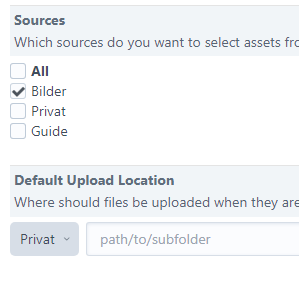
Selecting a matching default upload folder seems to fix that.
/Aylin
 wsydney76
on 29 Jan 2020
wsydney76
on 29 Jan 2020
@wsydney76 Great. This works. But it looks like they have restarted or I am crazy. As I usually set this.
ilicmarko
on 29 Jan 2020
Turned out to be the same issue as @wsydney76 for me. I also checked a different asset field and it was working perfectly fine for me, so it was field specific for me.
@andris-sevcenko Here are the stack traces if you're still interested:
TypeError: t is nullCraft.js:3510:12
    _expandSource Craft.js:3510
    getDefaultSourceKey Craft.js:2470
    getDefaultSourceKey Craft.js:8864
    e garnish.js:79
    getLabelForField Relabel.js:56
    <anonymous> Relabel.js:104
    trigger garnish.js:840
    onAfterInit Craft.js:3255
    afterInit Craft.js:2329
    afterInit Craft.js:8850
    e garnish.js:79
    init Craft.js:2312
    init Craft.js:8167
    e garnish.js:79
    constructor garnish.js:768
    constructor garnish.js:40
    constructor garnish.js:40
    constructor garnish.js:40
    createElementIndex Craft.js:1331
    _createElementIndex Craft.js:4937
    jQuery 5
        i
        n
        fireWith
        l
        o
uncaught exception: View mode "null" not supported. Craft.js:3097:20
    getViewClass Craft.js:3097
    createView Craft.js:3086
    _updateView Craft.js:3665
    updateElements Craft.js:2679
    jQuery 5
        i
        n
        fireWith
        l
        o
Thanks for the help everyone.
MarcHartwig13
on 29 Jan 2020
Ran into the same error as @ilicmarko here, looks like it was caused by messed up field settings, where the 'sources' selection did not match the 'default upload folder'
Huh.
@wsydney76 thanks for the update, looking into this!
@MarcHartwig13 thanks!
andris-sevcenko
on 29 Jan 2020
Thanks for the help, everyone! Should be fixed now!
To get the fix early, change your craftcms/cms requirement in composer.json to:
"require": {
  "craftcms/cms": "dev-develop#6fe9ed6b98193189881ccbda098fb04c3ca011f9 as 3.4.0.2",
  "...": "..."
}
Then run composer update.
andris-sevcenko
on 29 Jan 2020
3.4.1 is out now with this fix.
 brandonkelly
on 29 Jan 2020
brandonkelly
on 29 Jan 2020
Related issues
 angrybrad
·
3Comments
angrybrad
·
3Comments
 leigeber
·
3Comments
leigeber
·
3Comments
 darylknight
·
3Comments
darylknight
·
3Comments
 richhayler
·
3Comments
richhayler
·
3Comments
 rynpsc
·
3Comments
rynpsc
·
3Comments
Most helpful comment
Ran into the same error as @ilicmarko here, looks like it was caused by messed up field settings, where the 'sources' selection did not match the 'default upload folder'
Selecting a matching default upload folder seems to fix that.
/Aylin