Cms: "Save as a new entry" doesn't work when maxSlugIncrement is set to 1
Description
For our projects, we have maxSlugIncrement set to 1, which prevents URLs from being incremented:
test-page, test-page-1, test-page-2 etc.
This works absolutely fine, until we try and use Crafts "Save as a new entry" feature, which returns an error:
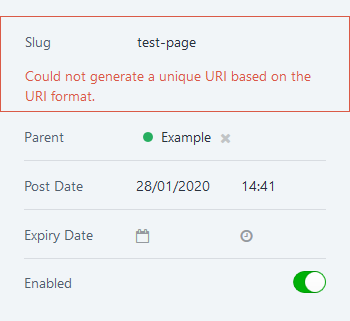
If we disable this config option, the page does duplicate as expected, and we can see the new URL it has generated:
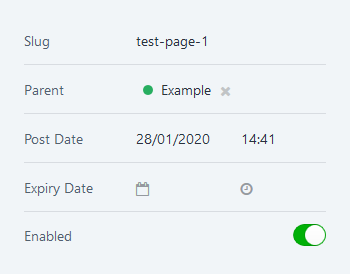
It seems that this feature duplicates the entry and increments the new slug, however this would always fail if your config option was set to avoid duplicate URLs.
To get around this, what if entries were duplicated with an empty slug value? That way, if the author renamed the new entry and hit save, it would automatically generate a slug from that title. Otherwise, they could enter their own slug manually.
In both situations, saving the entry for the first time with an empty slug would run it through the normal URL validation, which would _then_ check if maxSlugIncrement is defined?
Tested on a fresh Craft install with maxSlugIncrement set to 1.
Entries are created inside a Structure, and Entry URI Format is set to {parent.uri ?? ''}/{slug}
Additional info
- Craft version: 3.3.20.1
- PHP version: 7.3.8
- Database driver & version: MySQL 5.7.24
 jamiewade
All 5 comments
I don’t think allowing empty slugs is the answer here, but perhaps we could stop validating that elements have a unique URI, if they are disabled. Combined with setting entries’ statuses to disabled by default when duplicating them (which may be more desirable).
 brandonkelly
on 29 Jan 2020
brandonkelly
on 29 Jan 2020
Thanks Brandon. That sounds like a sensible approach to me, and does make a lot of sense in hindsight. If a user was working through a content entry process that involved duplicating an entry and then modifying it, they might not want the entry going live straight after duplication, before they have a chance the change the content.
jamiewade
on 29 Jan 2020
This has been resolved for the next 3.4 release:
- First, Craft no longer requires URIs to be unique unless the element is actually enabled.
- Second, when duplicating an element, if Craft can’t assign a unique URI to the new element, it will just be created as disabled, to get around the unique URI requirement.
brandonkelly
on 18 Feb 2020
Craft 3.4.6 is out now with this change.
brandonkelly
on 18 Feb 2020
That works great, thanks for sorting.
jamiewade
on 19 Feb 2020
Related issues
 Mosnar
·
3Comments
Mosnar
·
3Comments
 angrybrad
·
3Comments
angrybrad
·
3Comments
angrybrad
·
3Comments
angrybrad
·
3Comments
 darylknight
·
3Comments
angrybrad
·
3Comments
darylknight
·
3Comments
angrybrad
·
3Comments
Most helpful comment
Craft 3.4.6 is out now with this change.