Cms: [Suggestion] Start Clear Caches page with most/all options UNchecked
This suggestion comes from the situation I've encountered where someone wants clear the template cache, and will just click the red "Clear Caches" button for All The Things™, in the process wiping out all the image transforms and putting an incredible load on the server tasked with regenerating them all.
Making all checkboxes unchecked by default (with the button disabled until at least one is checked) would go a long way towards reducing the likelihood of an inadvertent full cache wipe.
Misc thoughts:
- You could mark the more high-impact options with a warning symbol & associated tooltip text to explain what the repercussions could be.
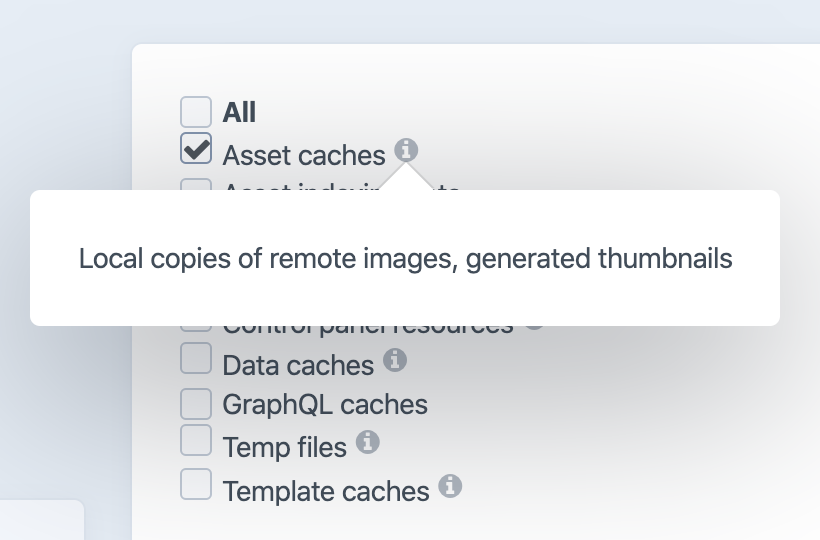
- In fact, adding short explanations on that page would be quite welcome regardless of checkboxes being checked or not—what's the difference between "Compiled templates" and "Template caches", what are "Control Panel resources", what are all the "Asset ____ ____" options, and what is the very generic-sounding "Data cache", etc.
- You could split up the checkboxes into categories based on low/med/high impact and/or commonly-used vs rarely-used.
- There should obviously be a way for plugins to follow suit with any changes here (thinking of Imager, mainly).
- Perhaps in a Settings page, the devs could specify which checkboxes are checked/unchecked by default for users?
Thanks!
 proimage
All 5 comments
This is sortof related to #1155.
I think a better route for both of these would be to have the utility start remembering what was previously selected, and use that as a starting point.
2. fact, adding short explanations on that page would be quite welcome regardless of checkboxes being checked or not—what's the difference between "Compiled templates" and "Template caches", what are "Control Panel resources", what are all the "Asset ____ ____" options, and what is the very generic-sounding "Data cache", etc.
Just added this for the next 3.4 release.
 brandonkelly
on 13 Jan 2020
brandonkelly
on 13 Jan 2020
Ok, so would remembering previous selections be stored on a per-user basis?
Also, I think there is still value to selecting reasonable (low impact) defaults as the initial state.
Finally, it looks like those icons need their line-height / vertical-align adjusted; they're knocking off the checkbox/text alignment. ;)
proimage
on 14 Jan 2020
Finally, it looks like those icons need their
line-height/vertical-alignadjusted; they're knocking off the checkbox/text alignment. ;)
Whoops, not sure how I missed that! Thanks :)
brandonkelly
on 14 Jan 2020
Just noticed that clicking the little info icons to show the popup also toggles the associated checkbox; this is probably unexpected behavior.
proimage
on 28 Jun 2020
@proimage thanks for pointing that out! Fixed for the next release.
brandonkelly
on 30 Jun 2020
Related issues
 Mosnar
·
3Comments
brandonkelly
·
3Comments
Mosnar
·
3Comments
brandonkelly
·
3Comments
 timkelty
·
3Comments
timkelty
·
3Comments
 rynpsc
·
3Comments
rynpsc
·
3Comments
 bitboxfw
·
3Comments
bitboxfw
·
3Comments
Most helpful comment
This is sortof related to #1155.
I think a better route for both of these would be to have the utility start remembering what was previously selected, and use that as a starting point.
Just added this for the next 3.4 release.