Cms: Typing in the content editor feels laggy while using Safari
While using Safari, typing in the content editor feels laggy (delayed response while typing). While using Chrome on the same machine, the content editor doesn't feel laggy.
Specs:
Safari 13.0.4
Running OSX 10.15.2
MacBook Pro (13-inch, 2019, Two Thunderbolt 3 ports)
Processor: 1.4 GHz Quad-Core Intel Core i5
Memory: 16 GB 2133 MHz LPDDR3
 owenconti
All 19 comments
Which fieldtype? Bard? Markdown?
 jackmcdade
on 4 Jan 2020
jackmcdade
on 4 Jan 2020
Bard & Markdown both exhibit this for me.
 edalzell
on 5 Jan 2020
edalzell
on 5 Jan 2020
Sorry Jack, I've experienced it in Bard and Textarea so far. I tried to find an easy way to capture it to show what I mean, but it's hard to capture a feeling. Here's the best I could do:
- I took a screen recording of myself typing "One two three" (I made a typo so it ended up as "One two tthree")
- I then took a second screen recording as I scrubbed through the first recording one frame at a time
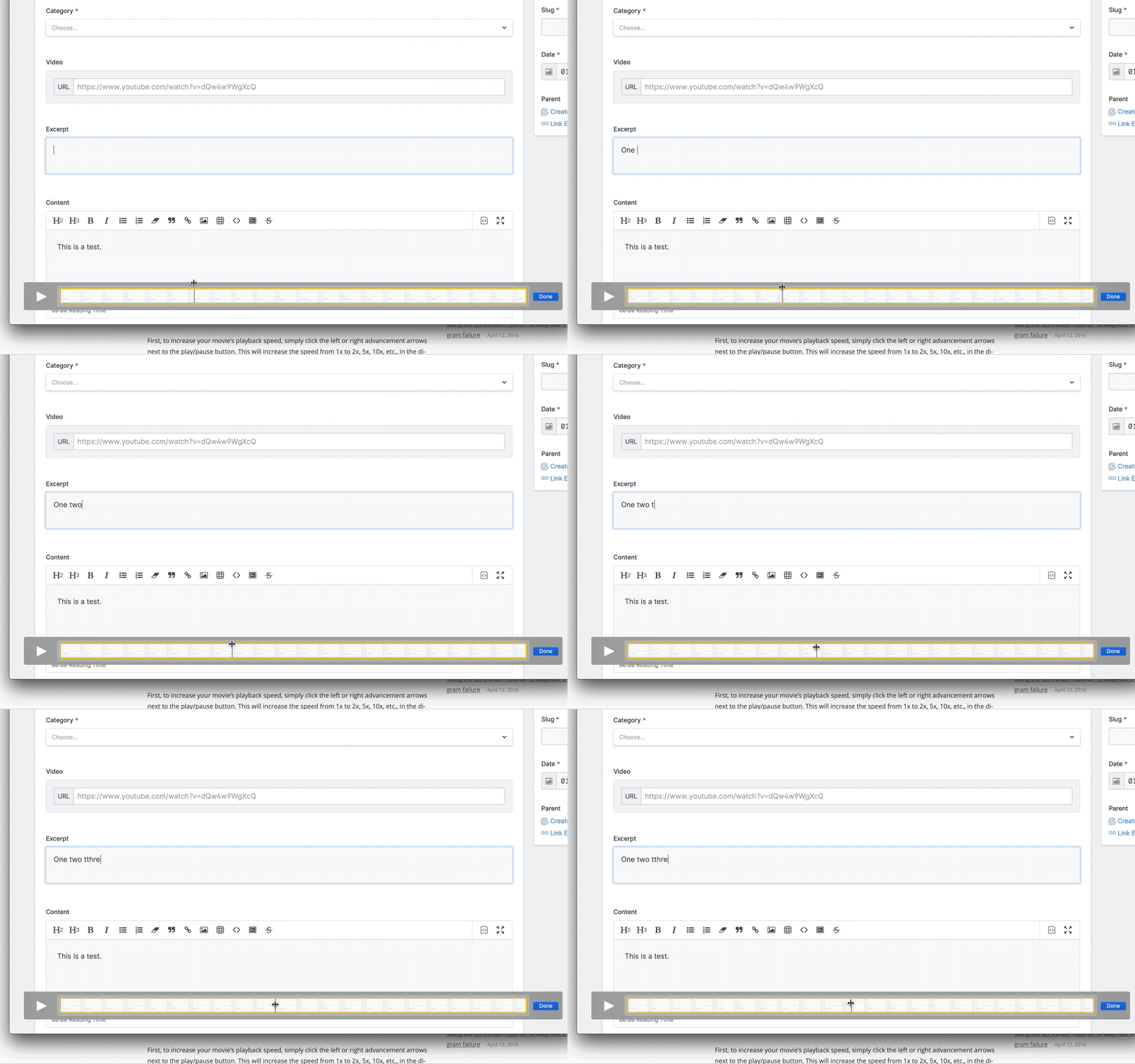
- So the first 5 characters are fine: "One t"
- Then instead of getting a frame for "w" and another for "o", we got a bit of a delay and then both "wo" appear together in the next frame
- The next characters " t" go through fine
- Then I make the typo, but the lag happens again for characters "th" where they both appear in the same frame.
Hopefully that helps!
owenconti
on 5 Jan 2020
FWIW I don't seem to experience this. macOS Catalina 10.15.2. Have you tried disabling browser extensions? Some are very aggressive with forms and can do odd things—LastPass comes to mind.
 derekjones
on 6 Jan 2020
derekjones
on 6 Jan 2020
Yeah I was just about to ask, do you have any extensions enabled?
 jasonvarga
on 6 Jan 2020
jasonvarga
on 6 Jan 2020
I do, I'll disable and re-test
edalzell
on 6 Jan 2020
I only had 1Password installed. Disabled it and still experienced it. Worth noting that on a more powerful machine, it doesn't seem to be as noticeable.
owenconti
on 6 Jan 2020
and I'm on an underpowered 2017 MacBook
edalzell
on 6 Jan 2020
I disabled all my extensions and it is still laggy for me.
edalzell
on 13 Jan 2020
Do you have devtools open? Is it any better with them closed?
jasonvarga
on 13 Jan 2020
I do not have dev tools open. No lag in Firefox.
edalzell
on 13 Jan 2020
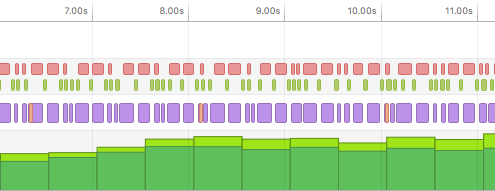
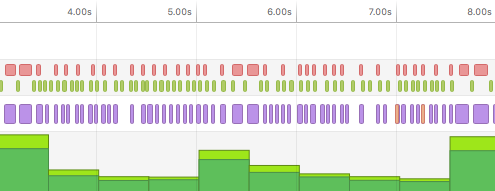
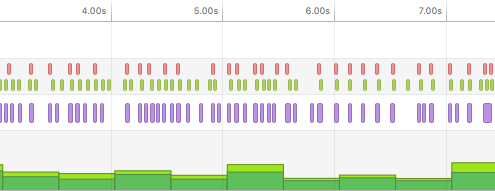
I took a look and EQCSS is causing this issue, in particular, it's the throttling feature. It's a performance issue not exclusive to one browser and it's causing a forced reflow, resulting in high CPU load.
Every time you input, it's calling EQCSS.throttle.
Default. (Throttle 200ms. Input throttle enabled)
Throttle 2s. Input throttle enabled
Throttle 200ms. Input throttle disabled.
 JonKaric
on 22 Jan 2020
JonKaric
on 22 Jan 2020
@JonKaric how were you able to determine it was eqcss.throttle on input that was causing the reflow?
jackmcdade
on 11 Mar 2020
@jackmcdade It was EQCSS causing the reflow, can't confirm it was eqcss.throttle but that was the root of the janky-ness for me. Happens when you interact with the page too, but it's not as bad.
Chrome dev tools > Performance > Record the page / whilst typing > Open the main tab
JonKaric
on 11 Mar 2020
I'm experiencing this problem too. I'm using a very long document and there's like a ~1 to 2 second lag after each key press, so it's not really usable at the moment.
 tao
on 5 Apr 2020
tao
on 5 Apr 2020
@jackmcdade This still happens on the latest beta, 3.0.0-beta.27. I found this page to be really useful.
If you're only using it to control the width of the .publish-field(s) based on the parent width, then you can do away with everything except the resize listener because that's the only one that will affect the widths of the fields.
The fields have set widths anyway, so typing content (listening for input) is redundant. The same with mousedown, mouseup, mousemove. You may need click somewhere for stacks™ or something? I'm not sure.
JonKaric
on 29 Apr 2020
@jackmcdade We are severely affected by this problem too. Big input lag on everything from bard editor, toogles, selects and so on.
Only happens when the blueprints require a lot input fields. Happens on all tested browsers and devices.
here is a gif of it, where only on whole word is appearing at a time due to lag :)

 AlexanderLindkjaer
on 12 Jun 2020
AlexanderLindkjaer
on 12 Jun 2020
This may be related to #1915
jasonvarga
on 12 Jun 2020
@JonKaric Thanks for that link. Do you actually see a way to disable certain events?
Locally I've brought eqcss inline and simply commented out the input event binding. It seems to help quite a bit. It would be nice if there was a setting I could use instead of having to "fork" the project.
jasonvarga
on 12 Jun 2020
Related issues
 ReneWeCode
·
3Comments
ReneWeCode
·
3Comments
 riasvdv
·
4Comments
riasvdv
·
4Comments
 dakisan
·
4Comments
dakisan
·
4Comments
 filipac
·
4Comments
filipac
·
4Comments
 AndreasSchantl
·
3Comments
AndreasSchantl
·
3Comments