Cms: Reassign Content dialog is unclear / overlooked
Description
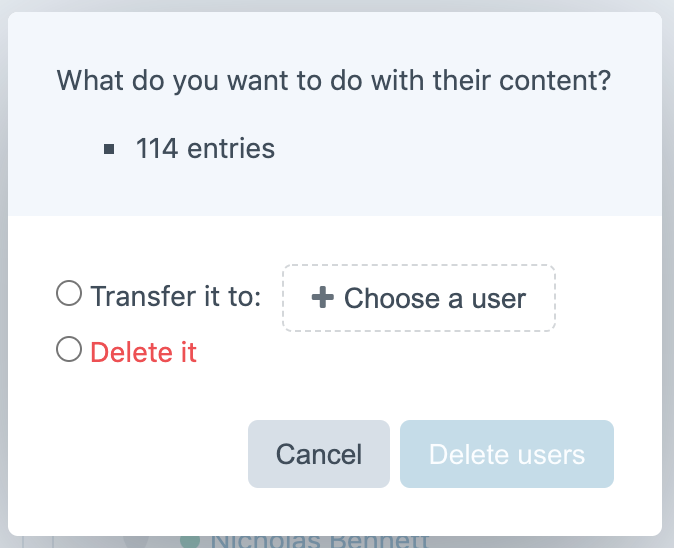
Over the years in both Craft and EE, my clients always seem to ignore or mis-interpret the option that appears when deleting a user asking them if they'd like to reassign the user's content to someone else or delete it (I suspect from the author's point of view, if they're not paying 100% attention and don't actually read the message, they instinctively think that it's just another confirmation button asking if they're sure they want to proceed with deleting the user.
Additional info
- Craft version: 3.3.16.1
 thisisjamessmith
All 11 comments
The UX in this area is exacerbated by the fact that the exact same 'reassign content' modal window appears even when deleting users who have no content, so for an editor who is going through methodically deleting old user accounts, they will become accustomed to always choosing the 'delete' option, even though once in a while they'll come across a back-end CP user who does have some content which should be reassigned.
My usual recommendation to clients is to never delete back-end users and instead always keep them in a suspended status so that an accurate history of entry authorship is maintained, however, you can understand why for regulatory reasons some industries may be required to 'hard delete' inactive users.
thisisjamessmith
on 2 Dec 2019
If you're deleting multiple users en-masse, the modal window doesn't break down which users have content attached to them, either.
thisisjamessmith
on 2 Dec 2019
_Each GitHub issue should only focus on a single thing, and considering the UX feedback has taken over in your follow-up comments, I’ve edited the OP to focus on that._
 brandonkelly
on 2 Dec 2019
brandonkelly
on 2 Dec 2019
Part of the reason we added soft-delete support in Craft 3.1 was for this issue. At least there is a way to “undo” the user/entry deletion now. But I agree it could be more clear what exactly is going to be deleted/transferred.
This is also related to commerce#1048, where users that have had any Commerce subscriptions aren’t able to be deleted at all.
We are thinking we will tackle both of them in Craft 4 by replacing the current delete confirmation dialog with a modal that lists any issues that are preventing the user from being deleted, with inline quick actions for resolving them, one-by-one. If a user has any entries, the quick action will be to view those entries, and from there, you’ll be able to batch-reassign them to someone else.
brandonkelly
on 2 Dec 2019
We just got bit pretty badly by this. I thought I'd seen a similar thread with a lot more upvotes, but here is our sob story...
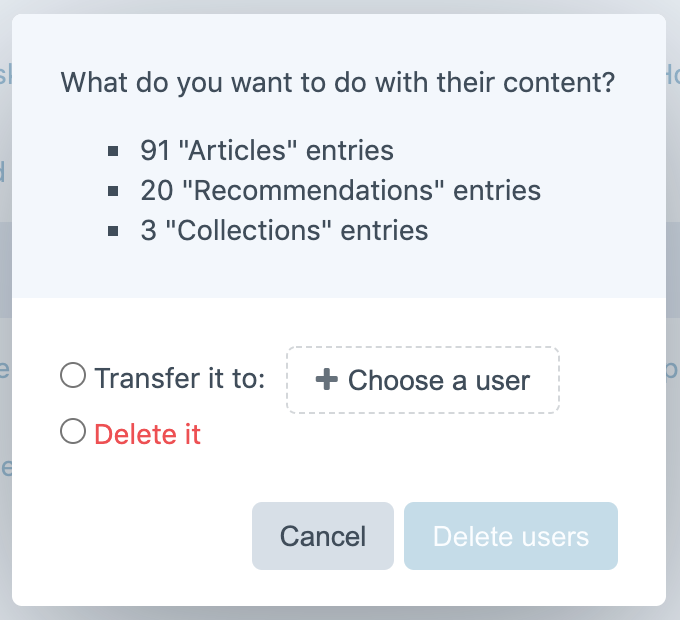
One of my smartest clients, who has been working with the website for years, has apparently been selecting "Delete it" because the messaging was so unclear. She did not realize that "entries" implied all of the related data that our users had been creating. The site contains tens of thousands of entries, so we don't know if anything has been deleted permanently over the years. 😕
I humbly propose this text change...
CURRENT
PROPOSED
 lindseydiloreto
on 17 Nov 2020
lindseydiloreto
on 17 Nov 2020
I’m not convinced extrapolating what content will be deleted would make a significant impact here. Either way, had they read the message, they would know what they’re doing. The problem is they’re not reading the message to begin with.
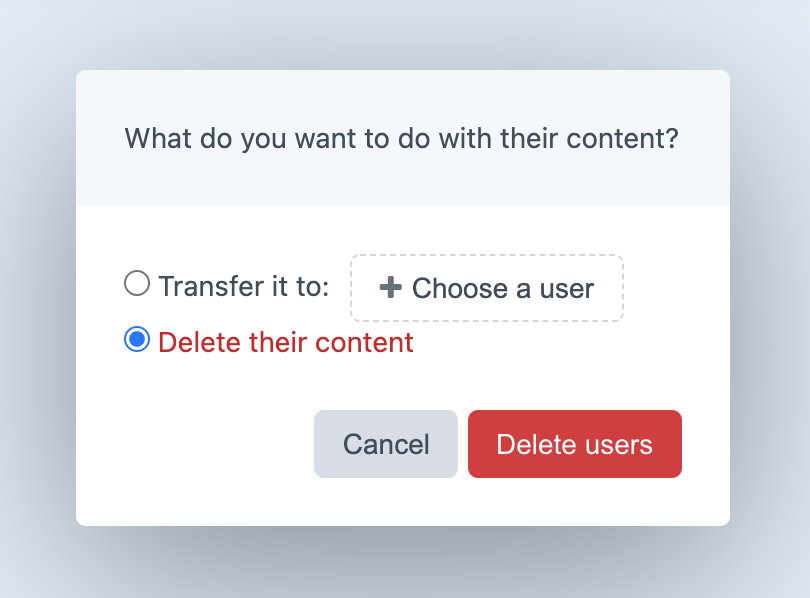
I suspect the reason people skip over that text is that they assume that this is _just_ a typical confirmation dialog, which is trying to be scary by making you confirm you really want to delete the user multiple times – once by clicking the “Delete it” radio (where you may assume “it” just refers to the user, having not read anything else in the dialog), and a second time by clicking the submit button.
I just changed that radio button’s label to “Delete their content” for the next release. If I’m right, then that could improve things quite a bit.
brandonkelly
on 18 Nov 2020
Maybe, but that mostly seems like a lateral move to me. "it" vs "their content" is practically the same generic language.
I fudged the screenshot, we aren't using "Articles" and "Recommendations". We are using "Films" and "Companies". Each user is tied to a single Company, and multiple Films.
My client is smart. If she had seen the actual section names in there, I'm almost 100% certain it would have stopped her. She would have stopped in her tracks if she saw a message talking about deleting 1 Company and 41 Films.
Yes, they are all "entries" under the hood. But that doesn't mean much to the client, unfortunately.
lindseydiloreto
on 18 Nov 2020
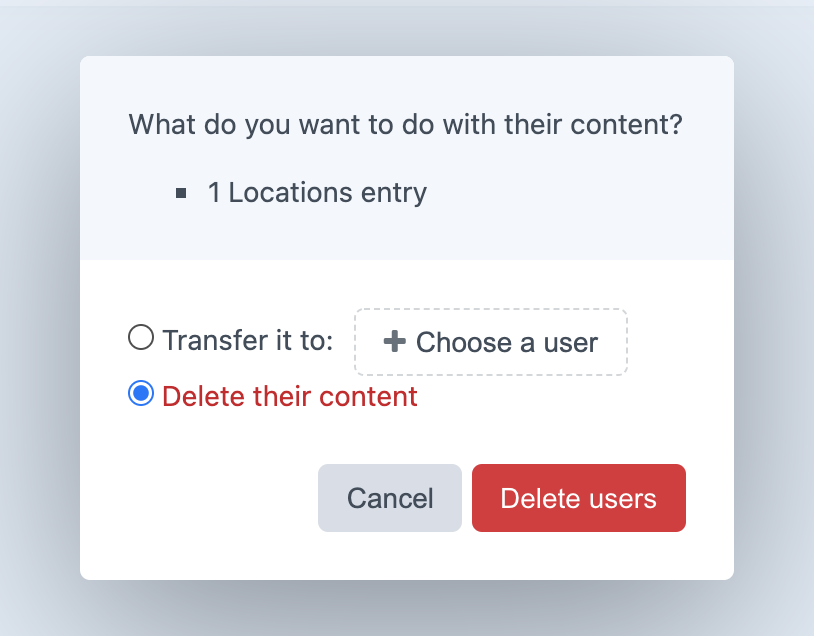
Guess it wouldn’t hurt to do both. Just made that change for the next release as well.
brandonkelly
on 18 Nov 2020
Ah, brilliant! Thanks @brandonkelly, greatly appreciated! 🍺
It's hard to quantify, but I'm fairly confident this will prevent at least a few avoidable tragedies. 😄
lindseydiloreto
on 18 Nov 2020
As a further minor enhancement to this, I find it's always useful to have the explicit action described in the button itself.
In this case, if they've selected "Delete their content", then the button could read "Delete users & their content" (or "Delete users & content" for brevity), and dynamically switch to just "Delete users" if the "Transfer" option is selected.
 proimage
on 29 Nov 2020
proimage
on 29 Nov 2020
@proimage Good idea, just made that change as well.
brandonkelly
on 30 Nov 2020
Related issues
 angrybrad
·
3Comments
angrybrad
·
3Comments
 leigeber
·
3Comments
leigeber
·
3Comments
 bitboxfw
·
3Comments
brandonkelly
·
3Comments
bitboxfw
·
3Comments
brandonkelly
·
3Comments
 lukebailey
·
3Comments
lukebailey
·
3Comments
Most helpful comment
Guess it wouldn’t hurt to do both. Just made that change for the next release as well.