Description
When deleting assets you can see them in the trashed list, but there is no option or a way to restore them.
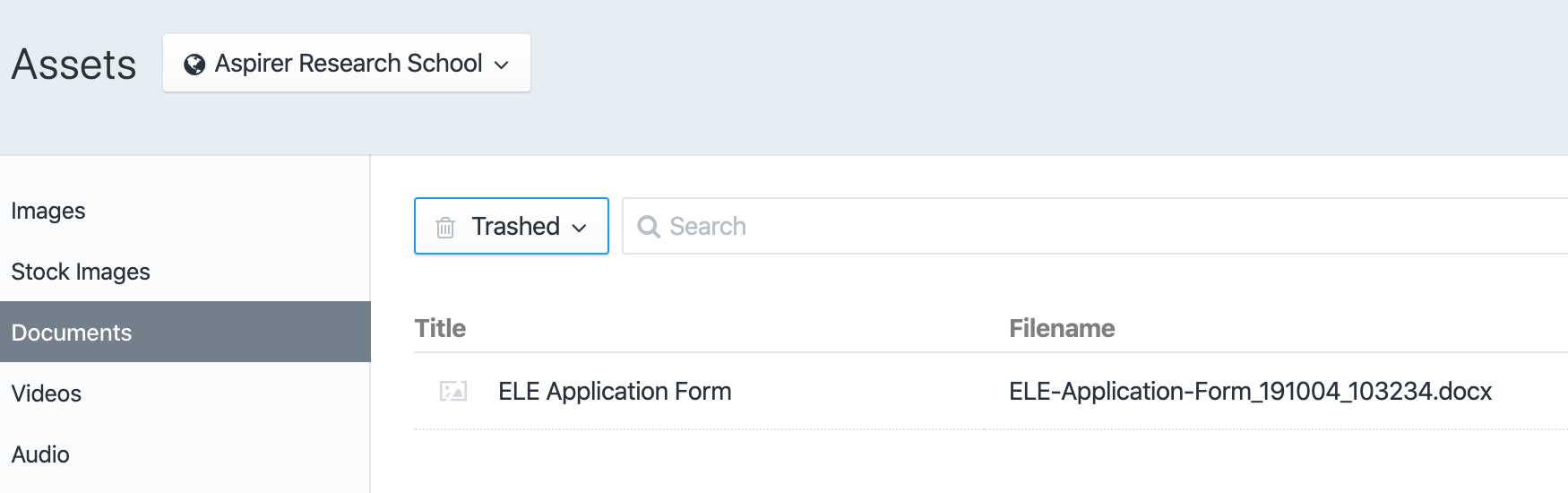
Steps to reproduce
- Delete an Asset
- Set the View to Trashed
Additional info
- Craft version: 3.3.8
- PHP version: 7.2
 michtio
All 7 comments
That is because the actual file is deleted immediately when you delete an asset, so it’s not possible for Craft to restore the element. (Whereas other element types primarily/only exist as database data.)
 brandonkelly
on 10 Oct 2019
brandonkelly
on 10 Oct 2019
@brandonkelly maybe a FR then to not hard delete the assets but soft delete them and display them in the Trashed folder? Without physically removing them, and only removing them when the garbage collection is run?
Or if it's physically deleted, then remove the "Trashed" option in the Assets view, because if we can select trashed, and still see the reference, it feels a bit "weird"
michtio
on 10 Oct 2019
@michtio I misunderstood how this worked too. It was only this week that I went to go restore an asset, only to realise this wasn't possible. Might also be complicated for volumes that are cloud based.
 jonleverrier
on 11 Oct 2019
jonleverrier
on 11 Oct 2019
Craft's Asset element actually has a keepFileOnDelete property:
https://github.com/craftcms/cms/blob/b6d3061e14e0d292aa563707f736b3ad5c1e91c6/src/elements/Asset.php#L510-L514
For those needing a temporary fix you can create a module that listens to the beforeDelete event and set's this property to true. However, a more permanent solution would be, as @michtio said to allow configuration of this property on delete allowing the authors to specify whether they want the asset's _file_ deleted.
@brandonkelly Just out of curiosity, why don't the asset's files just get stored somewhere in the soft-deletion period by default - I'm sure there is a good reason?
 gtettelaar
on 11 Oct 2019
gtettelaar
on 11 Oct 2019
@gtettelaar Seems dangerous to not delete a file that I expected to be deleted and possibly complex depending on storage adapter. If I delete a file that shouldn't have been uploaded, I'd be pretty upset if I found out it was never physically deleted from the volume or just moved to another location that's potentially still accessible, one way or another.
For this to work effectively, we'd need to be able to configure a "trashed" volume, which is intentionally not accessible. This starts to get complex if my volume is of a different type than the one that the deletion occurred in. Craft would also have to intelligently keep track of where to store these deleted files and what to name them in order to prevent collisions.
Additionally, now Craft has to worry about garbage collection for deleting files from the "Recycle Bin", which could potentially add some pretty heavy requests if I happen to deleted a lot of files.
I think this is do-able, but I'm not sure it's worth the time investment, cognitive overhead, and potential added security risks when we take into account all of the other features in the pipe for the next few years.
Perhaps a compromise is simply an option on volumes to "Keep files after delete"
 Mosnar
on 11 Oct 2019
Mosnar
on 11 Oct 2019
TL;DR: Personally, at least for the way we use Craft, I doubt it's worth the extra effort but I feel like we shouldn't show the asset's in the trashed folder if they are not recoverable - that behaviour is just confusing.
If I delete a file that shouldn't have been uploaded, I'd be pretty upset if I found out it was never physically deleted from the volume or just moved to another location that's potentially still accessible, one way or another.
You could use that as another argument for why #4420 is a good idea. Retain them to allow the people who may want to recover an asset to be able to do that - but allow hard deletion for those that don't. Now it's a one-way street.
For this to work effectively, we'd need to be able to configure a "trashed" volume, which is intentionally not accessible. This starts to get complex if my volume is of a different type than the one that the deletion occurred in. Craft would also have to intelligently keep track of where to store these deleted files and what to name them in order to prevent collisions.
Not really. You can just have one folder that Craft reserves and store the files by the asset UID? That's unique to the element and the original filename is stored in the DB. Restoration _should_ then be pretty easy.
Additionally, now Craft has to worry about garbage collection for deleting files from the "Recycle Bin", which could potentially add some pretty heavy requests if I happen to deleted a lot of files.
Fair point. That could cause slowdown although honestly you can get around this by offloading this part of the process to the queue and you might be able to index the soft-deleted files (somehow?).
I think this is do-able, but I'm not sure it's worth the time investment, cognitive overhead, and potential added security risks when we take into account all of the other features in the pipe for the next few years.
I can't say. Brandon will probably get involved in the discussion and give his opinion on that one. This issue is not a deal-breaker for me but the behaviour is awkward. Personally I found myself wondering why we have soft-deletes on asset's as it doesn't seem to have any functional value in the current implementation - you can't really recover them so what's the point. Curious to hear what the specific reason(s) were for this behaviour in the first place.
@Mosnar
gtettelaar
on 11 Oct 2019
We would need to introduce a Trashed Assets Location setting, similar to the current User Photo Location setting, so admins have control over where exactly trashed assets should be stored.
brandonkelly
on 12 Oct 2019
Related issues
 angrybrad
·
3Comments
angrybrad
·
3Comments
 richhayler
·
3Comments
richhayler
·
3Comments
 michaelhue
·
3Comments
Mosnar
·
3Comments
angrybrad
·
3Comments
michaelhue
·
3Comments
Mosnar
·
3Comments
angrybrad
·
3Comments
Most helpful comment
We would need to introduce a Trashed Assets Location setting, similar to the current User Photo Location setting, so admins have control over where exactly trashed assets should be stored.