Cms: Help! Uploading Asset and Saving Entry Returns Page Not Found and Entry is Lost
Description
My client recently noticed that when an asset is uploaded during the creation of an entry, and when the entry is saved a Page Not Found Error appears. Also the entry is completely lost. I've been able to confirm this, it happens every time.
Obviously this is extremely frustrating for my client, and it seems to be system wide (not limited to one section or content type).
Additional info
- Craft version: 3.3.4.1
- PHP version: 7.2.19
- Database driver & version: MySQL 5.7.27
 jonlongnecker
All 12 comments
@jonlongnecker Just briefly tested this on 3.3.4.1, and couldn't reproduce. I wonder if this is specific to something with your install. I would contact support ASAP if this is a priority, as this may be not a bug with Craft itself (or if so, specific to something in your environment).
 chasegiunta
on 23 Sep 2019
chasegiunta
on 23 Sep 2019
Could be. There's a few threads about query strings and Ngnix which I'm using, but none of their recommended changes are working, and their tests for query strings work for me. Has something to do with the asset uploading...
jonlongnecker
on 23 Sep 2019
This has also happened on our environment as well, on both our local environment and production environment. (Only saving entry, haven't able to reproduce the asset uploading)
It seems to happen when creating NEW channel / structure entry and clicking on save button while AJAX draft saving spinner is spinning.
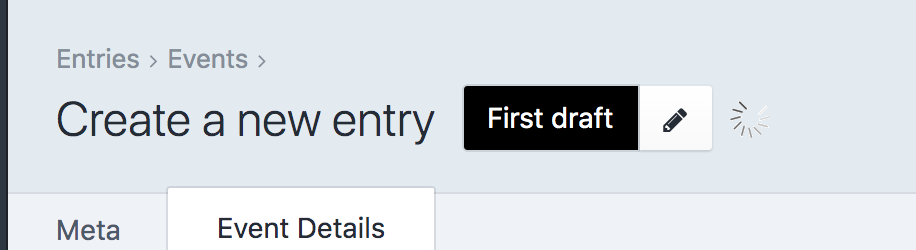
Also Entry save successfully if some required field is missing and returns to content entry screen and try to save while spinner is spinning.
Not sure if this issue applies to Singles, as Entry is already created when adding / editing content.
Our Environments are:
- Craft 3.3.3
- PHP 7.1
- NGINX
- PGSQL 9.6 remote, 11.4 local
Below is Yii Error log from my local environment when this has happened while saving new Channel entry.
yii\web\NotFoundHttpException: Entry not found in /usr/share/nginx/vendor/craftcms/cms/src/controllers/EntriesController.php:588
Stack trace:
#0 /usr/share/nginx/vendor/craftcms/cms/src/controllers/EntriesController.php(81): craft\controllers\EntriesController->_prepEditEntryVariables(Array)
#1 [internal function]: craft\controllers\EntriesController->actionEditEntry('eventsDetail', 29108, NULL, NULL, NULL, NULL)
#2 /usr/share/nginx/vendor/yiisoft/yii2/base/InlineAction.php(57): call_user_func_array(Array, Array)
#3 /usr/share/nginx/vendor/yiisoft/yii2/base/Controller.php(157): yii\base\InlineAction->runWithParams(Array)
#4 /usr/share/nginx/vendor/craftcms/cms/src/web/Controller.php(187): yii\base\Controller->runAction('edit-entry', Array)
#5 /usr/share/nginx/vendor/yiisoft/yii2/base/Module.php(528): craft\web\Controller->runAction('edit-entry', Array)
#6 /usr/share/nginx/vendor/craftcms/cms/src/web/Application.php(299): yii\base\Module->runAction('entries/edit-en...', Array)
#7 /usr/share/nginx/vendor/yiisoft/yii2/web/Application.php(103): craft\web\Application->runAction('entries/edit-en...', Array)
#8 /usr/share/nginx/vendor/craftcms/cms/src/web/Application.php(284): yii\web\Application->handleRequest(Object(craft\web\Request))
#9 /usr/share/nginx/vendor/yiisoft/yii2/base/Application.php(386): craft\web\Application->handleRequest(Object(craft\web\Request))
#10 /usr/share/nginx/web/index.php(24): yii\base\Application->run()
#11 {main}
 ryotadialpad
on 25 Sep 2019
ryotadialpad
on 25 Sep 2019
@jonlongnecker Can you please send a screen recording of this, plus your composer.json and composer.lock files and a database backup? [email protected]
 brandonkelly
on 25 Sep 2019
brandonkelly
on 25 Sep 2019
@brandonkelly do you want our screen rec, composer.json/.lock and db backup as well?
ryotadialpad
on 25 Sep 2019
Sure!
brandonkelly
on 25 Sep 2019
@brandonkelly I've been unable to reproduce this on my browsers but others are having same issue where entry gets lost after saving.
We started to notice after upgrading to 3.3.3 from 3.1.33...
Were you able to reproduce this issue at all?
ryotadialpad
on 2 Oct 2019
@ryotadialpad I've been working with Craft support on this via email, and we tracked down the issue to the fact that I was forcing trailing slashes via the NGNIX config on the live server for legacy SEO links. That trailing slash was causing certain URL's in the panel not to resolve correctly.
Currently testing this solution and it seems to be working so far: https://craftcms.stackexchange.com/questions/23870/trailing-slashes-with-nginx-and-craft
Not sure if you're forcing trailing slashes, too - but that's where I'm at. Also, I am using @khalwat 's NGINX Craft Scripts as my config base.
I agree something changed recently in the code that made this stop working, just not sure what.
jonlongnecker
on 2 Oct 2019
@jonlongnecker thanks for the update and quick reply.
We are forcing trailing slash as well and that stack exchange answer you mentioned is solution we're using at the moment.
I think there's issue with AJAX saving with trailing slash URLs.
Had trouble with AJAX saving on one of the plugins (Translations plugin) which used AJAX to save certain thing and trailing slash was the cause of the issue (I think between extra redirect it lost data? not exactly sure why redirect to trailing slash would cause it, but removing that redicrect solved the issue).
I believe AJAX saving is issue since Craft added draft auto saving (via AJAX) recently?
Asset uploading works fine for us, even though it is using AJAX to save/upload file... maybe those 2 have different logic?
Another weird thing is, it doesn't happen all the time... only on certain occasions to someone else, and not the devs...
ryotadialpad
on 2 Oct 2019
@ryotadialpad interesting. For us, it wasn't that Assets weren't working, it was that uploading an asset and then saving a new entry broke the entry. The asset still uploaded just fine.
I was also seeing an error when trying to change a related entry field. Saving the entry would default back to the previously saved related entry. So I think you're on to something with the AJAX thing because the Assets window and related entry window both use AJAX.
I noticed, too - especially for the related entry thing that it wasn't consistent. Sometimes the save would work, and sometimes it wouldn't.
jonlongnecker
on 3 Oct 2019
We were having exactly the same issue. We have recently updated from 3.1.34.3 to 3.2.10 and we are experiencing this issue. I fixed it by adding an exception on /admin on nginx configuration so it doesn't add trailing slashes to URIs that begin with /admin.
But we are still having another issue. And that is when creating new entries and trying to add an asset, the asset modal shows an empty list.
I noticed that removing {{ site.group }} from the path of the asset field solves the problem ! To me it seems like a Craft bug.
Working with assets has been really buggy with the latest updates.
 peimansh
on 13 Nov 2019
peimansh
on 13 Nov 2019
@peimansh I see you also commented on #4522 so will follow up with you there.
brandonkelly
on 19 Nov 2019
Related issues
 richhayler
·
3Comments
richhayler
·
3Comments
 mccombs
·
3Comments
mccombs
·
3Comments
 angrybrad
·
3Comments
angrybrad
·
3Comments
 lukebailey
·
3Comments
lukebailey
·
3Comments
 leigeber
·
3Comments
leigeber
·
3Comments