Cms: FR: GraphQL storing schemas/tokens/permissions on project config
Description
Having GraphQL by default is awesome and it opens a ton of possibilities to use Craft CMS with different systems, languages etc.
One of the things that although it seems not be enabled by default is having the schemas stored in some way in the project config file. This makes the process of deployment that become super easy and smooth with the project config feature more difficult, specially if like me, you have allowUpdates enabled in production or staging environments.
Before GraphQL been implemented I used and use CraftQL in production sites. I mentioned the same or somewhat related issue on the plugin github https://github.com/markhuot/craftql/issues/250
This for me seems crucial to have a smoother deployment (which was fixed with the projectConfig implementation). Hopefully we will continue to have that also when using Craft CMS with headlessMode on.
- Craft version: 3.3.0
 bzin
bzin
All 15 comments
Just a basic and common scenario that should be synced: If I turn of the public GraphQL schema in my development environment (in order to turn of GraphQL altogether) we currently have to remember to repeat this on all environments as the change is not synced.
 sebastian-lenz
on 28 Aug 2019
sebastian-lenz
on 28 Aug 2019
My current workaround is to create the schema needed locally, grab the values from the gqlschemas table and migrate to the stage/production servers - directly within the database. Not ideal, but it will work for now.
Maybe a good approach, but a larger change to the GraphQL and Project Config functionality, would be for each schemas permissions to be defined within the project config - but the tokens are stored/rotated in each environment.
So a deployment might look like:
- Create the schema locally and test. Those permissions are stored within the project config
- Deploy to stage/prod and generate/rotate the keys (or if they don't exist create them)
- Allow admins to generate tokens per schema in the UI
Alternatively, the schemas can be stored in the database as is and users with permissions can generate the schemas on each environment. This does create an issue with syncing access between each environment...
 jasonmccallister
on 28 Aug 2019
jasonmccallister
on 28 Aug 2019
[ was misplaced ]
 narration-sd
on 28 Aug 2019
narration-sd
on 28 Aug 2019
@narration-sd sounds like you were responding to #4844?
 andris-sevcenko
on 29 Aug 2019
andris-sevcenko
on 29 Aug 2019
I'm not sure what I was responding to -- doesn't seem that one either, though it was something definite! I'll figure it out and re-post, probably not tonight.
Apologies to those on this set, and will have redacted...
narration-sd
on 29 Aug 2019
@narration-sd ah the perils of sleep deprivation!
andris-sevcenko
on 29 Aug 2019
Too true -- but this time not for Craftish, as I hung it up :) Fixed now, after too-habitual edit of the post so nobody sees it correctly in email. It's a patented act...
narration-sd
on 29 Aug 2019
This makes more sense now that GraphQL is mainlined.
 dangayle
on 26 Sep 2019
dangayle
on 26 Sep 2019
+1! would love to have the graphQL schema's be able to be versioned somehow, so it's easier to collaborate with multiple devs on the same project without telling them all how to configure their CMS.
 FreekVR
on 15 Oct 2019
FreekVR
on 15 Oct 2019
+2!
 LarsDol
on 15 Oct 2019
LarsDol
on 15 Oct 2019
GraphQL schemas are now stored in the project config, for Craft 3.4!
Maybe a good approach, but a larger change to the GraphQL and Project Config functionality, would be for each schemas permissions to be defined within the project config - but the tokens are stored/rotated in each environment.
That’s the approach we ended up taking, as we think it should be possible to create/regenerate/delete access tokens on production. So access tokens are now managed separately from the main schema definitions.
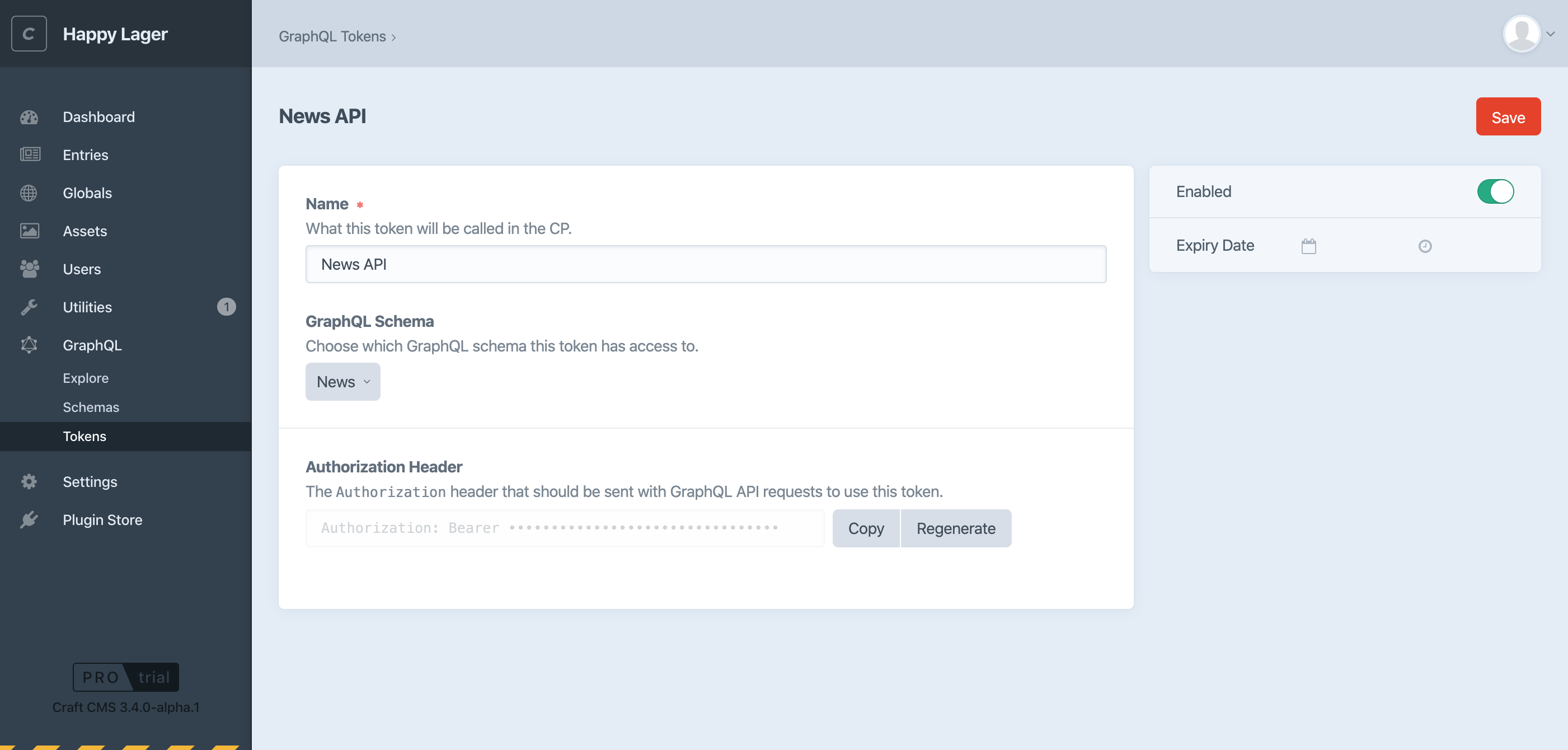
An added benefit of this approach is it’s now possible to create multiple tokens for the same schema.
To help test, change your craftcms/cms requirement in composer.json to:
"require": {
  "craftcms/cms": "3.4.x-dev",
  "...": "..."
}
Then run composer update.
⚠️ Warning: When you push this update to production, it will overwrite all GraphQL schemas with whatever is in
project.yaml. If any of the incoming schema UIDs match the old ones, it will recreate new access tokens automatically based on the old schema settings. Otherwise you will need to recreate your tokens manually. So we recommend that you pull down a recent database backup from production before updating to Craft 3.4 locally, to ensure that you have the latest schema definitions, and that their UIDs will match what’s on production.
 brandonkelly
on 2 Dec 2019
brandonkelly
on 2 Dec 2019
Why doesn't it store the Graphql token in project.yaml? I can see that it stores the schemas, but not the tokens. I did as described above, but when i deploy the code to production it says that no tokens exists yet.
Because if the tokens changes, how are you then gonna develop locally, making request to the Graphql, and the deploy it, since all references of the token in the code will be wrong.
 CMeldgaard
on 16 Jan 2020
CMeldgaard
on 16 Jan 2020
Because if the tokens changes, how are you then gonna develop locally, making request to the Graphql, and the deploy it, since all references of the token in the code will be wrong.
I don't think that storing access tokens in your code is the best way to go, though.
andris-sevcenko
on 16 Jan 2020
I mean, you wouldn't store database credentials in code, either. In a similar fashion, the access token to use should be a config setting.
andris-sevcenko
on 16 Jan 2020
Because if the tokens changes, how are you then gonna develop locally, making request to the Graphql, and the deploy it, since all references of the token in the code will be wrong.
Ideally you would store the token as an environment variable within your app’s environment, so it’s never hardcoded into your codebase.
brandonkelly
on 16 Jan 2020
Related issues
 mccombs
·
3Comments
mccombs
·
3Comments
 angrybrad
·
3Comments
angrybrad
·
3Comments
angrybrad
·
3Comments
angrybrad
·
3Comments
 benface
·
3Comments
benface
·
3Comments
 michel-o
·
3Comments
michel-o
·
3Comments
Most helpful comment
GraphQL schemas are now stored in the project config, for Craft 3.4!
That’s the approach we ended up taking, as we think it should be possible to create/regenerate/delete access tokens on production. So access tokens are now managed separately from the main schema definitions.
An added benefit of this approach is it’s now possible to create multiple tokens for the same schema.
To help test, change your
craftcms/cmsrequirement in composer.json to:Then run
composer update.