Cms: Saving entry failed if slug includes 4 byte characters, such as Japanese
Description
I cannot save entries if the slug includes 4-byte characters, such as Japanese and Chinese.
Steps to reproduce
- Create a new entry
- Type
こんにちはinto the slug field - Press the
Save EntryButton - Error message below shows:
Database Exception – yii\db\Exception
Error Info: Array
(
    [0] => HY000
    [1] => 1366
    [2] => Incorrect string value: '\xE3-\xE3-\xE3-...' for column 'slug' at row 1
)
↵
Caused by: PDOException
SQLSTATE[HY000]: General error: 1366 Incorrect string value: '\xE3-\xE3-\xE3-...' for column 'slug' at row 1
in /.../vendor/yiisoft/yii2/db/Command.php at line 1290
Additional info
- Craft version: 3.2.5.1
- PHP version: 7.2.18
- Database driver & version: MySQL 5.7.26
- Plugins & versions: Redactor | 2.3.3.2
 tinybeans
All 13 comments
We also encounter problems with the slug generation in Craft 3.2. On sites that ran on Craft 3.1 there are entries that contain special characters in their slugs, Craft did not remove those characters in 3.1 (I have never been a fan of this but that's how Craft used to work). With Craft 3.2 those entries become unsaveable with a very weird encoding showing up after hitting the save button.
While on a single site setup the slug can be corrected by hand, on a multisite setup it is completely impossible to save those entries (as the other sites that cannot be corrected by hand will throw an error when saving).
Example
- On Craft 3.1 we've created an entry named "Rundgänge", Craft 3.1 set the slug to "rundgänge" (keeping the special character not downcoding it, everything worked fine, the page was visible online)
- Saving the same entry on Craft 3.2 yields the error "URI is not a valid URI", the value "rungänge" shows up like "rundg�-nge"
- As the site is in preproduction and will have multiple language variants which have not been translated yet, even if I correct the slug to something like "rungaenge" manually, I cannot save the entry cause the other sites still contain the invalid slug.

Sidenote
If this turns out to be another ICU problem I would strongly recommend investigating alternatives. We had problems with Craft and its dependency on ICU for downcoding before (In our case we could not upload assets cause the ICU version on a shared host was too old). There are solid PHP libraries out there that handle character downcoding very well and without the hassle on relying on the ICU tables.
Additional info
- Craft version: 3.2.5.1
- PHP version: 7.2.19
- Database driver & version: MySQL 5.7.19
- ICU version 64.2
 sebastian-lenz
on 22 Jul 2019
sebastian-lenz
on 22 Jul 2019
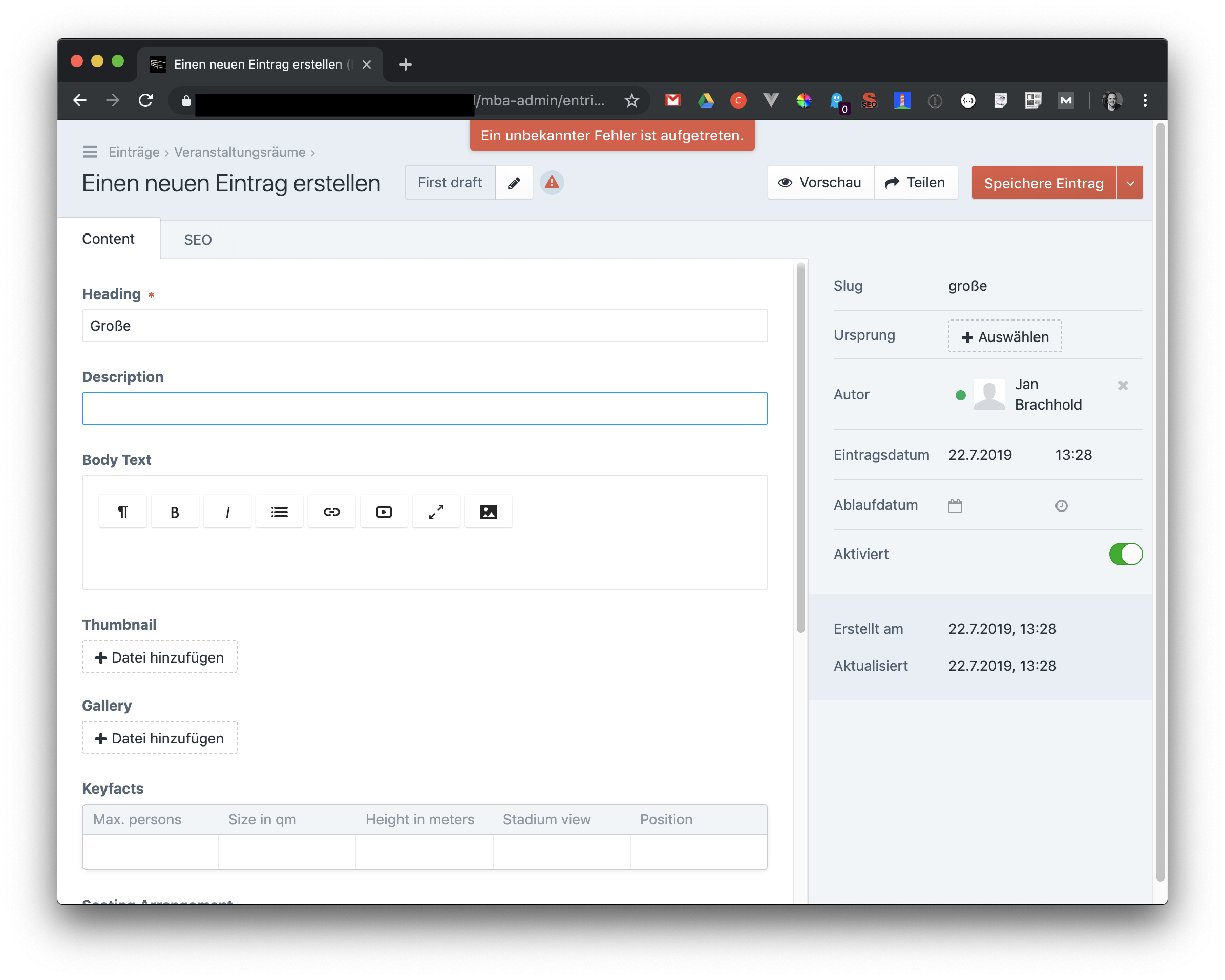
I have the same problem with letter "ß".

Additional info
- Craft CMS: 3.2.5.1
- PHP version: 7.3.7
- MySQL: 8.0.16
 Jan10
on 22 Jul 2019
Jan10
on 22 Jul 2019
Okay, the issue seems to be this regular expression:
https://github.com/craftcms/cms/blob/a6ee9044325191c063f42236e88a3f94ebf57bc6/src/helpers/ElementHelper.php#L79
The regular expression splits multibyte characters in half, after joining the strings back together an illegal string is created, e.g.:
https://www.phpliveregex.com/p/sTH
sebastian-lenz
on 22 Jul 2019
Yeah sorry about that, that should have been flagged as a unicode regex. Just fixed this for the next release.
To get the fix early, change your craftcms/cms requirement in composer.json to:
"require": {
  "craftcms/cms": "dev-develop#ccd3182d187fd12627da706b6acccc98df0a0f92 as 3.2.5.1",
  "...": "..."
}
Then run composer update.
 brandonkelly
on 22 Jul 2019
brandonkelly
on 22 Jul 2019
Thanks for quick fix! I actually just found out that Craft has a config option to downcode slugs, it's called limitAutoSlugsToAscii and when set to true Craft will remove multi byte characters using StringHelper::toAscii / Stringy::toAscii. However, it is basically never invoked as it is guarded by a pretty absolute check right here:
So non ascii characters are only removed if the slug is empty, which is never the case as the slug will be set by JavaScript in the frontend. I've just played around with a breakpoint in there and the only way I got it to trigger was by creating an entry in code, not setting the slug and saving it. So users a free to throw any fancy multi byte characters in there they like to.
It would be great if we could force Craft to always remove non ascii characters from slugs, I generally don't want characters like "ä" or "ß" in my slugs and they should be replaced by "ae" or "ss". The same is true for uploaded assets, another topic where I've seen files with strange characters in their filenames uploaded.
So, could we have an option like limitSlugsToAscii or, if you don't want it in there, an event that allows us to modify the slug?
sebastian-lenz
on 22 Jul 2019
@sebastian-lenz The limitAutoSlugsToAscii config setting will also effect the JavaScript slug generator. So with that enabled, the only time you should get non-ASCII characters in your slugs is if you type them into the Slug field yourself.
brandonkelly
on 22 Jul 2019
@brandonkelly
It seems to have an another error after apply "dev-develop#ccd3182d187fd12627da706b6acccc98df0a0f92 as 3.2.5.1".
I can't save new single section with erorr: "The section '{$section->name}' is not enabled for the site '{$this->siteId}'".
I confirmed "3.2.5.1" having no issue with the error.
 watarutmnh
on 23 Jul 2019
watarutmnh
on 23 Jul 2019
@watarutmnh can you send your composer.json and composer.lock files, and a database backup, over to [email protected]?
brandonkelly
on 23 Jul 2019
@brandonkelly I sent the data, Thank you!
watarutmnh
on 23 Jul 2019
@watarutmnh Thanks! I was able to reproduce and just got it fixed for today’s 3.2.6 release.
brandonkelly
on 23 Jul 2019
@brandonkelly I've just tried out the prerelease you gave in here and if I use it I get an error cause of the new version of Imagine used. It looks like there is a bug in Imagine. Should I comment here, open a new issue for Craft, a new issue for Imagine or are you aware of the problem with the new Imagine version?
sebastian-lenz
on 23 Jul 2019
@sebastian-lenz that’s already fixed.
brandonkelly
on 23 Jul 2019
We just released Craft 3.2.6 with the fix for this.
brandonkelly
on 23 Jul 2019
Related issues
 bitboxfw
·
3Comments
bitboxfw
·
3Comments
 rynpsc
·
3Comments
brandonkelly
·
3Comments
rynpsc
·
3Comments
brandonkelly
·
3Comments
 davist11
·
3Comments
davist11
·
3Comments
 mccombs
·
3Comments
mccombs
·
3Comments
Most helpful comment
We just released Craft 3.2.6 with the fix for this.