Cms: [3.2] Add ability to set a default Preview Target
Description
I'd love to have the option (possibly in the Section Settings) to select a default Preview Target.
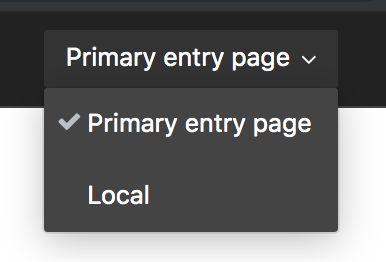
Currently, it defaults to "Primary entry page", which if I'm using Craft headless, I'd prefer the preview to not use the Twig template.
Steps to reproduce
N/A
Additional info
- Craft version: 3.2
 stursby
All 26 comments
Same here. We use Craft in headless fashion and do not use any twig template, so the local preview doesn't make sense here, instead, we wish to set the default preview target to our remote site which consumes content from Craft.
 minyangu-bgl
on 16 Jul 2019
minyangu-bgl
on 16 Jul 2019
@minyangu-bgl I was just using Local for my demo, but yes, being able to set something other than the Twig default template is what I'm looking for!
stursby
on 16 Jul 2019
 ryanpcmcquen
on 2 Aug 2019
ryanpcmcquen
on 2 Aug 2019
@brandonkelly This issue might be obsolete now with the release of 3.3 since after setting 'headlessMode' => true in configs/general.php the first Preview Target becomes the default.
stursby
on 29 Aug 2019
You’d get the same behavior without Headless Mode if you just left your section’s URI format blank.
 brandonkelly
on 29 Aug 2019
brandonkelly
on 29 Aug 2019
Seems like all the use cases for this are when using Craft as a headless CMS, in which case you shouldn’t be setting entry URI formats in the first place (and you don’t even have the option to set that if you enable headlessMode in v3.3).
brandonkelly
on 5 Sep 2019
@brandonkelly Yep, makes sense. With the 3.2/3.3 additions, I think that solved the issue. Thanks for the great releases! 🙌🏻
stursby
on 5 Sep 2019
@brandonkelly Is there some way to achieve this without running in headless mode?
I'm creating a Nuxt/CraftCMS stack atm - whilst it is technically a headless CMS, I'm utilising the entry URI formats as well as the uri field in GraphQL to determine my page structure (which is removed if I have enabled headless mode).
I suppose I could use the build this using slug/parent but would be a nightmare doing this through my entire web app.
Preview actually works fine now (pointing to my web app as the base URL), but Im thinking in production we may want a different site to host an SPA of the app for preview, then have a statically generated site for live. Would be great if there was a general settings options to override the preview base URL
 lmounsey
on 11 Sep 2019
lmounsey
on 11 Sep 2019
@lmounsey I’d suggest creating a custom field to store the URIs, perhaps using a Preparse field so that the actual value can still be based on a dynamic template.
brandonkelly
on 11 Sep 2019
Reopening this because I’m now realizing that there are in fact a couple cases where entry URI formats are still good to have, even when using Headless Mode.
Unique slugs. Craft doesn’t enforce slug uniqueness directly; it only ensures that elements’ resulting URIs are unique, and adjusts the slug value in order to achieve that by appending
-1,-2, etc. to the end of the slug (assuming the URI format contains a{slug}variable).Linking to entries from Redactor fields. Redactor fields can only allow authors to easily link to other entries if the entries have known URLs (#4934).
So I think the plan should be:
- Bring back element URI support when Craft is running in Headless Mode (without bringing back element URI routing though).
To resolve this issue, we should stop automatically prepending a Primary entry page option to the list of preview targets, and instead have that be something that the user has to define within the actual Preview Targets setting:

We can write a migration that automatically adds that preview target to existing sections that have entry URI formats, and new sections could have it by default, but the user is free to delete it if it’s unwanted.
As preview targets are currently a Craft Pro-only feature, we will need slightly loosen that restriction up as well, so Craft Solo can have one preview target per section.
brandonkelly
on 13 Sep 2019
Alright that’s all been done for Craft 3.4!
If you have a noncritical project you want to test it out on, change your craftcms/cms requirement in composer.json to:
"require": {
  "craftcms/cms": "3.4.x-dev",
  "...": "..."
}
Then run composer update.
brandonkelly
on 14 Sep 2019
I now get this error when adding a URI to a section in headless mode:
Undefined index: template
 diluno
on 16 Sep 2019
diluno
on 16 Sep 2019
@diluno Sorry about that, fixed now.
brandonkelly
on 24 Sep 2019
Hi @brandonkelly
I'm testing out 3.4.x-dev and I'm getting a "null" result on the uri when querying my entries in GraphQL - section URI formats have been set - is there anything else I need to do to get this to work?
lmounsey
on 11 Oct 2019
@lmounsey Just pushed 900b262e1c636f029934ca025a9d0e21c58863d5 which should fix that. Run composer update again.
brandonkelly
on 11 Oct 2019
@lmounsey I just read that you have a running preview in a headless setup. I have (had) the following approach, where graphql was not out as a core service yet:
- Open the frontend app in the preview window
- Using the preview token to send a graphql request to retrieve the latest draft of that entry
- rendering the content with the draft data.
Is this kind of the thing you do, or could you quickly point out the differences? That would be very much appreciated.
@brandonkelly And thanks a lot for bringing back the uris in headless mode!
 Jones-S
on 14 Oct 2019
Jones-S
on 14 Oct 2019
@brandonkelly
could it be that the uri is not yet exposed via GraphQl? I still get null when querying it.
Also I would wonder how I could use a preview URL like:

The problem with this is, when I don't have a nested page (I am using structures as sections), I get a uri like localhost:3000//slug – how could I make the first slash depending on the existence of a parent?
Thank you in advance
Jones-S
on 14 Oct 2019
@Jones-S Doh, sorry! Just fixed a couple remaining issues with headless mode + element URIs (e69c4d35d4e38ae7a842cc268ff68a3438c76c5d). Run composer update now, resave your entries, and you should be good to go.
brandonkelly
on 14 Oct 2019
@lmounsey I just read that you have a running preview in a headless setup. I have (had) the following approach, where graphql was not out as a core service yet:
- Open the frontend app in the preview window
- Using the preview token to send a graphql request to retrieve the latest draft of that entry
- rendering the content with the draft data.
Is this kind of the thing you do, or could you quickly point out the differences? That would be very much appreciated.
@Jones-S Yep that's right - seems to mostly work well, except then switching the entry type to an existing entry, the preview still thinks it's using the the old entry type (until I resave the entry). It's not a massive issue though as it would be pretty rare in my case.
lmounsey
on 15 Oct 2019
@brandonkelly thanks for the update. works like a charm now 👍
@lmounsey thank you for your input, now I know that I am on the right path :). And I think that limitation, you mention, is ok.
Jones-S
on 15 Oct 2019
yas... I need this for SEOmatic https://github.com/nystudio107/craft-seomatic/issues/485
 khalwat
on 30 Oct 2019
khalwat
on 30 Oct 2019
    /**
     * Returns an element by its URI.
     *
     * @param string $uri The element’s URI.
     * @param int|null $siteId The site to look for the URI in, and to return the element in.
     * Defaults to the current site.
     * @param bool $enabledOnly Whether to only look for an enabled element. Defaults to `false`.
     * @return ElementInterface|null The matching element, or `null`.
     */
    public function getElementByUri(string $uri, int $siteId = null, bool $enabledOnly = false)
    {
        if (Craft::$app->getConfig()->getGeneral()->headlessMode) {
            return null;
        }
^ will the above be changed as well? SEOmatic depends on this to find the matched element for a given URI; I realize this may be in there to prevent things down the chain from loading in an element.
Perhaps an additional force param that defaults to false, in cases where we need this? Feels gross, but the alternative is that I end up doing copy pasta on this method :)
khalwat
on 8 Nov 2019
@khalwat yeah, already removed in e69c4d35d4e38ae7a842cc268ff68a3438c76c5d
brandonkelly
on 8 Nov 2019
mmmm I should have looked at the diff more closely, sorry! Awesome news!
khalwat
on 8 Nov 2019
I'm sorry but could somebody explain how to use this feature exactly?
I'm running craft in headless mode, using the 3.4-dev Branch and I'm currently trying to Query the URL of my Sites Pages (inside a structure) and url and uri both are null in the GraphQL responses.
 JensvdHeydt
on 5 Jan 2020
JensvdHeydt
on 5 Jan 2020
@JensvdHeydt probably best if you post your question (with some more details) over at https://craftcms.stackexchange.com/.
brandonkelly
on 6 Jan 2020
Related issues
 davist11
·
3Comments
davist11
·
3Comments
 Mosnar
·
3Comments
Mosnar
·
3Comments
 rynpsc
·
3Comments
rynpsc
·
3Comments
 mccombs
·
3Comments
mccombs
·
3Comments
 darylknight
·
3Comments
darylknight
·
3Comments
Most helpful comment
Reopening this because I’m now realizing that there are in fact a couple cases where entry URI formats are still good to have, even when using Headless Mode.
Unique slugs. Craft doesn’t enforce slug uniqueness directly; it only ensures that elements’ resulting URIs are unique, and adjusts the slug value in order to achieve that by appending
-1,-2, etc. to the end of the slug (assuming the URI format contains a{slug}variable).Linking to entries from Redactor fields. Redactor fields can only allow authors to easily link to other entries if the entries have known URLs (#4934).
So I think the plan should be:
To resolve this issue, we should stop automatically prepending a Primary entry page option to the list of preview targets, and instead have that be something that the user has to define within the actual Preview Targets setting:
We can write a migration that automatically adds that preview target to existing sections that have entry URI formats, and new sections could have it by default, but the user is free to delete it if it’s unwanted.
As preview targets are currently a Craft Pro-only feature, we will need slightly loosen that restriction up as well, so Craft Solo can have one preview target per section.