Cms: Craft fails to install (File not found)
Description
When running 'composer install' using a composer.json OR a blank canvas with 'composer require craftcms/cms' the following error comes up
Finished: success: 35, skipped: 0, failure: 0, total: 35
Package operations: 114 installs, 0 updates, 0 removals
- Installing yiisoft/yii2-composer (2.0.7): Loading from cache
- Installing craftcms/plugin-installer (1.5.4): Loading from cache
Plugin installation failed, rolling back- Removing craftcms/plugin-installer (1.5.4)
[ErrorException]
include(/home/**/vendor/craftcms/plugin-installer/src/Plugin.php): failed to open stream: No such file o
r directory
Steps to reproduce
- Run 'composer install' using a ready-made composer.json file, or 'composer require craftcms/cms' if running from scratch
- Error.
Additional info
- Craft version: 3.1.28
- PHP version: 7.3
- Database driver & version:
- Plugins & versions:
Have tried completely removing vendor folder, tried clearing composer cache (composer clear-cache) and also downgrading the Composer version requirement, still doing it.
 DomLip94
All 19 comments
Any chance this is happening on a public box we could get some SSH access to? If so, can you send over to [email protected]?
 angrybrad
on 5 Jun 2019
angrybrad
on 5 Jun 2019
Local Vagrant dev VM for now
Laravel Homestead 8.4.0
Ubuntu 18.04.2 LTS (GNU/Linux 4.15.0-50-generic x86_64)
Was last working on Friday then seems to have just fallen apart today, nothing has changed with the box set up
Have also just tried running again but sudo'ing the composer command, still doing it.
I've just ran our deployment with envoyer and that's loading plugin-installer from cache, but I don't want to risk killing it on the staging/live servers by clearing the cache on there
... BUT...
That appears to be loading - Installing craftcms/plugin-installer (1.5.2): Loading from cache
which works fine (notice 1.5.2 instead of 1.5.4)
DomLip94
on 5 Jun 2019
Just tried forcing 1.5.2 to work, still nothing. How odd
Renamed composer.json to composer.json.bak
Removed vendor folder
exec'd composer clear-cache
then
vagrant@homestead:/home/*******$ sudo composer require craftcms/cms craftcms/plugin-installer:1.5.2 --ignore-platform-reqs
Do not run Composer as root/super user! See https://getcomposer.org/root for details
Using version ^3.1 for craftcms/cms
./composer.json has been created
Loading composer repositories with package information
Updating dependencies (including require-dev)
    1/11:   https://codeload.github.com/symfony/service-contracts/legacy.zip/191afdcb5804db960d26d8566b7e9a2843cab3a0
    2/11:   https://codeload.github.com/symfony/polyfill-php73/legacy.zip/d1fb4abcc0c47be136208ad9d68bf59f1ee17abd
    3/11:   https://codeload.github.com/yiisoft/yii2-composer/legacy.zip/1439e78be1218c492e6cde251ed87d3f128b9534
    4/11:   https://codeload.github.com/symfony/filesystem/legacy.zip/988ab7d70c267c34efa85772ca20de3fad11c74b
    5/11:   https://codeload.github.com/symfony/process/legacy.zip/a5e3dd4e93a364668034a3cb6efa963d0b33ab45
    6/11:   https://codeload.github.com/symfony/yaml/legacy.zip/c60ecf5ba842324433b46f58dc7afc4487dbab99
    7/11:   https://codeload.github.com/symfony/finder/legacy.zip/b3d4f4c0e4eadfdd8b296af9ca637cfbf51d8176
    8/11:   https://codeload.github.com/symfony/console/legacy.zip/707b619d2c3bedf0224d56f95f77dabc60102305
    9/11:   https://codeload.github.com/twigphp/Twig/legacy.zip/0418e17113266e84c03ccf758680af8abc4b22dc
    10/11:  https://codeload.github.com/yiisoft/yii2-framework/legacy.zip/3e74c7338dd83cea6ffc6f5c25202b9f2f271f89
    11/11:  https://codeload.github.com/craftcms/cms/legacy.zip/cb6e3054dd4351653329da508616c15dd0e69874
    Finished: success: 11, skipped: 0, failure: 0, total: 11
Package operations: 55 installs, 0 updates, 0 removals
  - Installing craftcms/plugin-installer (1.5.2): Loading from cache
Plugin installation failed, rolling back
  - Removing craftcms/plugin-installer (1.5.2)

Installation failed, deleting ./composer.json.


  [ErrorException]
  include(/home/*******/vendor/craftcms/plugin-installer/src/Plugin.php): faile
  d to open stream: No such file or directory


require [--dev] [--prefer-source] [--prefer-dist] [--no-progress] [--no-suggest] [--no-update] [--no-scripts] [--update-no-dev] [--update-with-dependencies] [--update-with-all-dependencies] [--ignore-platform-reqs] [--prefer-stable] [--prefer-lowest] [--sort-packages] [-o|--optimize-autoloader] [-a|--classmap-authoritative] [--apcu-autoloader] [--] [<packages>]...
Gotta be some local permissions issue? Try running it without sudo?
Just tested locally and it works as expected:
λ composer require craftcms/cms --ignore-platform-reqs
Using version ^3.1 for craftcms/cms
./composer.json has been created
Loading composer repositories with package information
Updating dependencies (including require-dev)
Package operations: 55 installs, 0 updates, 0 removals
  - Installing craftcms/plugin-installer (1.5.4): Loading from cache
  - Installing yiisoft/yii2-composer (2.0.7): Loading from cache
  - Installing zendframework/zend-stdlib (3.2.1): Loading from cache
  - Installing zendframework/zend-escaper (2.6.0): Loading from cache
  - Installing zendframework/zend-feed (2.12.0): Loading from cache
  - Installing symfony/process (v4.3.0): Loading from cache
  - Installing yiisoft/yii2-queue (2.1.0): Loading from cache
  - Installing symfony/polyfill-php72 (v1.11.0): Loading from cache
  - Installing symfony/polyfill-mbstring (v1.11.0): Loading from cache
  - Installing symfony/polyfill-intl-idn (v1.11.0): Loading from cache
  - Installing symfony/polyfill-iconv (v1.11.0): Loading from cache
  - Installing doctrine/lexer (v1.0.1): Loading from cache
  - Installing egulias/email-validator (2.1.8): Loading from cache
  - Installing swiftmailer/swiftmailer (v6.2.1): Loading from cache
  - Installing yiisoft/yii2-swiftmailer (2.1.2): Loading from cache
  - Installing yiisoft/yii2-debug (2.1.5): Loading from cache
  - Installing yiisoft/yii2 (2.0.19): Loading from cache
  - Installing craftcms/cms (3.1.29): Loading from cache
  - Installing yii2tech/ar-softdelete (1.0.3): Loading from cache
...
Done the 1 thing I hadn't already tried - destroy the vagrant box and go again.
And guess what...
I'm fuming (with myself)
DomLip94
on 6 Jun 2019
Have destroyed and up again but also getting this error trying to install with composer.
The latest version of Laravel Homestead also.
Installing craftcms/craft (1.0.42.1)
  - Installing craftcms/craft (1.0.42.1): Loading from cache
Created project in craft
    1/2:        http://repo.packagist.org/p/provider-latest$c3abb51bff5d90f3f911c26c5ef4ccb6aa50ac8ae901ff43a7cdcd3037a806d0.json
    2/2:        http://repo.packagist.org/p/provider-2019-04$94a09f72316c1761c484ebbd94b418322e23942528cfe15148bdc1e3ed80449e.json
    Finished: success: 2, skipped: 0, failure: 0, total: 2
Loading composer repositories with package information
Updating dependencies (including require-dev)
Package operations: 55 installs, 0 updates, 0 removals
  - Installing craftcms/plugin-installer (1.5.4): Loading from cache
Plugin installation failed, rolling back
  - Removing craftcms/plugin-installer (1.5.4)


  [ErrorException]
  include(/home/vagrant/code/goget/craft/vendor/craftcms/plugin-installer/src/Plugin.php): failed to open stream: No such file or directory
 digimiles
on 18 Jul 2019
digimiles
on 18 Jul 2019
Reopening
I have been getting it myself again. Quickest workaround was just zipping the vendor/ in production, downloading and unzipping where it is in the dev dir.
Obviously this isn't ideal
Destroying VM doesn't fix
DomLip94
on 18 Jul 2019
Hmmm. I see.
This is my first install in a while so don't have an updated production copy but will try it with a copy from the repo.
If anyone has a solution to this I'd be all ears.
digimiles
on 18 Jul 2019
Thought I had a fix by using NFS but that caused a dump-autoload error.
Script @composer dump-autoload -o handling the post-create-project-cmd event returned with error code 255
At least I got the vendor directory full.
digimiles
on 18 Jul 2019
Workaround when running Laravel Homestead.
- Enable NFS for mounted drives in Homestead.yaml.
- Install with Composer - dump-autoload error triggered right at the end.
- vagrant destroy
- Disable NFS.
- vagrant up
- composer update
So far so good.
digimiles
on 18 Jul 2019
Cool... going to go ahead and close this out, but feel free to comment if it comes up again.
angrybrad
on 19 Jul 2019
An easier workaround for me was not doing all that - just installed Composer globally to OSX, and ran the command from the terminal in the actual file directory.
Seems the quickest and best way @digimiles
DomLip94
on 22 Jul 2019
I resolved this issue by
- Installing in host
vagrant plugin install vagrant-winnfsd
- In the vagrant file
config.vm.synced_folder "./webroot", "/opt/webroot", type:"nfs", mount_options: %w{rw,async,fsc,nolock,vers=3,udp,rsize=32768,wsize=32768,hard,noatime,actimeo=2}
 godwinajit
on 27 Sep 2019
godwinajit
on 27 Sep 2019
An easier workaround for me was not doing all that - just installed Composer globally to OSX, and ran the command from the terminal in the actual file directory.
Seems the quickest and best way @digimiles
Can you say more about this, @DomLip94 ? I'm running into this very issue, today, on a fresh install of Catalina, VirtualBox, Vagrant, Composer, etc. I get the following:
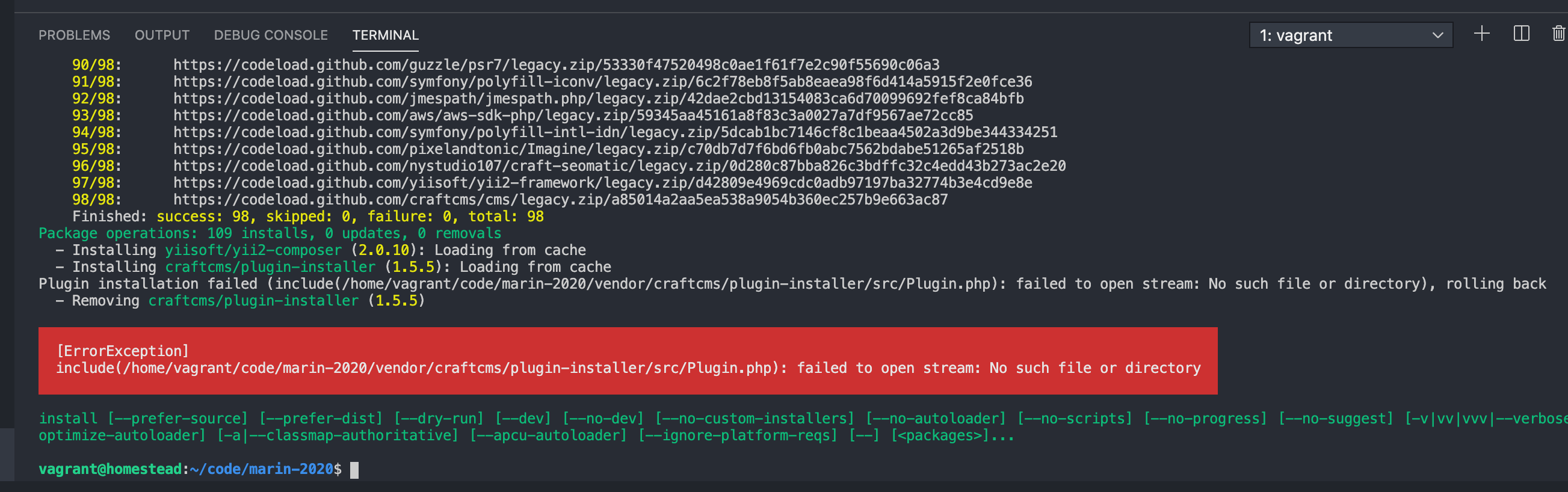
I don't quite understand your solution, but would love to get this sorted out. I installed Composer the way it's documented on the Composer website … but what do you mean when you say:
ran the command from the terminal in the actual file directory.
Thank you!
 marcamos
on 2 Oct 2020
marcamos
on 2 Oct 2020
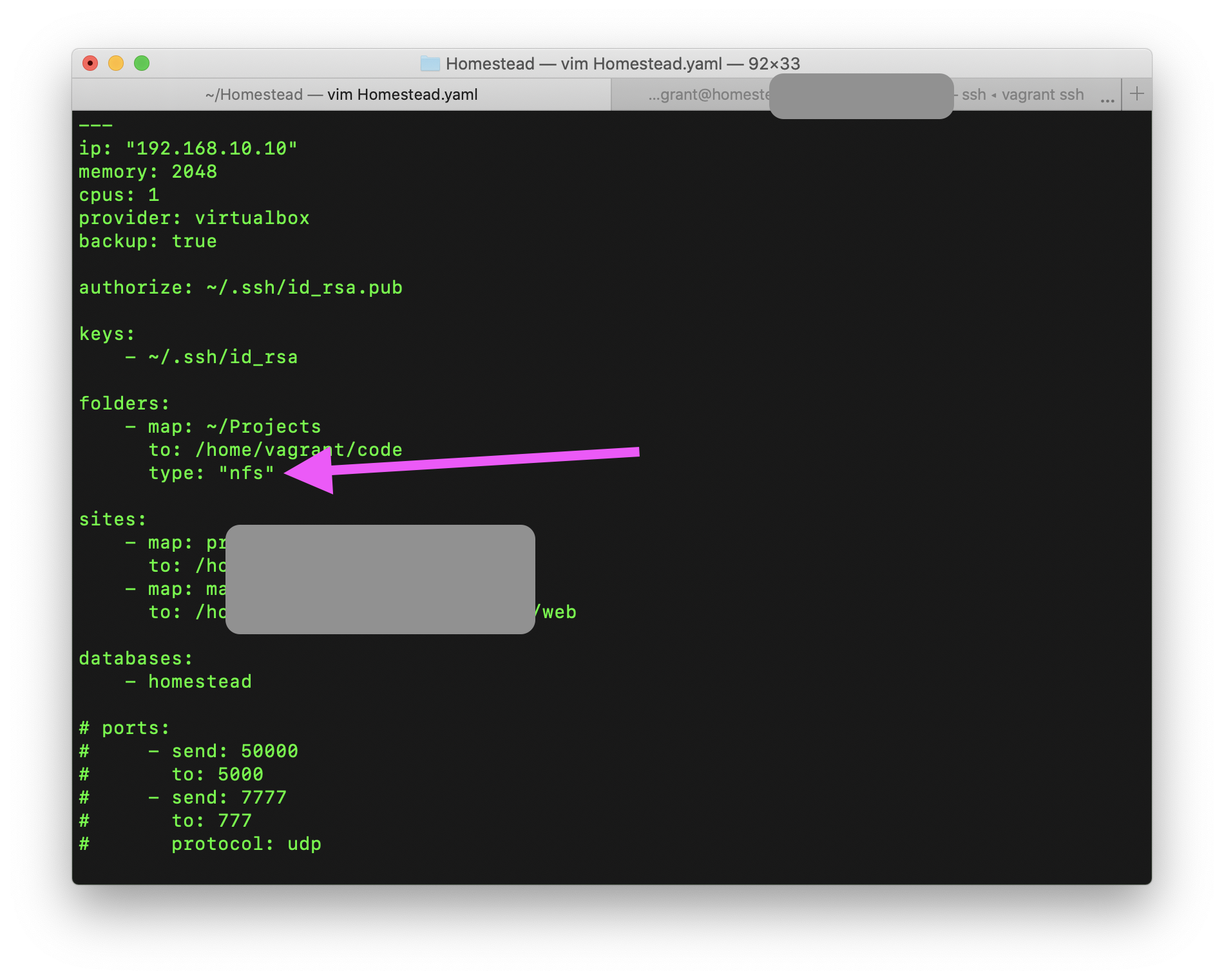
Update, in case anyone finds themselves in the same boat as me: by adding type: "nfs" to folders:, then running vagrant reload --provision, composer install finally worked!
marcamos
on 2 Oct 2020
@marcamos I am having the same issue as you mentioned when using Composer 2. I was not able to run composer update successfully without rolling back to Composer version 1.x. https://github.com/laravel/homestead/issues/1549
 tonyclemmey
on 23 Nov 2020
tonyclemmey
on 23 Nov 2020
Update, in case anyone finds themselves in the same boat as me: by adding
type: "nfs"tofolders:, then runningvagrant reload --provision,composer installfinally worked!
@marcamos where do I find the file to make this change?
 wssrstrm
on 6 Mar 2021
wssrstrm
on 6 Mar 2021
Hey @wssrstrm! You can find it here: ~/Homestead/Homestead.yaml
marcamos
on 6 Mar 2021
Thanks for the quick reply! I see why I got confused: I'm having this same issue with Composer 2 and Craft CMS, but instead of a Homestead VM it's a Virtual Box VM, so I have to figure out how to make this change on this other type of VM.
wssrstrm
on 6 Mar 2021
Related issues
 Mosnar
·
3Comments
Mosnar
·
3Comments
 davist11
·
3Comments
davist11
·
3Comments
 RitterKnightCreative
·
3Comments
RitterKnightCreative
·
3Comments
 mccombs
·
3Comments
mccombs
·
3Comments
 darylknight
·
3Comments
darylknight
·
3Comments
Most helpful comment
Update, in case anyone finds themselves in the same boat as me: by adding
type: "nfs"tofolders:, then runningvagrant reload --provision,composer installfinally worked!