Cms: Can't completely uninstall a plugin. Shows as "Missing".
Description
I'm trying delete the plugin SEOmatic from our production server, but it always displays at the bottom of the list of plugins as Missing.
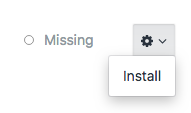
- I've checked my
composer.jsonfile. There's nothing related to this plugin. - I've tried to reinstall, then uninstall and delete. Still
Missing.
When I load up the /settings/plugins page, the missing SEOmatic plugin seems to load after other plugins in the list. Possibly added via javascript?
Additional info
- Craft version: 3.0.26.1
- PHP version: 7.1.22
- Database driver & version: MySQL 5.7.23
 jsunsawyer
All 10 comments
That happens because the plugin is still associated with this Craft license. You can untie it from https://id.craftcms.com. It is completely uninstalled though.
 brandonkelly
on 11 Oct 2018
brandonkelly
on 11 Oct 2018
We run into the same problem with a PRO account today.
Info
- Craft version: Craft CMS 3.5.14
- PHP version: 7.4
- Database driver & version: MySQL 5.7
- Plugin problem: Spoon can not be uninstalled
What I did:
- remove licence from https://id.craftcms.com for Spoon-Plugin
- go into craft cms backend and remove licence key from plugin
- start uninstall Spoon-Plugin over craft cms backend
- remove Spoon-Plugin over craft cms backend (composer update is running)
- after all the Plugin is still visible in the backend with the MISSING status
What did I wrong?
 TomHell
on 30 Nov 2020
TomHell
on 30 Nov 2020
Did you read my previous reply?
brandonkelly
on 30 Nov 2020
Yes I did, but I do not understand why it is still visible if the vendor package is uninstalled and also the Licence is removed from our Craft ID Account.
So what`s the point of this strange behavior, I mean there is no connection anymore between our Craft-ID account and the licence for this plugin.
Thanks for helping me out here.
TomHell
on 1 Dec 2020
It’s fully uninstalled. Your Spoon license is still tied to the Craft license from https://id.craftcms.com, so Craft is simply giving you an easy way to (re-)install it. If seeing it there bothers you, you can detach the plugin’s license from the Craft license by logging into https://id.craftcms.com.
brandonkelly
on 1 Dec 2020
Hi Brandon,
I have removed the Spoon Plugin one year ago after the licence was expired. We do not need this plugin anymore.
I did also a double check on https://id.craftcms.com and can not find the spoon plugin anymore.
I can see only 4 plugins which are active.
So why I see this plugin but there is no entry on https://id.craftcms.com?
TomHell
on 1 Dec 2020
Maybe the wrong Craft ID account? Are you able to see the same Craft license key listed in your account? (See config/license.key)
brandonkelly
on 1 Dec 2020
I compared config/license.key with the id.craftcms.com key an both are identical on my company side. (good tip from you)
History
- I bought me (private) a pro license in the past
- than I transmitted my license to my company
- than we bought a license for Spoon Plugin for 1 year
- than we decided to remove this Spoon Plugin but it will not removed
I also checked my private id.craftcms.com account an my solo version is not connected to this plugin. I hope this helps.
TomHell
on 4 Dec 2020
Alright well that’s as far as I can help you from here. If you’re not seeing the plugin license associated with your Craft CMS license over at https://id.craftcms.com, please send your Craft license key over to [email protected] and reference this issue. We can look into it further from there.
brandonkelly
on 12 Dec 2020
Thanks Brandon for your support.
I wrote an email today and hope we can clarify this.
TomHell
on 17 Dec 2020
Related issues
 RitterKnightCreative
·
3Comments
RitterKnightCreative
·
3Comments
 timkelty
·
3Comments
timkelty
·
3Comments
 michel-o
·
3Comments
michel-o
·
3Comments
 lukebailey
·
3Comments
lukebailey
·
3Comments
 bitboxfw
·
3Comments
bitboxfw
·
3Comments
Most helpful comment
That happens because the plugin is still associated with this Craft license. You can untie it from https://id.craftcms.com. It is completely uninstalled though.