Cms: Adding a new field to category - yii\base\Exception (Invalid field handle) from categories with level = 0
Description
I need to create a new field (simple _light switch_), and assign it to a Category.
Everything works fine, until I enter a parent (level 0) category from the admin and I get this:
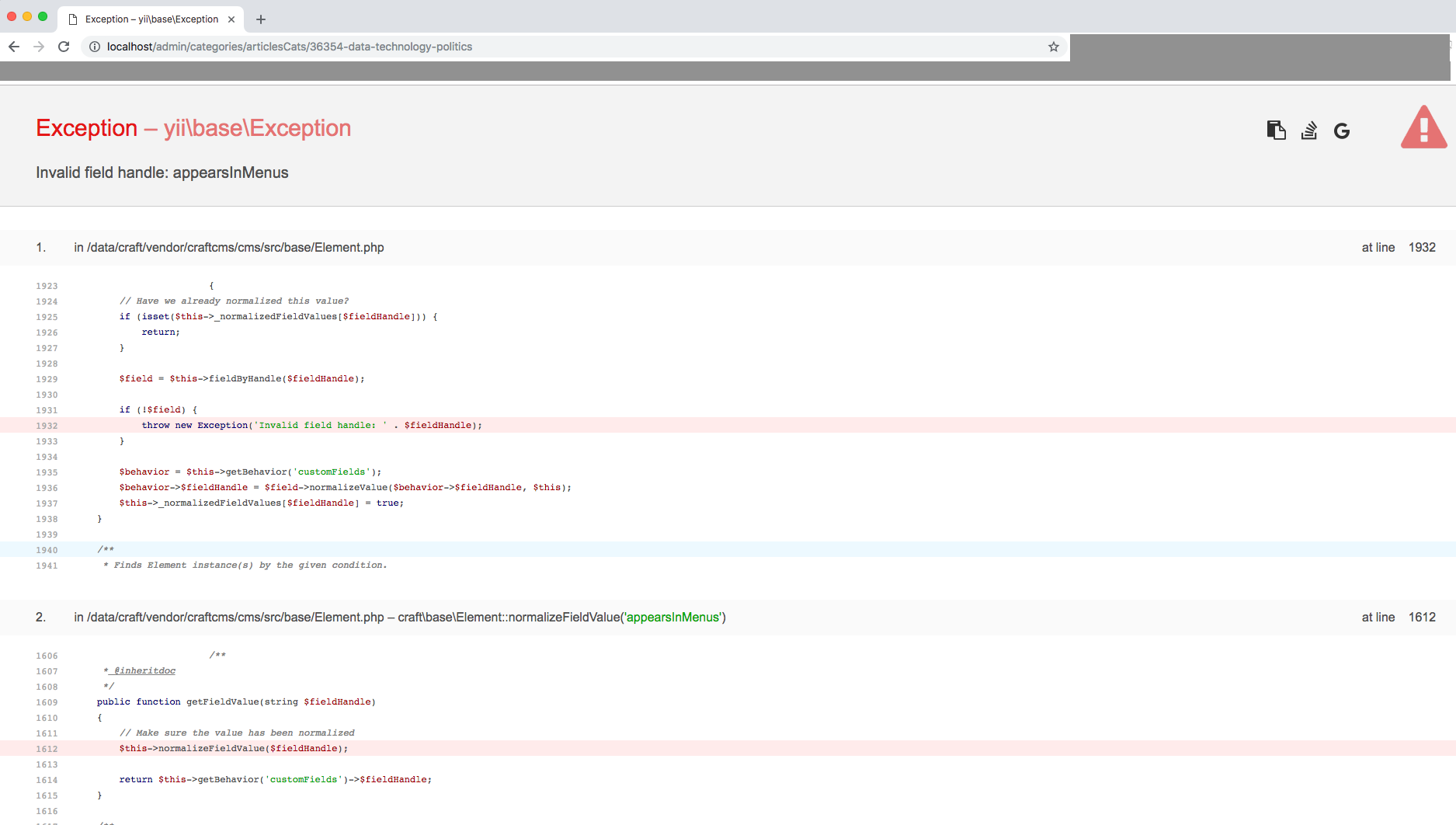
What I have:
- about 10 categories.
- 6 of these are nested into another one.
Steps to reproduce
- Make sure you have the setup as described above.
- Create the field (type:
lightswitch): OK - Assign it to the tab of the category: OK
- Now you want to go inside a Category and change the lightswitch (eg. from OFF to ON)
- If I go to one of the nested categories: OK, I can see the light switch and modify its value
- if I go to any of the "parent" (level 0) categories I get the error
Invalid field handle:(with the handle name I've set)
Additional info
- Craft version: 3.0.26.1 (latest at the moment of writing)
- PHP version: 7.1.17
- Database driver & version: pdo_mysql - mysqlnd 5.0.12-dev - 20150407
- Plugins & versions:
- Amazon S3 (1.0.8 - latest at moment of writing)
- Redactor (2.1.6 - latest at moment of writing)
- Schematic (4.0.17) - latest at moment of writing
Tests
- I've only tried exporting and re-importing the schema with Schematic, to se if something would get triggered by it...same error
Additional notes
- I have a custom docker setup, so I could easily run tests based on other environments.
- I'd like to have hints on what I could try (even if it's about modifying the core of craft and do a PR, it's good!)
- I'm available for anyone looking for more info
Thank you for you help.
 ricricucit
All 11 comments
Hm, strange. Do you have any other fields with a similar handle (perhaps with different casing)?
Can you try deleting your storage/runtime/compiled_classes folder and see if that helps?
 brandonkelly
on 4 Oct 2018
brandonkelly
on 4 Oct 2018
I've already tried changing to other names, but I've tried again with the name testingSomething: same result.
I've now deleted the folder: same result.
Now I see this, in the $fieldHandles array note the testingSomething:
...
        'subTitle' => true,
        'subTitle1' => true,
        'subTitle2' => true,
        'tags' => true,
        'template' => true,
        'termsConditions' => true,
        'testingSomething' => true,
        'textColor' => true,
        'title1' => true,
...
Any additional hint is more than welcome. 👋
ricricucit
on 5 Oct 2018
I’m not really sure what else to check off the top of my head. Any chance you can zip up your site and send it to [email protected], along with a database backup?
brandonkelly
on 5 Oct 2018
I'm actually experiencing this same issue. Only way I could solve it was to delete the category from the system and create it new with the fields required. This is happening on a normal PHP composer install on a staging server.
I can't speak to nested categories though as ours are only a single level.

 lxcodes
on 5 Oct 2018
lxcodes
on 5 Oct 2018
Turns out this was due to different FieldLayout IDs in the DB.
Can't really say if it was a Craft's issue or our own environment problem. Sorry...
ricricucit
on 17 Oct 2018
This is still an issue for me. I don't know if it's FieldLayout IDs mismatching, but once it happens, I still have to recreate the entire category.
lxcodes
on 25 Oct 2018
@lxcodes Next time it happens, please zip up your site and send it to us at [email protected], along with a database backup.
brandonkelly
on 25 Oct 2018
I have the same issue, when I added the field to the section on the local env worked fine, but when I did the same on production got the same error.
@ricricucit what do you mean by a different FieldLayout IDs, please ?
 onemoreahmad
on 5 Dec 2018
onemoreahmad
on 5 Dec 2018
You can have different "field layouts" defining how fields are displayed in the Control Panel, when editing the Category (or any other entry type). These different representations are stored in the database and each of these representations have their own FieldLayout ID.
For some reason, I've noticed that the "FieldLayout ID" that was assigned to those "broken Categories", was different from the FieldLayout ID that other "working categories" had.
Manually setting the same FieldLayout ID of "working categories" to the FieldLayout ID of the "broken categories", solved my problem.
ricricucit
on 5 Dec 2018
Clear, thanks a lot for clarify that.
onemoreahmad
on 5 Dec 2018
I was having the exact same problem, the solution of @ricricucit works:
- Editing an existing category triggers the error.
- Creating a new temporarily category works, remember the newly created category ID, retrieved from the URL.
- Find the category in the craft_elements table, searching for the ID and retrieve the field layout-ID.
- Replace the field layout-IDs for every messed up category-element with the working field layout-ID.
- Now they should all work and you may delete the temporarily category.
Still curious how this happens.. The incorrect field layout contains fields which should belong to an entry instead of my category. I am wondering where this gets mixed up. Removing all fields and tabs from the category and re-adding the fields does not fix this either.
I am using the latest version of Craft (Craft Pro 3.0.36) with PHP 7.2.11. The problem exists on multiple Docker-environments as well as our staging & production environments.
 jerome2710
on 3 Jan 2019
jerome2710
on 3 Jan 2019
Related issues
 lukebailey
·
3Comments
lukebailey
·
3Comments
 mattstein
·
3Comments
mattstein
·
3Comments
 RitterKnightCreative
·
3Comments
RitterKnightCreative
·
3Comments
 benface
·
3Comments
benface
·
3Comments
 darylknight
·
3Comments
darylknight
·
3Comments
Most helpful comment
You can have different "field layouts" defining how fields are displayed in the Control Panel, when editing the Category (or any other entry type). These different representations are stored in the database and each of these representations have their own FieldLayout ID.
For some reason, I've noticed that the "FieldLayout ID" that was assigned to those "broken Categories", was different from the FieldLayout ID that other "working categories" had.
Manually setting the same FieldLayout ID of "working categories" to the FieldLayout ID of the "broken categories", solved my problem.