Cms: Large images are blurry on transform
Description
Large images uploaded and then transformed result in unexpectedly blurry resulting transformed images.
Steps to reproduce
- Upload the source image attached
- Create a transform as shown
- Cry
So here's the original image:

It's a 3000x2004 image, 72dpi. I do have Imagick 3.4.3 (ImageMagick 6.8.9-9) installed:
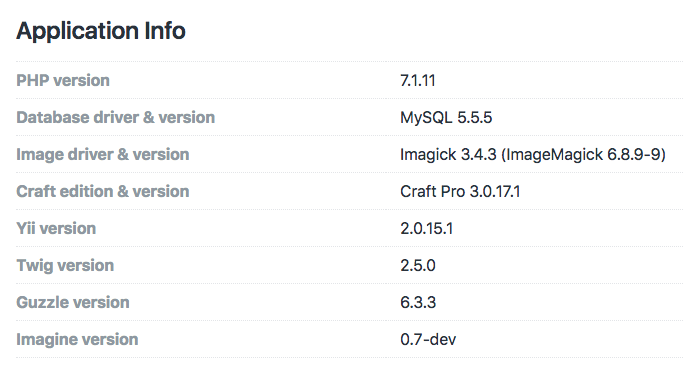
I created a Craft transform as follows:
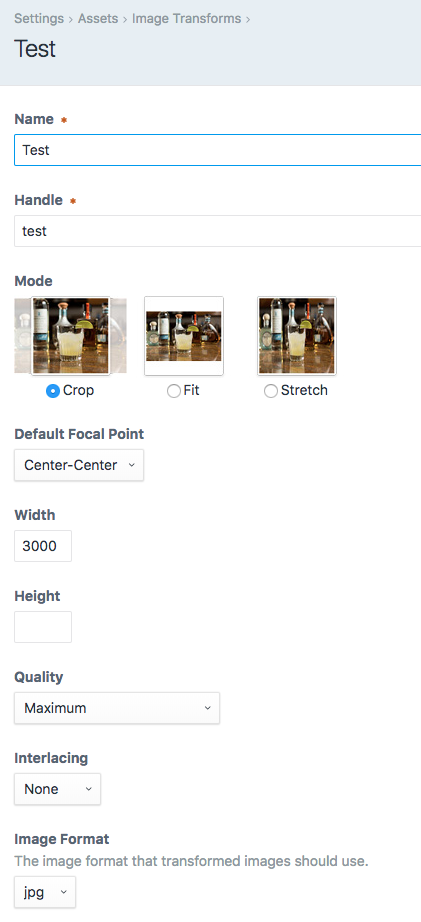
3000 pixel width (matching the original image), height unspecified, maximum quality (100), no interlacing, format JPG.
I realize this transform matches the original in size, but still... even scaled down below the original image's size, it doesn't look near the quality it should. And yet the file size is fairly large.
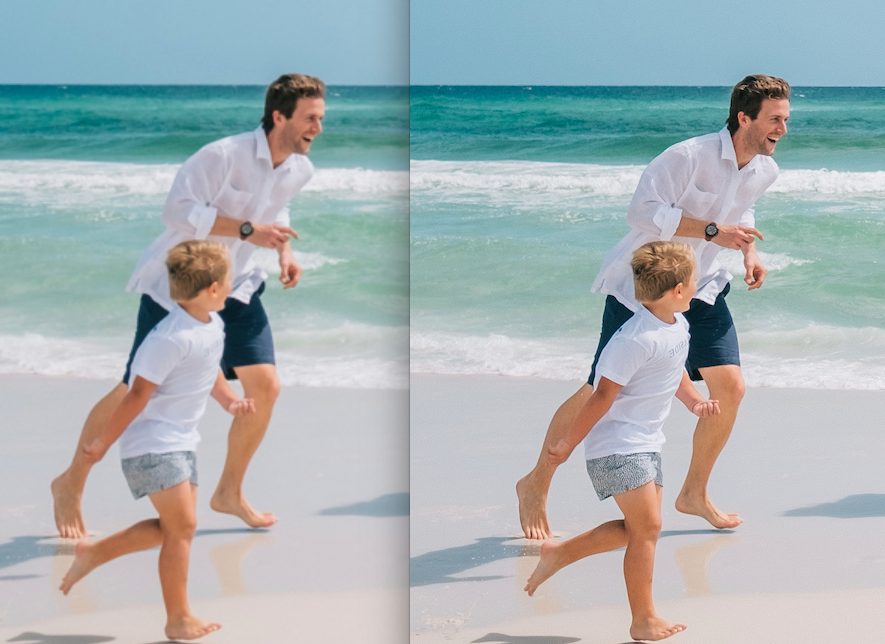
The result is a large file but the quality is very poor; not what I'd expect when the quality is set to Maximum:

The side by side difference makes it very apparent when both images are viewed at actual size:
Additional info
- Craft version: 3.0.17.1
- PHP version: 7.1.11
- Database driver & version: MySQL 5.5.5
- Plugins & versions:
 khalwat
All 19 comments
Additional datapoint:
if I use Imagick's convert on the command line, I don't see the resulting degradation in image quality:
convert original-image-test.jpg -resize 3000x2004 resized-image-test.jpg
Even more salient datapoint:
I was able to reproduce this issue in my local development environment for the site in question.
Then I went on to try to reproduce it on a totally separate Craft 3 test site that I use for development, and was wholly unable to. Same exact VM, same exact environment.
The only difference between the two sites is that on the site where I _can_ reproduce this, it's using a remote Amazon S3 bucket with a CloudFront CDN in front of it. We ruled out that it was errantly caching things by doing tests with entirely new (and thus uncached) file names.
On that site, I also have Cache remote images? set to be On
Something in this mix is likely what is causing the issue; I'm currently re-indexing with Cache remote images? set to be Off to see what happens, but it looks like that's going to take a very long time to complete.
khalwat
on 27 Jul 2018
Doing some debugging, I found that the image that ended up getting downloaded to runtime/assets/sources/ was a low-quality version of the image to begin with:

Of note: the "source image" is of the _wrong_ dimensions... it's 2000x1336 ... which is significantly smaller than the original image size of 3000x2004... and certainly explains why it would look poor when scaled up.
So I'm assuming the issue is somewhere in here:
/**
* Get a local image source to use for transforms.
*
* @param Asset $asset
* @throws VolumeObjectNotFoundException If the file cannot be found.
* @throws VolumeException If there was an error downloading the remote file.
* @return string
*/
public function getLocalImageSource(Asset $asset): string
{
$volume = $asset->getVolume();
$imageSourcePath = $asset->getImageTransformSourcePath();
try {
if (!$volume instanceof LocalVolumeInterface) {
if (!is_file($imageSourcePath) || filesize($imageSourcePath) === 0) {
// Delete it just in case it's a 0-byter
try {
FileHelper::unlink($imageSourcePath);
} catch (ErrorException $e) {
Craft::warning("Unable to delete the file \"{$imageSourcePath}\": " . $e->getMessage(), __METHOD__);
}
$tempFilename = uniqid(pathinfo($asset->filename, PATHINFO_FILENAME), true) . '.' . $asset->getExtension();
$tempPath = Craft::$app->getPath()->getTempPath() . DIRECTORY_SEPARATOR . $tempFilename;
$volume->saveFileLocally($asset->getPath(), $tempPath);
if (!is_file($tempPath) || filesize($tempPath) === 0) {
try {
FileHelper::unlink($tempPath);
} catch (ErrorException $e) {
Craft::warning("Unable to delete the file \"{$tempPath}\": " . $e->getMessage(), __METHOD__);
}
throw new VolumeException(Craft::t('app', 'Tried to download the source file for image “{file}”, but it was 0 bytes long.',
['file' => $asset->filename]));
}
$this->storeLocalSource($tempPath, $imageSourcePath);
// Delete the leftover data.
$this->queueSourceForDeletingIfNecessary($imageSourcePath);
try {
//FileHelper::unlink($tempPath);
} catch (ErrorException $e) {
Craft::warning("Unable to delete the file \"{$tempPath}\": " . $e->getMessage(), __METHOD__);
}
}
}
} catch (AssetException $exception) {
// Make sure we throw a new exception
$imageSourcePath = false;
}
if (!is_file($imageSourcePath)) {
throw new VolumeObjectNotFoundException("The file \"{$asset->filename}\" does not exist,");
}
$asset->setTransformSource($imageSourcePath);
return $imageSourcePath;
}
Hah! Found it!
    /**
     * Store a local image copy to a destination path.
     *
     * @param string $source
     * @param string $destination
     */
    public function storeLocalSource(string $source, string $destination = '')
    {
        if (!$destination) {
            $source = $destination;
        }

        $maxCachedImageSize = $this->getCachedCloudImageSize();

        // Resize if constrained by maxCachedImageSizes setting
        if ($maxCachedImageSize > 0 && Image::canManipulateAsImage(pathinfo($source, PATHINFO_EXTENSION))) {

            $image = Craft::$app->getImages()->loadImage($source);

            if ($image instanceof Raster) {
                $image->setQuality(100);
            }

            $image->scaleToFit($maxCachedImageSize, $maxCachedImageSize, false)->saveAs($destination);
        } else {
            if ($source !== $destination) {
                copy($source, $destination);
            }
        }
    }
...which calls:
    /**
     * Get the size of max cached cloud images dimension.
     *
     * @return int
     */
    public function getCachedCloudImageSize(): int
    {
        return (int)Craft::$app->getConfig()->getGeneral()->maxCachedCloudImageSize;
    }
...and oh look, it defaults to 2000
https://docs.craftcms.com/v2/config-settings.html#maxcachedcloudimagesize
OIY!!!!!
@$^%$&#$&^#%$
khalwat
on 28 Jul 2018

khalwat
on 28 Jul 2018
This reads like a good story.
 andris-sevcenko
on 28 Jul 2018
andris-sevcenko
on 28 Jul 2018
So what was the issue?
 HelgeSverre
on 15 Aug 2018
HelgeSverre
on 15 Aug 2018
@HelgeSverre this was the issue: https://twitter.com/nystudio107/status/1022989066357354498
khalwat
on 15 Aug 2018
I think Craft is rapidly approaching the point AT&T Bell Labs telephone switch designs did, where they instigated a (massive) coprogram called Maintenance, which ran around after operations and 'fixed up' anything that looked unexpected.
In Craft's case, this would be an AI which noted to you about tricky settings you didn't know about, which could be affecting your results in, dare we say it, strange and mysterious ways....
 narration-sd
on 15 Aug 2018
narration-sd
on 15 Aug 2018
I was asking because i have a similar problem, but not with cloud storage, normal local storage, It seems that no matter what driver, quality setting or "mode" i use, large crystal clear images, jsut become blurry messes when i resize them with a craft transform, however If i allow them to stay their normal size and simply resize them with CSS, they are crystal clear, I really don't get it... is Chrome's image resize algo far superior to imagick and GD or is this a bug in craft?
HelgeSverre
on 16 Aug 2018
I am having the same issues as @HelgeSverre
it is to the point where the crop feature is not worth the degradation in image quality on local storage
 tony-garand
on 23 Jan 2020
tony-garand
on 23 Jan 2020
@tony-garand do you have Imagick installed on your server? There's also this setting: https://docs.craftcms.com/v3/config/config-settings.html#defaultimagequality
andris-sevcenko
on 24 Jan 2020
I have Imagick installed and set defaultImageQuality to 100 but have the same issue as @HelgeSverre and @tony-garand. I had this issue using a different CMS and was hoping CraftCMS would be better about it.
 jacobalvarez
on 29 Jul 2020
jacobalvarez
on 29 Jul 2020
@jacobalvarez are you uploading this to a local volume or to a remote asset volume?
andris-sevcenko
on 29 Jul 2020
A local volume. I’m able to edit the images in CraftCMS and maintain quality. It’s only when I use transforms on the page that the quality drops significantly.
jacobalvarez
on 29 Jul 2020
@jacobalvarez if you're using named transforms, what is the quality set to on the transform itself in the CP? The defaultImageQuality setting applies only to unnamed transforms in templates, where the quality setting is omitted.
andris-sevcenko
on 30 Jul 2020
@andris-sevcenko I am using named transforms. The quality on all the transforms I've set up is set to "Auto". This doesn't make them use defaultImageQuality? Is there a way set a default for all named transforms?
jacobalvarez
on 30 Jul 2020
@andris-sevcenko I set the quality to "Maximum" on the transform, cleared all Craft caches, cleared my browser cache, and loaded the page again. The images are still poor quality.
I tested the Imager plugin, setting its quality setting to 100, and the transformed images look much, much better.
jacobalvarez
on 31 Jul 2020
@jacobalvarez do you have, by any chance, the optimizeImageFilesize set to true? (Default value)
andris-sevcenko
on 31 Jul 2020
Related issues
 Mosnar
·
3Comments
Mosnar
·
3Comments
 leigeber
·
3Comments
leigeber
·
3Comments
 angrybrad
·
3Comments
angrybrad
·
3Comments
 michel-o
·
3Comments
michel-o
·
3Comments
 davist11
·
3Comments
davist11
·
3Comments
Most helpful comment
Hah! Found it!
...which calls:
...and oh look, it defaults to
2000https://docs.craftcms.com/v2/config-settings.html#maxcachedcloudimagesize
OIY!!!!!
@$^%$&#$&^#%$