Description
I just discovered this after rsyncing ~30 files from a live site directory to our new Craft 3 build. I then go into Craft 3 Asset Indexes and re-index that directory, and Craft claims there are numerous files not in there…but I’m looking at them. They’re sitting there. Craft wants to delete them from the index.
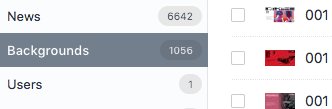
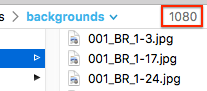
The original site has 1,080 files, our new Craft site has 1,080 files, but Craft thinks there are only 1,056 in there. (We know this because we installed CP Element Count.
In Craft:
In FTP app:
After running indexing on Backgrounds:
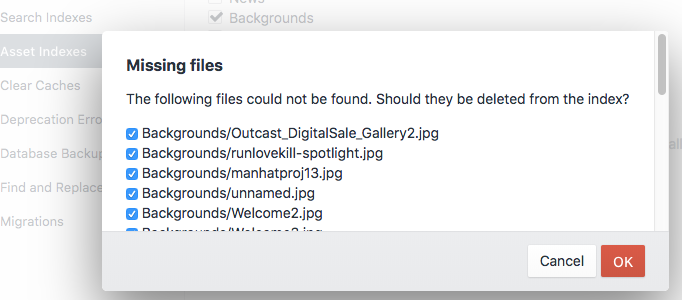
There are 24 missing images in that result. Looking at the permissions of "missing" images in the directory doesn't seem to indicate anything odd with them.
I tried re-indexing a couple other volumes and those were pretty far off, too. The images Craft claims it cannot find are there in the directories - I can see them.
Steps to reproduce
As far as I can tell all I have to do is:
- Run asset indexing on any volume - may or may not be off.
Not seeing any rhyme or reason to it.
In my case, only volumes that have 100's of images or more are off. I successfully re-indexed a volume with one image in it.
Additional info
- Craft version: 3.0.7
- PHP version: 7.2.3
- Database driver & version: MySQL 5.6.39
- Plugins & versions: (Is there an easy 1-click way to copy/paste this info I'm missing?)
AsyncQueue 1.3.2
CP Element Count 1.0.0
CP Field Inspect 1.0.4
Entry Instructions 1.0.0
Feed Me 3.0.0-beta.13
Feed Me Pro 3.0.4
ImageOptimize 1.4.32
Imager v2.0.0
Redactor 2.0.1
SEOmatic 3.0.12
 ryanmasuga
All 16 comments
Ran into similar behavior trying to get Craft to delete a reference to an image that I erased on the server... no matter what I tried I couldn't get re-indexing to remove the reference to the non existant file.
 theskyfloor
on 11 May 2018
theskyfloor
on 11 May 2018
I should note that after I posted the above I went under Clear Caches and cleared "Asset caches", "Asset indexing data", and "Asset transform index" then tried indexing again, and that had no effect.
ryanmasuga
on 11 May 2018
@ryanmasuga from your screenshot, it looks like the folder name is "backgrounds" on your file system, but in the database, Craft thinks it's "Backgrounds" (with a capital B).
My guess is at one point on some dev/staging server it was "Backgrounds" on the file system and it got indexed that way in the database. It was later renamed to "backgrounds". You're probably either running a case-sensitive file system or the database is using a case-sensitive collation, so as far as Craft is concerned, it really thinks the two are different. I'd guess if you checked the assetfiles table in the database, you'd see double entries for those particular files.
Probably best to consolidate on either an upper or lowercase one everywhere, let Craft re-index and delete the "wrong" ones from the database.
 angrybrad
on 11 May 2018
angrybrad
on 11 May 2018
Thanks Brad. I thought that capital letter display was coming from the name of the asset volume rather than the handle. It bothers me to see that capital there - because we always name asset folders as web-safe as possible, using lowercase.
That said, I don't see an assetfiles table but I do see volumefolders and in my limited mental capacity, I think it looks a bit like a mess. I'm guessing that somewhere, somehow, and probably in the last few days, a large bunch of these got duplicated? Then there is that group of capital letter versions at the top of the table with no path.
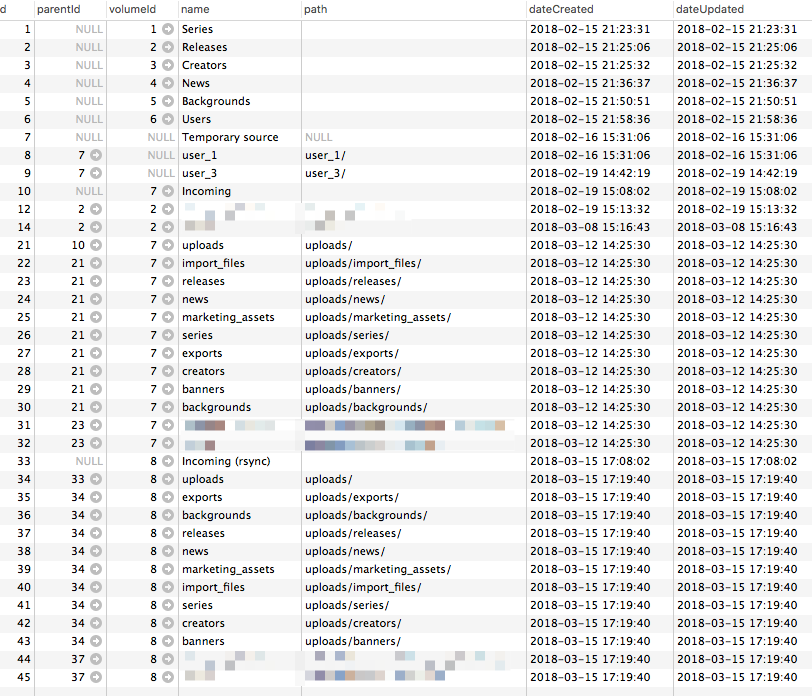
This site is only supposed to have 8 sources:
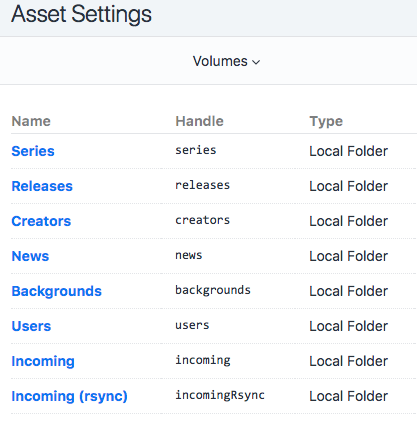
Can I, or should I, manually clean up that table?
ryanmasuga
on 11 May 2018
I thought that capital letter display was coming from the name of the asset volume rather than the handle.
Yup, you're right... this is why @andris-sevcenko usually answers Assets questions.
volumefolders will just store the Volume folder structures. The root ones won't have a parentId set, so from your screenshot it looks like you've got 8 of them corresponding to your 8 Volumes. They won't have a path value because that comes from the volumes table path setting for the Volume.
The actual file info is stored in the assets table. If you search the filename column for Outcast_DigitalSale_Gallery2.jpg does it exist there?
angrybrad
on 11 May 2018
Turns out Outcast_DigitalSale_Gallery2.jpg is in the assets table, and it belongs to volumeId 5 and folderId 5, which is Backgrounds. Craft may be getting confused by the other "backgrounds" volume folders?
This is only our second Craft 3 site, so I'm not sure how these volume tables should look if healthy, but I think I need to remove most of the rows in the volumefolders table.
I also mistakenly thought this happened in the last few days, but it appears that most of the bogus-looking volumefolders were created back in mid-March.
ryanmasuga
on 12 May 2018
Also, looking at the assets table, there are 1,080 rows with a volumeId of 5 (Backgrounds) which is exactly the number I expect to see - matches the number of files sitting in the directory.
ryanmasuga
on 12 May 2018
Also, looking at the assets table, there are 1,080 rows with a
volumeIdof 5 (Backgrounds) which is exactly the number I expect to see - matches the number of files sitting in the directory.
Looking at CP Element Count's code, you can see it's just querying Craft. Querying Assets has nothing to do with whether they exist on the disk or not, so there's no reason for those number to be different (unless, perhaps, if you have missing rows in the craft_elements table, which should not be possible due to FK contraints)
Have you configured your Volumes correctly? Is that the right server you're FTPing to and are you looking at the right folder?
If you have and you are, is it possible to get access to try to debug some code? If so, just shoot an email to [email protected]
 andris-sevcenko
on 14 May 2018
andris-sevcenko
on 14 May 2018
Well, what I do know is that 1,080 files are physically in that folder on the disk, and there are 1,080 rows in the assets table for that source. When I tell Craft to update Asset Indexes for that source, it consistently pops up the "Missing Files" modal with 24 files in it. SO, we have files, we have asset rows, but Craft thinks there are only 1,056 files there (which, as you said, is what the Entry Count plugin is showing)
This is the Asset source in question, and I've tried re-indexing with and without @baseUrl in the Base URL field:
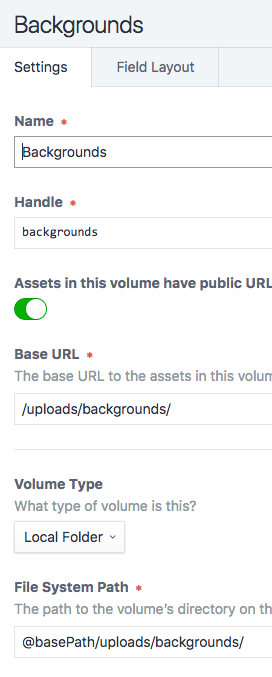
It also isn't just this source. Other count discrepancies are:
Series (source id 1)
337 entry count plugin, 422 on disk, 422 volumeID DB filter on assets table
Update Asset Index: 85 "missing" files
Creators (source id 3)
216 entry count plugin, 299 on disk, 299 volumeID DB filter on assets table
Update Asset Index: 84 "missing" files
News (source id 4)
6,642 entry count plugin, 6,716 on disk, 6,706 volumeID DB filter on assets table
Update Asset Index: 64 "missing" files
I'm happy to send some access info to you - maybe I'm missing something terribly obvious. Coming your way shortly. Thanks, Andris.
ryanmasuga
on 14 May 2018
Closing this. Ended up being a DB consistency issue on developer's end.
andris-sevcenko
on 22 May 2018
@andris-sevcenko @ryanmasuga I'm seeing similar. Please reopen!
Each operation seems to have completely inconsistent results.
Check out this screencast: https://drive.google.com/file/d/1TmkwfUzpVrPgwI8fpMlEt2Oa8vwDqFqM/view
This is an AWS volume, not sure if that matters.
I confirmed the volumes are all set up as expected, and the files do indeed exist.
 timkelty
on 30 Oct 2018
timkelty
on 30 Oct 2018
We've just come across this issue too with Amazon S3.
Craft 3.0.30.2
@andris-sevcenko What was the db consistency issue Ryan had?
 sjcallender
on 26 Feb 2019
sjcallender
on 26 Feb 2019
@sjcallender I'm doing some testing, but I think this is till happening on the latest Craft.
Will post findings here.
timkelty
on 26 Feb 2019
@sjcallender somebody manually removing rows from the craft_content table. Doubt you have the same issue.
andris-sevcenko
on 27 Feb 2019
@sjcallender I'm still seeing this as well - see https://github.com/craftcms/cms/issues/3450
timkelty
on 4 Mar 2019
@timkelty that's a different issue.
andris-sevcenko
on 5 Mar 2019
Related issues
 davist11
·
3Comments
angrybrad
·
3Comments
davist11
·
3Comments
angrybrad
·
3Comments
 leigeber
·
3Comments
leigeber
·
3Comments
 brandonkelly
·
3Comments
brandonkelly
·
3Comments
 Mosnar
·
3Comments
Mosnar
·
3Comments
Most helpful comment
@andris-sevcenko @ryanmasuga I'm seeing similar. Please reopen!
Each operation seems to have completely inconsistent results.
Check out this screencast: https://drive.google.com/file/d/1TmkwfUzpVrPgwI8fpMlEt2Oa8vwDqFqM/view
This is an AWS volume, not sure if that matters.
I confirmed the volumes are all set up as expected, and the files do indeed exist.