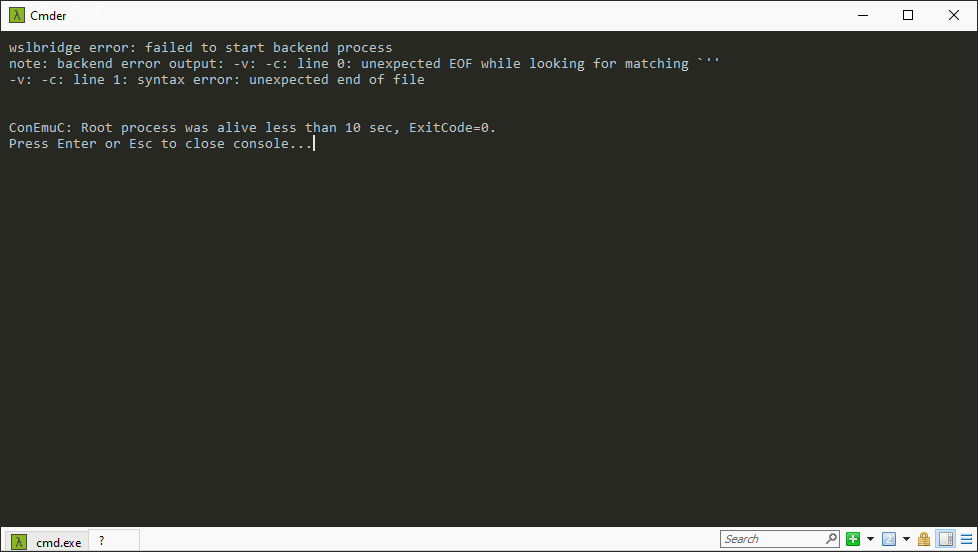
Cmder: wslbridge error: failed to start backend process
When I open a tab for WSL, WSL-> BASH, an error occurs.
 gabimladin
All 7 comments
It is a ConEmu thing. The whole WSL part is for WSL version 1, I guess you are running WSL version 2?
You need a new version of cygwin1.dll
Grab one here: https://cygwin.com/snapshots/
Go to vendor\conemu-maximus5\ConEmu\wsl and replace the dll.You need wslbridge 2:
Grab it here: https://github.com/Biswa96/wslbridge2/releases (the cygwin version)
Copy the content to the same directory: vendor\conemu-maximus5\ConEmu\wslNow edit your WSL bash task:
Replace the part "conemu-cyg-64.exe --wsl" with "conemu-cyg-64.exe %ConEmuBaseDirShort%\wsl\wslbridge2.exe"
Done.
 Ergamon
on 30 Aug 2020
Ergamon
on 30 Aug 2020
I have Windows 10 Build 19041 and Cmder v1.3.16. It's not a path problem because if I run Cmder\vendor\conemu-maximus5\ConEmu\wsl\wslbridge.exe, the same error occurs. The problem is to wslbridge.exe.
gabimladin
on 30 Aug 2020
When you use WSL2,do not use original wslbridge.exe,it's designed for WSL1.You can create a new task,and set the task command as: set PATH="%ConEmuBaseDirShort%\wsl";%PATH% & wsl -d kali-linux,which kali-linux is the distro name you have installed.You can get the name by seeing wsl -l output.
 Tiaonmmn
on 30 Aug 2020
Tiaonmmn
on 30 Aug 2020
Yes, I can run wsl.exe but will no longer use colors 256colors, looking like windows cmd.
gabimladin
on 1 Sep 2020
This issue has been automatically marked as stale because it has not had any recent activity. It will be closed in a week if no further activity occurs. Thank you for your contribution(s).
![stale[bot] picture](https://avatars3.githubusercontent.com/in/1724?v=4&s=40) stale[bot]
on 4 Oct 2020
stale[bot]
on 4 Oct 2020
This issue has been automatically closed due to it not having any activity since it was marked as stale. Thank you for your contribution(s).
stale[bot]
on 12 Oct 2020
Hey,
any progress?
 elisim
on 7 Nov 2020
elisim
on 7 Nov 2020
Related issues
 justinmchase
·
3Comments
justinmchase
·
3Comments
 edgariscoding
·
3Comments
edgariscoding
·
3Comments
 AaronKaa
·
3Comments
AaronKaa
·
3Comments
 jenisys
·
3Comments
jenisys
·
3Comments
 Joe1992w
·
3Comments
Joe1992w
·
3Comments
Most helpful comment
It is a ConEmu thing. The whole WSL part is for WSL version 1, I guess you are running WSL version 2?
You need a new version of cygwin1.dll
Grab one here: https://cygwin.com/snapshots/
Go to vendor\conemu-maximus5\ConEmu\wsl and replace the dll.
You need wslbridge 2:
Grab it here: https://github.com/Biswa96/wslbridge2/releases (the cygwin version)
Copy the content to the same directory: vendor\conemu-maximus5\ConEmu\wsl
Now edit your WSL bash task:
Replace the part "conemu-cyg-64.exe --wsl" with "conemu-cyg-64.exe %ConEmuBaseDirShort%\wsl\wslbridge2.exe"
Done.