Cmder: Cmder prompt/shortcuts broken in latest Windows build
Purpose of the issue
- [x] Bug report (encountered problems/errors)
- [ ] Feature request (request for new functionality)
- [ ] Question
Version Information
- Cmder: Version 1.3.15.1010
- ConEmu: 19.10.12.0
Windows version: Windows 10 Build 20157 (pre-release)
Description of the issue
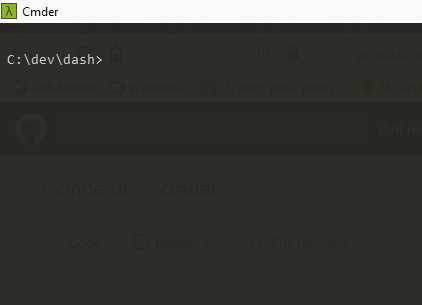
The latest Windows Insider build broke my cmder, and now I don't get the lambda prompt, nor do the shortcuts work (Ctrl+R, Alt+Ctrl+U, etc.). I'd love to help you debug or run other builds.
I tried the latest release (1.13.15.1010) just to confirm, but I was using 1.3.14.982 before, and that's broken as well.
Please let me know how I can help :) I'd love to get this fixed/root-caused.
An image of the current prompt:
 hecerinc
All 30 comments
@hecerinc Please provide the output of cmder_debug.cmd
 daxgames
on 29 Jun 2020
daxgames
on 29 Jun 2020
Sorry, where do I find this cmd? Or how do I run it?
hecerinc
on 30 Jun 2020
@hecerinc Open Cmder type cmder_debug. If that does not work it is in [Cmder folder]\vendor\bin\cmder_debug
daxgames
on 1 Jul 2020
So I assume you meant cmder_diag 'cause that's the only thing I found, but here it is: https://pastebin.com/znrU0v10
hecerinc
on 1 Jul 2020
@hecerinc could you also modify the cmder:cmder task and add /d after init.bat but before the " and start a new session and post the output.
daxgames
on 2 Jul 2020
hecerinc
on 2 Jul 2020
@daxgames any update on this? Anything I can do to help?
hecerinc
on 8 Jul 2020
@hecerinc the paste has expired.
The same issue happens to me on build 20161 (Dev Channel)


Here is my output -
DEBUG(init.bat): Env Var - CMDER_ROOT=C:\Users\Abhishek\scoop\apps\cmder\current

DEBUG(init.bat): Env Var - debug_output=1

DEBUG(Using /GIT_INSTALL_ROOT...):

DEBUG(Using Git from 'C:\Users\Abhishek\scoop\apps\git\current...):

DEBUG(init.bat): Preferring Windows commands

DEBUG(:enhance_path): Env Var INSIDE PATH C:\\Users\\Abhishek\\scoop\\apps\\git\\current\\cmd - found=0

DEBUG(:enhance_path): Env Var END PATH C:\\Users\\Abhishek\\scoop\\apps\\git\\current\\cmd - found=0

DEBUG(:enhance_path): Appending 'C:\Users\Abhishek\scoop\apps\git\current\cmd'

DEBUG(:enhance_path): END Env Var - PATH=C:\Users\Abhishek\scoop\apps\cmder\current\vendor\conemu-maximus5\ConEmu\Scripts;C:\Users\Abhishek\scoop\apps\cmder\current\vendor\conemu-maximus5;C:\Users\Abhishek\scoop\apps\cmder\current\vendor\conemu-maximus5\ConEmu;C:\Program Files\ImageMagick-7.0.10-Q16-HDRI;C:\Program Files (x86)\Common Files\Intel\Shared Libraries\redist\intel64\compiler;C:\WINDOWS\system32;C:\WINDOWS;C:\WINDOWS\System32\Wbem;C:\WINDOWS\System32\WindowsPowerShell\v1.0\;C:\WINDOWS\System32\OpenSSH\;C:\Program Files\Microsoft VS Code\bin;C:\Program Files\NVIDIA Corporation\NVIDIA NvDLISR;C:\Program Files (x86)\NVIDIA Corporation\PhysX\Common;C:\Program Files (x86)\Yarn\bin\;C:\Program Files\dotnet\;C:\Program Files\PowerShell\7-preview\preview;C:\WINDOWS\system32;C:\WINDOWS;C:\WINDOWS\System32\Wbem;C:\WINDOWS\System32\WindowsPowerShell\v1.0\;C:\WINDOWS\System32\OpenSSH\;C:\Users\Abhishek\scoop\apps\nvm\current\nodejs\nodejs;C:\Users\Abhishek\scoop\shims;C:\Users\Abhishek\AppData\Local\Microsoft\WindowsApps;C:\Users\Abhishek\AppData\Local\Yarn\bin;C:\Users\Abhishek\AppData\Local\Microsoft\WindowsApps;C:\Users\Abhishek\scoop\apps\git\current\cmd

DEBUG(:enhance_path): Env Var C:\\Users\\Abhishek\\scoop\\apps\\git\\current\\cmd - found=1

DEBUG(:enhance_path): Env Var INSIDE PATH C:\\Users\\Abhishek\\scoop\\apps\\git\\current\\mingw64\\bin - found=0

DEBUG(:enhance_path): Env Var END PATH C:\\Users\\Abhishek\\scoop\\apps\\git\\current\\mingw64\\bin - found=0

DEBUG(:enhance_path): Appending 'C:\Users\Abhishek\scoop\apps\git\current\mingw64\bin'

DEBUG(:enhance_path): END Env Var - PATH=C:\Users\Abhishek\scoop\apps\cmder\current\vendor\conemu-maximus5\ConEmu\Scripts;C:\Users\Abhishek\scoop\apps\cmder\current\vendor\conemu-maximus5;C:\Users\Abhishek\scoop\apps\cmder\current\vendor\conemu-maximus5\ConEmu;C:\Program Files\ImageMagick-7.0.10-Q16-HDRI;C:\Program Files (x86)\Common Files\Intel\Shared Libraries\redist\intel64\compiler;C:\WINDOWS\system32;C:\WINDOWS;C:\WINDOWS\System32\Wbem;C:\WINDOWS\System32\WindowsPowerShell\v1.0\;C:\WINDOWS\System32\OpenSSH\;C:\Program Files\Microsoft VS Code\bin;C:\Program Files\NVIDIA Corporation\NVIDIA NvDLISR;C:\Program Files (x86)\NVIDIA Corporation\PhysX\Common;C:\Program Files (x86)\Yarn\bin\;C:\Program Files\dotnet\;C:\Program Files\PowerShell\7-preview\preview;C:\WINDOWS\system32;C:\WINDOWS;C:\WINDOWS\System32\Wbem;C:\WINDOWS\System32\WindowsPowerShell\v1.0\;C:\WINDOWS\System32\OpenSSH\;C:\Users\Abhishek\scoop\apps\nvm\current\nodejs\nodejs;C:\Users\Abhishek\scoop\shims;C:\Users\Abhishek\AppData\Local\Microsoft\WindowsApps;C:\Users\Abhishek\AppData\Local\Yarn\bin;C:\Users\Abhishek\AppData\Local\Microsoft\WindowsApps;C:\Users\Abhishek\scoop\apps\git\current\cmd;C:\Users\Abhishek\scoop\apps\git\current\mingw64\bin

DEBUG(:enhance_path): Env Var C:\\Users\\Abhishek\\scoop\\apps\\git\\current\\mingw64\\bin - found=1

DEBUG(:enhance_path): Env Var INSIDE PATH C:\\Users\\Abhishek\\scoop\\apps\\git\\current\\usr\\bin - found=0

DEBUG(:enhance_path): Env Var END PATH C:\\Users\\Abhishek\\scoop\\apps\\git\\current\\usr\\bin - found=0

DEBUG(:enhance_path): Appending 'C:\Users\Abhishek\scoop\apps\git\current\usr\bin'

DEBUG(:enhance_path): END Env Var - PATH=C:\Users\Abhishek\scoop\apps\cmder\current\vendor\conemu-maximus5\ConEmu\Scripts;C:\Users\Abhishek\scoop\apps\cmder\current\vendor\conemu-maximus5;C:\Users\Abhishek\scoop\apps\cmder\current\vendor\conemu-maximus5\ConEmu;C:\Program Files\ImageMagick-7.0.10-Q16-HDRI;C:\Program Files (x86)\Common Files\Intel\Shared Libraries\redist\intel64\compiler;C:\WINDOWS\system32;C:\WINDOWS;C:\WINDOWS\System32\Wbem;C:\WINDOWS\System32\WindowsPowerShell\v1.0\;C:\WINDOWS\System32\OpenSSH\;C:\Program Files\Microsoft VS Code\bin;C:\Program Files\NVIDIA Corporation\NVIDIA NvDLISR;C:\Program Files (x86)\NVIDIA Corporation\PhysX\Common;C:\Program Files (x86)\Yarn\bin\;C:\Program Files\dotnet\;C:\Program Files\PowerShell\7-preview\preview;C:\WINDOWS\system32;C:\WINDOWS;C:\WINDOWS\System32\Wbem;C:\WINDOWS\System32\WindowsPowerShell\v1.0\;C:\WINDOWS\System32\OpenSSH\;C:\Users\Abhishek\scoop\apps\nvm\current\nodejs\nodejs;C:\Users\Abhishek\scoop\shims;C:\Users\Abhishek\AppData\Local\Microsoft\WindowsApps;C:\Users\Abhishek\AppData\Local\Yarn\bin;C:\Users\Abhishek\AppData\Local\Microsoft\WindowsApps;C:\Users\Abhishek\scoop\apps\git\current\cmd;C:\Users\Abhishek\scoop\apps\git\current\mingw64\bin;C:\Users\Abhishek\scoop\apps\git\current\usr\bin

DEBUG(:enhance_path): Env Var C:\\Users\\Abhishek\\scoop\\apps\\git\\current\\usr\\bin - found=1

DEBUG(init.bat): Env Var - git_locale="C:\Users\Abhishek\scoop\apps\git\current\usr\bin\locale.exe"

DEBUG(init.bat): Env Var - GIT_INSTALL_ROOT=C:\Users\Abhishek\scoop\apps\git\current

DEBUG(init.bat): Found Git in: 'C:\Users\Abhishek\scoop\apps\git\current'

DEBUG(:enhance_path): Env Var INSIDE PATH C:\\Users\\Abhishek\\scoop\\apps\\cmder\\current\\vendor\\bin - found=0

DEBUG(:enhance_path): Env Var BEGIN PATH C:\\Users\\Abhishek\\scoop\\apps\\cmder\\current\\vendor\\bin - found=0

DEBUG(:enhance_path): Prepending 'C:\Users\Abhishek\scoop\apps\cmder\current\vendor\bin'

DEBUG(:enhance_path): END Env Var - PATH=C:\Users\Abhishek\scoop\apps\cmder\current\vendor\bin;C:\Users\Abhishek\scoop\apps\cmder\current\vendor\conemu-maximus5\ConEmu\Scripts;C:\Users\Abhishek\scoop\apps\cmder\current\vendor\conemu-maximus5;C:\Users\Abhishek\scoop\apps\cmder\current\vendor\conemu-maximus5\ConEmu;C:\Program Files\ImageMagick-7.0.10-Q16-HDRI;C:\Program Files (x86)\Common Files\Intel\Shared Libraries\redist\intel64\compiler;C:\WINDOWS\system32;C:\WINDOWS;C:\WINDOWS\System32\Wbem;C:\WINDOWS\System32\WindowsPowerShell\v1.0\;C:\WINDOWS\System32\OpenSSH\;C:\Program Files\Microsoft VS Code\bin;C:\Program Files\NVIDIA Corporation\NVIDIA NvDLISR;C:\Program Files (x86)\NVIDIA Corporation\PhysX\Common;C:\Program Files (x86)\Yarn\bin\;C:\Program Files\dotnet\;C:\Program Files\PowerShell\7-preview\preview;C:\WINDOWS\system32;C:\WINDOWS;C:\WINDOWS\System32\Wbem;C:\WINDOWS\System32\WindowsPowerShell\v1.0\;C:\WINDOWS\System32\OpenSSH\;C:\Users\Abhishek\scoop\apps\nvm\current\nodejs\nodejs;C:\Users\Abhishek\scoop\shims;C:\Users\Abhishek\AppData\Local\Microsoft\WindowsApps;C:\Users\Abhishek\AppData\Local\Yarn\bin;C:\Users\Abhishek\AppData\Local\Microsoft\WindowsApps;C:\Users\Abhishek\scoop\apps\git\current\cmd;C:\Users\Abhishek\scoop\apps\git\current\mingw64\bin;C:\Users\Abhishek\scoop\apps\git\current\usr\bin

DEBUG(:enhance_path): Env Var C:\\Users\\Abhishek\\scoop\\apps\\cmder\\current\\vendor\\bin - found=1

DEBUG(:enhance_path_recursive): Env Var - add_path=

DEBUG(:enhance_path_recursive): Env Var - position=

DEBUG(:enhance_path_recursive): Env Var - depth=0

DEBUG(:enhance_path_recursive): Env Var - max_depth=1

DEBUG(:enhance_path): Env Var INSIDE PATH C:\\Users\\Abhishek\\scoop\\apps\\cmder\\current - found=0

DEBUG(:enhance_path): Env Var END PATH C:\\Users\\Abhishek\\scoop\\apps\\cmder\\current - found=0

DEBUG(:enhance_path): Appending 'C:\Users\Abhishek\scoop\apps\cmder\current'

DEBUG(:enhance_path): END Env Var - PATH=C:\Users\Abhishek\scoop\apps\cmder\current\vendor\bin;C:\Users\Abhishek\scoop\apps\cmder\current\vendor\conemu-maximus5\ConEmu\Scripts;C:\Users\Abhishek\scoop\apps\cmder\current\vendor\conemu-maximus5;C:\Users\Abhishek\scoop\apps\cmder\current\vendor\conemu-maximus5\ConEmu;C:\Program Files\ImageMagick-7.0.10-Q16-HDRI;C:\Program Files (x86)\Common Files\Intel\Shared Libraries\redist\intel64\compiler;C:\WINDOWS\system32;C:\WINDOWS;C:\WINDOWS\System32\Wbem;C:\WINDOWS\System32\WindowsPowerShell\v1.0\;C:\WINDOWS\System32\OpenSSH\;C:\Program Files\Microsoft VS Code\bin;C:\Program Files\NVIDIA Corporation\NVIDIA NvDLISR;C:\Program Files (x86)\NVIDIA Corporation\PhysX\Common;C:\Program Files (x86)\Yarn\bin\;C:\Program Files\dotnet\;C:\Program Files\PowerShell\7-preview\preview;C:\WINDOWS\system32;C:\WINDOWS;C:\WINDOWS\System32\Wbem;C:\WINDOWS\System32\WindowsPowerShell\v1.0\;C:\WINDOWS\System32\OpenSSH\;C:\Users\Abhishek\scoop\apps\nvm\current\nodejs\nodejs;C:\Users\Abhishek\scoop\shims;C:\Users\Abhishek\AppData\Local\Microsoft\WindowsApps;C:\Users\Abhishek\AppData\Local\Yarn\bin;C:\Users\Abhishek\AppData\Local\Microsoft\WindowsApps;C:\Users\Abhishek\scoop\apps\git\current\cmd;C:\Users\Abhishek\scoop\apps\git\current\mingw64\bin;C:\Users\Abhishek\scoop\apps\git\current\usr\bin;C:\Users\Abhishek\scoop\apps\cmder\current

DEBUG(:enhance_path): Env Var C:\\Users\\Abhishek\\scoop\\apps\\cmder\\current - found=1

DEBUG(init.bat): Env Var - HOME=C:\Users\Abhishek

DEBUG(init.bat): Calling - C:\Users\Abhishek\scoop\apps\cmder\current\config\user_profile.cmd


C:\Users\Abhishek>
 Lunchb0ne
on 9 Jul 2020
Lunchb0ne
on 9 Jul 2020
@hecerinc I am updating to the Windows 10 2004 now. Just an FYI the last time this happened the issue was Microsoft changed something in the console that broke Clink and it took months to get the clink Dev to fix it. I am not confident this will get fixed quickly or possibly ever.
daxgames
on 11 Jul 2020
@hecerinc as I feared. https://github.com/mridgers/clink/issues/543
daxgames
on 11 Jul 2020
Oh no
Lunchb0ne
on 11 Jul 2020
Hey @daxgames, seems like there's some discussion on this in mridgers/clink#543 but it looks like the last commit on mridgers/clink was in 2018 -- is this really a hard dependency for the core functionality in Cmder?
If mrigers/clink is no longer maintained, this issue might break Cmder for everyone once the functionality in Windows build >= 20150 makes it to the stable channel, no?
 talmo
on 22 Jul 2020
talmo
on 22 Jul 2020
Clink is the core that makes the Cmder Cmd.exe shell more functional so yes it is a hard dependency. If you use Bash or Powershell then no it's not.
daxgames
on 23 Jul 2020
Even if they fix clink 1.x.x it does not work with Cmder and I doubt they will come back and fix Clink 0.4.9 that Cmder uses.
daxgames
on 24 Jul 2020
@Stanzilla I know you fixed this last time before @mridgers did. Have you had a look?
daxgames
on 24 Jul 2020
Ugh, this might just be the time to give up on clink :/
 Stanzilla
on 24 Jul 2020
Stanzilla
on 24 Jul 2020
We could try https://github.com/mridgers/clink/pull/522
Stanzilla
on 24 Jul 2020
@daxgames can you try this? I don't have permissions on the repo https://github.com/cmderdev/clink/pull/1
Stanzilla
on 24 Jul 2020
I will take a look.
daxgames
on 24 Jul 2020
I don't have access either. I need to see if I have a machine I can even test this on.
daxgames
on 24 Jul 2020
I'll merge your PR @Stanzilla
 MartiUK
on 25 Jul 2020
MartiUK
on 25 Jul 2020
Thanks! So there are test builds here now https://ci.appveyor.com/project/Stanzilla/clink/builds/34286875/artifacts
Stanzilla
on 25 Jul 2020
@cmderdev/trusted-contributors Sorry for the (multi-year) delay, you should all have the permissions now
MartiUK
on 25 Jul 2020
@cmderdev/trusted-contributors I compiled the modified clink and tried it on a broken windows insiders build and it did not help
daxgames
on 26 Jul 2020
@cmderdev/trusted-contributors I compiled the modified clink and tried it on a broken windows insiders build and it did not help
Can confirm that binaries from the cmderdev/clink (05b8a8a) do not seem to resolve the problem on Win10 build 20175.
talmo
on 26 Jul 2020
Welp. Was worth I shot. I sadly don't have the time (or skills) to investigate Conhost changes, so any help is welcome.
Stanzilla
on 26 Jul 2020
Hey this might be related to another bug
When using the current Version (1.3.16) the prompt for the powershell seems broken. Instead of a lambda it shows an λ.

This is not the case for powershell core or in earlier versions like 1.3.12. I tried to copy the default profile.ps1 from the 1.3.12 to 1.3.16 but that didn't change anything.
EDIT: I updated the profile.ps1 script and replaced the λ symbol on line 71 with $([char]0x000003BB) and the lambda symbol now shows up again in powershell. This change doesn't break powershell core and could be replacement.
 mentofa123
on 7 Aug 2020
mentofa123
on 7 Aug 2020
Hey this might be related to another bug
When using the current Version (1.3.16) the prompt for the powershell seems broken. Instead of a lambda it shows an λ.
I had the same issue, thank for the hotfix!
 radzio
on 11 Aug 2020
radzio
on 11 Aug 2020
This issue has been automatically marked as stale because it has not had any recent activity. It will be closed in a week if no further activity occurs. Thank you for your contribution(s).
![stale[bot] picture](https://avatars3.githubusercontent.com/in/1724?v=4&s=40) stale[bot]
on 11 Sep 2020
stale[bot]
on 11 Sep 2020
This issue has been automatically closed due to it not having any activity since it was marked as stale. Thank you for your contribution(s).
stale[bot]
on 19 Sep 2020
Related issues
 AaronKaa
·
3Comments
AaronKaa
·
3Comments
 jenisys
·
3Comments
jenisys
·
3Comments
 bmeverett
·
3Comments
bmeverett
·
3Comments
 spooky
·
3Comments
spooky
·
3Comments
 justinmchase
·
3Comments
justinmchase
·
3Comments
Most helpful comment
Hey this might be related to another bug

When using the current Version (1.3.16) the prompt for the powershell seems broken. Instead of a lambda it shows an λ.
This is not the case for powershell core or in earlier versions like 1.3.12. I tried to copy the default profile.ps1 from the 1.3.12 to 1.3.16 but that didn't change anything.
EDIT: I updated the profile.ps1 script and replaced the λ symbol on line 71 with $([char]0x000003BB) and the lambda symbol now shows up again in powershell. This change doesn't break powershell core and could be replacement.