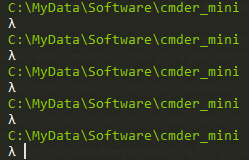
How do you remove the echo every time you press enter within cmder?
 DuCFb1xU1CYEICVIaQHt
All 4 comments
I don't understand the question. You sent a screenshot of the cmder prompt hitting enter several times.
 daxgames
on 19 Nov 2019
daxgames
on 19 Nov 2019
How do I remove the "C:\MyData\Software\cmder_mini" echo every time I press enter?
DuCFb1xU1CYEICVIaQHt
on 19 Nov 2019
That IS the prompt for Cmder telling you tour current working directory. The prompt is customizable using the lua language that us used by Clink to write the prompt.
You would need to write a custom %cmder_root%\config\prompt.lua to change the way the prompt is written.
daxgames
on 19 Nov 2019
You have everything on one line:
function my_prompt_filter()
    cwd = clink.get_cwd()
    prompt = "\x1b[1;32;40m{cwd}{git}{hg}{svn}\x1b[1;30;40m{lamb} \x1b[0m"
    new_value = string.gsub(prompt, "{cwd}", cwd)
    clink.prompt.value = string.gsub(new_value, "{lamb}", "λ")
end

clink.prompt.register_filter(my_prompt_filter, 1)

Or remove the path entirely:
function my_prompt_filter()
    cwd = clink.get_cwd()
    prompt = "\x1b[1;32;40m{git}{hg}{svn}\x1b[1;30;40m{lamb} \x1b[0m"
    clink.prompt.value = string.gsub(prompt, "{lamb}", "λ")
end

clink.prompt.register_filter(my_prompt_filter, 1)

daxgames
on 19 Nov 2019
🚀1
❤1
🎉1
😄1
👍1
Was this page helpful?
0 / 5 - 0 ratings
Related issues
 Joe1992w
·
3Comments
Joe1992w
·
3Comments
 tfarina
·
3Comments
tfarina
·
3Comments
 AaronKaa
·
3Comments
AaronKaa
·
3Comments
 zsedcbm
·
3Comments
zsedcbm
·
3Comments
 emesx
·
3Comments
emesx
·
3Comments
Most helpful comment
You have everything on one line:
Or remove the path entirely: