Currently I am running Git bash inside IntelliJ Idea (http://blog.codeleak.pl/2014/02/git-bash-in-intellij-idea-13-on-windows.html). I would like to use cmder but I need to know if I can do the same, and if so, what command line arguments do I need to supply?
 justechn
All 112 comments
That would be be great for me too. If we could run cmder inside Idea as Terminal
 jirikrepl
on 11 Feb 2015
jirikrepl
on 11 Feb 2015
+1
 sayems
on 12 Mar 2015
sayems
on 12 Mar 2015
You'll probably need to do something like this:
$CMDER_LOCATION\cmder\vendor\conemu-maximus5\ConEmu.exe /Icon "$CMDER_LOCATION\cmder\icons\cmder.ico" /Title Cmder /LoadCfgFile "$CMDER_LOCATION\cmder\config\ConEmu.xml"
_OR_
C:\Windows\system32\cmd.exe" /k "$CMDER_LOCATION\cmder\vendor\conemu-maximus5\..\init.bat
 MartiUK
on 12 Mar 2015
MartiUK
on 12 Mar 2015
+1
 codeengie
on 17 Sep 2015
codeengie
on 17 Sep 2015
Holy moly that'd be awesome!!!!
 DanielGGordon
on 18 Sep 2015
DanielGGordon
on 18 Sep 2015
I got it working!
It was pretty simple based on @MartiUK's suggestions above:
- Set an environment variable called
CMDER_ROOTto your root Cmder folder (in my caseC:\Program Files (x86)\Cmder). It seems to be important that this does _not_ have quotes around it because they mess with concatenation in the init script.

- In your IntelliJ terminal settings, use
cmd.exe /k ""%CMDER_ROOT%\vendor\init.bat""as the Shell path. The double-double-quotes are intentional, as they counteract the missing double quotes in the environment variable.

- Et voilà!

Unfortunately the lambda symbol is not supported in IntelliJ yet, but everything else seems to be working fine.
 nikrolls
on 9 Dec 2015
nikrolls
on 9 Dec 2015
Awesome! Thank you for figuring this out. Props to @MartiUK and @nikrolls
codeengie
on 11 Dec 2015
@nikrolls technique worked for me as well (Thanks!). The only requirement was that I needed to restart IntelliJ for it to work correctly after adjusting the settings. Simply hitting "Apply" and "OK" was not enough.
 nateperry
on 31 Dec 2015
nateperry
on 31 Dec 2015
IntelliJ 15.0.2 displays the lambda symbol.
codeengie
on 6 Jan 2016
thank you very much @MartiUK @nikrolls
 fflrichard
on 30 Jan 2016
fflrichard
on 30 Jan 2016
Nice! Thanks @nikrolls
 BassOfLion
on 5 Feb 2016
BassOfLion
on 5 Feb 2016
What about opening mintty with git bash in Intellij? Can you specify the mintty task when doing this?
I have opened git bash in intellij, but the lambda symbol still shows up as ?
DanielGGordon
on 5 Feb 2016
When I try @nikrolls suggestion, I get "The system cannot find the path specified."
When I put %CMDER_ROOT% into a windows explorer address bar, it works. I put cmd.exe /k ""%CMDER_ROOT%vendorinit.bat"" as my Shell path in PHPStorm. I start PHPStorm and get "The system cannot find the path specified."

 martin-sweeny
on 18 Feb 2016
martin-sweeny
on 18 Feb 2016
@martin-wiseweb Perhaps you forgot to restart ide. I had the same error in IntelliJ. It helped me.
 Campeadoris
on 20 Feb 2016
Campeadoris
on 20 Feb 2016
@nikrolls Thanks, man. It works.
 kuzarth
on 3 Mar 2016
kuzarth
on 3 Mar 2016
Cmder in cmd.exe is a half success as i see...
The best way should be to use cmder in conemu, but it does not embed in PHPstorm currently:/

If I missing some configuration or misunderstood something, please correct me.
Thx
 mdesign83
on 15 Mar 2016
mdesign83
on 15 Mar 2016
@mdesign83 It isn't technically running cmder in IntelliJ, just the initialisation scripts that cmder uses.
MartiUK
on 15 Mar 2016
Thanks, it working for me
 AcidHardcore
on 16 Apr 2016
AcidHardcore
on 16 Apr 2016
I'm having trouble getting the lambda icon to come up in IntelliJ. Was there any special config or some command flag that needs to be passed to make this available in IntelliJ 2016.1?
 brdegenars
on 2 May 2016
brdegenars
on 2 May 2016
After the latest security update I have to use quotes for the cmd.exe part:
"cmd.exe" /k ""%CMDER_ROOT%\vendor\init.bat""
 MIKAGMR
on 17 May 2016
MIKAGMR
on 17 May 2016
I did something similar by wrapping the whole thing in a bat file and calling that, kind of achieved the same solution, no lamdba sign though :cry:
 michaeljohnbennett
on 17 May 2016
michaeljohnbennett
on 17 May 2016
I get some odd env when I run the cmd.exe

any ideas?
Sean
 born2net
on 29 May 2016
born2net
on 29 May 2016
@born2net I was getting the same issue, but resolved it by using the full cmder install opposed to the mini.
 kevin-ashton
on 31 May 2016
kevin-ashton
on 31 May 2016
mmm tried full version, having same issue :/
running:
"cmd.exe" /k "C:\cmder\vendor\init.bat""
@born2net see https://github.com/cmderdev/cmder/issues/223, torresandres' solution - helped in my case on Windows 10
 dschulten
on 12 Jun 2016
dschulten
on 12 Jun 2016
tx @dschulten I see clink is from some foreign site, I am reluctant to use compiled exe due to hidden trojans :(
any other solution? tx for the reply....
born2net
on 12 Jun 2016
@born2net wait until cmder includes the latest clink executable :)
dschulten
on 13 Jun 2016
ok tx! I haven't seen new builds from cmder in a while
born2net
on 13 Jun 2016
Tried @nikrolls (and @MIKAGMR tweak) - "The system cannot find the path specified" ;(
I'm on Windows 10, PhpStorm 2016.2.
 legshooter
on 15 Jul 2016
legshooter
on 15 Jul 2016
Does not seem to work. I'm getting a JAVA IO exception: couldn't create PTY. Using PHPstorm 2016.2
Anyone knows a work-around?
 kylescousin
on 29 Jul 2016
kylescousin
on 29 Jul 2016
PhpStorm 2016.2, work fine for me with this way:
"cmd.exe" /k "%CMDER_ROOT%\vendor\init.bat"
 angelside
on 2 Aug 2016
angelside
on 2 Aug 2016
@angelside That's not cmder
kylescousin
on 2 Aug 2016
@kylescousin I use this. It is cmd.exe via Cmder in PhpStorm, as the lambda prompt can attest in this screenshot;
http://imgur.com/a/nUdrn
Now I'd love to get the same thing working with powershell.exe because Ctrl-R to search through the command history doesn't work with cmd.exe,
 otravers
on 11 Oct 2016
otravers
on 11 Oct 2016
Thank you so much! This was the best thing that's happened to me today !
 cal0610
on 2 Nov 2016
cal0610
on 2 Nov 2016
Using IntelliJ 2016.2.2 and got it working with:
"cmd.exe" /k "%CMDER_ROOT%\vendor\init.bat"
 rtc11
on 10 Nov 2016
rtc11
on 10 Nov 2016
Since the last version of Webstorm (2016.3), I must change the command for :
"cmd" /k ""%CMDER_ROOT%\vendor\init.bat""
If somebody have the same problem with the update try this.
 guillaumejparis
on 15 Nov 2016
guillaumejparis
on 15 Nov 2016
In my WebStorm 2016.3 I tested all options and no one working.
I tested the last one from @guillaumejparis and no luck.
Everytime I begin WebStorm the Terminal > Project Settings > Shell path is reseted to: cmd.exe
 gabrielizalo
on 21 Nov 2016
gabrielizalo
on 21 Nov 2016
With the today bug fix in Webstorm this problem is now solve.
And "cmd" /k ""%CMDER_ROOT%\vendor\init.bat"" works.
guillaumejparis
on 23 Nov 2016
@guillaumejparis I have updated to Webstorm 2016.3.1 and I'm using your command in the settings. It didn't works neither.
The webstorm saves this setting (I restarted several times) and I tested it in a RUN command and it works too, but my webstorm terminal continues with the traditional one.
gabrielizalo
on 24 Nov 2016
@gabrielizalo it's a bug in latest WebStorm. Was fixed 3 days ago and waiting for new build for the fix.
born2net
on 24 Nov 2016
Note that you should have ansi_code_support = 1 in config\settings file in order to correctly display ASCII escapes (colors, etc).
Otherwise you'll get this nice prompt:

 bryanjhv
on 3 Dec 2016
bryanjhv
on 3 Dec 2016
@guillaumejparis @born2net finally works with the latest Guillaume code in my WebStorm 2016.3.2
Thanks!
gabrielizalo
on 13 Dec 2016
C:Windowssystem32cmd.exe" /k "C:cmdervendorinit.bat
This worked for me in IntelliJ 2016.3.4. I have cmder folder on C: drive
It worked for few days and stopped working. I get this error now
Generating clink initial settings in "C:configsettings"
Additional *.lua files in "C:config" are loaded on startup.
The system cannot find the path specified.
Creating initial user-aliases store in "C:configuser-aliases.cmd"...
The system cannot find the path specified.
'"C:configuser-aliases.cmd"' is not recognized as an internal or external command,
operable program or batch file.
And I fixed this by adding this line
set CMDER_ROOT=C:cmder
in the init.bat in folder C:cmdervendorinit.bat
It is working once again!! :-)
 contactash
on 24 Feb 2017
contactash
on 24 Feb 2017
How to integrate PowerShell via Cmder with PyCharm?
PS: "cmd.exe" /k ""%CMDER_ROOT%\vendor\init.bat"" worked for PyCharm 2016.3.2
 osya
on 28 Feb 2017
osya
on 28 Feb 2017
And I fixed this by adding this line
set CMDER_ROOT=C:cmder
in the init.bat in folder C:cmdervendorinit.bat
It is working once again!! :-)
it works, thanks
 isvetlov
on 4 Mar 2017
isvetlov
on 4 Mar 2017
Anyone been able to do "vagrant ssh" with this terminal?
Mine just says the VM is not running, but I can do "vagrant ssh" from the stand alone cmder window in the same directory.
 octoxan
on 15 Mar 2017
octoxan
on 15 Mar 2017
Using IntelliJ 2016.2.2 and got it working with:
"cmd.exe" /k "%CMDER_ROOT%vendorinit.bat"
Got this working on IntelliJ 2017.1
 jamesg1
on 11 Apr 2017
jamesg1
on 11 Apr 2017
Is it possible to run macros with this? It's working with standalone cmder but on in inside the IntelliJ idea. Im using idea 2017.1.1
 chamisf
on 17 Apr 2017
chamisf
on 17 Apr 2017
Run echo %CMDER_ROOT% from the terminal to see if intellij did pick up the environment variable.
If it didn't, make sure it does. In my case, I had begun to use the Jetbrains toolbox recently, and it has to be restarted to pick up changes to environment variables, which then can be passed on to intellij.
Once intellij sees CMDER_ROOT, there is no need to edit init.bat.
dschulten
on 23 Apr 2017
Using 2017.1 I had to use "cmd.exe" /k ""%CMDER_ROOT%"\vendor\init.bat"
This all depends on what your CMDER_ROOT actually is. Cmder's init script does something funky with spaces in the env variable (I think), so if you put your root in c:\Program Files\... you have to include the extra quotes in your ide.
 JFrankfurt
on 20 May 2017
JFrankfurt
on 20 May 2017
Wow @MartiUK and @nikrolls you guys are awesome! So happy right now this made my week. I didn't have to put double quotes before and after the %CMDER_ROOTvendorinit.bat% but I did have to put quotes around the cmd.exe part. Here is code that worked for me "cmd.exe" /k "%CMDER_ROOT%\vendor\init.bat" . It doesn't load my default CMDER settings so if anybody figures that out I will be eternally grateful . Also Lambda symbol worked for me , it might have to do with the location of my CMDER_ROOT .
 jaycruz805
on 31 May 2017
jaycruz805
on 31 May 2017
Everything seems working, colours are fine with git but composer and symfony commands remain uncoloured. Why is that?
mdesign83
on 1 Jun 2017
If you use Powershell via Cmder and use the _config/user-profile.ps1_. This will be better:
"cmd.exe" /k powershell -ExecutionPolicy Bypass -NoLogo -NoProfile -NoExit -Command "Invoke-Expression '. '%CMDER_ROOT%\vendor\profile.ps1'''"
 cambalamas
on 2 Jun 2017
cambalamas
on 2 Jun 2017
It's running
"C:\Windows\System32\cmd.exe" /k "C:\Program Files (x86)\cmder\vendor\init.bat"
 BerkhanBerkdemir
on 20 Jul 2017
BerkhanBerkdemir
on 20 Jul 2017
My Environment
- Windows 10 Professional
- WebStorm 2017.3.3
- Cmder folder path: C:Toolscmder
System Environment Variable
CMDER_ROOT:
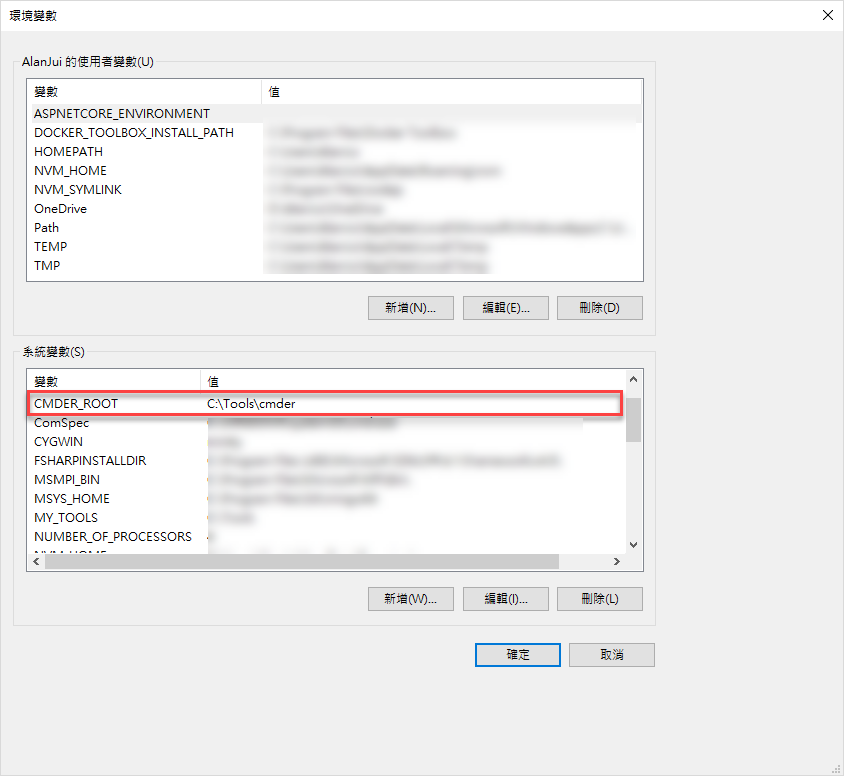
Setting for Shell path of WebStorm
Shell path: "C:\Windows\System32\cmd.exe" /k set ConEmuDir=""%CMDER_ROOT%\vendor\conemu-maximus5&&Call %CMDER_ROOT%\vendor\init.bat""

Final Result
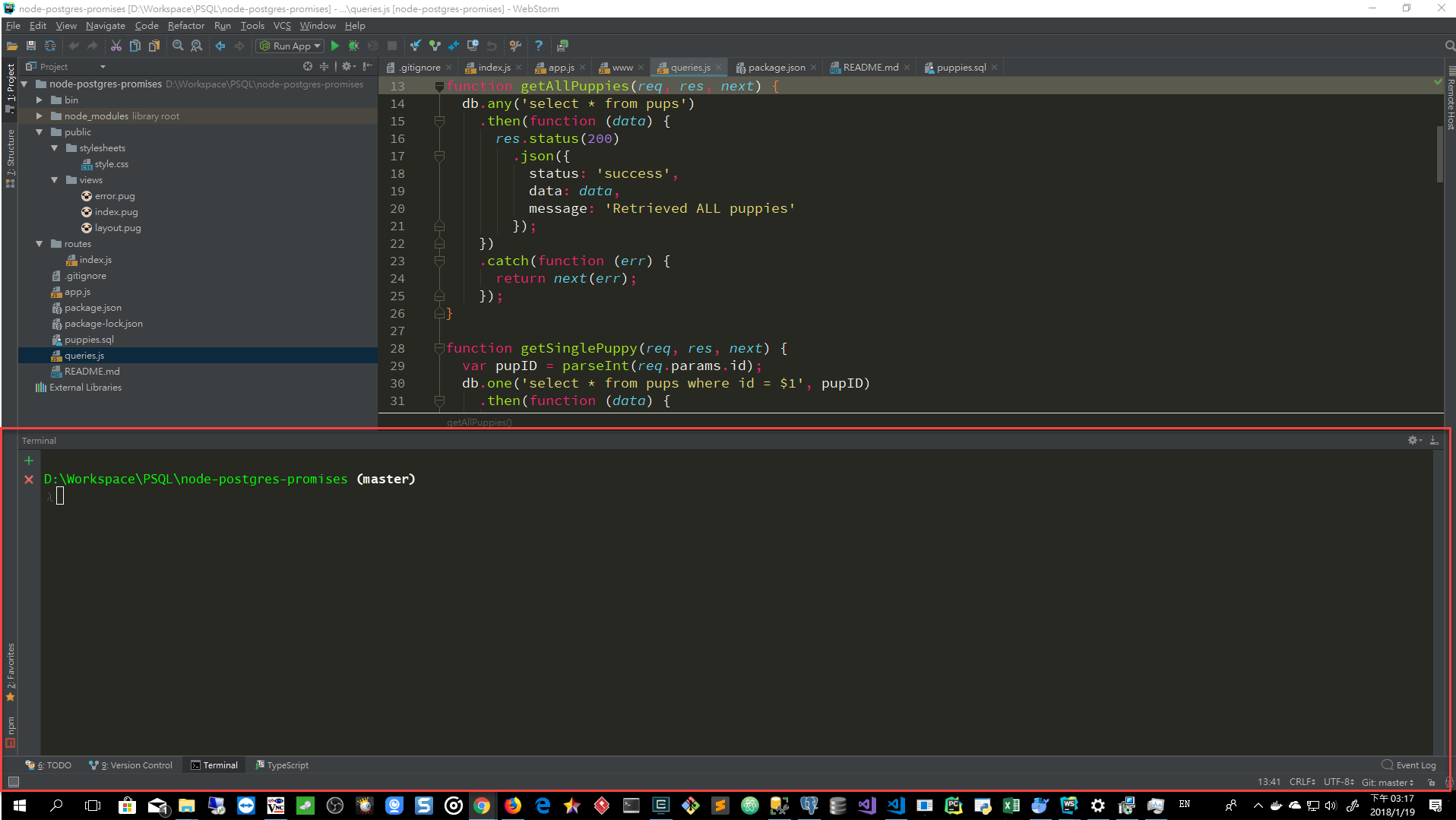
 AlanJui
on 10 Aug 2017
AlanJui
on 10 Aug 2017
FWIW, also set terminate_autoanswer=1 in
%CMDER_ROOT%\config\settings
to get rid of the Terminate batch job (y/n) prompt in cmder
dschulten
on 20 Aug 2017
@AlanJui Thanks! It's work for me.
 BigLiao
on 22 Aug 2017
BigLiao
on 22 Aug 2017
The following command worked on
Intellij 2017.2
"cmd" /k ""%CMDER_ROOT%\vendor\init.bat""
OS
Windows 7 - Enterprise - 64bit
 UltimateTechDeveloper
on 14 Sep 2017
UltimateTechDeveloper
on 14 Sep 2017
If you are missing composer (or some other) colors:
 jgnovo
on 27 Sep 2017
jgnovo
on 27 Sep 2017
@AlanJui
Everything works great for me, despite cmder wont start up in the working directory in WebStorm. Any ideas? It always starts up in my home directory
 phs92
on 10 Nov 2017
phs92
on 10 Nov 2017
nevermind, found the solution in pull request.
https://github.com/cmderdev/cmder/pull/1547/files
Just edit %CMDER_ROOT%vendorinit.bat line 154
phs92
on 10 Nov 2017
I get it working in PHPstorm with this
"cmd.exe" /k ""%CMDER_ROOT%\vendor\init.bat""
But any idea how can I get the color scheme. Like for example if I run the laravel artisan the output is in all white. I am on windows 10 using PHP 7.1
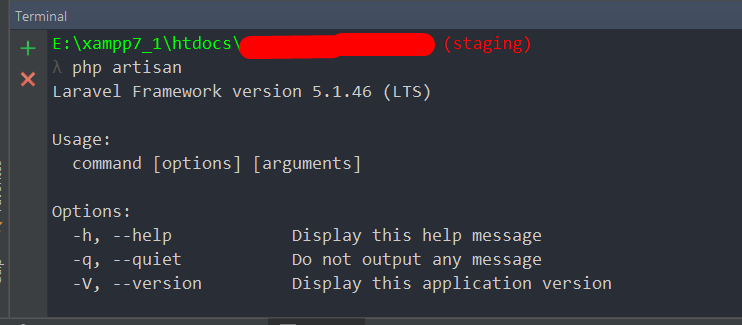
 fuzz101010
on 10 Dec 2017
fuzz101010
on 10 Dec 2017
Maybe you can try to use "/k set ConEmuDir=...Cmder\cmder\vendor\conemu-maximus5&&...Cmder\cmder\vendor\init.bat" to get work.
 longnlp
on 13 Dec 2017
longnlp
on 13 Dec 2017
@iLuffy you mean something like this ? Well this is not working.
"cmd.exe" /k set ConEmuDir=""%CMDER_ROOT%\vendor\conemu-maximus5&&%CMDER_ROOT%\vendor\init.bat""
fuzz101010
on 13 Dec 2017
@AlanJui solution worked for me, but i have a char probleme;
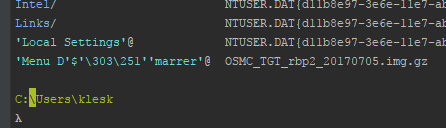
 kl3sk
on 20 Dec 2017
kl3sk
on 20 Dec 2017
@fuzz101010
would you try to add call command to call the init.bat to see if it works?
"cmd.exe" /k set ConEmuDir=""%CMDER_ROOT%vendorconemu-maximus5&&Call %CMDER_ROOT%vendorinit.bat""
longnlp
on 29 Dec 2017
the font space has some issues
 holysky5
on 4 Jan 2018
holysky5
on 4 Jan 2018
I tried iLuffy suggestion ( thanks! ) but got : 'C:Program' is not recognized as an internal or external command, ( under win10 / install is in "c:Program Files". )
So I resolved it like this ( notice a pair of " is now around %CMDER_ROOT%.
"cmd.exe" /k set ConEmuDir=""%CMDER_ROOT%"vendorconemu-maximus5&&Call %CMDER_ROOT%vendorinit.bat"
Hope this helps.
 DrPandalot
on 4 Jan 2018
DrPandalot
on 4 Jan 2018
Command "cmd.exe" /k "%CMDER_ROOT%\vendor\init.bat" can work. However, when I open terminal, the direction would not locate in my project. (It will locate in C;user.) Anyone knows?
 em14Vito
on 18 Jan 2018
em14Vito
on 18 Jan 2018
@em14Vito
Please follow the solution provided from iLuffy. Change your command to:
"cmd.exe" /k set ConEmuDir=""%CMDER_ROOT%"\vendor\conemu-maximus5&&Call %CMDER_ROOT%\vendor\init.bat"
AlanJui
on 19 Jan 2018
It work well by using @AlanJui and @phs92 solutions. Thanks a lot :clap:
em14Vito
on 22 Jan 2018
IntelliJ IDEA 2017.3 (Ultimate Edition)
JRE: 1.8.0_152-release-1024-b6 amd64
JVM: OpenJDK 64-Bit Server VM by JetBrains s.r.o
Windows 10 10.0
CMDER_ROOT=D:\Program Files\cmder
it not work
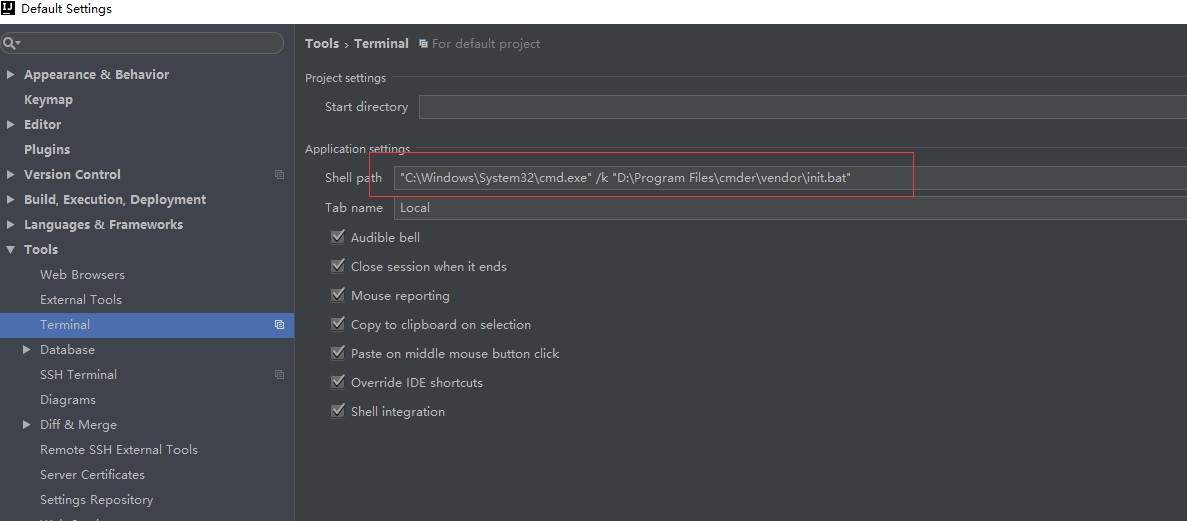
"C:\Windows\System32\cmd.exe" /k set ConEmuDir=""%CMDER_ROOT%\vendor\conemu-maximus5&&Call %CMDER_ROOT%\vendor\init.bat""

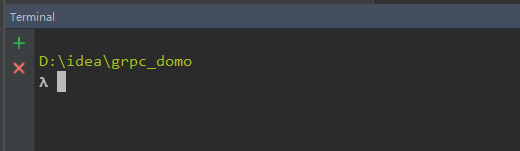
I edit “init.bak”
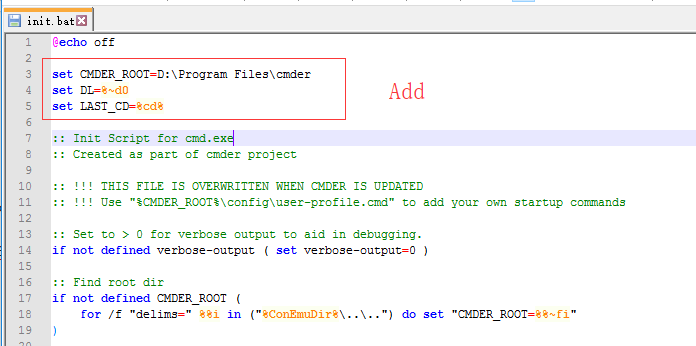

set CMDER_ROOT=D:\Program Files\cmder
set DL=%~d0
set LAST_CD=%cd%

%DL%
cd %LAST_CD%

"C:\Windows\System32\cmd.exe" /k "D:\Program Files\cmder\vendor\init.bat"
 LambdaExpression
on 23 Jan 2018
LambdaExpression
on 23 Jan 2018
@cambalamas I had an error when trying your solution
The string is missing the terminator: '.
    + CategoryInfo          : ParserError: (:) [], ParentContainsErrorRecordException
    + FullyQualifiedErrorId : TerminatorExpectedAtEndOfString
 blowsie
on 8 Mar 2018
blowsie
on 8 Mar 2018
1061
 DRSDavidSoft
on 14 Mar 2018
DRSDavidSoft
on 14 Mar 2018
Hey, it works but any idea why it always opens not in the project folder because when I open the terminal it works with cmder but it's navigated in my windows user folder and not in my project location. http://prntscr.com/is6i7u help would be much appreciated.
 nexusondesign1
on 16 Mar 2018
nexusondesign1
on 16 Mar 2018
If your location of cmder isn't constantly changing, just put the absolute path to where ever you have it located and forget all that environment variable crap. This works perfectly well in Webstorm 2018.1.

 davidlav
on 5 Apr 2018
davidlav
on 5 Apr 2018
@TheNexusDesigns Ironically I found the perfect solution in the VSCode thread, that points Cmder to the correct project location:
First create a file intellij.bat in your Cmder installation folder, say C:\Dev\cmder\intellij.bat:
@echo off
SET CurrentWorkingDirectory=%CD%
SET CMDER_ROOT=C:\Dev\cmder\
CALL "%CMDER_ROOT%\vendor\init.bat"
CD /D %CurrentWorkingDirectory%
In IntelliJ > Settings > Tools > Terminals, fill the Shell path field with:
"cmd.exe" /K "C:/Dev/cmder/intellij.bat"
Note the forward slash /, works for me on Windows 10.
 kentnek
on 18 Apr 2018
kentnek
on 18 Apr 2018
@kentnek This seems to be the same solution listed here:
https://github.com/cmderdev/cmder/issues/1267#issuecomment-370366013
DRSDavidSoft
on 22 Apr 2018
@DRSDavidSoft it's a bit different, as this solution includes a CD command in the new .bat file, which makes sure that Cmder starts up in the project directory.
kentnek
on 22 Apr 2018
@kentnek Right, but this issue has been fixed in init.bat in recent versions of Cmder, so no CD should be required here. (Of course, I'd appreciate it if you could verify this with your own installation, just to be sure.)
DRSDavidSoft
on 22 Apr 2018
Windows10 64bit
Intellij IDEA - community
add environment variables
CMDER_ROOT
c:cmder

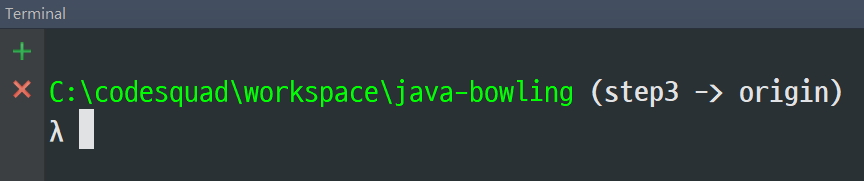
config terminal setting
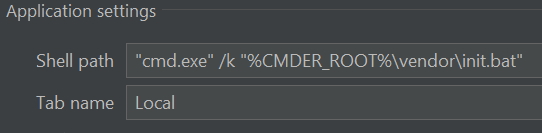
"cmd.exe" /k "%CMDER_ROOT%\vendor\init.bat"
DONE!
 david-learner
on 26 Apr 2018
david-learner
on 26 Apr 2018
Maybe this fix will help to someone, who has issues with PyCharm and virtualenv activation.
"cmd.exe" /k "%CMDER_ROOT%\vendor\init.bat&&%VIRTUAL_ENV%\Scripts\activate.bat"
I also commented this block in activate.bat - without commenting it cmder unix tools stopped to work
:: if defined _OLD_VIRTUAL_PATH (
::     set "PATH=%_OLD_VIRTUAL_PATH%"
:: ) else (
::     set "_OLD_VIRTUAL_PATH=%PATH%"
:: )
 77cc33
on 9 May 2018
77cc33
on 9 May 2018
I tried Ansicon, which works for a regular cmd.exe. cmder (ConEmu), however, blocks it from running.
When Ansicon is installed for cmd.exe and PhpStorm is using the recommended "cmd.exe" /K "%CMDER_ROOT%\vendor\init.bat", it just crashes.
Running Windows 7. I just really want to use Cmder and still see those colours from Composer, and any other PHP console app for that matter. I don't think it's possible though.
 hexus
on 10 May 2018
hexus
on 10 May 2018
@kentnek it works for win10
cmdervendorinit.bat
add -
@echo off
SET CurrentWorkingDirectory=%CD%
:: Init Script for cmd.exe
:: Created as part of cmder project
CD /D %CurrentWorkingDirectory%
exit /b
::
:: sub-routines below here
::
pycharm
"cmd.exe" /k ""%CMDER_ROOT%vendorinit.bat""
 NotFind
on 22 May 2018
NotFind
on 22 May 2018
Good day! is there a way how to fix this strange output in Phpstorm terminal? I'm using cmder.
λ php artisan tinker
?[34mPsy Shell v0.7.2 (PHP 7.0.13 ΓÇö cli) by Justin Hileman?[39m
$p= AppStatus::all()
=> ?[34;4mIlluminateDatabaseEloquentCollection?[39;24m {#1731
?[34mall?[39m: [
?[34;4mAppStatus?[39;24m {#1732
?[34mid?[39m: ?[35m1?[39m,
?[34mstatus?[39m: "?[32mAdded?[39m",
?[34mdescription?[39m: "?[32mAdded to cart but not purchase yet?[39m",
 shifoodew
on 6 Jun 2018
shifoodew
on 6 Jun 2018
Side note, if you want to display debug information, for example if you use @debug in sass, you need to enable verbose mode.
The shell path should look like this:
"C:\Windows\System32\cmd.exe" /k set ConEmuDir=""%CMDER_ROOT%\vendor\conemu-maximus5&&Call %CMDER_ROOT%\vendor\init.bat"" verbose-output 1
 dcorriveau-omniscient
on 7 Jun 2018
dcorriveau-omniscient
on 7 Jun 2018
This one worked for me:
"cmd.exe" /k set CMDER_ROOT=D:\Program Files\cmder&&set ConEmuDir=%CMDER_ROOT%\vendor\conemu-maximus5&&call "%CMDER_ROOT%\vendor\init.bat"
 mbayrak78
on 2 Oct 2018
mbayrak78
on 2 Oct 2018
How do i set what task to use?, when i use C:\Tools\Cmder\cmder_shell.bat i get CMD but my default in cmder/ConEmu is Fish (using msys2)
cmder_shell.bat:
@cmd.exe /k %0\..\vendor\init.bat
 Peter-Optiway
on 30 Oct 2018
Peter-Optiway
on 30 Oct 2018
@Peter-Optiway : I created a bash.bat with the following content and set the Shell path to"cmd.exe" /k "%CMDER_ROOT%\bash.bat":
@echo off
CALL cmd /c ""%CMDER_ROOT%\vendor\git-for-windows\bin\bash" --login -i"
I assume replacing the last line with the appropriate command from the relevant Task in Cmder (or ConEmu) settings will do the job, but I welcome any corrections!
 motjuste
on 3 Dec 2018
motjuste
on 3 Dec 2018
@david-learner That worked out for me in Windows 10 with an additional quotes
"cmd.exe" /k ""%CMDER_ROOT%vendorinit.bat""
 mathewjustin
on 17 Jan 2019
mathewjustin
on 17 Jan 2019
Does anyone know how to use PowerShell Cmder task in JetBrains IDEs? Here is the instruction for VSCode https://github.com/cmderdev/cmder/wiki/Seamless-VS-Code-Integration#use-powershell-instead-of-cmdexe, but I didn't know how to pass this parameters to Rider terminal settings.
 beta-tank
on 18 Jan 2019
beta-tank
on 18 Jan 2019
Just as a heads up, I didn't have to use any hacks, environment variables, etc.... I just pointed the shell path to [cmder path]/vendor/git-for-windows/bin/bash.exe.
Everything seems to be working correctly and even the lambda shows up correctly
 InvenTorrey
on 21 Feb 2019
InvenTorrey
on 21 Feb 2019
can confirm @mathewjustin s way works with the CMDer mini version in 2019.1 EAP via
"cmd.exe" /k "C:\Program Files (x86)\cmder_mini\vendor\init.bat"
 ljosberinn
on 24 Feb 2019
ljosberinn
on 24 Feb 2019
@beta-tank, I use the following for PowerShell Cmder:
"pwsh.exe" -ExecutionPolicy Bypass -NoLogo -NoProfile -NoExit -Command . 'C:\\tools\\cmdermini\\vendor\\profile.ps1'
 Slooz
on 10 Apr 2019
Slooz
on 10 Apr 2019
In my case the %% path didnt work, used hardcoded and its working, thanks
 therepo90
on 16 May 2019
therepo90
on 16 May 2019
"pwsh.exe" -ExecutionPolicy Bypass -NoLogo -NoProfile -NoExit -Command . 'C:\\tools\\cmdermini\\vendor\\profile.ps1'@kczelusniak
I had to modify the above one as per my requirement as given below
"pwsh.exe" -ExecutionPolicy Bypass -NoLogo -NoProfile -NoExit -Command . 'C:\Users\C5269983\OneDrive - SAP SEPRAJOTH\SOFTWARES\Cmder\vendor\profile.ps1'
But it throws the below error.
Cannot open Local Terminal
Failed to start ["pwsh.exe" -ExecutionPolicy Bypass -NoLogo -NoProfile -NoExit -
 prajothp
on 31 Aug 2019
prajothp
on 31 Aug 2019
"pwsh.exe" -ExecutionPolicy Bypass -NoLogo -NoProfile -NoExit -Command . 'C:\\tools\\cmdermini\\vendor\\profile.ps1'@kczelusniak
I had to modify the above one as per my requirement as given below"pwsh.exe" -ExecutionPolicy Bypass -NoLogo -NoProfile -NoExit -Command . 'C:UsersC5269983OneDrive - SAP SEPRAJOTHSOFTWARESCmdervendorprofile.ps1'
But it throws the below error.
Cannot open Local Terminal
Failed to start ["pwsh.exe" -ExecutionPolicy Bypass -NoLogo -NoProfile -NoExit -
Finally, it's working with the below changes.
"powershell" -ExecutionPolicy Bypass -NoLogo -NoProfile -NoExit -Command . 'C:\Users\C5269983\OneDrive - SAP SEPRAJOTH\SOFTWARES\Cmder\vendor\profile.ps1'
Thanks a lot @kczelusniak
prajothp
on 31 Aug 2019
Hello,
In my case, creating a Environment Variable CMDER_ROOT wasn't working. I managed to make it work by setting the CMDER_ROOT directly in PyCharm (D:\Valentin\Logiciels\Cmder for me) :

Hope it helps
 ValentinVignal
on 17 Oct 2019
ValentinVignal
on 17 Oct 2019
can confirm @mathewjustin s way works with the CMDer mini version in 2019.1 EAP via
"cmd.exe" /k "C:\Program Files (x86)\cmder_mini\vendor\init.bat"
This also worked for me - tried everything else but this did the job. I'm using the Full version of Cmder.
 nvwebd
on 23 Dec 2019
nvwebd
on 23 Dec 2019
The instructions at https://github.com/cmderdev/cmder/wiki/Seamless-IntelliJ-based-Integration no longer work with 2020.1, you have to use the full path to cmder_shell.bat and put it in double quotes now. The expansion of %CMDER_ROOT% no longer seems to work.
"C:\Program Files\cmder\cmder_shell.bat"
No variable expansion with the classic solution either, now it has to be:
"cmd.exe" /k ""C:\Program Files\cmder\vendor\init.bat""
dschulten
on 21 Mar 2020
OR FOR POWERSHELL
"powershell" -ExecutionPolicy Bypass -NoLogo -NoProfile -NoExit -Command . 'pathToCmder\Cmder\vendor\profile.ps1'
prajothp
on 21 Mar 2020
Hello, all works
But how to change color theme of included cmder? from monokai to tomorrow theme. Because i use light theme in phpstorm
 director74
on 22 Apr 2020
director74
on 22 Apr 2020
@lamoed in IntelliJ? There is no Cmder theme. Themes are a part of Conemu.
 daxgames
on 22 Apr 2020
daxgames
on 22 Apr 2020
@lamoed in IntelliJ? There is no Cmder theme. Themes are a part of Conemu.
Yes, if i writed cmd.exe /k ""%CMDER_ROOT%vendorinit.bat"" maybe i could setup color scheme of conemu here?
director74
on 22 Apr 2020
But you are not running Conemu. 'init.bat' is the cmder init script. Normally by default it runs in Conemu but you are running Cmder inside IntelliJ. There is no theme unless the IntelliJ console is themeable.
daxgames
on 22 Apr 2020
Hello, all works
But how to change color theme of included cmder? from monokai to tomorrow theme. Because i use light theme in phpstorm
@lamoed in IntelliJ? There is no Cmder theme. Themes are a part of Conemu.
But you are not running Conemu. 'init.bat' is the cmder init script. Normally by default it runs in Conemu but you are running Cmder inside IntelliJ. There is no theme unless the IntelliJ console is themeable.
- Download this plugin for your Jetbrains IDE: TERMINAL COLORS
- Get different Terminal color profile from this website --> https://terminal.sexy/
- You can also get configured iTerm2 color profiles here --> https://iterm2colorschemes.com/
- Follow the guidelines on how to set the terminal color through a color profile you downloaded
-- see screenshot below on how to navigate

 joberror
on 18 May 2020
joberror
on 18 May 2020
Themes are a part of Conemu. You are not using Conemu when integrated with IntelliJ Idea. Color of the shell would come from IntelliJ Idea I assume.
daxgames
on 18 May 2020
Themes are a part of Conemu. You are not using Conemu when integrated with IntelliJ Idea. Color of the shell would come from IntelliJ Idea I assume.
I just gave an example on how it is easy to get a theme configured (iTerm2 color profile) for the Conemu terminal in Jetbrains. Everything works perfectly if the guideline is being followed.
joberror
on 22 May 2020
when i run
CTRL + L
only lamda remain in terminal other part gone outside terminal window
is there any solution for that


problem when i will be playing with github.
can i tweak it like bash shell so everything will be in lamda line not above ?
 Drprincerajput
on 10 Aug 2020
Drprincerajput
on 10 Aug 2020
Tried this and had an error C:\Program is not recognized as an internal or external command operable program or batch file.
So I guess the "space" character in "Program Files" was messing with the script.
Following this SO post, I changed the CMDER_ROOT environment variable from: C:\Program Files\cmder to C:\PROGRA~1\cmder and it works :)
So full process for PHPStorm 2020.2 on windows:
- install cmder
- Create the environment variable CMDER_ROOT with the cmder path as the value
- if you have the same issue as me, use
C:\PROGRA~1\cmderinstead ofC:\Program Files\cmder, orC:\PROGRA~2\cmderinstead ofC:\Program Files (x86)\cmder
- if you have the same issue as me, use
- Edit PHPStorm settings Tools>Terminal>Shell path to
cmd.exe /k ""%CMDER_ROOT%\vendor\init.bat"" - restart PHPstorm
 mtx-z
on 11 Aug 2020
mtx-z
on 11 Aug 2020
The Installation instructions recommend against putting Cmder in the C:\program files* folders. There is user specific config in Cmder and thus the best and recommended place for it is in a folder inside a users home folder.
daxgames
on 11 Aug 2020
In case it helps anyone: I had to specify the full path to cmd.exe, like this:
"C:\Windows\System32\cmd.exe" /k "C:\cmder\vendor\init.bat"
 Lypheo
on 22 Nov 2020
Lypheo
on 22 Nov 2020
Related issues
 Joe1992w
·
3Comments
Joe1992w
·
3Comments
 spooky
·
3Comments
spooky
·
3Comments
 AaronKaa
·
3Comments
AaronKaa
·
3Comments
 zsedcbm
·
3Comments
zsedcbm
·
3Comments
 isnullxbh
·
3Comments
isnullxbh
·
3Comments
Most helpful comment
After the latest security update I have to use quotes for the cmd.exe part: