How run notepad after run Cmder.exe?
For example "c:\MyProgarms\cmder\Cmder.exe /START c:\windows\notepad.exe"
Does't work....
 goodandrewsoft
All 10 comments
A batch file that runs one then the other:
Cmder_notepad.bat
Cmder.exe
Notepad.exe
 daxgames
on 8 Feb 2019
daxgames
on 8 Feb 2019
Ok , i see, you very smart 🥇 :)
How run "ping exe" in cmder window
like cmd.exe /k "ping.exe"
but
cmder.exe /k "ping.exe" or something...
goodandrewsoft
on 8 Feb 2019
Was not trying to be 'smart'. What you ask is not possible, cmder is not a shell cmd.exe is. I simply answered your question with less detail than you wanted.
daxgames
on 8 Feb 2019
is not possible
I'm doubt
goodandrewsoft
on 8 Feb 2019
You may be able to create a task in cmder that does this and then point to that task via a cmder command line arg, but you cannot do this with cmder.exe alone. If anyone knows this I do, I am one of the maintainers of this repo.
I am however on a phone at the moment trying to answer your questions.
daxgames
on 8 Feb 2019
I'm done with it.
Hardcoded info (don't have much time).
The command:
ConEmu.exe /Icon F:\Run\Utilties\System\cmder\icons\cmder.ico /Title Cmder /LoadCfgFile F:\Run\Utilties\System\cmder\config\ConEmu.xml -Single -run "{run} ping"
The new task run:
cmd /k "%ConEmuDir%\..\init_run.bat" -new_console:d:%USERPROFILE%
The batch file init_run.bat:
just make copy init.bat to init_run.bat and add this lines to the end of copied file:
@if [%1]==[] goto end
@echo starting %1
@call %1
:end
Cool, Now that you have a task you can:
Cmder /task [task_name]
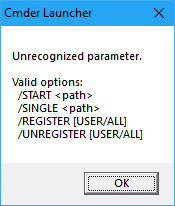
My Cmder - Version v1.2 - i think
goodandrewsoft
on 8 Feb 2019
Time to upgrade. Also you may want to put your script in '%cmder_root%\config` and call it from there.
daxgames
on 8 Feb 2019
@goodandrewsoft Make sure you follow the instructions in the readme.md file before upgrading. To ensure you don't lose any config.
daxgames
on 9 Feb 2019
Related issues
 giuliannosbrugnera
·
3Comments
giuliannosbrugnera
·
3Comments
 danwellman
·
3Comments
danwellman
·
3Comments
 vincentntang
·
3Comments
vincentntang
·
3Comments
 Joe1992w
·
3Comments
Joe1992w
·
3Comments
 zsedcbm
·
3Comments
zsedcbm
·
3Comments
Most helpful comment
Time to upgrade. Also you may want to put your script in '%cmder_root%\config` and call it from there.