Purpose of the issue
- [ ] Bug report (encountered problems/errors)
- [* ] Feature request (request for new functionality)
- [ ] Question
Description of the issue
Given that cmder is slow https://github.com/cmderdev/cmder/issues/188
And probably that is an upstream issue.
Could we have some work-arounds, if you know a command is going to output a lot you can >:NUL or 2>:NUL but if you only find out the command is verbose when running it, you have to sit and wait, or force it to crash.
e.g. running mvn versions:set in my machine takes >10 mins in cmder and a matter of seconds in cmd.exe depending on the size of the repo and the warnings it prints.
Workarounds could be keyboard shortcuts to swallow output after its started until the command ends.
Perhaps Ctrl - O to stop outputting stdout and Ctrl - E to stop outputting error.
Perhaps some way to freeze all output, until the command finishes.
Perhaps some way to redirect to a file instead of screen after the command has started.
Perhaps some way to shrink the screen to size 0 and then printing output would be a noop.
Clearly this would be hard/impossible for console apps but for command line apps it should be feasible.
 teknopaul
All 6 comments
Do you have this issue running straight cmd.exe in conemu? Have you tried other shells in cmder like Bash or Powershell? They might be faster, if they are it might be an issue with, Clink, the cmd.exe shell enhancement package we use.
I'm afraid what you are asking is beyond the scope of the Cmder team. Cmder is a curated set of packages tied together with some scripts and configuration to provide an enhanced shell env for Windows users wanting a more Linux like experience. Perhaps the macros you ask for could be added to, Conemu, the terminal emulator we use.
 daxgames
on 16 Mar 2019
daxgames
on 16 Mar 2019
This issue has been automatically marked as stale because it has not had recent activity. It will be closed in a week if no further activity occurs. Thank you for your contribution.
![stale[bot] picture](https://avatars3.githubusercontent.com/in/1724?v=4&s=40) stale[bot]
on 25 May 2019
stale[bot]
on 25 May 2019
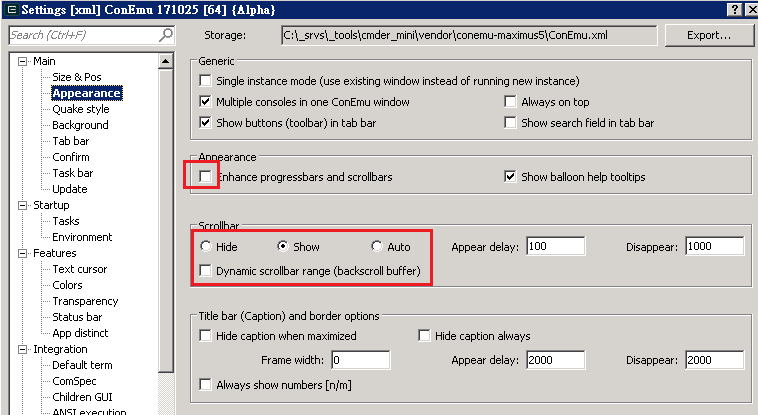
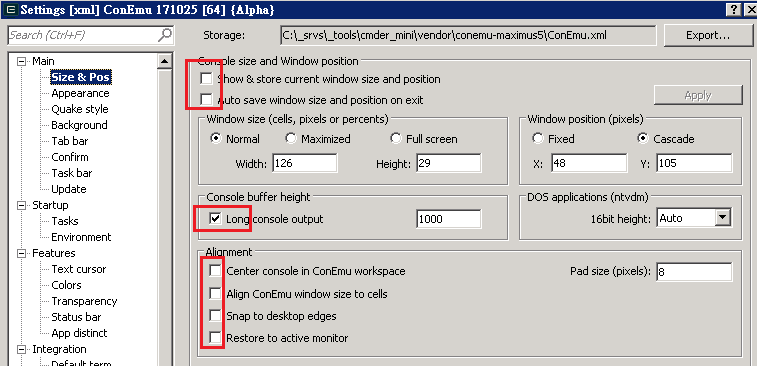
@teknopaul
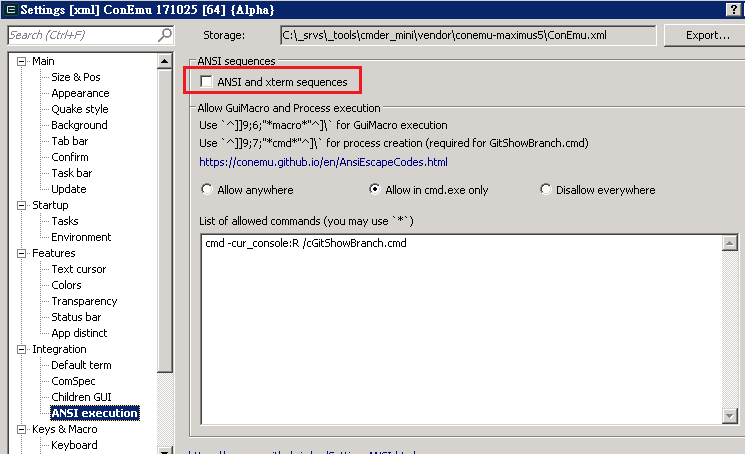
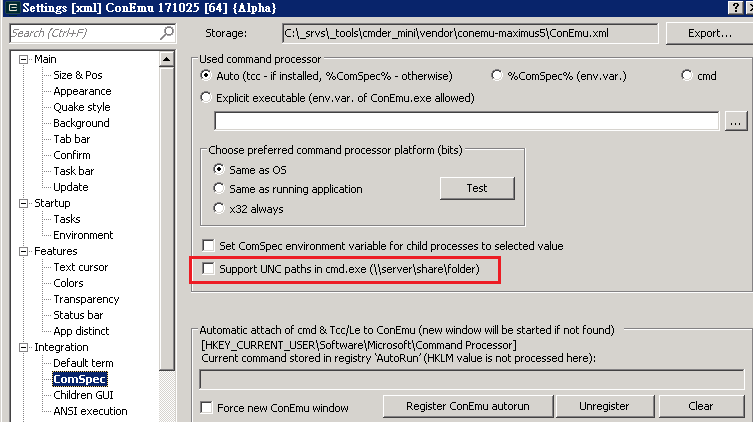
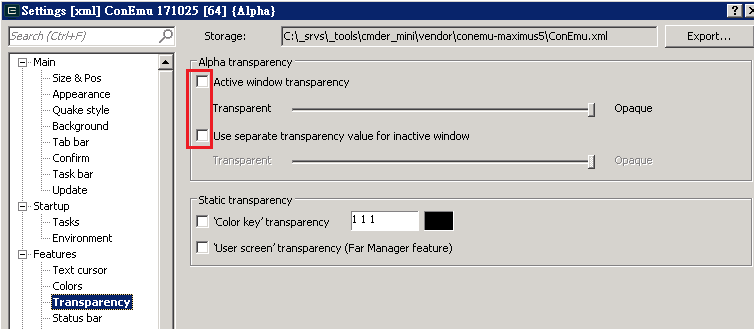
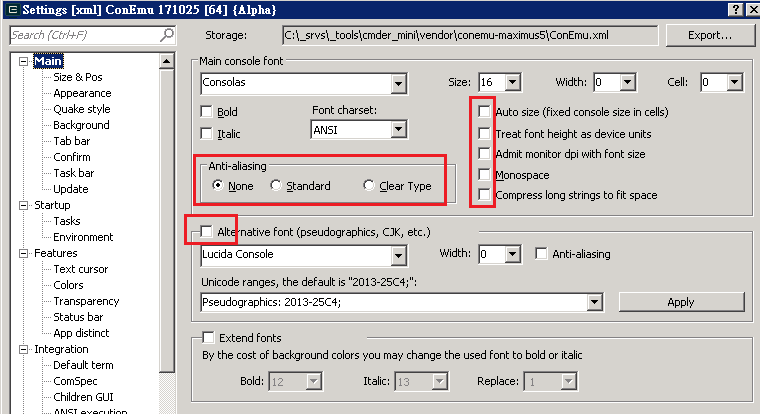
you can try these settings
 AminLA
on 27 May 2019
AminLA
on 27 May 2019
This issue has been automatically marked as stale because it has not had any recent activity. It will be closed in a week if no further activity occurs. Thank you for your contribution(s).
stale[bot]
on 26 Jun 2019
This issue has been automatically closed due to it not having any activity since it was marked as stale. Thank you for your contribution(s).
stale[bot]
on 3 Jul 2019
I know this issue has been closed, but maybe my experience will be useful for somebody.
I had a similar problem running a maven build (with console output) in git-bash in cmder 1.34 (win-7). In native git-bash the build finished in 2:41, in cmder it was one minute slower.
Switching off transparency and the enhanced progress bars (as suggested in the screenshots above) worked for me. Now the build finishes in 2:29, which is the same if not better then git-bash. :-)
 rjo67
on 22 Jan 2020
rjo67
on 22 Jan 2020
Related issues
 hyrious
·
3Comments
hyrious
·
3Comments
 bmeverett
·
3Comments
bmeverett
·
3Comments
 emesx
·
3Comments
emesx
·
3Comments
 edgariscoding
·
3Comments
edgariscoding
·
3Comments
 jordanrobinson
·
3Comments
jordanrobinson
·
3Comments
Most helpful comment
@teknopaul
you can try these settings