Cmder: oh-my-posh startup scripts in user_profile.ps1 don't work
Purpose of the issue
- [x] Bug report (encountered problems/errors)
- [ ] Feature request (request for new functionality)
- [ ] Question
Description of the issue
Put oh-my-posh startup scripts in user_profile.ps1:
Import-Module posh-git
Import-Module oh-my-posh
Set-Theme Paradox
It doesn't work. If these scripts are written to profile.ps1, it works.
Is there something wrong?
 riverscn
All 22 comments
Not familiar with oh my posh, need more detail than 'It doesn't work'.
 daxgames
on 21 Jan 2019
daxgames
on 21 Jan 2019
Let me explain.
oh-my-posh requires overwriting the prompt line.
But in profile.ps1:
# Once Created these code blocks cannot be overwritten
Set-Item -Path function:\PrePrompt   -Value $PrePrompt   -Options Constant
Set-Item -Path function:\CmderPrompt -Value $CmderPrompt -Options Constant
Set-Item -Path function:\PostPrompt  -Value $PostPrompt  -Options Constant

# Functions can be made constant only at creation time
# ReadOnly at least requires `-force` to be overwritten
Set-Item -Path function:\prompt  -Value $Prompt  -Options ReadOnly
These codes which create constant prompt line cause codes in user_profile.ps1 cannot change the prompt line:
Import-Module oh-my-posh
Set-Theme Paradox
I removed those lines in profile.ps1 and oh-my-posh startup scripts in user_profile.ps1 works again.
riverscn
on 22 Jan 2019
@riverscn can you try this pre-release and confirm if it helps?
daxgames
on 17 Mar 2019
I have an issue that's somewhat similar to this but it might be due to my lack of knowledge on cmders setup, can you help me clarify this?
I use pwsh6 and the default profile for my modules (Microsoft.PowerShell_profile.ps1). In this I have various module imports like;
Import-Module Get-ChildItemColor
Import-Module posh-git
Import-Module oh-my-posh
Set-Theme Agnoster
I added pwsh to the startup task with the commands
pwsh -ExecutionPolicy Bypass -NoLogo -NoExit -Command "Invoke-Expression 'Import-Module "%ConEmuDir%\..\profile.ps1""
pwsh seems to load fine and all my modules get loaded too but the theme from oh-my-posh doesn't get loaded. The only way I can get it to work is typing set-theme after cmder has loaded.
I followed this style guide and this issue doesn't seem to exist there. Is this a bug or am I not using the profile.ps1 files correctly?
 Greyze
on 21 Mar 2019
Greyze
on 21 Mar 2019
@riverscn can you try this pre-release and confirm if it helps?
I didn't find cmderconfiguser_profile.ps1 in cmder_mini.
riverscn
on 22 Mar 2019
@riverscn cmder mini uses cmder\config\user_profile.ps1 just like cmder full does. It is auto generated the first time you run cmder.exe if it does not already exist.
daxgames
on 22 Mar 2019
@greyze yeah don't do that try the pre release I suggested to @riverscn and add what you want to cmder\config\user_profile.ps1
daxgames
on 22 Mar 2019
@riverscn
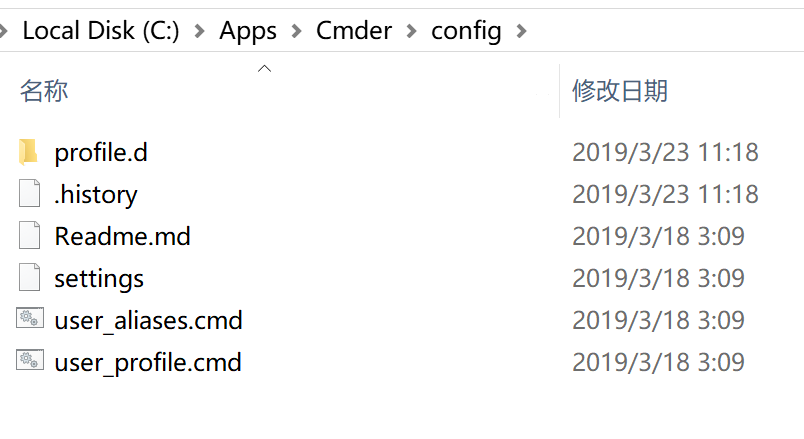
cmder miniusescmder\config\user_profile.ps1just likecmder fulldoes. It is auto generated the first time you runcmder.exeif it does not already exist.
It doesn't generate user_profile.ps1.
riverscn
on 23 Mar 2019
@riverscn it does if you start a powershell session. I should have said: It is auto generated the first time you run Powershell::Powershell session in Cmder.
daxgames
on 23 Mar 2019
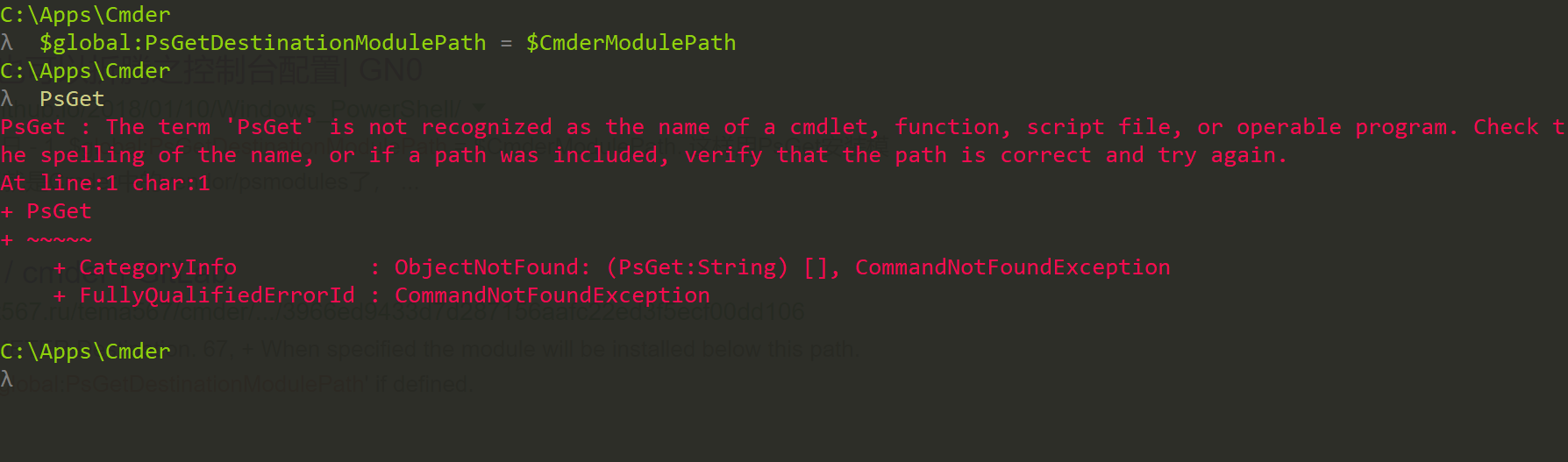
I can't use PsGet in pre release.
riverscn
on 23 Mar 2019
Psget is not included with cmder. Did you download and install the module? http://psget.net/
daxgames
on 23 Mar 2019
Psget is not included with cmder. Did you download and install the module? http://psget.net/
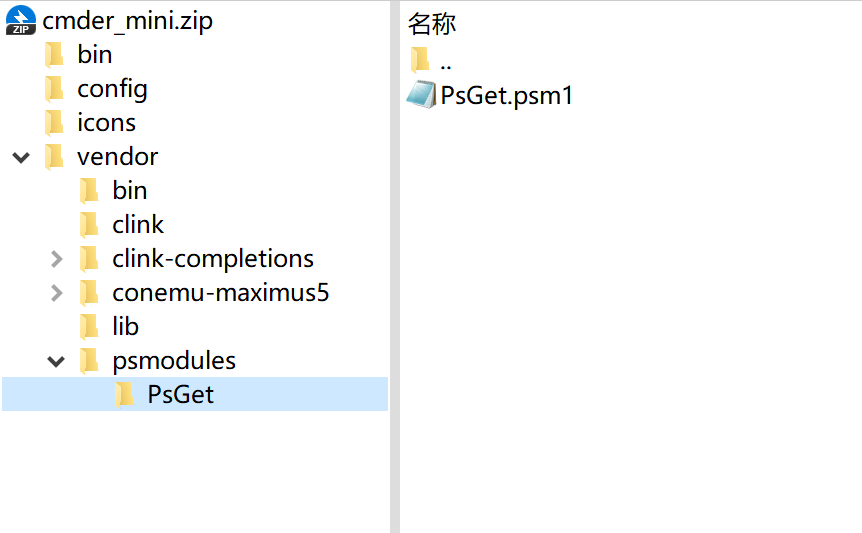
But it is included in cmder's vendor folder. And I always use it in previous releases.
riverscn
on 23 Mar 2019
Ok then I'm wrong and have no idea why it would fail in this prerelease. Looking.
daxgames
on 23 Mar 2019
@riverscn This is expected behavior. Adding %cmder_root%\vendor\modules to the module path is skipped if install-module is already available. See the code:
# Do not load bundled psget if a module installer is already available
# -> recent PowerShell versions include PowerShellGet out of the box
$moduleInstallerAvailable = [bool](Get-Command -Name 'Install-Module' -ErrorAction SilentlyContinue)

# Add Cmder modules directory to the autoload path.
$CmderModulePath = Join-path $PSScriptRoot "psmodules/"

if(-not $moduleInstallerAvailable -and -not $env:PSModulePath.Contains($CmderModulePath) ){
    $env:PSModulePath = $env:PSModulePath.Insert(0, "$CmderModulePath;")
}
I don't think psget was ever imported automatically it had to be manually done once. We just provided the file and added its location to the path to make it easier for users.
Use install-module instead to install posh-git
daxgames
on 23 Mar 2019
Thank you for explanation.
Now I use Install-Module instead of the portable PsGet + psmodules/ folder.
oh-my-posh theme applied in my user_profile.ps1 file:
Import-Module posh-git
Import-Module oh-my-posh
Set-Theme Paradox
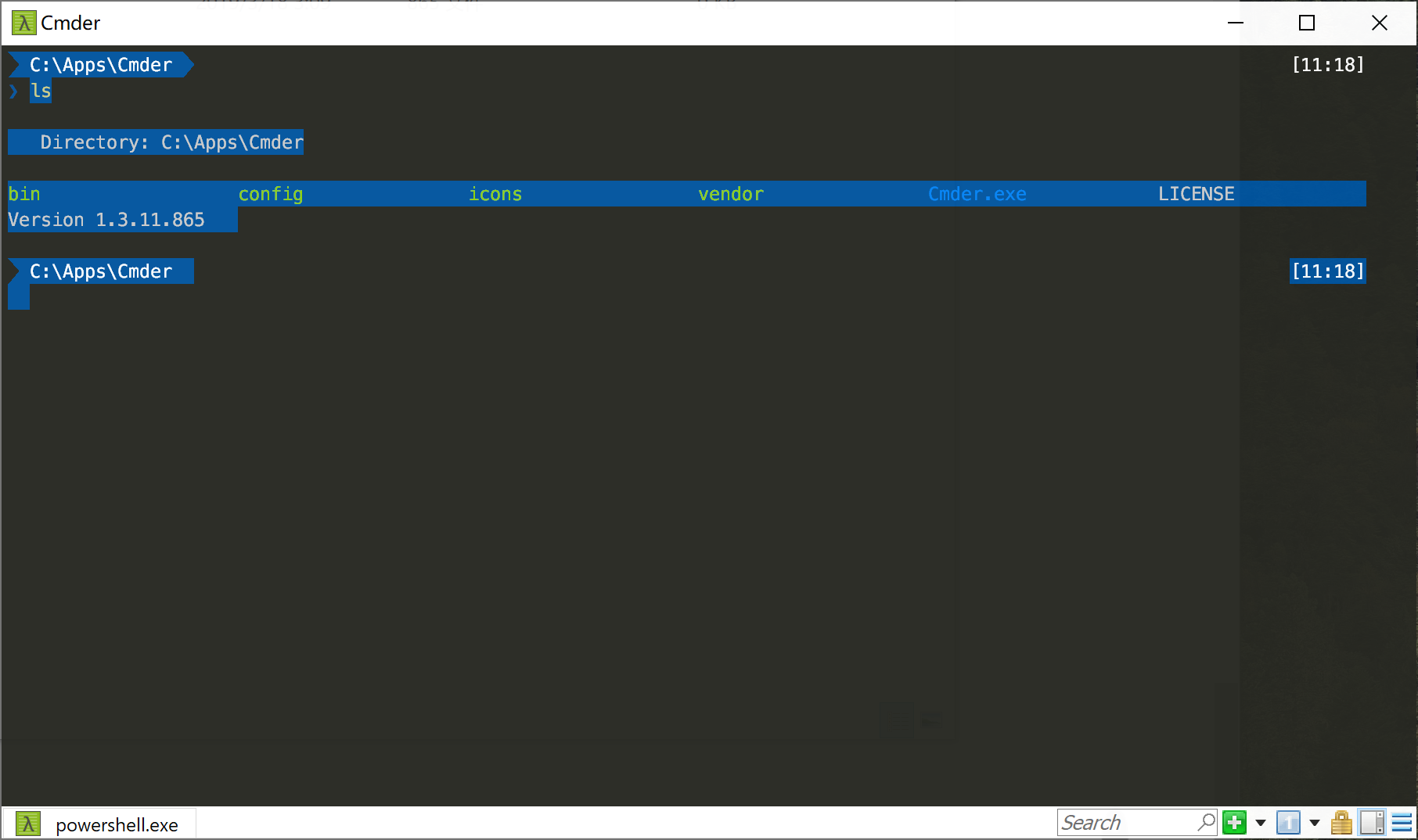
But text display is in a mess:
riverscn
on 24 Mar 2019
Looks like a color theme issue I can't fix. I havent seen that on my end. What color theme are you using in conemu?
daxgames
on 24 Mar 2019
It is the default color theme.
When I delete these lines in vendor/profile.ps1, this issue is gone.
  Set-Item -Path function:\PrePrompt   -Value $PrePrompt   -Options Constant
  Set-Item -Path function:\CmderPrompt -Value $CmderPrompt -Options Constant
  Set-Item -Path function:\PostPrompt  -Value $PostPrompt  -Options Constant

  # Functions can be made constant only at creation time
  # ReadOnly at least requires `-force` to be overwritten
  # if (!$(get-command Prompt).Options -match 'ReadOnly') {Set-Item -Path function:\prompt  -Value $Prompt  -Options ReadOnly}
  Set-Item -Path function:\prompt  -Value $Prompt  -Options ReadOnly
So I think it is the script related issue.
riverscn
on 24 Mar 2019
Those lines should not even be running that was the entire point of this pre-release. Could be a language or code page issue. I am not running those lines if the current ps1 prompt is the Microsoft default. Maybe yours does not match what I am expecting and is running them anyway?
daxgames
on 24 Mar 2019
Oh forgive me, I looked into the old release. When I delete these lines in the old release, this issue is gone.
This pre-release did not run these lines.
I'll continue to try in the pre-release.
riverscn
on 24 Mar 2019
It seems it's obvious, it doesn't let prompt be overridden in the user session, as it says in vendor\profile.ps1:
<#
This scriptblock runs every time the prompt is returned.
Explicitly use functions from MS namespace to protect from being overridden in the user session.
Custom prompt functions are loaded in as constants to get the same behaviour
#>
[ScriptBlock]$Prompt = {
    $realLASTEXITCODE = $LASTEXITCODE
    $host.UI.RawUI.WindowTitle = Microsoft.PowerShell.Management\Split-Path $pwd.ProviderPath -Leaf
    PrePrompt | Microsoft.PowerShell.Utility\Write-Host -NoNewline
    CmderPrompt
    Microsoft.PowerShell.Utility\Write-Host "`nλ " -NoNewLine -ForegroundColor "DarkGray"
    PostPrompt | Microsoft.PowerShell.Utility\Write-Host -NoNewline
    $global:LASTEXITCODE = $realLASTEXITCODE
    return " "
}
but Oh-My-Posh is just meant to customize prompt. In this case oh-my-posh prompt does not appear at all, Cmder's preset prompt is still there.
can you try this pre-release and confirm if it helps?
Thank you very much, this is helpful. So will it included in later updates?
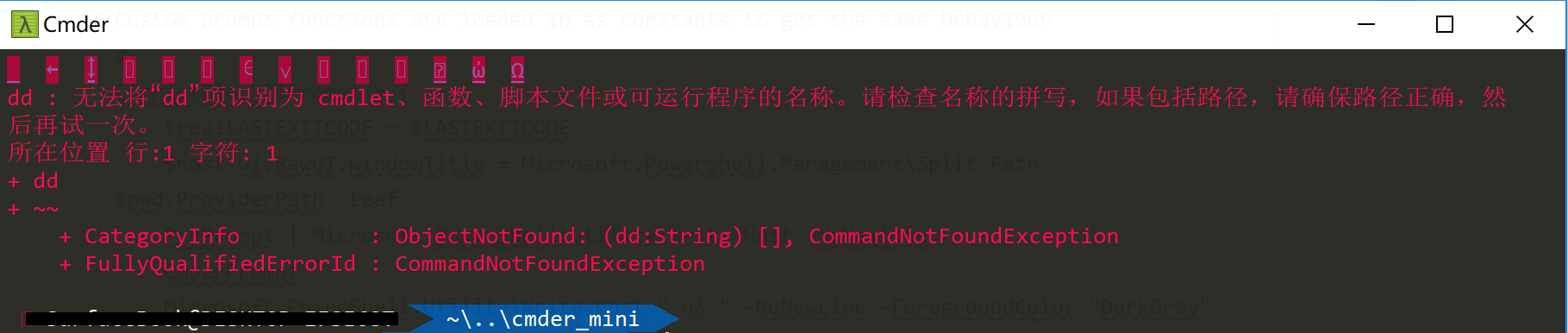
Btw, there's another problem, when used this pre-release, Windows PowerShell and Oh-My-Posh, with Chinese as Windows default language, I got random mojibake when pressed down first stroke after launched, even if in English (US) IME. Other than that, everything seems ok.
screenshots:
I also tried following for comparing purpose:
(still use same profile to import Oh-My-Posh, with Chinese as Windows default language)
| Terminal/Console | font | charset | Shell | Result | Note |
| ------- | ------- | ------- | ------- | ------- | ------- |
| Windows console | simhei | 936 (ANSI/OEM - GBK) | Windows PowerShell | ok | it doesn't let me select a English-only font at all |
| Windows console | simsun | 65001 (UTF-8) | PowerShell Core | ok | when dot-sourced profile it auto switches font from previous consolas to simsun |
| Fluent Terminal (0.4.1.0) | | | Windows PowerShell | ok |
| Cmder (the pre-release) | Consolas | ANSI | PowerShell Core | ok | seems because it's English-only version |
| Cmder (the pre-release) | Consolas | ANSI | Windows PowerShell | mojibake |
| Cmder (the pre-release) | simhei | ANSI | Windows PowerShell | mojibake |
| Cmder (the pre-release) | simhei | GB 2312 | Windows PowerShell | mojibake |
| Cmder (the pre-release) | simhei | "Default" | Windows PowerShell | mojibake |
| Cmder (the pre-release) | Consolas, simhei | "Default" | Windows PowerShell | mojibake |
 Retia-Adolf
on 13 May 2019
Retia-Adolf
on 13 May 2019
@Retia-Adolf yes it will be included in the next release.
daxgames
on 13 May 2019
I am using the latest version and still find that including a call to Set-Theme mytheme in my user_profile.ps1 does not set the theme. Running the command after the powershell tab loads works fine.
My current work around is to set the theme in the vendor/profile.ps1 on the very last line (after Set-Item -Path function:\prompt...
And, for what it's worth, if I set the theme just prior to this line it does not work.
Working vendor/profile.ps:
# Functions can be made constant only at creation time
# ReadOnly at least requires `-force` to be overwritten
Set-Item -Path function:\prompt  -Value $Prompt  -Options ReadOnly
Set-Theme mytheme
Not Working vendor/profile.ps:
# Functions can be made constant only at creation time
# ReadOnly at least requires `-force` to be overwritten
Set-Theme mytheme
Set-Item -Path function:\prompt  -Value $Prompt  -Options ReadOnly
 mikesigs
on 30 Jul 2019
mikesigs
on 30 Jul 2019
Related issues
 hyrious
·
3Comments
hyrious
·
3Comments
 edgariscoding
·
3Comments
edgariscoding
·
3Comments
 brunowego
·
3Comments
brunowego
·
3Comments
 emesx
·
3Comments
emesx
·
3Comments
 tfarina
·
3Comments
tfarina
·
3Comments
Most helpful comment
@Retia-Adolf yes it will be included in the next release.