Cmder: Git detection should use env from git install root
Purpose of the issue
- [x] Bug report (encountered problems/errors)
- [ ] Feature request (request for new functionality)
- [ ] Question
Description of the issue
Version: Cmder 1.3.8, installed through chocolatey.
When I start a new shell in Cmder I get the following line before the prompt.
env: /usr/bin/locale: No such file or directory

E:\Dev
λ
I believe this comes from init.bat line 247: for /F "delims=" %%F in ('env /usr/bin/locale -uU 2') do ( and it is probably caused by me having an env.exe in my path before the one from git.
I changed it locally to for /F "delims=" %%F in ('"%GIT_INSTALL_ROOT%\usr\bin\env" /usr/bin/locale -uU 2') do ( which works for me.
My output for where env and git from a plain command prompt:
e:\Dev>where env
C:\GnuWin\bin\env.exe

e:\Dev>where git
C:\Program Files\Git\cmd\git.exe
Doing same from a cmder prompt:
E:\Dev
λ where env
C:\GnuWin\bin\env.exe
C:\Program Files\Git\usr\bin\env.exe

E:\Dev
λ where git
C:\Program Files\Git\cmd\git.exe
C:\Program Files\Git\mingw64\bin\git.exe
Note: GnuWin 0.6.3.1, Git 2.19.1 and Cmder 1.3.8 were all installed through Chocolatey.
 rjvdboon
All 7 comments
seeing this as well
C:\
λ where env
C:\scoop\shims\env.exe
C:\scoop\apps\git\current\usr\bin\env.exe
 jorgheymans
on 27 Nov 2018
jorgheymans
on 27 Nov 2018
Some say prefer my pre-installed Git some say prefer Cmder Git. We can't have it both ways. The assumption made by Cmder is if you installed Git you want to use that Git.
If that is not the case you can modify your Cmder task in the conemu gui and add /git_install_root [CMDER_ROOT]\vendor\git-for-windowsand it will use it and skip Git detection.
 daxgames
on 27 Nov 2018
daxgames
on 27 Nov 2018
@daxgames thanks for looking at the issue, but please note that specifying /git_install_root will not actually solve the issue. The error isn't raised during git detection, but is raised during git configuration (which is done when a git is supplied, or when a git is detected). See init.bat :CONFIGURE_GIT.
The reason the error is raised on my system (and Jorg's apparently), is that there is an env.exe in my path which does not automatically translates /usr/bin/locale to a locale.exe somewhere my path. My env.exe actually tries to execute /usr/bin/locale, and as /usr/bin/locale does not exist, it raises the error. The issue is really about that the script assumes env works like the git provided env, and that assumption is broken on some systems, and it causes an error that is hard for users to fix.
Would you consider reopening the issue please? Would you take a PR with the fix I mentioned in the original description?
rjvdboon
on 28 Nov 2018
@rjvdboon PRs are always welcome. Even with your fix though if cmder detects a git that does not behave correctly the problem could still occur. so it is possible you would still need to add /git_install_root [path] to avoid using git detection.
daxgames
on 29 Nov 2018
I had this problem because of the early installed "GitHub Desktop". Cmder detected the installed git, but for some reason locale.exe is missing from this distribution. I just copied this file from a full git installation on another machine, and put it in the bin directory of "GitHub Desktop" (where env to find where it is located).
 ArtZAleks
on 27 Feb 2019
ArtZAleks
on 27 Feb 2019
For me GOW x86 (Gnu on Windows) and it's copy of env was doing this. Changed the files name and problem is gone.
 pmic
on 17 Jul 2019
pmic
on 17 Jul 2019
I had the same problem and it's solved in my own way.
Problem:
In order to prevent redundancy and save up storage (because I already has msys2 installed) , I had git installed by MinGit. Unlike standard Git, MinGit doesn't ship \usr\bin\locale.exe. I had %GIT_INSTALL_ROOT% defined and it points to MinGit installation directory.
On init file: \vendor\init.bat; if %git_locale% isn't defined, Cmder will automatically locates locale.exe and stores it onto %git_locale%. In this case, because %GIT_INSTALL_ROOT% is defined, it's assuming the git directory has locale.exe binary.
https://github.com/cmderdev/cmder/blob/8781779636a44078db21d34cf85f5ecee5b854f8/vendor/init.bat#L258
Solution:
The way to solve it is simple, on ConEmu Settings > Startup > Environment add this line:
set git_locale=C:\full\path\to\mingit\usr\bin\locale.exe
As shown bellow:
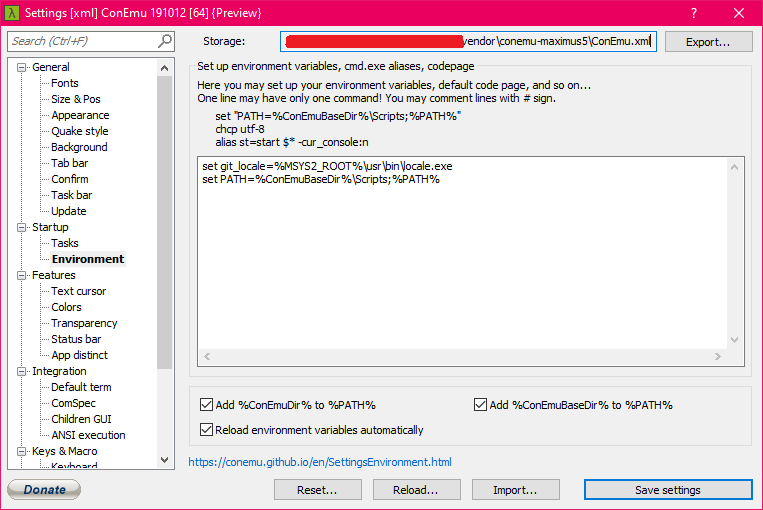
In my case, I had %MSYS2_ROOT% declared and it points to the root of msys2 and it has tons of POSIX binaries. You might want to set %git_locale% it yourself as you needed.
Extra: Runs Cmder outside ConEmu
Method above only works on cmder.exe (ConEmu) terminal only, thought. In case you want to integrate Cmder with other terminal or editor, as explained on Wiki page, you might want to declare %git_locale% before execute initial script (init.bat), eg:
C:\Users\yourname>set git_locale=%MSYS2_ROOT%\usr\bin\locale.exe
C:\Users\yourname>%CMDER_ROOT%\vendor\init.bat
C:\Users\yourname
λ
Or declare %git_locale% on User Variables as shown bellow:

Thoughts:
1) It's kinda odd on how locale.exe is required on init.bat, but not on profile.ps1 (Powershell profile). You can runs Cmder under Powershell too. All you have to do is load $env:CMDER_ROOT\vendor\profile.ps1.
2) locale.exe is required, this means you should have this binary on local PC. Normally, it shipped with POSIX-like software, such as Git, Cygwin, or MSYS2. If it nowhere to be found, you can _void_ it by set the %git_locale% to REM, which a Batch statement for comment. WARNING: Unexpected outcome might happen.
 gphg
on 10 Jul 2020
gphg
on 10 Jul 2020
Related issues
 zsedcbm
·
3Comments
zsedcbm
·
3Comments
 spooky
·
3Comments
spooky
·
3Comments
 vincentntang
·
3Comments
vincentntang
·
3Comments
 justinmchase
·
3Comments
justinmchase
·
3Comments
 danwellman
·
3Comments
danwellman
·
3Comments