Cmder: W10 - problem on starting \conemu-maximus5\..\init.bat is not recognized
Purpose of the issue
- [x] Bug report (encountered problems/errors)
- [ ] Feature request (request for new functionality)
- [ ] Question
Description of the issue
Hi
I have seen some similar issues but not exactly the same.
So I have the version mini cmder Version 1.3.6.678
When I launch it (as Administrator), I got the following error:
\cmder_mini\vendor\conemu-maximus5\..\init.bat"' is not recognized as an internal or external command,
operable program or batch file.
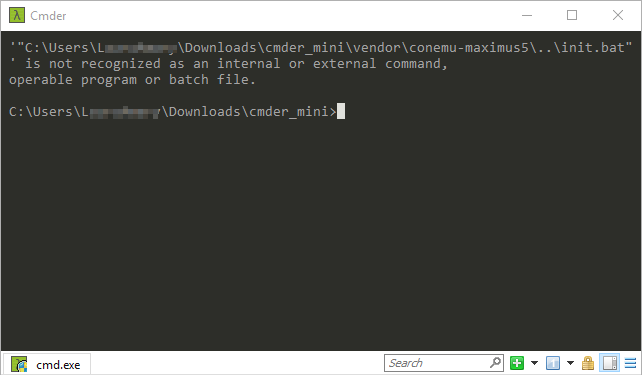
This is usable but it doesn't load the ssh agent for example.
What I have tried:
I have also tried to download the full version and mini version from the official website.
Then I tried to download from the latest unreleased builds, and I got always the same problem
I am a very basic user of Cmder - just download and launch it but today it stopped working.
Please can you advice?
Many thanks
 lamapidu
All 13 comments
@lamapidu Fresh install of upgrade?
 daxgames
on 15 Oct 2018
daxgames
on 15 Oct 2018
@daxgames : on my mini-cmder I did an upgrade, and then I downloaded fresh installs from the official website and from the latest unreleased builds and launched it from the download folder.
Would it be better to try to remove/clean everything and download again?
Thanks
lamapidu
on 15 Oct 2018
I am not where I can look at it now but will look when I can and respond then.
daxgames
on 15 Oct 2018
@daxgames many thanks for your time and help, let me know if you need more information or screenshots
lamapidu
on 15 Oct 2018
The same thing is happening to me. Been using Cmder for 2 years, but I'm encountering the same status message since yesterday.
 cosmicmarkup
on 18 Oct 2018
cosmicmarkup
on 18 Oct 2018
It seems to be because of a windows 10 update, I tried on a computer without the last updates and it worked, then it did the updates and cmder gave me the error again.
lamapidu
on 18 Oct 2018
@lamapidu @cosmicmarkup Check that your antivirus is not quarantining init.bat when you extract the archive or run cmder.exe. Does %cmder_root%\vendor\init.bat file exist after extraction or cmder.exe execution?
daxgames
on 20 Oct 2018
@daxgames You are totally right! I checked the extracted folder and the init.bat wasn't here but it was well into the archive.
This is really odd that I didn't have any notification that the antivirus removed it.
I use avast on this laptop and it seems that it removed it yes.
It works back to normal now!
Many thanks
lamapidu
on 22 Oct 2018
Many thanks
 fandyramadhan
on 23 Nov 2018
fandyramadhan
on 23 Nov 2018
@lamapidu @cosmicmarkup Check that your antivirus is not quarantining
init.batwhen you extract the archive or runcmder.exe. Does%cmder_root%\vendor\init.batfile exist after extraction orcmder.exeexecution?
I use AVG and it also quanrantined the init.bat file.. It works again after restoring the file. Many thanks
 hbweb
on 29 Nov 2018
hbweb
on 29 Nov 2018
Avast Free is sending init.bat to the quarantine since last summer.
 loginov-rocks
on 16 Dec 2018
loginov-rocks
on 16 Dec 2018
Can confirm the issue with Avast. If you're manually grabbing file from github don't forget to use the one for your version.
 SimZal
on 13 Jan 2019
SimZal
on 13 Jan 2019
Pessoal boa noite, não possuo antivírus no sistema mas mesmo assim quando faço a extração dos arquivos e percebi que o init.bat não extrai. Será que o próprio windows não está permitindo?
por favor me ajudem!
 tiago-84
on 26 Feb 2020
tiago-84
on 26 Feb 2020
Related issues
 tfarina
·
3Comments
tfarina
·
3Comments
 brunowego
·
3Comments
brunowego
·
3Comments
 justinmchase
·
3Comments
justinmchase
·
3Comments
 luisrudge
·
3Comments
luisrudge
·
3Comments
 bmeverett
·
3Comments
bmeverett
·
3Comments
Most helpful comment
@lamapidu @cosmicmarkup Check that your antivirus is not quarantining
init.batwhen you extract the archive or runcmder.exe. Does%cmder_root%\vendor\init.batfile exist after extraction orcmder.exeexecution?