Cmder: Add an option to have cmder start in the current directory
I typically want a command line in the current folder I'm viewing in windows explorer. With cmd, I just type cmd into the address bar, and it opens in the current folder.
If I type cmder however, it opens in my home directory. I'm currently getting around this by renaming the cmder executable to cmder-raw, and creating a cmder.bat like:
cmder-raw %CD%
(open 'cmder-raw', with the current directory as an argument, which apparently opens cmder there)
This does exactly what I want, but it's a bit hacky, and it results in a very very brief flash on non-cmder console window appearing, before cmder opens. It'd be great if cmder could add an option to act like this natively.
 pimterry
All 19 comments
:+1: I would love the ability to type cmder into the address bar of file explorer and have it open in that directory!
 futurechan
on 18 Feb 2015
futurechan
on 18 Feb 2015
":+1: I would love the ability to type cmder into the address bar of file explorer and have it open in that directory!"
me too!
 mrgrain
on 9 Apr 2015
mrgrain
on 9 Apr 2015
:+1:
 vitr
on 4 Jun 2015
vitr
on 4 Jun 2015
:+1: Agreed, I really miss this ability when working with cmder.
 dvlsg
on 26 Jun 2015
dvlsg
on 26 Jun 2015
Me too.
 hstarorg
on 31 Dec 2015
hstarorg
on 31 Dec 2015
Just go to cmder settings, then Tasks tab and set {cmd} task full command to:
cmd /k "%ConEmuDir%\..\init.bat" -new_console:%__CD__%
 kjeske
on 3 Feb 2016
kjeske
on 3 Feb 2016
If you register cmder, then right click -> Cmder here works that way.
[Ok, and the batch file startup works and I find that ok... I actually added that to my setup, as I find that faster as the right click :-)]
[Note that both solutions need a recent development build as there was for some time a bug which prevented the "start with a path"-scenario; not sure if the last release had this bug or not]
On a "pure" cmder solution, the comment by @kjeske works if you set this task as your default task. But then cmder must be in your normal path (which it isn't in my case)
 jankatins
on 3 Feb 2016
jankatins
on 3 Feb 2016
@kjeske Thank you, it's available.
hstarorg
on 5 Feb 2016
This is not working for me. cmder just opens in my home directory. What am I doing wrong?

 onewhaleid
on 2 Mar 2018
onewhaleid
on 2 Mar 2018
Hardcoding the task is not the right answer. Most of you want to be able to open a cmder session in a folder from explorer. This should work using cmder /REGISTER [USER|ALL]. This adds the Cmder Here context menu you can get to by a right click on the folder.
In all situations I would recommend downloading the latest version of cmder and make sure your tasks do not use the -new-console argument at all.
What exactly are the rest of you trying to do here, and I do mean 'exactly'. Give me the process step by step from the very beginning. Are you in explorer and want to open cmder in a right clicked folder? Are you in a Windows cmd.exe or a cmder session and want to open cmder in the current folder by typing cmder [something]? Or clicking a shortcut icon? I believe cmder can indeed work in all these sutuations, just need to know what you,are trying to do.
In all situations I would recommend downloading the latest version of cmder and make sure your tasks do not use the -new_console argument at all.
 daxgames
on 4 Mar 2018
daxgames
on 4 Mar 2018
I wanted to navigate to a folder in explorer, then type cmder into the explorer address bar, and have cmder open up a new console in that folder.
onewhaleid
on 4 Mar 2018
@onewhaleid did you try my suggestions? I have not with your use case.
daxgames
on 5 Mar 2018
@daxgames the address bar method did not work. I am using the context menu instead.
onewhaleid
on 5 Mar 2018
@onewhaleid I tried various things also and could not make that option work. The context menu is your best option for explorer.
daxgames
on 5 Mar 2018
Why is this closed?
I want to type "cmder" in my file manager (Total Commander, Far, etc) or in my command prompt and I want it to start in current dir, just like cmd or any other program would do
PS. it's a standard, you know. If a program is started in a dir - please be nice and work in that dir. Like, when I type git - it looks at the current directory (surprise!), not some home user profile folder or whatever! Don't be like Microsoft reinventing standards.
 alex-jitbit
on 14 Mar 2018
alex-jitbit
on 14 Mar 2018
@alex-jitbit PRs welcome!
 Stanzilla
on 14 Mar 2018
Stanzilla
on 14 Mar 2018
@daxgames As said, we want to be able to type cmder in the Windows explorer's address bar and the console opens up in that directory. I used fix from @pimterry and that seems to work, but as he sais, its a bit hacky and that quick flash of the standard cmd window is a little annoying...
 thewingit
on 17 May 2018
thewingit
on 17 May 2018
This is fixed try a nightly build. See the readme.md
daxgames
on 18 May 2018
Hi there!!
I add the file location in enviromente varables, but only copy and paste all cmder's folder, not the bin, and that work!!! (for me).
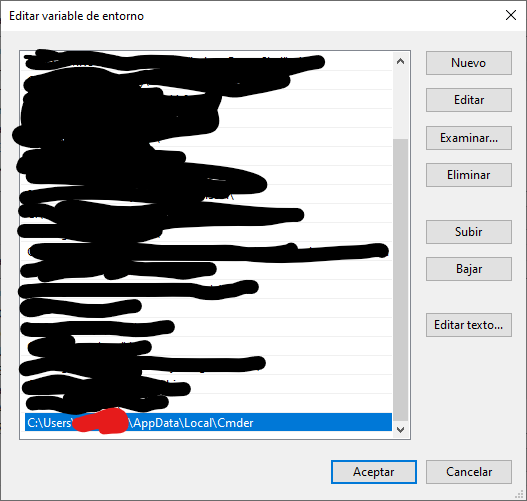
Something like this.
 NicolasZapata
on 13 Oct 2020
NicolasZapata
on 13 Oct 2020
Related issues
 edgariscoding
·
3Comments
edgariscoding
·
3Comments
 spooky
·
3Comments
spooky
·
3Comments
 vincentntang
·
3Comments
vincentntang
·
3Comments
 sathishsoundharajan
·
3Comments
sathishsoundharajan
·
3Comments
 isnullxbh
·
3Comments
isnullxbh
·
3Comments
Most helpful comment
Just go to cmder settings, then Tasks tab and set {cmd} task full command to: