Cmder: Azure CLI 'C:\Program' is not recognized as an internal or external command, operable program or batch file.
Purpose of the issue
- [X] Bug report (encountered problems/errors)
- [ ] Feature request (request for new functionality)
- [ ] Question
Description of the issue
Unable to run any Azure CLI commands from CMDER, keep getting the error:
'C:\Program' is not recognized as an internal or external command, operable program or batch file.
Full example of what I'm trying to:
user.name@BRM-19822-L ~/OneDrive/cmder
λ username=$(az account show --query user.name --output tsv)

user.name@BRM-19822-L ~/OneDrive/cmder
λ vm=$(az vm show --resource-group chkprm-compute --name asdfmmon0 --query id -o tsv)

user.name@BRM-19822-L ~/OneDrive/cmder
λ az role assignment create --role "Virtual Machine Administrator Login" --assignee $username --scope $vm

'C:\Program' is not recognized as an internal or external command, operable program or batch file.
Install locations:
CMDER: C:\Users*USER*\OneDrive\cmder
Az CLI: C:\Program Files (x86)\Microsoft SDKsAzure\CLI2\wbin\az.cmd
Environment set for Az CLI:
C:\Users*USER*\OneDrive\cmder\configuser-profile.sh
where this is set so I don't have to type az.cmd each time:
alias az='az.cmd'
Now it's obvious that CMDER breaks when accessing the full path of az.cmd when it comes across the first 'space' in the path name. Sadly, I cannot change the program path of CLI during install. Thanks Microsoft. So, does anyone know how I can reference this without it breaking, please?
 fluffy-cakes
All 11 comments
Looks like you are in a bash shell? I doubt the az.cmd will work in a bash shell. Have you tried it in the default cmd->cmder shell?
 daxgames
on 3 Sep 2018
daxgames
on 3 Sep 2018
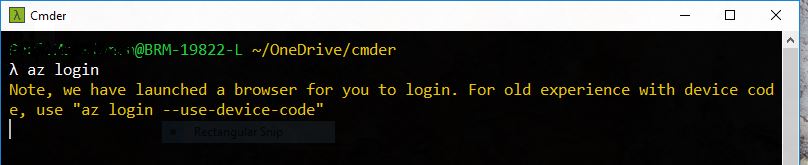
@daxgames , the Az command does work fine in the bash shell (see screenshot of login)
fluffy-cakes
on 4 Sep 2018
I realize at least some things work properly in bash but I do n9t have an azure account to test with.
So I will ask again have you tried the exact same command that is failing in bash in the cmder default cmd.exe shell.
I doubt Cmder is spontaneously modifying what is being called by az.cmd so it is probably calling an unquoted fully qualified path with spaces that are not properly escaped that is failing because I saw no fully qualified path in your example.
Just a thought but I need you to confirm in a cmd.exe as well as a cmder enhanced cmd.exe shell.
daxgames
on 4 Sep 2018
This is probably not a great example now, but this does happen with a lot of other commands. So much so, that I ended giving up on cmder for any Az commands and instead loaded Ubuntu in VMWare just for this. Anyway, here is the output of the command in PowerShell (cmd does not like variables), an altered command, because the ones you see listed above do not work for anything else but Linux. In addition to that, it did fail, but took about 4-5min to bring back an error;
$username = az account show --query user.name --output tsv
$vm = az vm show --resource-group MyResourceGroup --name MyServer --query id -o tsv
az role assignment create --role "Virtual Machine Administrator Login" --assignee $username --scope $vm
PS C:\Users\paul.mackinnon> az role assignment create --role "Virtual Machine Administrator Login" --assignee $username --scope $vm
az : ERROR: Error occurred in request., RetryError: HTTPSConnectionPool(host='management.azure.com', port=443): Max retries exceeded with url: /subscriptions/MySubScription
/resourceGroups/MyResourceGroup/providers/Microsoft.Compute/virtualMachines/MyServer/providers/Microsoft.Authorization/roleAssignments/705356c0-1f2a-420e-9fdf-aa821f70076f?api-version=2018-01
-01-preview (Caused by ResponseError('too many 504 error responses',))
At line:1 char:1
+ az role assignment create --role "Virtual Machine Administrator Login ...
+ ~~~~~~~~~~~~~~~~~~~~~~~~~~~~~~~~~~~~~~~~~~~~~~~~~~~~~~~~~~~~~~~~~~~~~
+ CategoryInfo : NotSpecified: (ERROR: Error oc...r responses',)):String) [], RemoteException
+ FullyQualifiedErrorId : NativeCommandError
Traceback (most recent call last):
File "C:\Program Files (x86)\Microsoft SDKs\Azure\CLI2\Lib\site-packages\requests\adapters.py", line 445, in send
timeout=timeout
File "C:\Program Files (x86)\Microsoft SDKs\Azure\CLI2\Lib\site-packages\urllib3\connectionpool.py", line 731, in urlopen
body_pos=body_pos, **response_kw)
File "C:\Program Files (x86)\Microsoft SDKs\Azure\CLI2\Lib\site-packages\urllib3\connectionpool.py", line 731, in urlopen
body_pos=body_pos, **response_kw)
File "C:\Program Files (x86)\Microsoft SDKs\Azure\CLI2\Lib\site-packages\urllib3\connectionpool.py", line 731, in urlopen
body_pos=body_pos, **response_kw)
File "C:\Program Files (x86)\Microsoft SDKs\Azure\CLI2\Lib\site-packages\urllib3\connectionpool.py", line 711, in urlopen
retries = retries.increment(method, url, response=response, _pool=self)
File "C:\Program Files (x86)\Microsoft SDKs\Azure\CLI2\Lib\site-packages\urllib3\util\retry.py", line 398, in increment
raise MaxRetryError(_pool, url, error or ResponseError(cause))
urllib3.exceptions.MaxRetryError: HTTPSConnectionPool(host='management.azure.com', port=443): Max retries exceeded with url: /subscriptions/MySubScription/resourceGroups/
MyResourceGroup/providers/Microsoft.Compute/virtualMachines/MyServer/providers/Microsoft.Authorization/roleAssignments/705356c0-1f2a-420e-9fdf-aa821f70076f?api-version=2018-01-01-preview
(Caused by ResponseError('too many 504 error responses',))
During handling of the above exception, another exception occurred:
Traceback (most recent call last):
File "C:\Program Files (x86)\Microsoft SDKs\Azure\CLI2\Lib\site-packages\msrest\service_client.py", line 342, in send
response = http_driver.send(request, **kwargs)
File "C:\Program Files (x86)\Microsoft SDKs\Azure\CLI2\Lib\site-packages\msrest\service_client.py", line 187, in send
**kwargs)
File "C:\Program Files (x86)\Microsoft SDKs\Azure\CLI2\Lib\site-packages\requests\sessions.py", line 512, in request
resp = self.send(prep, **send_kwargs)
File "C:\Program Files (x86)\Microsoft SDKs\Azure\CLI2\Lib\site-packages\requests\sessions.py", line 622, in send
r = adapter.send(request, **kwargs)
File "C:\Program Files (x86)\Microsoft SDKs\Azure\CLI2\Lib\site-packages\requests\adapters.py", line 504, in send
raise RetryError(e, request=request)
requests.exceptions.RetryError: HTTPSConnectionPool(host='management.azure.com', port=443): Max retries exceeded with url: /subscriptions/MySubScription/resourceGroups/
MyResourceGroup/providers/Microsoft.Compute/virtualMachines/MyServer/providers/Microsoft.Authorization/roleAssignments/705356c0-1f2a-420e-9fdf-aa821f70076f?api-version=2018-01-01-preview (Caused
by ResponseError('too many 504 error responses',))
During handling of the above exception, another exception occurred:
Traceback (most recent call last):
File "C:\Program Files (x86)\Microsoft SDKs\Azure\CLI2\Lib\site-packages\knack\cli.py", line 197, in invoke
cmd_result = self.invocation.execute(args)
File "C:\Users\trdai\AppData\Local\Temp\pip-install-17ev678d\azure-cli-core\azure\cli\core\commands\__init__.py", line 369, in execute
File "C:\Program Files (x86)\Microsoft SDKs\Azure\CLI2\Lib\site-packages\six.py", line 693, in reraise
raise value
File "C:\Users\trdai\AppData\Local\Temp\pip-install-17ev678d\azure-cli-core\azure\cli\core\commands\__init__.py", line 343, in execute
File "C:\Users\trdai\AppData\Local\Temp\pip-install-17ev678d\azure-cli-core\azure\cli\core\commands\__init__.py", line 182, in __call__
File "C:\Users\trdai\AppData\Local\Temp\pip-install-17ev678d\azure-cli-core\azure\cli\core\__init__.py", line 436, in default_command_handler
File "C:\Users\trdai\AppData\Local\Temp\pip-install-17ev678d\azure-cli-role\azure\cli\command_modules\role\custom.py", line 132, in create_role_assignment
File "C:\Users\trdai\AppData\Local\Temp\pip-install-17ev678d\azure-cli-role\azure\cli\command_modules\role\custom.py", line 151, in _create_role_assig
nment
File "C:\Users\trdai\AppData\Local\Temp\pip-install-17ev678d\azure-mgmt-authorization\azure\mgmt\authorization\operations\role_assignments_operations.py", line 322, in create
File "C:\Program Files (x86)\Microsoft SDKs\Azure\CLI2\Lib\site-packages\msrest\service_client.py", line 369, in send
raise_with_traceback(ClientRequestError, msg, err)
File "C:\Program Files (x86)\Microsoft SDKs\Azure\CLI2\Lib\site-packages\msrest\exceptions.py", line 54, in raise_with_traceback
raise error.with_traceback(exc_traceback)
File "C:\Program Files (x86)\Microsoft SDKs\Azure\CLI2\Lib\site-packages\msrest\service_client.py", line 342, in send
response = http_driver.send(request, **kwargs)
File "C:\Program Files (x86)\Microsoft SDKs\Azure\CLI2\Lib\site-packages\msrest\service_client.py", line 187, in send
**kwargs)
File "C:\Program Files (x86)\Microsoft SDKs\Azure\CLI2\Lib\site-packages\requests\sessions.py", line 512, in request
resp = self.send(prep, **send_kwargs)
File "C:\Program Files (x86)\Microsoft SDKs\Azure\CLI2\Lib\site-packages\requests\sessions.py", line 622, in send
r = adapter.send(request, **kwargs)
File "C:\Program Files (x86)\Microsoft SDKs\Azure\CLI2\Lib\site-packages\requests\adapters.py", line 504, in send
raise RetryError(e, request=request)
msrest.exceptions.ClientRequestError: Error occurred in request., RetryError: HTTPSConnectionPool(host='management.azure.com', port=443): Max retries exceeded with url: /subscriptions/-
MySubScription/resourceGroups/MyResourceGroup/providers/Microsoft.Compute/virtualMachines/MyServer/providers/Microsoft.Authorization/roleAssignments/705356c0-1f2a-420e-9fdf-aa821f
70076f?api-version=2018-01-01-preview (Caused by ResponseError('too many 504 error responses',))
If I repeat the command in cmder as initially stated, it would error immediately. I would like to give you more varied commands that fail, but as I said, I gave up on cmder and Az working together.
fluffy-cakes
on 4 Sep 2018
Possible duplicate of https://github.com/cmderdev/cmder/issues/1355
 oliversalzburg
on 15 Oct 2018
oliversalzburg
on 15 Oct 2018
Possible duplicate of #1355
My username does not contain any spaces.
fluffy-cakes
on 15 Oct 2018
My username does not contain any spaces.
Good to know.
oliversalzburg
on 15 Oct 2018
Another error when trying to assign a role via cmder;
username@BRM-19822-L ~/OneDrive/cmder
λ az role assignment create --assignee MY-SUBSCRIPTION --role Contributor --scope $ACR_ID
Error occurred in request., InvalidSchema: No connection adapters were found for 'C:/Users/username/OneDrive/cmder/vendor/git-for-windows/subscriptions/MY-SUBSCRIPTION/resourceGroups/aks/providers/Microsoft.ContainerRegistry/registries/MYACR/providers/Microsoft.Authorization/roleDefinitions?$filter=roleName%20eq%20%27Contributor%27&api-version=2018-01-01-preview'
Traceback (most recent call last):
File "C:\Program Files (x86)\Microsoft SDKs\Azure\CLI2\Lib\site-packages\msrest\service_client.py", line 342, in send
response = http_driver.send(request, **kwargs)
File "C:\Program Files (x86)\Microsoft SDKs\Azure\CLI2\Lib\site-packages\msrest\service_client.py", line 187, in send
**kwargs)
File "C:\Program Files (x86)\Microsoft SDKs\Azure\CLI2\Lib\site-packages\requests\sessions.py", line 512, in request
resp = self.send(prep, **send_kwargs)
File "C:\Program Files (x86)\Microsoft SDKs\Azure\CLI2\Lib\site-packages\requests\sessions.py", line 616, in send
adapter = self.get_adapter(url=request.url)
File "C:\Program Files (x86)\Microsoft SDKs\Azure\CLI2\Lib\site-packages\requests\sessions.py", line 707, in get_adapter
raise InvalidSchema("No connection adapters were found for '%s'" % url)
requests.exceptions.InvalidSchema: No connection adapters were found for 'C:/Users/username/OneDrive/cmder/vendor/git-for-windows/subscriptions/MY-SUBSCRIPTION/resourceGroups/aks/providers/Microsoft.ContainerRegistry/registries/MYACR/providers/Microsoft.Authorization/roleDefinitions?$filter=roleName%20eq%20%27Contributor%27&api-version=2018-01-01-preview'
During handling of the above exception, another exception occurred:
Traceback (most recent call last):
File "C:\Program Files (x86)\Microsoft SDKs\Azure\CLI2\Lib\site-packages\knack\cli.py", line 197, in invoke
cmd_result = self.invocation.execute(args)
File "C:\Users\trdai\AppData\Local\Temp\pip-install-17ev678d\azure-cli-core\azure\cli\core\commands\__init__.py", line 369, in execute
File "C:\Program Files (x86)\Microsoft SDKs\Azure\CLI2\Lib\site-packages\six.py", line 693, in reraise
raise value
File "C:\Users\trdai\AppData\Local\Temp\pip-install-17ev678d\azure-cli-core\azure\cli\core\commands\__init__.py", line 343, in execute
File "C:\Users\trdai\AppData\Local\Temp\pip-install-17ev678d\azure-cli-core\azure\cli\core\commands\__init__.py", line 182, in __call__
File "C:\Users\trdai\AppData\Local\Temp\pip-install-17ev678d\azure-cli-core\azure\cli\core\__init__.py", line 436, in default_command_handler
File "C:\Users\trdai\AppData\Local\Temp\pip-install-17ev678d\azure-cli-role\azure\cli\command_modules\role\custom.py", line 132, in create_role_assignment
File "C:\Users\trdai\AppData\Local\Temp\pip-install-17ev678d\azure-cli-role\azure\cli\command_modules\role\custom.py", line 144, in _create_role_assignment
File "C:\Users\trdai\AppData\Local\Temp\pip-install-17ev678d\azure-cli-role\azure\cli\command_modules\role\custom.py", line 473, in _resolve_role_id
File "C:\Program Files (x86)\Microsoft SDKs\Azure\CLI2\Lib\site-packages\msrest\paging.py", line 131, in __next__
self.advance_page()
File "C:\Program Files (x86)\Microsoft SDKs\Azure\CLI2\Lib\site-packages\msrest\paging.py", line 117, in advance_page
self._response = self._get_next(self.next_link)
File "C:\Users\trdai\AppData\Local\Temp\pip-install-17ev678d\azure-mgmt-authorization\azure\mgmt\authorization\operations\role_definitions_operations.py", line 281, in internal_paging
File "C:\Program Files (x86)\Microsoft SDKs\Azure\CLI2\Lib\site-packages\msrest\service_client.py", line 369, in send
raise_with_traceback(ClientRequestError, msg, err)
File "C:\Program Files (x86)\Microsoft SDKs\Azure\CLI2\Lib\site-packages\msrest\exceptions.py", line 54, in raise_with_traceback
raise error.with_traceback(exc_traceback)
File "C:\Program Files (x86)\Microsoft SDKs\Azure\CLI2\Lib\site-packages\msrest\service_client.py", line 342, in send
response = http_driver.send(request, **kwargs)
File "C:\Program Files (x86)\Microsoft SDKs\Azure\CLI2\Lib\site-packages\msrest\service_client.py", line 187, in send
**kwargs)
File "C:\Program Files (x86)\Microsoft SDKs\Azure\CLI2\Lib\site-packages\requests\sessions.py", line 512, in request
resp = self.send(prep, **send_kwargs)
File "C:\Program Files (x86)\Microsoft SDKs\Azure\CLI2\Lib\site-packages\requests\sessions.py", line 616, in send
adapter = self.get_adapter(url=request.url)
File "C:\Program Files (x86)\Microsoft SDKs\Azure\CLI2\Lib\site-packages\requests\sessions.py", line 707, in get_adapter
raise InvalidSchema("No connection adapters were found for '%s'" % url)
msrest.exceptions.ClientRequestError: Error occurred in request., InvalidSchema: No connection adapters were found for 'C:/Users/username/OneDrive/cmder/vendor/git-for-windows/subscriptions/MY-SUBSCRIPTION/resourceGroups/aks/providers/Microsoft.ContainerRegistry/registries/MYACR/providers/Microsoft.Authorization/roleDefinitions?$filter=roleName%20eq%20%27Contributor%27&api-version=2018-01-01-preview'
username@BRM-19822-L ~/OneDrive/cmder
Running the command in Ubuntu VM worked straight away, no issues.
fluffy-cakes
on 23 Oct 2018
I don't use CMDER but stumbled on this issue because I was seeing the same thing when trying to run az from the MINGW Bash shell that comes with Git for Windows.
At first, I tried the alias of az to az.cmd but that broke down when trying to invoke shell scripts that invoke az.
What worked for me was adding this to ~/.bashrc:
AZURE_CLI_PATH="/c/Program Files (x86)/Microsoft SDKs/Azure/CLI2"

export PATH="${PATH}:${AZURE_CLI_PATH}:${AZURE_CLI_PATH}/Scripts"
Then restarting the shell. From then on, az worked as expected in all cases.
This works because a Bash version of the az command exists in the /Scripts folder of the Azure CLI path. The parent folder must also be in the path to ensue that Python is available.
 GuyPaddock
on 5 Jan 2019
GuyPaddock
on 5 Jan 2019
This issue has been automatically marked as stale because it has not had recent activity. It will be closed in a week if no further activity occurs. Thank you for your contribution.
![stale[bot] picture](https://avatars3.githubusercontent.com/in/1724?v=4&s=40) stale[bot]
on 25 May 2019
stale[bot]
on 25 May 2019
This issue has been automatically closed due to it not having any activity since it was marked as stale. Thank you for your contribution.
stale[bot]
on 1 Jun 2019
Related issues
 justinmchase
·
3Comments
justinmchase
·
3Comments
 Joe1992w
·
3Comments
Joe1992w
·
3Comments
 giuliannosbrugnera
·
3Comments
giuliannosbrugnera
·
3Comments
 bmeverett
·
3Comments
bmeverett
·
3Comments
 GlassGruber
·
3Comments
GlassGruber
·
3Comments
Most helpful comment
I don't use CMDER but stumbled on this issue because I was seeing the same thing when trying to run
azfrom the MINGW Bash shell that comes with Git for Windows.At first, I tried the alias of
aztoaz.cmdbut that broke down when trying to invoke shell scripts that invokeaz.What worked for me was adding this to
~/.bashrc:Then restarting the shell. From then on,
azworked as expected in all cases.This works because a Bash version of the
azcommand exists in the/Scriptsfolder of the Azure CLI path. The parent folder must also be in the path to ensue that Python is available.