How to make look like this?

Thank you very much...
 victormongi
All 7 comments
https://github.com/cmderdev/cmder/blob/8237b1010cbedefb57850144d55ea36c5fbee0c3/vendor/clink.lua#L42-L50
 gucong3000
on 6 Mar 2018
gucong3000
on 6 Mar 2018
This is my example code
    local cmder_prompt = "\x1b[1;32;1;40m{lamb} \x1b[36m"..dir.." \x1b[32;1;1m{git}{hg}{svn} \x1b[0m"
    local lambda

    -- char set • →
    cmder_prompt = string.gsub(cmder_prompt, "{cwd}", cwd)
    if env == nil then
        lambda = "→"
    else
        lambda = "("..env..") →"
    end
    clink.prompt.value = string.gsub(cmder_prompt, "{lamb}", lambda

How to edit the git:(master) section... Thank you @gucong3000 ...
victormongi
on 6 Mar 2018
Mabe here: https://github.com/cmderdev/cmder/blob/8237b1010cbedefb57850144d55ea36c5fbee0c3/vendor/clink.lua#L266-L272
gucong3000
on 6 Mar 2018
Hi @gucong3000 Ive been trying to achieve this.
But how to make the prompt like this → folderName git(branchname) instead of → folderName git(branchname -> origin). Where to remove the -> origin?
Thank you...
victormongi
on 7 Mar 2018
@victormongi The easiest way while not really correct would be to delete the file '%cmder-root%\vendor\clink-completions\git_prompt.lua'.
I am working on a more corrwct way to do this.
 daxgames
on 7 Mar 2018
daxgames
on 7 Mar 2018
Thank you @daxgames it just work...
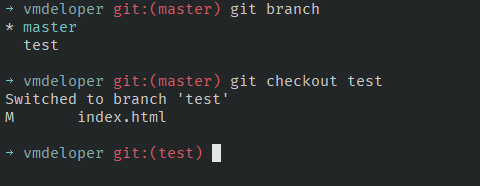
If you get the more correct way, please share...
victormongi
on 7 Mar 2018
just as a reference for googlers:
small tutorial how to add a custom prompt to your commander
https://dev.to/c33s/how-to-add-a-custom-prompt-to-cmder-gb2
@maintainers should we add something like this to the wiki?
 c33s
on 24 Oct 2018
c33s
on 24 Oct 2018
Related issues
 luisrudge
·
3Comments
luisrudge
·
3Comments
 bmeverett
·
3Comments
bmeverett
·
3Comments
 jenisys
·
3Comments
jenisys
·
3Comments
 Joe1992w
·
3Comments
Joe1992w
·
3Comments
 sathishsoundharajan
·
3Comments
sathishsoundharajan
·
3Comments
Most helpful comment
https://github.com/cmderdev/cmder/blob/8237b1010cbedefb57850144d55ea36c5fbee0c3/vendor/clink.lua#L42-L50