Cmder: Wrong HOME directory - SSH on WIN10 (latest official release)
Hi,
I have the latest portable version of CMDER. When I try to create SSH key or use SSH, it always refers to the directory:
\home\username\ instead of c:\Users\username\
Screen: https://i.imgur.com/9Snt431.png

Even though my HOME directory variable is fine, CMDER still looks in the home folder as it would on Linux.
Any idea what could help me solve this?
Thank you.
 ladislavsulc
All 16 comments
Could you do echo %HOME% and echo %USERPROFILE%? I see a " (quotation mark) at the end of your HOME variable.
 DRSDavidSoft
on 1 Mar 2018
DRSDavidSoft
on 1 Mar 2018
@DRSDavidSoft thank you, fixed that, but still it looks for a home directory:
https://i.imgur.com/foukYyq.png

Tried that also with ssh-keygen -t rsa -> Enter file in which to save the key (/home/ladis/.ssh/id_rsa).
ladislavsulc
on 1 Mar 2018
Make sure C:\Users\ladis\.ssh exists (mkdir .ssh) - from past experience, that's sometimes the problem.
Just to be sure, please also issue where ssh. It could be another ssh installation interfering.
DRSDavidSoft
on 1 Mar 2018
It exists (existed), despite that path "bug" it wrote the server to known_hosts. Don't get it. There is no other .ssh folder.
ladislavsulc
on 1 Mar 2018
where ssh ->
C:\ProgramData\chocolatey\bin\ssh.exe
C:\Program Files\OpenSSH-Win64\ssh.exe
C:\Program Files\Git\usr\bin\ssh.exe

ladislavsulc
on 1 Mar 2018
which ssh and post output? You have multiple this will tell us which one is running.
 daxgames
on 1 Mar 2018
daxgames
on 1 Mar 2018
@ladislavsulc Hm this seems to be an chocolatey issue rather than cmder – you can confirm this if you get the same results by running the same command in cmd.exe rather than Cmder.
In addition to which ssh, please post ssh -V. You might have an outdated version of OpenSSH installed. The best practice is using Cmder with either Cygwin (which has ssh built in), or easier to use vendored Git with cmder.
Also, I like to mention that the screenshots are much appreciated :)
DRSDavidSoft
on 1 Mar 2018
@daxgames which ssh > /c/ProgramData/chocolatey/bin/ssh.
@DRSDavidSoft cmd.exe shows the same except the GIT ssh. Same problem (but that is obvious since it is also linked with Chocolatey).
which ssh as stated above. ssh -v doesn't work. I have the latest version of OpenSSH, always keep my packages up to date.
Do you think I should try to uninstall OpenSSH so it would work with just the GIT (Bash) one?
Thank you for your help.
ladislavsulc
on 1 Mar 2018
@DRSDavidSoft sorry, used -v instead of -V for ssh -V :( This is the output:
OpenSSH_7.1p1, OpenSSL 1.0.2e 3 Dec 2015
Thank you.
ladislavsulc
on 1 Mar 2018
@ladislavsulc OpenSSH_7.1p1 (the one that chocolatey uses) is obviously not the latest version, I have OpenSSH_7.6p1 on my machine at the moment.
Try this:
"C:\Program Files\OpenSSH-Win64\ssh.exe" [email protected] -p 22
and report back if it works.
DRSDavidSoft
on 1 Mar 2018
@DRSDavidSoft this works also with ssh-keygen, finally the right folder (C:\Users\ladis). What should I do now, please?
Thank you.
ladislavsulc
on 1 Mar 2018
In my opinion:
- Update the
%PATH%priorities to use the OpenSSH installation first and _before_ any other SSH installations. - For Chocolatey, go to the installation directory and manually _remove_ or better, _update_ the
ssh.exe.
Personally, I would symlink it to a recentssh.exebinary.
Change the PATH from:
Windows + Pause/Break → Advanced system settings → Environment Variables... (button at the bottom) → From System variables, choose PATH and then Edit.
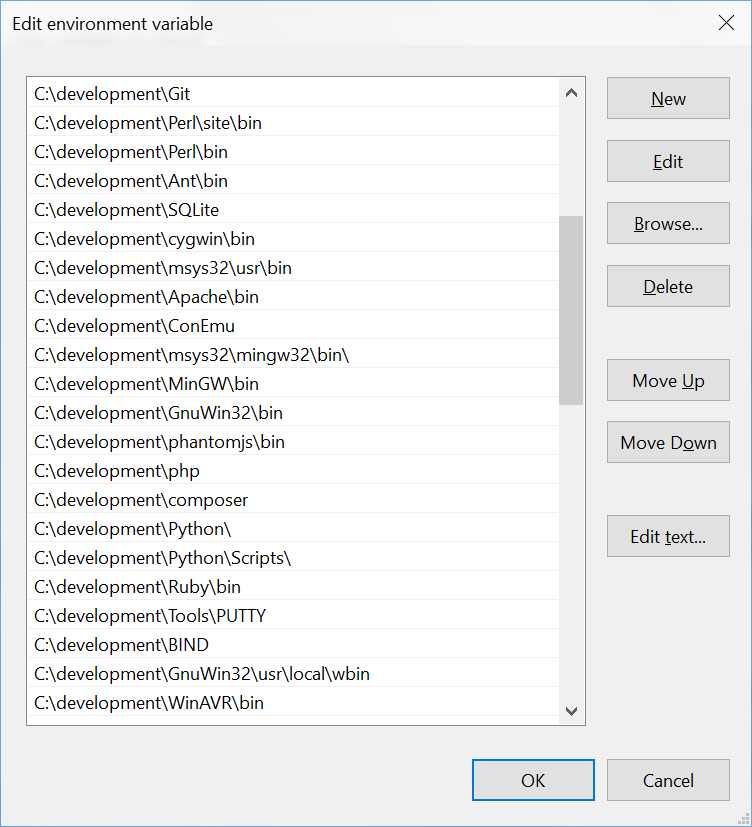
Select the path with OpenSSH and move it above Chocolatey's path.
For example, here's an screenshot ofwhat my PATH are:
DRSDavidSoft
on 1 Mar 2018
@DRSDavidSoft Thanks for all your help. Moving the variable for OpenSSH before the Chocolatey one now WORKS!
ladislavsulc
on 1 Mar 2018
Let me just add that now it also uses the latest version OpenSSH_7.6p1, LibreSSL 2.5.3. 👍
ladislavsulc
on 1 Mar 2018
@ladislavsulc Glad it works now for you. So, it wasn't really a Cmder issue!
If everything's fine now, please close the issue.
DRSDavidSoft
on 2 Mar 2018
https://stackoverflow.com/a/2840909/1262580
Try set the variable HOME for Windows
 FrankFang
on 10 Aug 2019
FrankFang
on 10 Aug 2019
Related issues
 zsedcbm
·
3Comments
zsedcbm
·
3Comments
 jenisys
·
3Comments
jenisys
·
3Comments
 AaronKaa
·
3Comments
AaronKaa
·
3Comments
 tfarina
·
3Comments
tfarina
·
3Comments
 danwellman
·
3Comments
danwellman
·
3Comments
Most helpful comment
In my opinion:
%PATH%priorities to use the OpenSSH installation first and _before_ any other SSH installations.ssh.exe.Personally, I would symlink it to a recent
ssh.exebinary.Change the PATH from:
Windows + Pause/Break → Advanced system settings → Environment Variables... (button at the bottom) → From System variables, choose PATH and then Edit.
Select the path with OpenSSH and move it above Chocolatey's path.
For example, here's an screenshot ofwhat my PATH are: