Cmder: Launching {bash::bash}} and trying to have use aliases always give me this error
This is the error I receive when I launch cmder is shown below. This issue might be completely user error but I have been trying to find a solution for days now. Any help would be great.
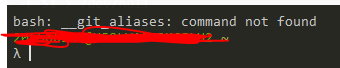
If I run source ~/.bashrc right after the console loads the aliases work.
This is my current .bashrc file.
# ----------------------
# Git Aliases
# ----------------------
alias g='git'

if [ -f /etc/bash_completion ] && ! shopt -oq posix; then
    . /etc/bash_completion
fi


function_exists() {
    declare -f -F $1 > /dev/null
    return $?
}

for al in `__git_aliases`; do
    alias g$al="git $al"

    complete_func=_git_$(__git_aliased_command $al)
    function_exists $complete_fnc && __git_complete g$al $complete_func
done

# Run Eval on SSH-Agent and Add Key(s)
# if [ -z "$SSH_AUTH_SOCK" ] ; then
#   eval `ssh-agent -s`
#   echo "Adding Keys..."
#   ssh-add
# fi

# Aliases
alias 7z="/c/Program\ Files/7-Zip/7z.exe"
alias ll="ls -lhA"
alias edprof="code ~/.bashrc && source ~/.bashrc"
alias c="clear"
alias ..="cd .."
alias ...="cd ../.."
alias ....="cd ../../.."
alias grep="grep --color"
This is my .gitconfig file aliases are
[alias]
    # logs
    l = log --pretty=format:"%C(yellow)%h\\ %ad%Cred%d\\ %Creset%s%Cblue\\ [%cn]" --decorate --date=short
    lg='git log --graph --oneline --decorate --all'

    cl = clone

    a = add
    ap = add -p
    aa = add .

    c = commit --verbose
    ca = commit -a --verbose
    cm = commit -m
    cam = commit -a -m
    m = commit --amend --verbose

    d = diff
    ds = diff --stat
    dc = diff --cached

    s = status -s
    co = checkout
    cob = checkout -b

    pl = pull
    plo = pull origin
    pr = pull --rebase

    p = push
    po = push origin

    st = stash
    sta = stash apply
    std = stash drop
    stl = stash list
    stp = stash pop
    sts = stash save

    # list branches sorted by last modified
    b = "!git for-each-ref --sort='-authordate' --format='%(authordate)%09%(objectname:short)%09%(refname)' refs/heads | sed -e 's-refs/heads/--'"
    bd = branch --delete

    # list aliases
    la = "!git config -l | grep alias | cut -c 7-"
 ArtisJr
All 14 comments
What is '__git_aliases'? Is it another script that is missing? Your .bashrc is trying to run this command and not finding it.
 daxgames
on 21 Feb 2018
daxgames
on 21 Feb 2018
You may be able to replace '__git_aliases' with 'git config --get-regexp alias' and get what you expect. This is a guess and not tested!
daxgames
on 21 Feb 2018
@daxgames Unfortunately running git config --get-regexp alias It caused an execution loop.
ArtisJr
on 23 Feb 2018
Yeah looking at it again more changes to that script are needed. I bet/etc/bash_completion does not exist, at least in that exact path, and it is setting __git_aliases which itself is probably an alias.
Change what I originally suggested back and change /etc/bash_completion to ${GIT_INSTALL_ROOT}/etc/bash_completion.
daxgames
on 23 Feb 2018
That will not work either unless you copy that script to that path but there is probably a better way.
You should copy that script to "$CMDER_ROOT/config/profile.d/bash_completion.sh". If there it will run every time you start bash::bash setting the appropriate aliases. Then remove/comment the first if block from your .bashrc file.
Maybe more but that's where I'd start.
daxgames
on 23 Feb 2018
To make it all portable you could also move the contents of your .bashrc into $CMDER_ROOT/config/user-profile.sh. depends on whether cmder is your only bash environment.
daxgames
on 23 Feb 2018
I'm not too worried about portability which is why I have the .bashrc file.
I did notice while writing all of this the /etc/bash_completion doesn't exist. However when I first set this up. Launching a bash console initially gave no errors. Then the next day after setting it up I received this __git_aliases error.
But still, why would it work after I run source ~/.bashrc?

ArtisJr
on 23 Feb 2018
Actually now I get the error but I can still use the git aliases? Is the source ~/.bashrc like saved?

ArtisJr
on 23 Feb 2018
Cmder init scripts source your .bashrc on start.
daxgames
on 23 Feb 2018
Without __git_aliases being set then the following block does nothing:
for al in `__git_aliases`; do
    alias g$al="git $al"

    complete_func=_git_$(__git_aliased_command $al)
    function_exists $complete_fnc && __git_complete g$al $complete_func
done
When you say you can use the git aliases what do you mean. You can type:
git [alias name]
And it works? I would expect this as this is how git aliases work. The purpose of the code in .bashrc is for translate your git aliases into bash aliases so git aliases:
git cm
Or
g cm # .bashrc sets `alias g='git'`
That actually runs git commit -m would become a bash alias:
What bash aliases do you get when you type alias?
daxgames
on 23 Feb 2018
Yes gcm is git commit -m
ArtisJr
on 26 Feb 2018

ArtisJr
on 9 Mar 2018
@ArtisJr As I said earlier the below block does nothing so comment it and the error will go away:
for al in `__git_aliases`; do
    alias g$al="git $al"

    complete_func=_git_$(__git_aliased_command $al)
    function_exists $complete_fnc && __git_complete g$al $complete_func
done
FYI: as of this commit, which is included in git v2.18.0, __git_aliases has been replaced by:
$ git --list-cmds=alias
 chocolateboy
on 5 Jul 2018
chocolateboy
on 5 Jul 2018
Related issues
 spooky
·
3Comments
spooky
·
3Comments
 justinmchase
·
3Comments
justinmchase
·
3Comments
 emesx
·
3Comments
emesx
·
3Comments
 giuliannosbrugnera
·
3Comments
giuliannosbrugnera
·
3Comments
 jordanrobinson
·
3Comments
jordanrobinson
·
3Comments
Most helpful comment
FYI: as of this commit, which is included in git v2.18.0,
__git_aliaseshas been replaced by: