Cmder: Cmder lambda and info virtualenv not appearing or the color is wrong
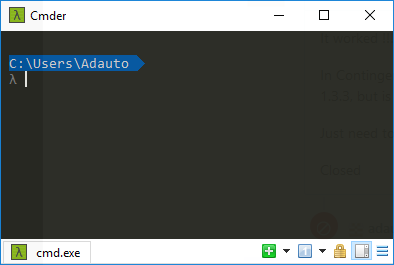
Lambda character, not appearing. I believe the color is the same background, but I could not change.
cmder version 1.3.3
OS: Windows 10 Fall Creators Version 1709 build 16299.19
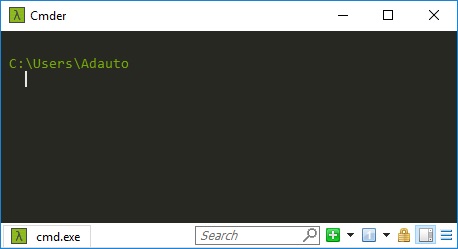
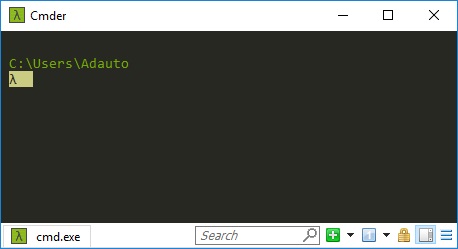
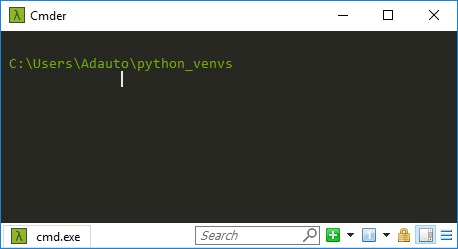
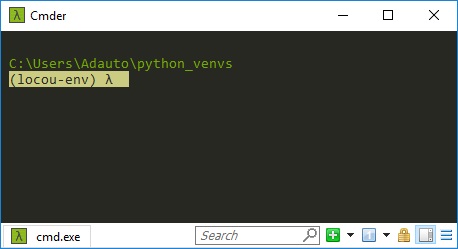
Thanks in advance
Sorry for my English
 kayzzen01
All 17 comments
Hey there, can you check out if https://github.com/cmderdev/cmder/commit/a8d32611a9b93cfb58f0318ae4b8041bc8a86c68 fixes it? Thanks!
 Stanzilla
on 29 Oct 2017
Stanzilla
on 29 Oct 2017
It worked !!! Thanks.
In Contingency, I had downloaded the conemu portable and replaces the original conemu of the version 1.3.3, but is now solved. ;-)
Just need to update the builds.
Closed
kayzzen01
on 29 Oct 2017
@Stanzilla
I preferred to replace ConEmu portable, the color of the text λ and venv are in gray. I think this is the cmder default.
I'm practically out of time so I could not pinpoint what the problem was. I did some testing here and when I replaced the files
conemu-maximus5 \ ConEmu \ ConEmuHk64.dll
conemu-maximus5 \ ConEmu64.exe
ConEmu updated and fixed the problem.
I am not familiar with the project, but perhaps re-packaging with the current version of ConEmu could solve the problem.
Follow the print with powerline installed ;-)
kayzzen01
on 29 Oct 2017
@adautoserpa So which version of ConEmu did you download and install? Because 1.3.3 actually comes with the latest alpha version. So if you downloaded the latest release version, you actually downgraded ConEmu and only delayed running into the problem
Stanzilla
on 29 Oct 2017
@Stanzilla I am using the stable version 161 206.
I downloaded alpha version 171025 and did the same procedure. The bug appears.
This leads to believe that it is some bug in the conemu or some incompatibility with the alpha version.
kayzzen01
on 30 Oct 2017
Yup makes sense, thank you for checking!
@maximus5 Intended change or regression?
Stanzilla
on 30 Oct 2017
To set highlighted foreground colors it's recommended to use ESC [ 90..97 m instead of ambiguous BrightOrBold.
Intended change.
 Maximus5
on 30 Oct 2017
Maximus5
on 30 Oct 2017
@Stanzilla and @Maximus5
We could use the code below to have the same result as the previous version of cmder, dark gray.
local cmder_prompt = "\x1b[1;32;40m{cwd} {git}{hg}{svn} \n\x1b[1;30;90m{lamb} \x1b[0m"
or
local cmder_prompt = "\x1b[1;32;40m{cwd} {git}{hg}{svn} \n\x1b[30;90m{lamb} \x1b[0m"
ESC [ 30..90 m
kayzzen01
on 30 Oct 2017
@vbm suggested using 39m because that's the default color of foreground at startup -> https://github.com/shiena/ansicolor/blob/master/README.md
I'm inclined to leave it like that.
Stanzilla
on 31 Oct 2017
I use this:
local cmder_prompt = "\x1b[1;32;40m{cwd} {git}{hg}{svn} \n\x1b[1;37;40m{lamb} \x1b[0m"
then the color is the same as code,i like it. nice.
 0123guoxiao
on 31 Oct 2017
0123guoxiao
on 31 Oct 2017
Just to let you know: Just downloaded the minimal version from the cmder home page (v1.3.3/cmder_mini.zip) and ran into the same issue.
Not really sure what the right fix is, after reading the conversation.
 rhpijnacker
on 2 Nov 2017
rhpijnacker
on 2 Nov 2017
@rhpijnacker I resolved this problem just open C:\cmder\vendor\clink.lua file with my editor, then located to 41 line and replace 30 with 39. Just like:
Old: local cmder_prompt = "\x1b[1;32;40m{cwd} {git}{hg}{svn} \n\x1b[1;30;40m{lamb} \x1b[0m"
New: local cmder_prompt = "\x1b[1;32;40m{cwd} {git}{hg}{svn} \n\x1b[1;39;40m{lamb} \x1b[0m"
refer to : a8d3261
 xiaolei16fan
on 2 Nov 2017
xiaolei16fan
on 2 Nov 2017
@Stanzilla Can I close the issue?
Then tell us when to leave the build with the fix. Thank you!
kayzzen01
on 2 Nov 2017
I think so, yeah. 1.3.4 is out now
Stanzilla
on 3 Nov 2017
@Stanzilla the official cmder download link leads to version 1.3.3.
 freiro
on 12 Nov 2017
freiro
on 12 Nov 2017
@freiro I know, the PR updating the links has not been merged yet.
Stanzilla
on 12 Nov 2017
@Stanzilla #worked like a charm 👍 👍 👍
 vrufine
on 14 Nov 2017
vrufine
on 14 Nov 2017
Related issues
 bmeverett
·
3Comments
bmeverett
·
3Comments
 danwellman
·
3Comments
danwellman
·
3Comments
 AaronKaa
·
3Comments
AaronKaa
·
3Comments
 emesx
·
3Comments
emesx
·
3Comments
 luisrudge
·
3Comments
luisrudge
·
3Comments
Most helpful comment
@rhpijnacker I resolved this problem just open
C:\cmder\vendor\clink.luafile with my editor, then located to 41 line and replace 30 with 39. Just like:refer to : a8d3261