Cmder: weird Ghost character for CJK User
I'm a CJK user.
Note that there is nothing before “git” when I press “↑” on keyboard
I keep press “↑” on keyboard to to get out another history command
“vagrant ssh”,then I press “↓” on keyboard to get“git” back.
You will see that there is a additional “v” fom “vagrant” before “git”
But it's actually a “git” there ,not “vgit”. the "v" character is just like a ghost
here is a screen record,I'm Using windows 10 (64 bit), with chinese language enabled, same issue on windows 7 (64 bit),with a clean install of cmder 1.3.2

 ihipop
All 8 comments
Open: Cmder\vendor\clink.lua
https://github.com/cmderdev/cmder/blob/master/vendor/clink.lua#L44
Change:
if env == nil then
    lambda = "$"
else
    lambda = "("..env..") $"
end
 Kisesy
on 24 Apr 2017
Kisesy
on 24 Apr 2017
@Kisesy It works..
Why don't provide any settings to change this prompt ....
ihipop
on 24 Apr 2017
add chcp utf-8
see https://github.com/cmderdev/cmder/issues/1339#issuecomment-293768557
 clijiac
on 27 Apr 2017
clijiac
on 27 Apr 2017
@clijiac it‘s not a utf-8 issue
I‘ve tried
run chcp 65001 won't work. and some programs such as vagrant won't work in utf-8 code page in Chinese env
change the prompt from λ to $ here work the best and cost the least.
ihipop
on 1 May 2017
I have met exactly the same issue. Following @Kisesy 's advice, it works. Go to where cmder is installed, e.g., D:Program Files, the clink.lua file is in vendor sub-directory.
 jdhao
on 29 Dec 2017
jdhao
on 29 Dec 2017
I have facing the same issue. I tested it on my Windows10 laptop, and this issue appear only when I add
chcp utf-8
to Cmder->Setting->environment
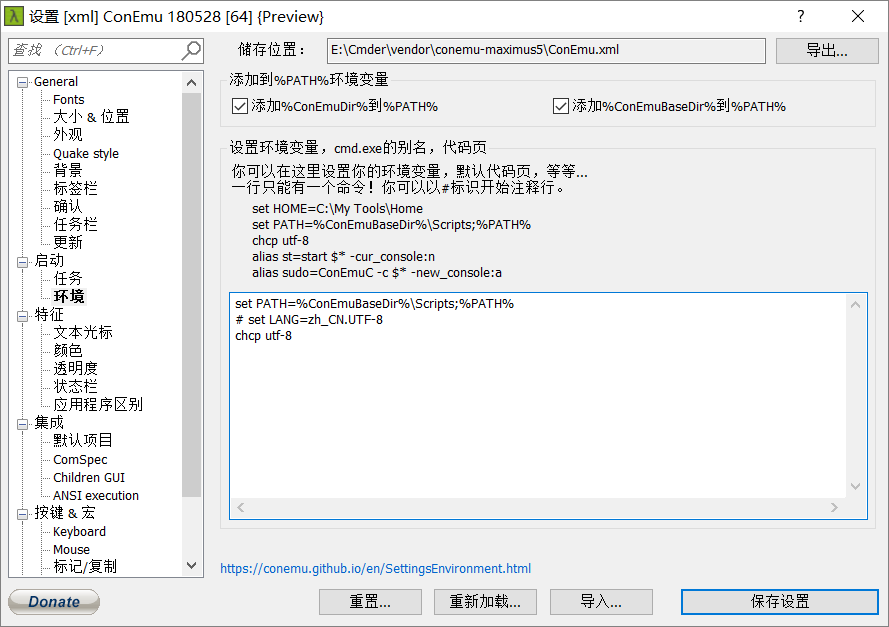
And I have also have downloaded the ConEmu to power my guess.
This issue doesn't appear in ConEmu.
It may be the mistake when calculating the length of character λ that lead to this issue.
 KB5201314
on 6 Jul 2018
KB5201314
on 6 Jul 2018
This issue still persists. Solution for the latest release of cmder (version 1.3.8) can be found here.
jdhao
on 15 Nov 2018
This issue has been automatically marked as stale because it has not had recent activity. It will be closed in a week if no further activity occurs. Thank you for your contribution.
![stale[bot] picture](https://avatars3.githubusercontent.com/in/1724?v=4&s=40) stale[bot]
on 25 May 2019
stale[bot]
on 25 May 2019
Related issues
 sathishsoundharajan
·
3Comments
sathishsoundharajan
·
3Comments
 hyrious
·
3Comments
hyrious
·
3Comments
 isnullxbh
·
3Comments
isnullxbh
·
3Comments
 tfarina
·
3Comments
tfarina
·
3Comments
 danwellman
·
3Comments
danwellman
·
3Comments
Most helpful comment
Open:
Cmder\vendor\clink.luahttps://github.com/cmderdev/cmder/blob/master/vendor/clink.lua#L44
Change: