Cmder: Missing colors in `ls` after Windows 10 Creators Update
I've recently upgraded to the Windows 10 Creators Update and I've noticed that colors of directories when executing ls are missing:
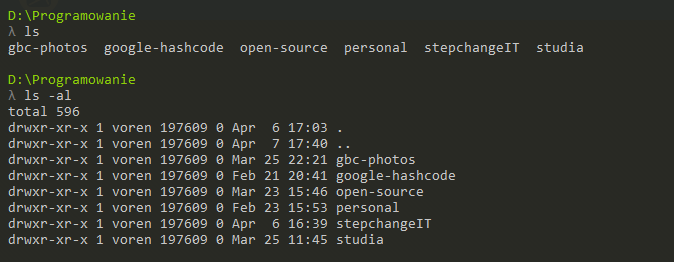
Previously all the directories were blue which let me easily distinguish them from regular files. Now they're the same grayish color all other output is.
I am not sure it's connected to the Windows 10 update, but I remember them being blue and now, having upgraded, they no longer are. On my laptop, where I have not yet upgraded, everything works as normal.
Colors from other commands, for instance, doing a choco upgrade all, work fine, displaying red and yellow. I am running the same version of Cmder on both my PC and my laptop (161206 stable).
How do I restore back the colors for ls?
Apart from this, I've noticed another difference - on my laptop there are slashes after directory names in ls, whereas on my PC there are none. Is this perhaps because directories are no longer viewed as directories by Cmder on my PC? I'm just listing possible causes.
 Gelio
Gelio
All 7 comments
Via which ls I've checked which ls.exe is used and on my laptop it was the one from _git-for-windows_ directory, however, for my PC it now lists the following:
λ which ls
/usr/bin/ls
which looks strange, as I cannot cd into /usr/bin nor run ls directly via /usr/bin/ls.
I am currently upgrading my laptop to the Creators Update to check whether that's an issue with this specific upgrade.
Gelio
on 7 Apr 2017
After upgrading my laptop to Windows 10 Creators Upgrade the problem started occurring - colors in ls are missing.
Additionally, the path is different. On my laptop the path to ls is:
λ which ls
/bin/ls
I am using plain Cmder. I have Bash on Ubuntu on Windows installed, but I haven't changed any settings nor run it for a long time, even before the update.
Gelio
on 7 Apr 2017
The path seems to be almost the same as with _Bash on Ubuntu on Windows_:
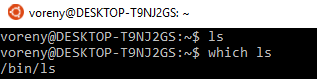
I believe this may be a problem.
Gelio
on 7 Apr 2017
@Gelio you need to use "where ls" not "which ls" to know where the executable is located in windows.
On a pre-creator update with colors working this is what I have:

So this is not the source of the problem you have with colors.
 mrRosset
on 7 Apr 2017
mrRosset
on 7 Apr 2017
@mrRosset Yes, you are right. On my PC the paths are as follows:

They look similar to yours. Still, let's wait till more people upgrade to Creators and see it the issue appears for them. It's not a big problem for me, just a minor inconvenience.
Gelio
on 7 Apr 2017
ls is an alias to 'ls --show-control-chars -F --color $* ' in cmder. However, aliases don't work any more, link #1325. i think this is the root cause.
 MonwF
on 8 Apr 2017
MonwF
on 8 Apr 2017
@MonwF Thanks, I apologize for not conducting a thorough research before creating this issue. It's very probable. Let's wait till the other issue is resolved and for now, I'll close this one. Thank you for help, guys!
Gelio
on 8 Apr 2017
Related issues
 GlassGruber
·
3Comments
GlassGruber
·
3Comments
 luisrudge
·
3Comments
luisrudge
·
3Comments
 Joe1992w
·
3Comments
Joe1992w
·
3Comments
 tfarina
·
3Comments
tfarina
·
3Comments
 isnullxbh
·
3Comments
isnullxbh
·
3Comments
Most helpful comment
ls is an alias to 'ls --show-control-chars -F --color $* ' in cmder. However, aliases don't work any more, link #1325. i think this is the root cause.