Cmder: New Tab - Use same directory as previously active tab
I often run into a situation where I need another tab in the same directory (like developing a JavaScript Server while tailing a logfile while also using git all from the same base directory). I would like to simply Ctrl+T and be in the same location in the new tab.
So imagine what's happening currently:
- Be in
C:\dev\project-1 - Open new tab
- Land in
C:\Users\user\ - Navigate to
C:\dev\project-1
Desired behaviour:
- Be in
C:\dev\project-1 - Open new tab (possibly with an option "keep current path" or something)
- get a new tab at
C:\dev\project-1
To make this clear: I do not want to always start in C:\dev\project1 - I know I could set this up permanently in the settings. The point is that I'm having 20 projects between which I am switching a lot.
 ccoenen
All 21 comments
I defined a macro (ctrl+n) with below command that helps to open tabs in the same location.
- Shell("new_console:I")
Sometimes it is better to share the same window to have multiple split tabs using below GUI macro (shift+ctrl+n)
- Shell("new_console:Is50")
To define a macro, navigate to Settings - Key & Macro
 sapeyes
on 22 Feb 2017
sapeyes
on 22 Feb 2017
works quite nicely and i'm very happy for that workaround. One thing this approach does not do is, let you choose the extra options (which shell, admin or not, new window...).
The latter is not terribly important to me, the macro is a 95% solution for me, which is great! Maybe it could be included in a default installation as well. Not sure how many people find it useful.
ccoenen
on 22 Feb 2017
@sapeyes cool! Do you know how to set default shell? I want to set default shell from cmd to git bash :)
 MarvinXu
on 20 Oct 2017
MarvinXu
on 20 Oct 2017
"Duplicate root" is the ConEmu command you're looking for, it can be mapped to Ctrl+T in settings (I use it this way, together with Ctrl+W to close the tab).
 borekb
on 5 Jul 2018
borekb
on 5 Jul 2018
Duplicate root, Shell(new_console:l), removing new_console from end of line or adding it, do not help in duplicating a Powershell console in the current working directory. I can only duplicate it from the initially opened directory or a specific area with environment variable like -new_console:d:%USERPROFILE% (using %cd% did not work).
This is using cmder 1.3.11 and similar to this issue:
https://github.com/cmderdev/cmder/issues/1684 which also references a previous much older issue.
 calizarr
on 26 Mar 2019
calizarr
on 26 Mar 2019
This seems to be more related to oh-my-posh and ConEmu than cmder itself (at least for my problem)
See:
https://conemu.github.io/en/ShellWorkDir.html
and
https://github.com/JanDeDobbeleer/oh-my-posh/issues/126
calizarr
on 26 Mar 2019
Try this from inside cmder:
cmder /task Powershell::powershell /single
 daxgames
on 26 Mar 2019
daxgames
on 26 Mar 2019
@calizarr ^^^^^^
daxgames
on 26 Mar 2019
From cmd::cmder session alias dupps=^^%cmder_root^^%\cmder.exe /task Powershell::powershell /single
then:
Opens a Powershell tab in the current folder.
daxgames
on 26 Mar 2019
If I add oh-my-posh back in and set a theme Set-Theme agnoster and remove the function prompts that ConEmu requests for posh-git and the Powershell::powershell task looks like thus:
PowerShell -ExecutionPolicy Bypass -NoLogo -NoProfile -NoExit -Command "Invoke-Expression 'Import-Module %USERPROFILE%\Documents\WindowsPowerShell\Microsoft.PowerShell_profile.ps1'" -new_console
I can do the cmder /task Powershell::powershell /single and it opens a new tab with the current working directory/folder from within Powershell. The second one also works from within cmd.
On the other hand, at least with posh-git and the prompt function from the ConEmu link,
Duplicate works as well as this macro Shell("new_console:d:%cd%") and adding it as -new_console:d:%cd% to the end of the task (Powershell::powershell CWD) in my instance.
Now, I have to figure out how to make it a keyboard shortcut to launch from a Powershell tab. I can at least alias it if nothing else.
calizarr
on 27 Mar 2019
This issue has been automatically marked as stale because it has not had recent activity. It will be closed in a week if no further activity occurs. Thank you for your contribution.
![stale[bot] picture](https://avatars3.githubusercontent.com/in/1724?v=4&s=40) stale[bot]
on 25 May 2019
stale[bot]
on 25 May 2019
I'm having trouble opening a WSL tab in the same directory. Have tried just about everything. I can't get it to open in any directory other than "/mnt/c/Program Files/cmder" which is what it defaults to.
 Wardrop
on 30 May 2019
Wardrop
on 30 May 2019
@Wardrop can you provide a little more info on what you are trying to do and what you have tried?
daxgames
on 30 May 2019
Ok,I've been having a bit more of play. It seems %cd% refers to the working directory that the console was originally opened with, rather than the actual current working directory.
For example, if a open a new wsl::bash console in /mnt/c/Users, then cd to /mnt/c/Windows, if I then open a new console using Shell("new_console:d:%cd%") or Shell("new_console:l"), the new console opens to /mnt/c/Users rather than /mnt/c/Windows.
How would I open a new console to the same directory as whatever the current working directory is in my active console? I'm basically trying to achieve what the macOS Terminal does by default.
Wardrop
on 30 May 2019
This issue has been automatically marked as stale because it has not had any recent activity. It will be closed in a week if no further activity occurs. Thank you for your contribution(s).
stale[bot]
on 29 Jun 2019
This issue has been automatically closed due to it not having any activity since it was marked as stale. Thank you for your contribution(s).
stale[bot]
on 6 Jul 2019
This is bugging me as well, I'd like to create additional consoles based on my current path
 Zephilinox
on 6 Apr 2020
Zephilinox
on 6 Apr 2020
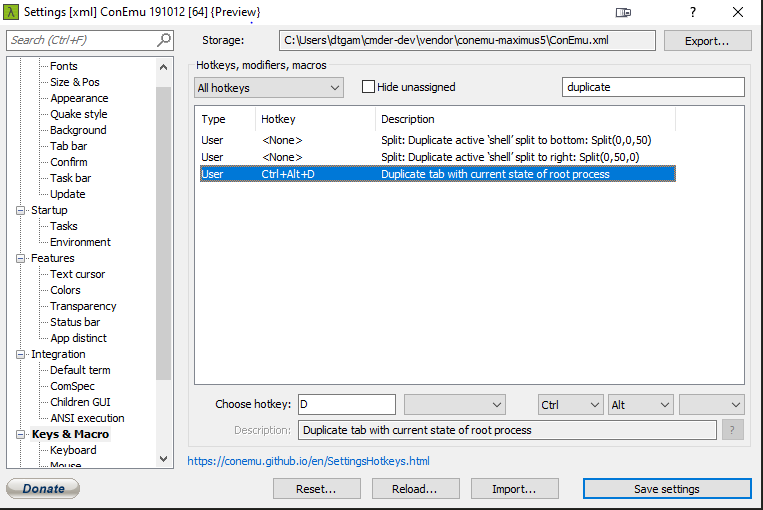
This works for me, Just not for bash or powershell.
daxgames
on 6 Apr 2020
@Wardrop sorry for the HORRIBLY delayed response, I just saw this today since another user responded to this issue and I got an email on that.
If you are using WSL you are not using Cmder. You are using WSL in ConEmu so your question might be better received in https://github.com/Maximus5/ConEmu/issues. I do not use WSL so I can't answer the question.
daxgames
on 6 Apr 2020
@Zephilinox does this work for you?
daxgames
on 6 Apr 2020
Sorry for the delayed response @daxgames
Duplicating the current state doesn't seem to preserve the directory. I open conemu, CD to a folder, duplicate the state in a new tab, and I'm back at my home directory ~
The ideal thing would be if I could do a split, with the new split terminal being the same directory as the original. My main usecase is that when programming, I open conemu, CD to the relevant folder, and split it 4-ways. I then later cd in to separate folders within that main one, but it's easier to do if they're all already in the root folder I need them to be in.
At the moment, I just copy and paste the same cd command to all of them. Not the worst thing in the world, but could be nicer.
Edit: ah sorry I didn't see that you said not bash or powershell. My main terminal is git-bash.
Zephilinox
on 15 Apr 2020
Related issues
 tfarina
·
3Comments
tfarina
·
3Comments
 sathishsoundharajan
·
3Comments
sathishsoundharajan
·
3Comments
 giuliannosbrugnera
·
3Comments
giuliannosbrugnera
·
3Comments
 jenisys
·
3Comments
jenisys
·
3Comments
 spooky
·
3Comments
spooky
·
3Comments
Most helpful comment
I defined a macro (ctrl+n) with below command that helps to open tabs in the same location.
Sometimes it is better to share the same window to have multiple split tabs using below GUI macro (shift+ctrl+n)
To define a macro, navigate to Settings - Key & Macro