Cmder: Problems using tmux on Host-side ?
Hi, when I ssh to a remote-box (e.g. Ubuntu or CentOS) I use often tmux or byobu-tmux for session-handling, multiwindow etc.. Unfortunately, this easily brakes my terminal-view as in my screenshot. This is easily reproducable with tmux, but also happens with other terminal-output as soon as it gets somewhat fancy. Same doesn´t happen in putty.
Anyone experiencing the same issues ?

 Dod9er
All 14 comments
Hi, I use tmux over cmder as well and I've been facing these same issues. It's the only problem I've encountered so far on what is otherwise an amazing terminal for windows.
 jaypatel384
on 15 Feb 2017
jaypatel384
on 15 Feb 2017
I've got the same exact issue. Has the former commenters found a temporary workaround? For now I've settled with using PuTTY, but I miss using Cmder.
ConEmu's maintainer stresses it is not a bug with ConEmu in Maximus5/ConEmu#590 but rather the downstream terminals. At the same time, this issue is tagged with upstream: ConEmu and I don't see this issue being resolved with both projects pointing at eachother. Is there anything I can do to help pinpoint and identify the bug?
__Update:__ The preview build of ConEmu that was released 6 days ago seems to have fixed an issue that may be related to this. I'm going test the preview version out and report back if this issue is resolved or persistent.
 Svenskunganka
on 13 Mar 2017
Svenskunganka
on 13 Mar 2017
Looks like preview build really solves this. I came here googling why tmux's status line is jumping up.
 olegstepura
on 20 Mar 2017
olegstepura
on 20 Mar 2017
Yes it seems to have fixed it, but at the same time I experienced some weird behaviour with colors & character encoding, especially with Vim. It was solved by running tmux -u -2. It has to be ran for all tmux commands, like tmux attach-session -u -2. To read what these parameters does, man tmux.
I think it it safe to say this issue is resolved.
Svenskunganka
on 20 Mar 2017
I have the latest preview build (170316) and I still have the problem. When I ssh to a server with byobu (tmux) enabled, the screen continuously scrolls. It should be updating byobu's status bar in place, not scrolling.
 HenryGessau
on 27 Mar 2017
HenryGessau
on 27 Mar 2017
I am having the same issue as well. Just wondering are you guys able to scroll up for the buffer in tmux? I am using conemu-cyg-64 connector.
 takizo
on 27 Apr 2017
takizo
on 27 Apr 2017
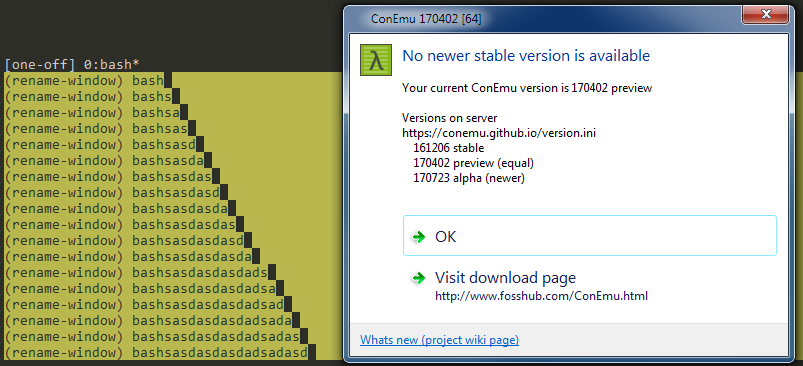
cmder has an issue with updating a line when using tmux. An easy way to reproduce this for example is to run yarn in a cmder session without tmux and in a session with tmux and see progress bars.
I have attached a screenshot to show it is still not fixed with the preview build of ConEmu.
 rteshnizi
on 24 Jul 2017
rteshnizi
on 24 Jul 2017
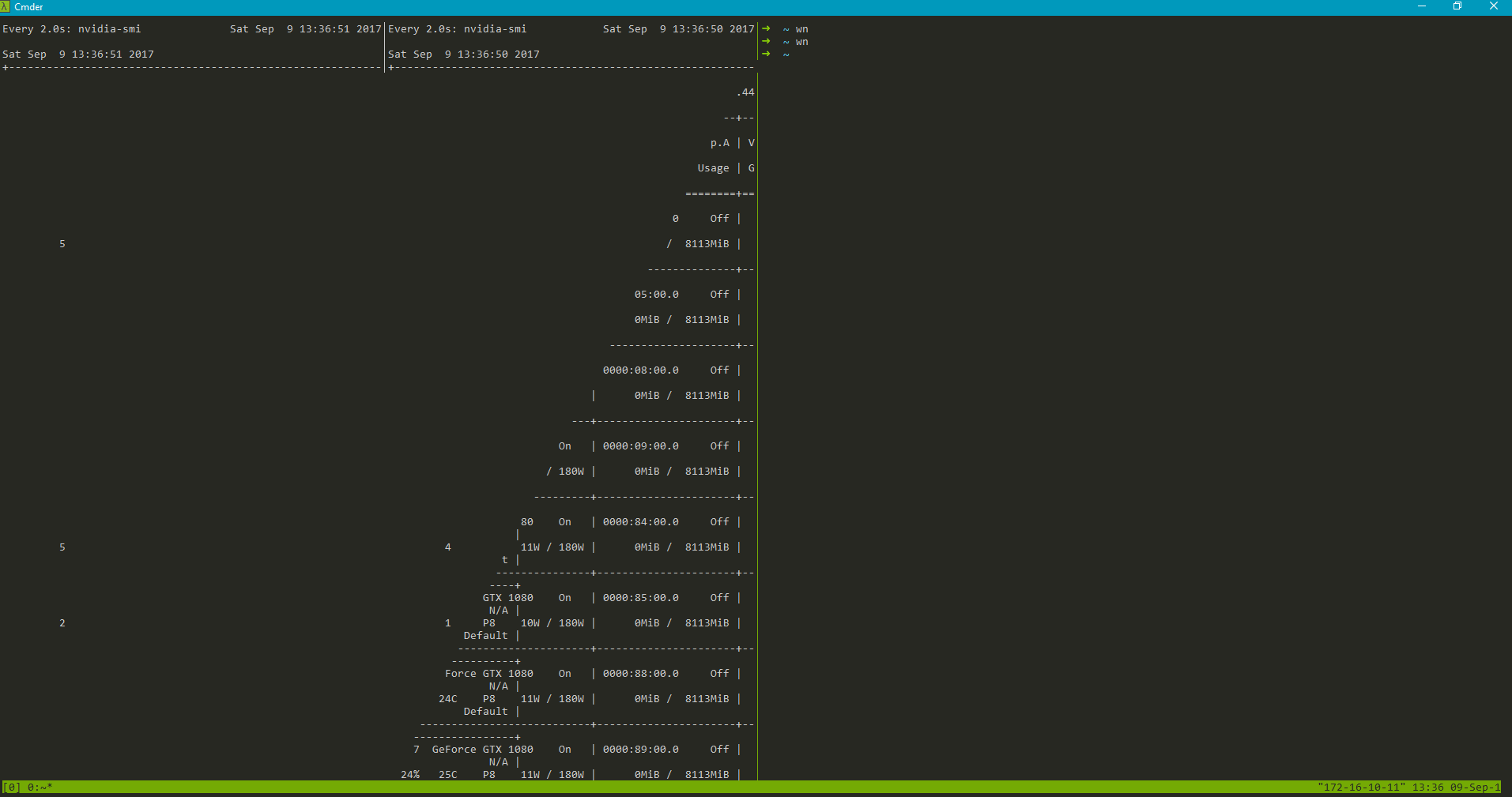
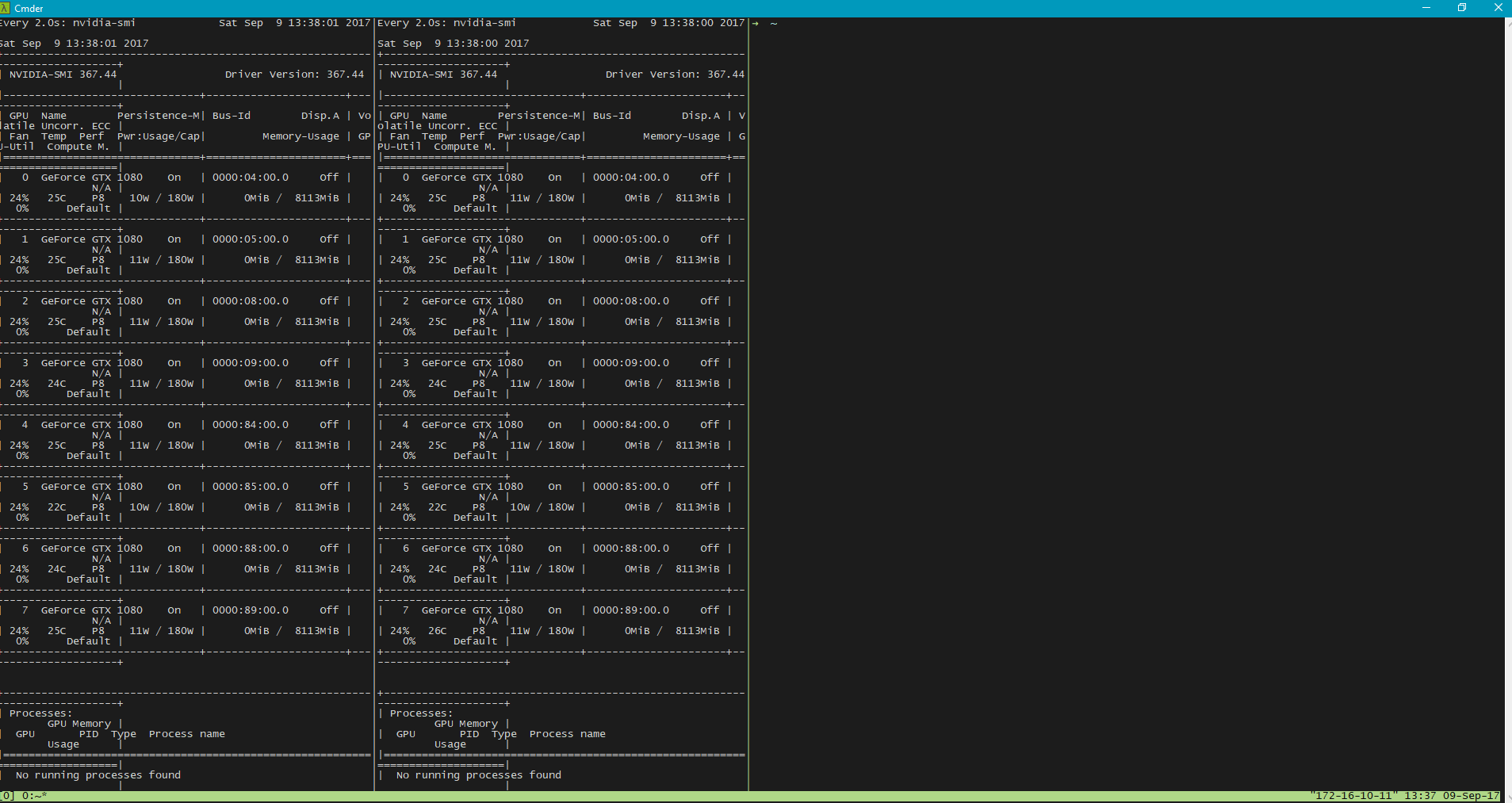
Confirmed that the tmux incompatibility issue can be resolved by combining cmder with babun. See the two screenshots attached. The bad one is using cmder with git for windows, the good one is using cmder with babun.
 wengcq
on 9 Sep 2017
wengcq
on 9 Sep 2017
It works because it's using mintty. cmder + mintty is working as well.
takizo
on 9 Sep 2017
Another way to avoid having the breaking drawing is to use WSL (Ubuntu bash on Windows) inside of cmder, steps here
I always had this problem when I ssh to a server, use tmux and split screens vertically to have vim on the side. Vim drawing always broke, and I always had to redraw the screen using Ctrl+b Next Ctrl+b Previous. Now with bash on Windows it works fine.
You can easily test this by splitting vertically, run htop on the left (because it's moving and draws on all the space), open a long file in vim on the right, then page down the file until the end.
 owkwen
on 31 Oct 2017
owkwen
on 31 Oct 2017
You can simply avoid this problem by using Bash::Cygwin bash for the startup task instead of the default cmd::Cmder

You can get Cygwin here, it's much smaller than Babun.
I guess the reason behind this problem is that the default task Cmder uses, cmd::Cmder, only fetches one line at a time from the remote machine and uses that line to update the whole frame by shifting the original lines up one step and then inserting the new line at the bottom. In a regular virtual terminal, the tmux status bar always sits at the bottom of the frame. So, each and every time the output of remote machine is updated, the status bar will be fetched to your Cmder terminal and soon your frame will be filled with green.
 Juan-Cortez3
on 3 Sep 2018
Juan-Cortez3
on 3 Sep 2018
Just throwing my 2 cents into this.
I've found that this issue does not arise if i enter a WSL instance beforehand.
To be clear:
Open cmder -> ssh -> tmux -> weird text shuffling might happen
Open cmder -> activate WSL instance (ubuntu 16.04 in my case) -> ssh -> tmux -> everything is nice
 ColombianViking
on 16 Nov 2018
ColombianViking
on 16 Nov 2018
I can confirm that @Juan-Cortez3's answer appears to work. However, you may have Cygwin installed, but need to click the Add/refresh default tasks... button for it to be automatically added to the tasks list.
 nayrangnu
on 22 Jan 2019
nayrangnu
on 22 Jan 2019
Just an update: mintty included in cmder package works fine with ssh + tmux, but mintty need to be started separately to setup the font/theme.
 georgix
on 18 Jul 2019
georgix
on 18 Jul 2019
Related issues
 edgariscoding
·
3Comments
edgariscoding
·
3Comments
 danwellman
·
3Comments
danwellman
·
3Comments
 zsedcbm
·
3Comments
zsedcbm
·
3Comments
 luisrudge
·
3Comments
luisrudge
·
3Comments
 AaronKaa
·
3Comments
AaronKaa
·
3Comments
Most helpful comment
I have the latest preview build (170316) and I still have the problem. When I ssh to a server with byobu (tmux) enabled, the screen continuously scrolls. It should be updating byobu's status bar in place, not scrolling.