Cmder: ls is not working correctly in cmder with unicode characters

All chars with unicode filenames is replaced when testing ls.

When with "ls -b" it is like that.
The git-bash is good:

 DaZui
DaZui
All 10 comments
@DaZui This work #985
set LANG=zh_CN.UTF-8 for your cmder Environment
 poychang
on 28 Sep 2016
poychang
on 28 Sep 2016
And if that doesn't work, set LANG=C.UTF-8 for generic UTF-8 support.
 mbirth
on 4 Apr 2017
mbirth
on 4 Apr 2017
@mbirth This worked for me.
dir commands worked fine but the ls didn't until I ran this.
Add the line to my user-config.cmd file so it always runs
OS: Win10 Japanese
 tyler36
on 11 Oct 2017
tyler36
on 11 Oct 2017
my solution
Win+Alt+P
Settings -> Environment
set PATH=%ConEmuBaseDir%\Scripts;%PATH%
set LC_ALL=ru_RU.UTF-8
set LANG=ru_RU.UTF-8
chcp utf8
set ConEmuDefaultCp=65001
 7dir
on 18 Jun 2018
7dir
on 18 Jun 2018
Tks!!Work for me
In PT-BR words like 'Correção' showed: 'Corre
set LC_ALL=ru_RU.UTF-8
set LANG=ru_RU.UTF-8
chcp utf8
set ConEmuDefaultCp=65001
It's work!
 thwyster
on 19 Sep 2018
thwyster
on 19 Sep 2018
Tks!!Work for me
In PT-BR words like 'Correção' showed: 'Correo' after use:
set LC_ALL=ru_RU.UTF-8
set LANG=ru_RU.UTF-8
chcp utf8
set ConEmuDefaultCp=65001It's work!
Man have you used ru_RU, not br_PT? Well... I've changed to br_PT ;) and it worked like a charm
set PATH=%ConEmuBaseDir%\Scripts;%PATH%
set LC_ALL=pt_BR.UTF-8
set LANG=pt_BR.UTF-8
chcp utf8
set ConEmuDefaultCp=65001
 marco-olimpio
on 19 Oct 2018
marco-olimpio
on 19 Oct 2018
Should be fixed in current version. Closing.
 daxgames
on 3 Dec 2018
daxgames
on 3 Dec 2018
Still not working for polish.
'ls' above with wrong naming and 'dir' bellow (good)
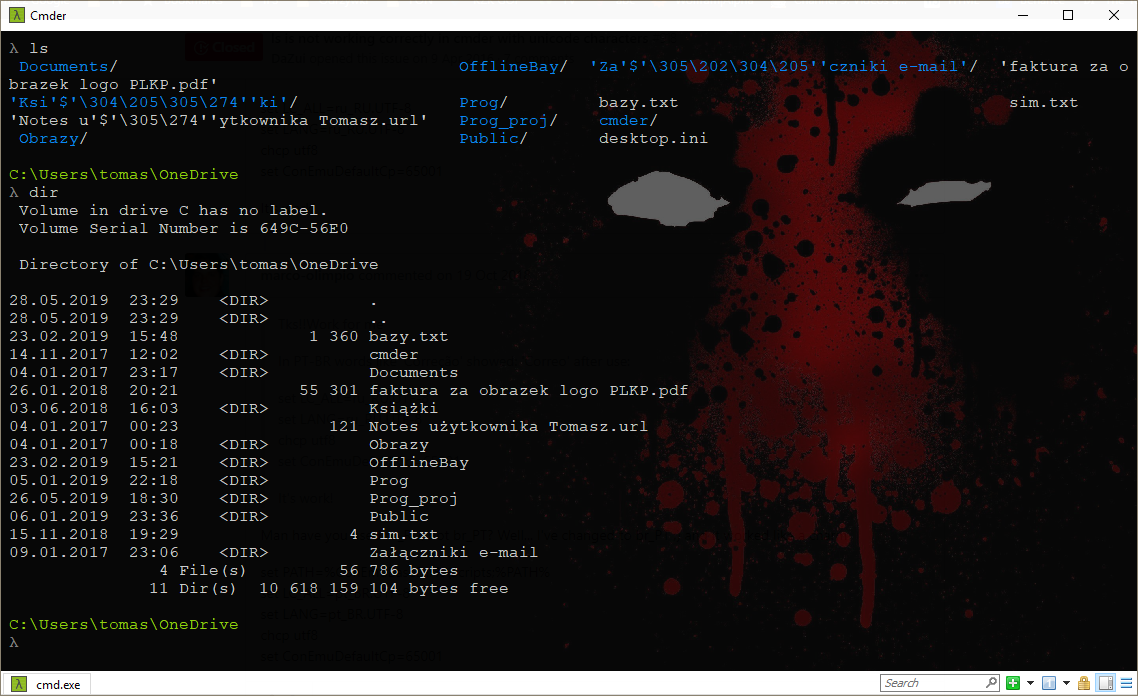
 TomaszGrzmilas
on 28 May 2019
TomaszGrzmilas
on 28 May 2019
For polish. It works like a charm :)
set LC_ALL=pl_PL.UTF-8
set LANG=pl_PL.UTF-8
chcp utf8
set ConEmuDefaultCp=65001
 HenrykSz
on 19 Dec 2019
HenrykSz
on 19 Dec 2019
Thanks you , thank you, thank you
For Vietnamese. It work like a charm :))
chcp utf-8
set LC_ALL=en_US.UTF-8
set LANG=en_US.UTF-8
chcp utf8
set ConEmuDefaultCp=65001
 kiemrong08
on 8 Jan 2020
kiemrong08
on 8 Jan 2020
Related issues
 emesx
·
3Comments
emesx
·
3Comments
 AaronKaa
·
3Comments
AaronKaa
·
3Comments
 jordanrobinson
·
3Comments
jordanrobinson
·
3Comments
 spooky
·
3Comments
spooky
·
3Comments
 luisrudge
·
3Comments
luisrudge
·
3Comments
Most helpful comment
my solution
Win+Alt+P
Settings -> Environment