Cmder: Support for the new Windows 10 bash shell
 born2net
All 72 comments
btw: how to enable the bash(linux) environment now?
 kebot
on 31 Mar 2016
kebot
on 31 Mar 2016
Not possible yet, will be available in a future insider build.
 Stanzilla
on 31 Mar 2016
Stanzilla
on 31 Mar 2016
i believe this bash come on Windows 2016 build
 sekti92
on 31 Mar 2016
sekti92
on 31 Mar 2016
They said it will be released as part of the summer 2016 build. Is there a way to get a hand on the beta version?
 DanielGGordon
on 31 Mar 2016
DanielGGordon
on 31 Mar 2016
Yes Insider builds of Windows 10, will be in the next or the one after that.
Stanzilla
on 31 Mar 2016
Why not, just need to see it working.
 MartiUK
on 31 Mar 2016
MartiUK
on 31 Mar 2016
Now the bash is available in Build 14316 and I've tried it with cmder. The problem is that arrow keys and Home/End/PgUp/PgDn don't work.
 mxalbert1996
on 8 Apr 2016
mxalbert1996
on 8 Apr 2016
@mxalbert1996 - how did you get it working? When I type bash into cmder, it takes me to MINGW64, not to the new Linux subsystem. The bash command works correctly in a normal command prompt, however.
 nloding
on 12 Apr 2016
nloding
on 12 Apr 2016
Same question here. Wondering how to configure cmder to load the linux subsystem with bash
 jkudish
on 12 Apr 2016
jkudish
on 12 Apr 2016
Turns out the latest development version (downloaded today) has integration for the new subsystem bash
jkudish
on 12 Apr 2016
I could probably research this myself, but I'm lazy - is the new Bash available in Windows 10 yet? Or just the Insider build?
DanielGGordon
on 12 Apr 2016
@DanielGGordon only in latest insider build
 gmsantos
on 12 Apr 2016
gmsantos
on 12 Apr 2016
@jkudish @nloding
https://conemu.github.io/blog/2016/04/11/Build-160411.html
 msenturk
on 12 Apr 2016
msenturk
on 12 Apr 2016
If you have the insider build installed, you can add linux subsystem bash support by adding a new task that points to:
cmd /k "C:\Windows\System32\bash.exe" -new_console:d:%USERPROFILE%
To those that have tried this, how is the experience? Does everything work as you would expect?
 rmorrin
on 18 Apr 2016
rmorrin
on 18 Apr 2016
Everything works as expected within Cmder. The shell is still a beta and I've run into a couple quirks that I've reported back to Microsoft, but overall it's pretty seamless. As long as the bash command launches you into the subsystem instead of MINGW64, Cmder works great! (Outside of the arrows, which is a known bug.)
nloding
on 18 Apr 2016
How is the performance? Cmder is great, but it does take slightly longer to respond than the native command line.
 crisbeto
on 18 Apr 2016
crisbeto
on 18 Apr 2016
I've not noticed much I'd call a performance issue, either with the new bash subsystem or Cmder. Cmder is only "slow" to launch for me; once it's open I've not had anything I'd call lag.
nloding
on 18 Apr 2016
How about ConEmu keybindings? Does the shell 'swallow' these in the same way it does with Mintty currently?
rmorrin
on 4 May 2016
@rmorrin so that's what I was excited about. It doesn't need to use Mintty, so all the ConEmu binding should work. I have been using Mintty, so I don't even remember which bindings don't work when using ConEmu + Mintty.
I know that ctrl + W to close a tab works now - but that does not work with Mintty (I think. I actually don't have it setup in front of me now).
DanielGGordon
on 4 May 2016
Thanks @jkudish that worked for me
 gavargas22
on 20 Jul 2016
gavargas22
on 20 Jul 2016
Can we get default scripts going for Cmder/Bash on Windows? Like, if I run the Bash task, it'll give me the folder in color, lambda below style, but the new Bash on Windows obviously doesn't work like that yet, etc.
 SimonMeskens
on 3 Aug 2016
SimonMeskens
on 3 Aug 2016
This is default in new update of WIndows 10 now, I have added of Cmder, but continues with a bug using the arrows.
 felipefialho
on 3 Aug 2016
felipefialho
on 3 Aug 2016
Guys how do you actually start the bash using Cmder?
 stanislavromanov
on 4 Aug 2016
stanislavromanov
on 4 Aug 2016
@stanislavromanov
You make a new task called Bash::Ubuntu
Task parameters:
/icon "%USERPROFILE%AppData\Local\lxssbash.ico"
Commands:
cmd /k "%SYSTEMROOT%\System32bash.exe" -new_console:d:%USERPROFILE%
Then you make a new task called Bash::Ubuntu as Admin
Task parameters same as before
Commands:
*cmd /k "%SYSTEMROOT%\System32bash.exe" -new_console:d:%USERPROFILE%
SimonMeskens
on 4 Aug 2016
@SimonMeskens Do you know why the arrows does't work?
felipefialho
on 4 Aug 2016
@LFeh You can add -cur_console:p to the Commands.

This is my settings and everything works perfectly.
mxalbert1996
on 4 Aug 2016
@SimonMeskens It's working like charm. Now I won't need to use the wrapper which lacking all kinds of basic functionality.
 asabla
on 4 Aug 2016
asabla
on 4 Aug 2016
@mxalbert1996 Doesn't work for me =(
felipefialho
on 4 Aug 2016
@mxalbert1996 Hey sorry but do you know how can I make sure that cmder will execute a command after launching the window? For example it would be good if it would execute zsh so that proper shell is loaded instead of default one.
stanislavromanov
on 4 Aug 2016
@LFeh Think I was just able to replicate this issue.
If I add my own Task to the command groups and then set it as my startup task, it won't be able to detect any of my keypresses (on any of the arrow keys). However, if then spawn a new window with the same task it will be able to detect my arrow keys again.
Maybe it's not reading all arguments upon starting Cmder?
asabla
on 4 Aug 2016
@stanislavromanov Use bash.exe -c zsh.
See: https://msdn.microsoft.com/en-us/commandline/wsl/reference?f=255&MSPPError=-2147217396
mxalbert1996
on 5 Aug 2016
@mxalbert1996 It's work for me. Thanks!
Using cmder minimal. :smile:
 deyvisonrocha
on 8 Aug 2016
deyvisonrocha
on 8 Aug 2016
Thanks @mxalbert1996 , it worked like a charm!
 ingro
on 11 Aug 2016
ingro
on 11 Aug 2016
Hey @asabla and @mxalbert1996, here my configs

The arrows doesn't work yet =(
felipefialho
on 15 Aug 2016
@LFeh I think you need to update ConEmu to the latest version 160724.
mxalbert1996
on 15 Aug 2016
@mxalbert1996 Nice, I'll to try tomorrow :wink:
felipefialho
on 15 Aug 2016
What about shortcut on taskbar that will open this "ubuntu" profile? Can this be achieved?
Here is example of question: https://superuser.com/questions/1112088/how-to-create-cmder-shortcut-to-start-a-task
stanislavromanov
on 16 Aug 2016
@mxalbert1996 It's works fine! Thanks!
Doubt, the Unix Bash doesn't use my public key?
Other problem is the symbols seems strange for me

felipefialho
on 16 Aug 2016
@LFeh from my understanding it's using a separate one. But you could just specify everything manually under ~/.ssh
asabla
on 17 Aug 2016
Sorry if this is a close-to-be stupid question, but is there a way to have all the colors / indicators things that are on this screenshot below ?
Because actually, it's rendering this way for me:

Thus I don't see where I'm winning from the original bash :disappointed: , I know I must have missed something but I can't find what.
Here is my actual configuration (taken from default tasks actually):

Bonus: If you know how I can make the "open here" work with this bash this would be very nice too, same thing, I've looked for this but when I click "Open here" in the explorer it opens the bash in the default folder.
 mbeaudru
on 11 Sep 2016
mbeaudru
on 11 Sep 2016
@mbeaudru AFAIK cmder can't interact with WSL so you have to customize everything inside bash.
mxalbert1996
on 11 Sep 2016
@mxalbert1996 Oh, okay :smile:. Any clue on how to do that by chance ?
mbeaudru
on 11 Sep 2016
@mbeaudru
Just install oh-my-zsh inside the bash and it will give you colors and all the stuff you want.
Steps:
apt-get install zsh git wgetwget https://github.com/robbyrussell/oh-my-zsh/raw/master/tools/install.sh -O - | zsh- chsh -s
which zsh - Close and open the bash
If it does not start automatically type zsh and see if it will run. Then you can add zsh command in your startup in cmder and it will be launched automatically on start by adding -c "zsh" in the command section.
stanislavromanov
on 14 Sep 2016
@mbeaudru I don't have it installed on this machine to confirm, but have you tried checking your .bashrc? I believe Ubuntu includes a default one that has the following somewhere:
#force_color_prompt=yes
Uncomment this line (remove the leading #) and then run source ~/.bashrc
rmorrin
on 14 Sep 2016
@rmorrin I did what you said but actually as installing oh-my-zsh did the trick I didn't noticed any difference...
But your belief were right, there was this commented line in the first place :+1:
mbeaudru
on 14 Sep 2016
The zsh history-substring-search isn't working for me when I am in bash-zsh through Cmder. This may just be because of the arrows bug...
 josephbergevin
on 15 Nov 2016
josephbergevin
on 15 Nov 2016
I used these instructions (found above) to set up a bash shell tab and I can now use my arrow keys. But when using ZSH, the up and down arrow keys should search through the .zsh_history for matches to the text. Instead they just pull up the last commands entered. Is anyone else experiencing this behavior using zsh in the bash shell inside Cmder?
josephbergevin
on 16 Nov 2016
@josephbergevin You have to enable this feature like this: https://coderwall.com/p/jpj_6q/zsh-better-history-searching-with-arrow-keys. Or basically you can use Oh My Zsh.
mxalbert1996
on 17 Nov 2016
@josephbergevin Can you show us your configuration on how you use zsh in cmder? I'm very curious. I have been able to use oh-my-zsh with Cygwin/babun, but I never got it working in the bash task.
DanielGGordon
on 17 Nov 2016
@DanielGGordon https://gist.github.com/MadLittleMods/0e38f03774fb16e8d698175e505f1f3e#want-zsh, :point_up: August 5, 2016 12:34 AM
 MadLittleMods
on 17 Nov 2016
MadLittleMods
on 17 Nov 2016
this step from stanislavromanov doesnt work for me
chsh -s which zsh
so i use this one instead
sudo chsh -s "$(command -v zsh)" "${USER}"
 egiathamaershada
on 8 Dec 2016
egiathamaershada
on 8 Dec 2016
When I type Win+S "bash.exe" cmder does not start. Only a regular console windows openes. Is this supported somehow? If not will it be?
 bitbonk
on 4 Feb 2017
bitbonk
on 4 Feb 2017
@bitbonk: I simply created a symlink to cmder (after renaming the original bash.exe in System32). For instance: mklink "C:\Windows\System32bash.exe" "C:\Users\NAME\Downloads\cmder\cmder.exe". Make cmder run the renamed bash.exe as startup shell then. This also allows you to type bash in windows explorer as path and invoke cmder with the current directory set as well.
You may also want to change the target of the "Bash on Ubuntu on Windows" shortcut to cmder.
 LMSDev
on 1 Apr 2017
LMSDev
on 1 Apr 2017
@LMSDev Why didn't I have to do this for cmd.exe, can't the same mechanism that works for cmd.exe also be used for bash.exe?
bitbonk
on 1 Apr 2017
@bitbonk I only stumbled upon cmder today because I installed the creators update, so I have no idea how it works with cmd.exe. This is just the workaround I came up with and which works fine for me. If there normally is a more graceful way of replacing that doesn't work with bash.exe, I can't help sorry.
LMSDev
on 1 Apr 2017
Could someone PR a README addition on how Bash For Windows should work with Cmdr please? This thread is TR;DR.
 tomByrer
on 30 Apr 2017
tomByrer
on 30 Apr 2017
@MadLittleMods posted a good link a few comments back. But I do agree with needing a readme or maybe just a new page on the wiki.
Although I do believe there is still an issue with arrow keys when using vim :(
Kind of a deal breaker for me honestly. I guess if you are a vim pro, it wouldn't bother you. But I'm pretty far from not using arrow keys when I'm in insert mode. And unfortunately, Microsoft has put this issue on the backlog for now, so realistically I don't think we'll see a fix for at least 6+ months
DanielGGordon
on 1 May 2017
@DanielGGordon Try adding -cur_console:p to your task command. After adding this I can use arrow keys in vim.
mxalbert1996
on 1 May 2017
I used this Gist to get Bash4Win working in Cmder. Arrow keys worked right away, 'LS_COLORS' is not :(
tomByrer
on 2 May 2017
Thanks @mxalbert1996, I create new task based on your screenshot, the arrow key works now.
 xulz
on 14 May 2017
xulz
on 14 May 2017
Hi everyone, firstly thanks so much, I'm running WSL on cmder and it is excellent! However, I seem to lose the "arrows working in vim" functionality when I open a second tabbed terminal - any idea what I can do to work around this?
 andrewandante
on 28 Jun 2017
andrewandante
on 28 Jun 2017
Is there an update on this?
ConEmu has a guide. https://conemu.github.io/en/BashOnWindows.html
Can Bash on Ubuntu on Windows be added as a default environment in Cmder?
 ehartford
on 11 Jan 2018
ehartford
on 11 Jan 2018
Yes @ehartford,
I have mine cmder loading on linux at start/default.

then changed the bottom to the Bash you just created.
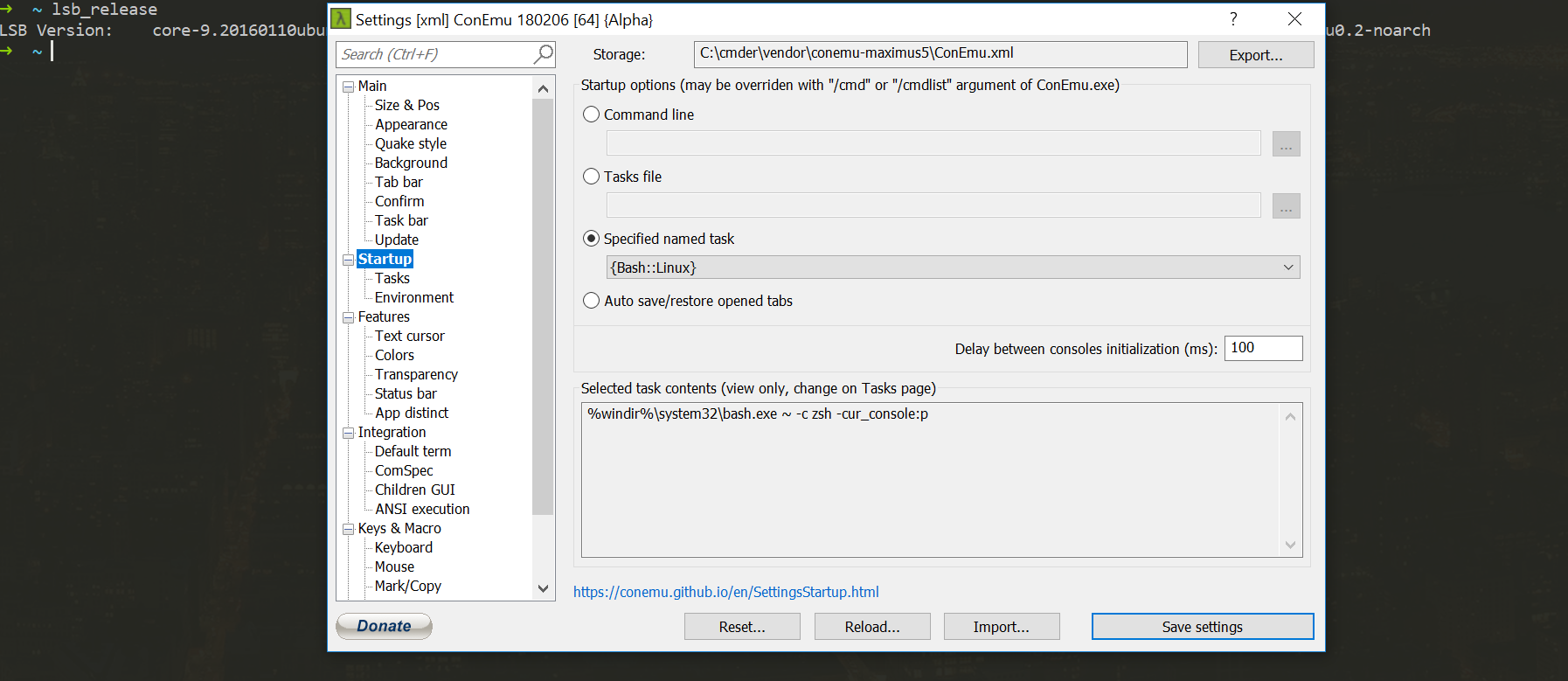
 codercodingthecode
on 4 Mar 2018
Stanzilla
on 23 Mar 2018
codercodingthecode
on 4 Mar 2018
Stanzilla
on 23 Mar 2018
On Microsoft Windows [Version 10.0.16299.611] %USERPROFILE%\AppData\Local\lxss\bash.ico is not found. Is there an updated location for the file?
 gliptak
on 1 Oct 2018
gliptak
on 1 Oct 2018
Hi,
I had the same problem with arrowkeys not working in vim when using cmder (E388: Couldn't find definition).
The solution which worked for me (since '-cur_console:p' had no effect) was adding the following line to the ~/.vimrc file:
:set term=builtin_ansi
I hope this may help anyone else,
have fun :)
 KuroKensei
on 4 Mar 2019
KuroKensei
on 4 Mar 2019
@DanielGGordon Try adding
-cur_console:pto your task command. After adding this I can use arrow keys in vim.
For anyone coming in here to read this, try replacing p with p5.
https://github.com/cmderdev/cmder/issues/1832#issuecomment-404006917
 CoskunSunali
on 11 Mar 2019
CoskunSunali
on 11 Mar 2019
Anyone able to get their tabs back after restarts when the task is WSL based?
My current task is:
cmd /c C:\Windows\System32\wsl.exe -cur_console:p5:d:D:\work
CoskunSunali
on 11 Mar 2019
Nice! @CoskunSunali p5 is worked for me. (Windows 10 1903)
 JonasGao
on 12 Aug 2019
JonasGao
on 12 Aug 2019
I'm having this issue when I ssh into a remote host and use vim. It doesn't matter which shell I'm using. It just doesn't work.
 lonelykid
on 22 Aug 2019
lonelykid
on 22 Aug 2019
For issues with the support of WSL in ConEmu, please open a ticket over there.
Stanzilla
on 22 Aug 2019
Related issues
 edgariscoding
·
3Comments
edgariscoding
·
3Comments
 vincentntang
·
3Comments
vincentntang
·
3Comments
 tfarina
·
3Comments
tfarina
·
3Comments
 justinmchase
·
3Comments
justinmchase
·
3Comments
 brunowego
·
3Comments
brunowego
·
3Comments
Most helpful comment
@stanislavromanov
You make a new task called Bash::Ubuntu
Task parameters:
/icon "%USERPROFILE%AppData\Local\lxssbash.ico"
Commands:
cmd /k "%SYSTEMROOT%\System32bash.exe" -new_console:d:%USERPROFILE%
Then you make a new task called Bash::Ubuntu as Admin
Task parameters same as before
Commands:
*cmd /k "%SYSTEMROOT%\System32bash.exe" -new_console:d:%USERPROFILE%