Hello,
I was wondering if this magnificent tool might enable automatic tab naming :+1:
I usually launch git bash within new tab, tab title remains : bash.exe or ssh.exe when connected to a server .. found the tab template, but won't help ..
I'd like at least for a windows opened tab to display the last folder's title
- for ssh connections to display the server name or adress ..
Because I have currently 16 opened tabs, 5 who displays "ssh.exe", 11 "bash.exe", not that convenient
http://www.cnet.com/news/how-to-use-ssh-host-names-for-tabs-in-the-os-x-terminal/
 Ben749
All 11 comments
cmd:
title HelloCmder
PowerShell:
$host.ui.RawUI.WindowTitle = "HelloCmder"
bash:
echo -ne '\e]0;HelloCmder\a'
Only the conemu version I'm using (151210) doesn't seem to rename the tabs, only when you right click the tab > rename it appears.
 MartiUK
on 27 Jan 2016
MartiUK
on 27 Jan 2016
Maybe you need something like in issue #14?
I recently searched how rename tab with alias. Now i got something like this:
mdbs=cd C:\Program Files\MongoDB\Server\3.0\bin && mongod --dbpath /data/db --smallfiles "-new_console:t:MongoDB Daemon"
This runs new console tab with name "MongoDB Daemon" and changes directory to mongodb dir, then runs mongod daemon.
Applying to your request of ssh connection name, it may be something like:
sshl=ssh $* "-new_console:t:$1"
For example:
sshl 127.0.0.1
This runs new console tab and change name to "127.0.0.1" (and for some reason icon of tab is not a cmder lamba, but windows shield icon).
Cmder have -cur_console, but i don't understand how make this work, it doesn't rename current tab or i do it wrong.
 alcovegan
on 27 Jan 2016
alcovegan
on 27 Jan 2016
I have the following alias to rename the current cmd tab:
title=cmd /c RenameTab "$*"
 glucas
on 4 Feb 2016
glucas
on 4 Feb 2016
@MartiUK It's actually an issue in the ConEmu config bundled with Cmder. In Main → Tab bar, the console tab template is set to %n, which is just the process name. You need to change it to %s to see the custom tab title.
Changing this config option to %s makes tab naming work fine for me. sshing to a remote server results in the tab name changing to daniel@server:~ which is exactly what I wanted :)
 Daniel15
on 13 Mar 2016
Daniel15
on 13 Mar 2016
@Daniel15 After setting the tab to %s, I just get cmd - ssh user@hostname.
How do you actually get current remote directory in the tab?
Is there a way to get cmder to use the PS1 of the remote Linux server for the tab name?
 xzxpurple2017
on 14 Aug 2016
xzxpurple2017
on 14 Aug 2016
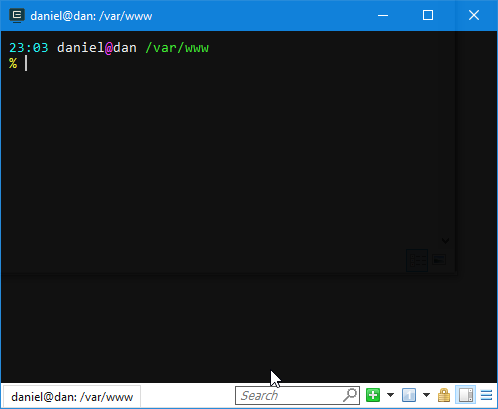
Hmm, the tab title is definitely set to the remote directory for me:
Daniel15
on 4 Sep 2016
@Daniel15 Would you be willing to share your remote shell configuration (like .zshrc), and any other relevant configs? I am curious if I can translate this feature to remote BASH shells.
xzxpurple2017
on 5 Sep 2016
@r57shell - I'm using "oh my zsh", which looks like it's handling it for me: https://github.com/robbyrussell/oh-my-zsh/blob/83cf8dc16f51babbb0193c5b97e568739c1f40de/lib/termsupport.zsh#L44,L59. I'm a bit of a n00b with things like this so I'm not sure what the Bash equivalent is :stuck_out_tongue:
Daniel15
on 5 Sep 2016
@Daniel15 - Thanks! That is very helpful. I think I might have an idea now.
xzxpurple2017
on 5 Sep 2016
@Daniel15 - Yes! Got it to work actually.
To fix the problem, add this to your .bashrc:
If this is an xterm set the title to user@host:dir
case "$TERM" in
xterm_|rxvt_)
PS1="[\e]0;${debian_chroot:+($debian_chroot)}\u@\h: \w\a]$PS1"
;;
cygwin*)
PS1="[\e]0;${debian_chroot:+($debian_chroot)}\u@\h: \w\a]$PS1"
;;
*)
;;
esac
I uploaded my .bashrc for reference.
r57shell_github_cmder_working_tabs_bashrc.txt
xzxpurple2017
on 5 Sep 2016
What about those IPs which doesn't have the above lines in ~/,bashrc?
For them, I would just want to display the IP. How is it possible here?
But unfortunately, unless I login to that IP, that setting is not known.
One workaround is to set the default title to the IP and then if the bashrc has those lines, then change it to current directory.
But how to do this?
 jtechpro
on 1 Apr 2019
jtechpro
on 1 Apr 2019
Related issues
 danwellman
·
3Comments
danwellman
·
3Comments
 sathishsoundharajan
·
3Comments
sathishsoundharajan
·
3Comments
 jenisys
·
3Comments
jenisys
·
3Comments
 bmeverett
·
3Comments
bmeverett
·
3Comments
 spooky
·
3Comments
spooky
·
3Comments
Most helpful comment
@MartiUK It's actually an issue in the ConEmu config bundled with Cmder. In Main → Tab bar, the console tab template is set to
%n, which is just the process name. You need to change it to%sto see the custom tab title.Changing this config option to
%smakes tab naming work fine for me.sshing to a remote server results in the tab name changing todaniel@server:~which is exactly what I wanted :)