Cmb2: File-list returns in a different order
Hi.
I'm using CMB2 to create a meta field on a post. The field is a file-list (image gallery). When I upload a bunch of images, they look fine on the post edit page, i can even re-order them and they will look fine.
The problem is, when I try outputting the images on the front end using the example in the docs: https://github.com/CMB2/CMB2/wiki/Field-Types#file_list, or even through the REST api the order of the files are changed, they are in an ascending order (by image_id) always.
As i need to fix this urgently for my site, can you please provide me details on the code you use to get the right order on the admin page please, and I can try replicate that for the front-end. Thank you :)
 DardanMu
All 10 comments
I don't have an answer for how to handle that, as I've never seen it come up in other support requests thus far. One question I have is are they in order when viewing in the database directly, before doing a get_post_meta() ?
Do you have your CMB2 config handy that you could share for this?
 tw2113
on 23 Jun 2018
tw2113
on 23 Jun 2018
@tw2113 Thanks for your quick reply. Yes they are in order when viewing it in the DB directly.
I did a little more digging, the issue seems to be that they are saved in the db like this:
a:2:{i:50;s:107:"url_here1";i:13;s:56:"url_here2";}
array( (image_id => url) )
where image_id is an int. I think when you call get_post_meta() it unserializes the array but thinks the int keys are actually the index in simple array? which is why they may be returned in a ordered fashion like that.
However if you loop over the result like this: foreach ($id => $value in get_post_meta()) {}, it seems to work fine, with every iteration being in the correct order...
so maybe an easy fix would be to store the id's as a string?
DardanMu
on 23 Jun 2018
Not managing to recreate at the moment.
I have this saved as a meta value, exactly:
a:2:{i:50;s:9:"url_here1";i:13;s:9:"url_here2";}
When doing this:
var_dump( get_post_meta( 180, 'thing', true ) );
I am getting these results:
array (size=2)
  50 => string 'url_here1' (length=9)
  13 => string 'url_here2' (length=9)
So I'm not seeing any sort of automated ordering, at least not with my local setup.
tw2113
on 24 Jun 2018
@tw2113 hmm you are right. get_post_meta() returns the data in the correct order as saved in the DB. To test this I was using a WP rest endpoint so the data I was seeing was first going through a json_encode() function <- and that is where the problem lies.
Sending an array with int keys through a JSON serialiser will change the order just because of how javascript works. Relevant: https://stackoverflow.com/questions/20912492/json-encode-not-preserving-order
I apologize since this is not an issue related to this plugin. But currently requesting cmb2 file_list data through the WP rest api will not have the correct order. As a work around i've created my own custom endpoint to get the results in the right order. A little annoying but it works.
Thanks again for looking into it so soon.
DardanMu
on 24 Jun 2018
Welcome.
tw2113
on 24 Jun 2018
The order, when json_encoded, is definitely wrong, but I'm a bit stuck on what to do to fix it. If I "fix it", I will have to change the format of the value (where the index is no longer the field ID), and it will break backwards-compatibility for any users who are using it as-is currently. Open to suggestions.
 jtsternberg
on 2 Aug 2018
jtsternberg
on 2 Aug 2018
Hi there,
Having a similar problem here.
We are getting a list of images from a CMB2 file_list type, and the order the list of images is returned from the API is the same as they were uploaded to the media library. So, the order the images are listed on the backend, does not replicates the order they are being shown up on the front.
Have you comed up with a fix for this?
Is there a way I can get the order the images are ordered on the file list CMB2 on the backend, at least?
 ghost
on 23 Apr 2019
ghost
on 23 Apr 2019
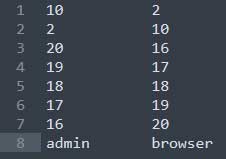
On the left (admin) is the name of the images, in the order they are listed on the backend file_list.
On the right (browser) is the name of the images, in the order they are being shown on the front end, which is the exact same order these images were uploaded to the wordpress media library.
If I could get the order the images are listed on the list flie CMB2 on the backend, I could reorder them at least, I guess.
ghost
on 23 Apr 2019
@DardanMu could you share your custom endopoint code ?
ghost
on 23 Apr 2019
I have added a snippet to the snippet library that you can use to update the specific fields you are using to use the preserved correct order: https://github.com/CMB2/CMB2-Snippet-Library/blob/master/api/cmb2-file-list-ordered.php
Simply replace _yourprefix_demo_file_list with your own file_list field's id.
jtsternberg
on 23 Apr 2019
Related issues
 gorirrajoe
·
4Comments
gorirrajoe
·
4Comments
 noquierouser
·
8Comments
noquierouser
·
8Comments
 alanef
·
4Comments
alanef
·
4Comments
 jquimera
·
8Comments
jquimera
·
8Comments
 stabilimenta
·
8Comments
stabilimenta
·
8Comments
Most helpful comment
I have added a snippet to the snippet library that you can use to update the specific fields you are using to use the preserved correct order: https://github.com/CMB2/CMB2-Snippet-Library/blob/master/api/cmb2-file-list-ordered.php
Simply replace
_yourprefix_demo_file_listwith your ownfile_listfield's id.