Cmb2: Radio Image Option not working: Images not appearing in the back-end to choose.

add_action( 'cmb2_admin_init', 'radio_template' );
function radio_template(){
    $cmb = new_cmb2_box( array(
        'id'            => $prefix . 'metabox',
        'title'         => __( 'Select The template for you Post Page', 'cmb2' ),
        'object_types'  => array( 'page', 'post' ), // Post type
        // 'show_on_cb' => 'yourprefix_show_if_front_page', // function should return a bool value
        // 'context'    => 'normal',
        // 'priority'   => 'high',
        // 'show_names' => true, // Show field names on the left
        // 'cmb_styles' => false, // false to disable the CMB stylesheet
        // 'closed'     => true, // true to keep the metabox closed by default
    ) );

   $cmb->add_field( array(
            'name'             => __( 'Select Template', 'cmb2' ),
            'desc'             => __( 'field description (optional)', 'cmb2' ),
            'id'               => $prefix . 'template_selector',
            'type'             => 'radio_image',
            'options'          => array(
                'full-width'    => __('Full Width', 'cmb2'),
                'sidebar-left'  => __('Left Sidebar', 'cmb2'),
                'sidebar-right' => __('Right Sidebar', 'cmb2'),
            ),
            'images_path'      => get_template_directory_uri(),
            'images'           => array(
                'full-width'    => 'images/full-width.png',
                'sidebar-left'  => 'images/sidebar-left.png',
                'sidebar-right' => 'images/sidebar-right.png',
            )
        ) );
}
Images are not appearing in the backend. I have added just one image: 'sidebar-right' => 'images/sidebar-right.png',
but that too is not coming in the backend.

what is the cause?

 fastmarketo
All 34 comments
Not familiar with a "radio_image" field type. Is it coming from some CMB2 extension you have installed? If yes, the GitHub/Support page for that extension would be the best place to go to. The only two radio field types that come with CMB2 core, are "radio" and "radio_inline"
 tw2113
on 25 Sep 2017
tw2113
on 25 Sep 2017
I have simple CMB2 plugin installed. I used this → https://github.com/satwinderrathore/CMB2-radio-image
fastmarketo
on 25 Sep 2017
You'll want to open up an issue over at https://github.com/satwinderrathore/CMB2-radio-image/issues or perhaps have @satwinderrathore step in here.
Closing this issue as it's not directly related to CMB2 core, but feel free for potential discussion beyond that.
tw2113
on 25 Sep 2017
thanks. do you think that w/o using any extension we can achieve what I am trying to achieve? It is not easy to trust new extensions. I hope I am not spamming the post.
fastmarketo
on 25 Sep 2017
I imagine you could, that type of effect is heavily CSS.
tw2113
on 25 Sep 2017
sir, I have a humble request I hope you do not feel offended. As a plugin maker can you please include this feature in the (primary) plugin itself. I am distributing your plugin in a commercial theme; that way it will look more professional if everything(all meta's) is coming via one plugin.
fastmarketo
on 25 Sep 2017
Please make sure you are using the proper template tag for path.
 satwinderrathore
on 25 Sep 2017
satwinderrathore
on 25 Sep 2017
this is the theme setup → https://www.screencast.com/t/A4iy5GYPZo and this the code → Can you identify if I am going wrong anywhere→ https://www.screencast.com/t/wGdWbdCkfPdE?
fastmarketo
on 25 Sep 2017
this is the image →

fastmarketo
on 25 Sep 2017
Your code is okay, Please make sure images exists in the folder and you are using the main theme(parent theme)
satwinderrathore
on 25 Sep 2017
I think everything is in place → https://www.screencast.com/t/kvXj3snq that's what is astonishing me a lot why things are not working; the only image is not appearing. https://www.screencast.com/t/k80OIpegC
fastmarketo
on 25 Sep 2017
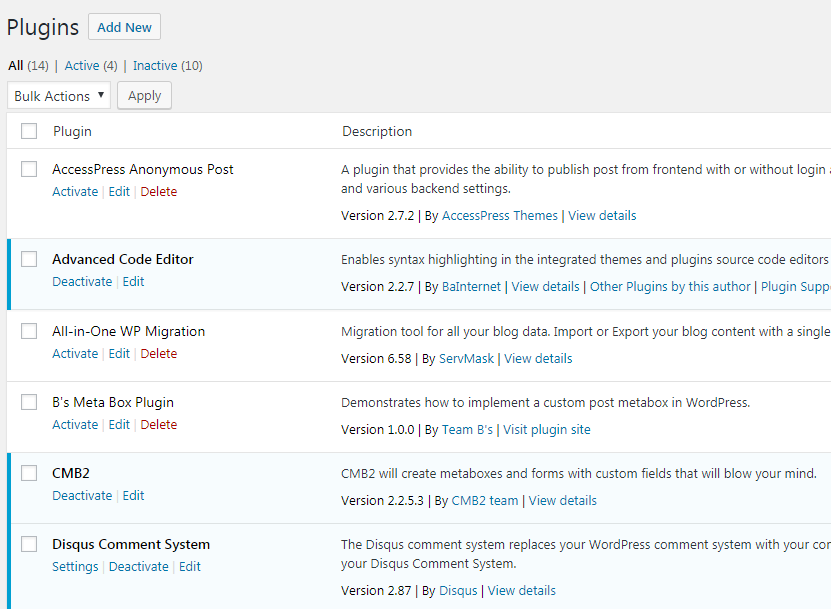
Just wanted to step in and say...it doesn't look like you have the Radio Image plugin installed at all. I just see CMB2 core. See the screenshot at https://github.com/CMB2/CMB2/issues/1029#issuecomment-331754577
tw2113
on 25 Sep 2017
can you please include this feature in the (primary) plugin itself
I'm not sure the issue, but this is fairly trivial to do. E.g.
$cmb_demo->add_field( array(
    'name'    => __( 'Image Radio', 'cmb2' ),
    'desc'    => __( 'Use images for the radio button labels', 'cmb2' ),
    'id'      => '_yourprefix_demo_radio_images',
    'type'    => 'radio_inline',
    'options' => array(
        'img1' => '<img src="http://via.placeholder.com/350x150/E8117F/ffffff?text=Image%201" alt="Image 1" title="Image 1">',
        'img2' => '<img src="http://via.placeholder.com/350x150/f9a82f/ffffff?text=Image%202" alt="Image 2" title="Image 2">',
        'img3' => '<img src="http://via.placeholder.com/350x150/49aed7/ffffff?text=Image%203" alt="Image 3" title="Image 3">',
    ),
) );
 jtsternberg
on 25 Sep 2017
jtsternberg
on 25 Sep 2017
Actually, the template selection through images is quite a common thing in today's premium theme. This feature should be included in the plugin in its entirety, including the CSS because as soon as we dive too much into customizing a plugin than the purpose of using a plugin is defied. Secondly, it will look just unprofessional in a premium/commercial theme to add extensions of a plugin, which itself is bundled with TMG. The sole idea of the discussion is to convey that this should be a useful feature already built-in the main plugin w/o requiring any CSS writing as in the case of the example suggested by you. I tried the code suggested by you it needs CSS tweaks.
fastmarketo
on 25 Sep 2017
Hi, hope you don't mind me chiming in. I actually use cmb2 within my theme and also the radio image extension that @tw2113 referenced.
@fastmarketo, if CMB2 is a requirement of your theme, then you could just include it as a core file then add the extension on top of it like I have done. Or if you pref to have CMB2 be installed with TMG, you could instead include only the extension in your core theme and have it check if CMB2 exist before being used.
 bnecreative
on 25 Sep 2017
bnecreative
on 25 Sep 2017
Let's not delve into the topic of what plugins should do what and where sources.
@fastmarketo the biggest issue I saw, after looking things over a bit closer last night is that while CMB2 core plugin is installed and active, the Radio Images plugin is not. Until both are installed and active, you're not going to have a populated metabox. I copy/pasted your CMB2 code for the radio image box into a local install and images were showing for me, selectable, and everything. So the plugin pair is working, at least when properly paired up.
Once you get that detail taken care of and tested, we can work from there.
tw2113
on 25 Sep 2017
I am now using this, but this is not simple HTML, but coming through code and dynamic array →
https://github.com/CMB2/CMB2/issues/1029#issuecomment-331876878
The solution to make it image selective lies here →
https://codepen.io/paulobrien/pen/xbJjs?editors=1010
But how to implement this in terms of CSS and specially structured HTML to render this all.
fastmarketo
on 5 Oct 2017
If it's coming through as an array, then you'll want to do a foreach loop on that variable and output that way, instead of just trying to echo the variable holding the data.
tw2113
on 5 Oct 2017
can you show me how with a sample sir?
fastmarketo
on 5 Oct 2017
$cmb->add_field( array(
    'name'    => __( 'Image Radio', 'text_domain' ),
    'desc'    => __( 'Use images for the radio button labels', 'text_domain' ),
    'id'      => '_yourprefix_demo_radio_images',
    'type'    => 'radio_inline',
    'options' => array(
        'img1' => '<img src="<?php echo get_template_directory_uri(); ?>/inc/admin/images/layout_one.png" alt="Image 1" title="Image 1">',
        'img2' => '<img src="<?php echo get_template_directory_uri(); ?>/inc/admin/images/layout_one.png" alt="Image 2" title="Image 2">',
        'img3' => '<img src="<?php echo get_template_directory_uri(); ?>/inc/admin/images/layout_one.png" alt="Image 3" title="Image 3">',
        'img1' => '<img src="<?php echo get_template_directory_uri(); ?>/inc/admin/images/layout_one.png" alt="Image 1" title="Image 1">',
        'img2' => '<img src="<?php echo get_template_directory_uri(); ?>/inc/admin/images/layout_one.png" alt="Image 2" title="Image 2">',
        'img3' => '<img src="<?php echo get_template_directory_uri(); ?>/inc/admin/images/layout_one.png" alt="Image 3" title="Image 3">',
        'img1' => '<img src="<?php echo get_template_directory_uri(); ?>/inc/admin/images/layout_one.png" alt="Image 1" title="Image 1">',
        'img2' => '<img src="<?php echo get_template_directory_uri(); ?>/inc/admin/images/layout_one.png" alt="Image 2" title="Image 2">',
        'img3' => '<img src="<?php echo get_template_directory_uri(); ?>/inc/admin/images/layout_one.png" alt="Image 3" title="Image 3">',
    ),
) );
/inc/admin/images/layout_one.png → Is this not the correct method to include images in the post backend page meta?
fastmarketo
on 1 Nov 2017
I see nothing wrong with the method above, as long as the images are in that location and the generated url is complete and accurate
tw2113
on 1 Nov 2017
I see nothing wrong with the method above, as long as the images are in that location and the generated url is complete and accurate.
'img1' => '<img src="<?php echo get_template_directory_uri(); ?>/inc/admin/images/layout_one.png" alt="Image 1" title="Image 1">',
Shouldn't it be something like this?
'img1' => '<img src="' . echo get_template_directory_uri(); . '/inc/admin/images/layout_one.png" alt="Image 1" title="Image 1">',
 pgroot91
on 1 Nov 2017
pgroot91
on 1 Nov 2017
i stand corrected :D but @Zaanmedia doesn't quite have it right either.
Try below:
$cmb->add_field( array(
    'name'    => __( 'Image Radio', 'text_domain' ),
    'desc'    => __( 'Use images for the radio button labels', 'text_domain' ),
    'id'      => '_yourprefix_demo_radio_images',
    'type'    => 'radio_inline',
    'options' => array(
        'img1' => '<img src="' . get_template_directory_uri() . '/inc/admin/images/layout_one.png" alt="Image 1" title="Image 1">',
        'img2' => '<img src="' . get_template_directory_uri() . '/inc/admin/images/layout_one.png" alt="Image 2" title="Image 2">',
        'img3' => '<img src="' . get_template_directory_uri() . '/inc/admin/images/layout_one.png" alt="Image 3" title="Image 3">',
        'img1' => '<img src="' . get_template_directory_uri() . '/inc/admin/images/layout_one.png" alt="Image 1" title="Image 1">',
        'img2' => '<img src="' . get_template_directory_uri() . '/inc/admin/images/layout_one.png" alt="Image 2" title="Image 2">',
        'img3' => '<img src="' . get_template_directory_uri() . '/inc/admin/images/layout_one.png" alt="Image 3" title="Image 3">',
        'img1' => '<img src="' . get_template_directory_uri() . '/inc/admin/images/layout_one.png" alt="Image 1" title="Image 1">',
        'img2' => '<img src="' . get_template_directory_uri() . '/inc/admin/images/layout_one.png" alt="Image 2" title="Image 2">',
        'img3' => '<img src="' . get_template_directory_uri() . '/inc/admin/images/layout_one.png" alt="Image 3" title="Image 3">',
    ),
) );
@tw2113 was pretty close... 😂 but that looks more like it!
pgroot91
on 1 Nov 2017
Thanks.
fastmarketo
on 1 Nov 2017
How to make one among these as the default layout?
fastmarketo
on 1 Nov 2017
Don't know personally, that'd be a question more for @satwinderrathore at the moment
tw2113
on 1 Nov 2017
I am not using his plugin I have styled it myself with the basis of CSS. I think it is a basic question related to meta.
fastmarketo
on 1 Nov 2017
if you're rendering your own radio buttons and whatnot, you could see about using something like the WP selected function.
If you're using the radio field type, try setting a default like shown at https://github.com/CMB2/CMB2/wiki/Field-Types#radio_inline
tw2113
on 1 Nov 2017
I am using this for selecting the layout. How should I pick the condition?
I mean →
If certain condition {echo class1;}
fastmarketo
on 1 Nov 2017
That looks like it'd be good for conditionally showing classes for CSS purposes, but it doesn't do anything for filling in the form to be saved for the post saving process and resulting post meta data.
tw2113
on 1 Nov 2017
I dont know what you are saying, but all these images are created and loaded in teh post meta. the user can select the post layout based on the image selected, but I need correct If condition for that.
fastmarketo
on 1 Nov 2017
You need to make sure you're actually be saving a value for what they chose too.
From the looks of things, some sort of value should be getting saved to a meta key of _yourprefix_demo_radio_images
You can use get_post_meta() in your code, using the current post ID and that meta key knowledge to fetch what you currently have saved if anything, and determine which to highlight based on that returned value. Chances are high that what's going to get returned is the html for the selected image, based on what I'm seeing in previous code snippets.
tw2113
on 1 Nov 2017
If we add this CSS then radio_inline option can be used for images also →
input.cmb2-option[type=radio]{
  position:absolute;
  left :-999em
}
input.cmb2-option[type=radio] + label img{
  border:2px solid transparent;
}
input.cmb2-option[type=radio]:checked + label img{
  border:2px solid #000000;
}
I think you can add this CSS into the plugin.
fastmarketo
on 15 Nov 2017
Related issues
 jflagarde
·
6Comments
tw2113
·
8Comments
jflagarde
·
6Comments
tw2113
·
8Comments
 noquierouser
·
8Comments
noquierouser
·
8Comments
 needtakehave
·
7Comments
needtakehave
·
7Comments
 bomsn
·
5Comments
bomsn
·
5Comments