Cmb2: Repeatable Field - New item takes value from previous one
Expected Behavior:
When I am adding items in repeater (for example slides in slider) it should give me new field with empty fields (like slide title, url, image).
Actual Behavior:
Instead, it takes some of the values from previous slide.
This happens with CUSTOM fields (individually built fields for CMB2) and there is no identificator (ID for the new field which we could use for workaround - whole field object is being duplicated.
Steps to reproduce (I have confirmed I can reproduce this issue on the trunk branch):
- Create some custom field for CMB2
- Use that field in Repeatable Group
- Try adding items in this group
CMB2 Field Registration Code:
You could use exactly these examples - https://github.com/WebDevStudios/CMB2/wiki/Adding-your-own-field-types
 kshengelia
All 29 comments
It'd still be useful for us on the support side to have a gist or so of exactly what you're using. I know you provided a link to the wiki, but that doesn't help me enough to know which snippets from the page you used.
 tw2113
on 4 Feb 2017
tw2113
on 4 Feb 2017

So this is a screenshot. A repeater field with my field (code is also shown on screenshot).
So the third item is added by "Add New" button after page reload (so the other two was already there when I opened this page).
This third item took all the values and arguments of CMB field from the second item. $field, $escaped_value and all others are taken from second item.
You can see that 41 is an ID of "Basketball" post and it is copied to third item as well.
kshengelia
on 6 Feb 2017
I appreciate the screenshots and whatnot, but the code you're using to create these metaboxes and repeaters are still valuable, so that I can try things out on a local install using the exact same configuration that is being troublesome.
tw2113
on 6 Feb 2017
Sorry, I don't understand, could you rephrase?
kshengelia
on 8 Feb 2017
The code similar to what you see here: https://github.com/WebDevStudios/CMB2/blob/trunk/example-functions.php#L109-L153 where you added your desired fields/configurations for the fields.
tw2113
on 8 Feb 2017
My coworker has been trying to explain to you for several days that the CMB2 group type field has bug while using an individual field.
When does the bug occur? How to provoke it?
this requires:
1) To register a new post type
2) To create individual field by using CMB2
3) To create other fields where there would be a text and the second field created by us in the group type of the field.
4) Click on Add Group
The code is given below and the bug is shown on the screenshot.

1. Post Type
add_action('init', function() {

    $args = [
        'labels'                 => [
           'name'                 => 'Test',
           'singular_name'  => 'Test',
           'menu_name'      => 'Test'
           ],
               'description'              => 'Description',
        'public'                     => true,
        'publicly_queryable' => true,
        'show_ui'                  => true,
        'show_in_menu'       => true,
        'query_var'               => true,
        'has_archive'            => true,
        'hierarchical'             => false,
        'menu_position'        => null,
        'supports'                  => ['title', 'editor']
    ];

    register_post_type('test', $args);

});
2. Custom Field
add_action('cmb2_init', function() {

    add_action('cmb2_render_tw2113', function($field, $escaped_value, $object_id, $object_type, $field_type)
    {

        echo 'New item takes value from previous one <br />';
        echo '----- ----- ---';
        var_dump($escaped_value);

    }, 10, 5);

});
3. CMB2 Fields
add_action('cmb2_init', function() {

    $cmb = new_cmb2_box([
        'id'           => 'test',
        'title'        => 'Test',
        'object_types' => ['test'],
        'context'      => 'normal',
        'priority'     => 'default'
    ]);

    $group_field_id = $cmb -> add_field([
        'id'   => 'group',
        'type' => 'group'

    ]);

    $cmb -> add_group_field($group_field_id, [

        'id'   => 'text',
        'name' => 'Text Field',
        'type' => 'text'

    ]);

    $cmb -> add_group_field($group_field_id, [

        'id'   => 'tw2113',
        'name' => 'Custom Field',
        'type' => 'tw2113'

    ]);

}, 20, 2);
As you see, while adding the new Repeater Item, the field tw2113 has recieved the meaning of the upper tw2113 field, $field, $escaped_value, $object_id, $object_type, $field_type in variables, from which i typed $escaped_value where it is obvious that it has recieved the meaning of upper item which is input in a tw2113 field.
Is everything clear now?
 guramsutidze
on 15 Feb 2017
guramsutidze
on 15 Feb 2017
Copy/pasted the code above into a mu-plugin to get things going for this setup, and I'm not managing to recreate at the moment.
Screenshot of my metabox area with a couple groups populated with different text values:

Entire PHP file I'm using to set up the post type, metabox, etc: https://gist.github.com/tw2113/b5f2abe23cf46bc1d5c10d0b381daa0d
What has me curious is the fact that the metabox layout is different compared to your screenshot @guramsutidze, which has me curious if the code used to show the screenshot is different from the code provided to me. Either that, or it's from a different version of CMB2. I am using the master branch here from GitHub, which corresponds to the current version available on wordpress.org.
tw2113
on 15 Feb 2017
@tw2113 Layouts are different because i have default styles of CMB2 turned off and in order to improve repeater and visual i am using my own css and javascript. There is nothing to do with layout, the bug is on the server side. PHP bugs it, not css/js. if you are not competent about it, just let other developers of WebDevStudio to help me here and fix this bug in the next release of CMB2.
guramsutidze
on 16 Feb 2017
Noted regarding the styling differences.
My server side isn't recreating the bug, and I'm using the code you provided. With all due respect, until someone else can recreate with a bare install, it's hard to consider it a bug. I am not aware of anyone else having the same issue.
I have the group set up, it has 2 fields. 1 that is a text field, 1 that is a custom made one that echos out some text, and does a var_dump on an escaped value. If I'm understanding correctly, it's presumed to be the value from the first field. That's not what I'm seeing. Each time the var_dump is returning empty strings.
Is it possible that you were using the meta key previously for something else, and there's meta data lingering in the database that may be getting pulled in?
tw2113
on 16 Feb 2017
let's just repeat what i say step by step...
1.there is the repeater created with the code i gave you, with field and with custom field which is aslo text input
- enter the values into both fields, your name in the first field and your surname in the second field and then click on the post update.
- click on the Add Group of the repeater in order to add a new item and observe to the typed value. surname field (custom field) will take the meaning from the previous item.
P.S. after filling the first item, post must be saved and then be added a new item.
guramsutidze
on 17 Feb 2017
The custom field is NOT also a text input, based on the code you provided in https://github.com/WebDevStudios/CMB2/issues/853#issuecomment-279943761
add_action('cmb2_init', function() {

    add_action('cmb2_render_tw2113', function($field, $escaped_value, $object_id, $object_type, $field_type)
    {

        echo 'New item takes value from previous one <br />';
        echo '----- ----- ---';
        var_dump($escaped_value);

    }, 10, 5);

});
It is 2 lines of echoing debugging details, and a var_dump. This is not matching what you're using/seeing in your screenshots, styles/appearance disregarded due to using a different theme.
Just on the hunch that it may be playing a part, the IDs for individual fields should NOT match, as that property is what gets used for meta keys/option keys when saving, and could logically be causing things to pull in from previous fields.
tw2113
on 17 Feb 2017
While trying to simplify the perception of the code for you, i've accidentlly missed the part of carrying out input field. it is logical that you would not be able to cause the bug without this. please, replace that part of that code with this....
- Fill this custom input field and then click on save post
- Press Add Group and you will see BUG
add_action('cmb2_init', function() {

    add_action('cmb2_render_tw2113', function($field, $escaped_value, $object_id, $object_type, $field_type)
    {

        echo 'New item takes value from previous one <br />';
        echo '----- ----- ---';
        var_dump($escaped_value);

        echo $field_type -> input([

            'type'        => 'text',
            'name'        => $field -> args('id'),
            'class'       => 'regular-text'

        ]);

    }, 10, 5);

});
Sorry for the delay in response here, it's been an interesting week.
I'm just not able to recreate with a regular install and the official release of the plugin.
Steps I'm trying.
- Add new test post
- Fill in first field and second field. Click publish.
- Note that first field saved, custom field type did not.
- Note that var_dump still shows empty string.
- Re-fill in custom field type, and also add a 2nd group, filling in both. Click save.
- Note that the state seen in steps 3-4 are the same, except with 2 groups now.
Do you have any other CMB2-based plugins installed activated? Perhaps plugins in general that could also be using CMB2? Any other configurations like the above that are creating metaboxes for other post types/options pages?
Something in your current setup is contributing, is the best I have at the moment. It's something that is not occurring in my own testing. Note I'm not saying "no, it's not a bug", it's just that we need to figure out the source of it all. Is it possible for you to disable all plugins but CMB2 and see if it still occurs? If it does not at that point, then we'd want to slowly re-activate plugins until it returns. At that point, we'd have the likely source and can dive in further there.
tw2113
on 23 Feb 2017
If the custom field could not be saved after filling and then saving the first item, it is logical that while adding the second item var_dump would be still empty. I have no idea why the value is not saved in your case, but if i were you, i would think about the couse.
guramsutidze
on 23 Feb 2017
I'm not following the issue here 100%, but using your code locally, everything appears to be working as expected, which makes me think this is due to another conflict you have.
Going to close this, feel free to re-open or make a PR with a fix if you do find an issue in CMB2.
Thank you.
 bradp
on 3 Apr 2017
bradp
on 3 Apr 2017
I'd like to re-open this issue, as I'm seeing the same behavior.
CMB2 v2.2.4
This is a lone-file in mu-plugins:
add_action( 'cmb2_init', function() {

    $cmb = new_cmb2_box([
        'id'           => 'test',
        'title'        => 'Test',
        'object_types' => array( 'post' ),
        'context'      => 'normal',
        'priority'     => 'default'
    ]);

    $group_field_id = $cmb->add_field( array(
        'id'   => 'group',
        'type' => 'group',
    ));

    $cmb->add_group_field( $group_field_id, array(
        'name' => 'Text Test',
        'id'   => 'text_test',
        'type' => 'text',
    ));

    $cmb->add_group_field( $group_field_id, array(
        'name'              => 'Select Test',
        'id'                => 'select_test',
        'type'              => 'select',
        'default'           => '',
        'select_all_button' => false,
        'options'           => array(
            ''    => 'Empty',
            'one' => 'One',
            'two' => 'Two',
        ),
    ) );

}, 20, 2 );
Steps to reproduce potential bug:
- Create a new post
- Add a post title to ensure the post saves correctly later
- Add data to the text field and choose "One" or "Two" as the select field value
- Save/Publish the post
- Click "Add Group"
The select field of the new row uses whatever the saved value is from the previous row. I'm only seeing this with select fields, though I haven't tested others yet. The text field is clear, but the select value (using multiple select fields does the same thing) seems to be the issue.
 JiveDig
on 4 Jul 2017
JiveDig
on 4 Jul 2017
FWIW, just confirmed this bug/behavior on a totally separate install.
JiveDig
on 4 Jul 2017
Has been seen by me, trying to find a moment of time to carve out to test with your code snippet.
tw2113
on 5 Jul 2017
Agreeing that it is happening with the select input, but not the regular text. I wonder if the js that duplicates is cloning in the selected value.
I'm curious if this line of javascript isn't finding what it needs due to the nested/grouped nature.
$elements.filter(':selected').prop( 'selected', false );
Using a browser breakpoint, I found this when I did `$elements.filter(':selected'); in the console:
Object { selector: "", length: 0, prevObject: Object, context: <div#group_repeat.cmb-nested.cmb-field-list.cmb-repeatable-group.non-sortable.repeatable> }
I think it's trying to act on the <select> among others, instead of the the <option> properties.
I know you get this from me a lot @jtsternberg but, thoughts?
tw2113
on 5 Jul 2017
Forgot this screenshot
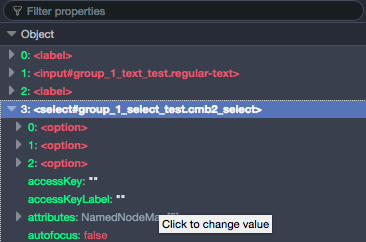
tw2113
on 5 Jul 2017
Note: I tested with Checkbox, Radio, and Multicheck, and it only seems to happen with Select fields.
JiveDig
on 5 Jul 2017
I think it's trying to act on the
<select>among others, instead of the the<option>properties.
Thanks for digging in @tw2113. This is correct. I needed to target the child elements as well. Should be good now.
 jtsternberg
on 7 Jul 2017
jtsternberg
on 7 Jul 2017
Welcome. :)
tw2113
on 7 Jul 2017
A related issue seems to have resurfaced after the last update. Using 2.2.5.3 when i add a new row, the select fields do not take the default value as set in the field, they just use the first item in the options array.
If this is considered a separate issue, I can open a new issue here.
JiveDig
on 17 Oct 2017
Slightly off topic but none the less related...If the group fields have default values, what happens? Do those only happen for the first row? And every row after is sans the default values?
 AlchemyUnited
on 6 Dec 2017
AlchemyUnited
on 6 Dec 2017
In my case my code has defaults set but 2nd and beyond rows don't respect the defaults, they just use the first option.
JiveDig
on 6 Dec 2017
@JiveDig - I ran into this a couple+ year ago (not with CMB2 but doing some js for a similar need. Much like you (for me at the time) the problem after the first row was the repeater had to be an "empty" (read: no default values) of the first row. (I also think I ran into the same muck with the select.)
In any case, what I ended up doing - and again, this was quite some time ago (so please don't shoot me) - was to establish the default row, but hide it. So when I added a new row I used that hidden default row, instead of an empty version of the previous row. I suppose you could also use a data attribute in some way but that's going to take more work than a simple - what comes down to - copy & paste.
You can see it here, if you're interested.
https://github.com/ezWebDevTools/ezDynamicList
Think about it again, I'd probably try to handle the three possible new rows. That is: blank, dupe the previous, or new w/ defaults.
Again, this is something I did so long ago I had forgotten about it til now. Certainly since then, better solutions may have come along. But at the time, the only way to have a new row with defaults was to do something like I did. At least I think so :)
p.s. I'm considering dusting it off updating it. Let me know if there's any interested.
AlchemyUnited
on 6 Dec 2017
@AlchemyUnited I see how that could be a workaround. I haven't looked at the fundamentals of how the rows duplicate, but it seems like an issue that CMB core should handle correctly IMO. Maybe @tw2113 can take a look again and re-open this issue?
JiveDig
on 6 Dec 2017
@JiveDig - Yeah agreed.
I actually have my own much more lite weigh version of CMB2 (called WPezMeta). It doesn't have groups, as that felt outside my initial scope of KISS. That said, I've been considering it, if only for the challenge. Now that I remembered I have some js, it's now mostly a matter of deciding how to save the data (as I think CMB2 and ACF each do it a different way - neither of which works with custom WP_Query).
We'll see :)
AlchemyUnited
on 6 Dec 2017
Related issues
 paaljoachim
·
8Comments
paaljoachim
·
8Comments
 kidatart
·
7Comments
kidatart
·
7Comments
 bomsn
·
5Comments
bomsn
·
5Comments
 mathetos
·
8Comments
mathetos
·
8Comments
 noquierouser
·
8Comments
noquierouser
·
8Comments
Most helpful comment
Thanks for digging in @tw2113. This is correct. I needed to target the child elements as well. Should be good now.