Cmak: Yikes! Ask timed out on [ActorSelection[Anchor(akka://kafka-manager-system/), Path(/user/kafka-manager/prod/kafka-state)]] after [2000 ms]
I tried to search for the solution to this one with no luck. Please help.
I am encountering the same issue Yikes! Ask timed out on [ActorSelection[Anchor(akka://kafka-manager-system/), Path(/user/kafka-manager/prod/kafka-state)]] after [2000 ms]
I am running the kafka-manager on a node where i can confirm that i can telnet into the ZK on 2181. We use Kafka 811.
I am running with
/home/ubuntu/kafka-manager-1.3.3.13/bin/kafka-manager -Dconfig.file=/home/ubuntu/kafka-manager-1.3.3.13/conf/application.conf -Dhttp.port=9292 -Dkafka-manager.zkhosts=kafka1:2181,kafka2:2181,kafka3:2181,kafka4:2181 > /var/log/kafka-manager.log 2>/home/ubuntu/kafka-manager-1.3.3.13/error.log &
When i load the test cluster it's fine. Help needed please.
 dinar-dalvi
All 19 comments
Disabling Poll consumer information (Not recommended for large # of consumers) fixes it for me
 simplesteph
on 12 Sep 2017
simplesteph
on 12 Sep 2017
I don't have it checked in anyways.
dinar-dalvi
on 12 Sep 2017
seems like i have around 14k topics and this is the issue, any suggestions?
dinar-dalvi
on 12 Sep 2017
I had the same error, in my case I fixed it by limiting the Cluster ZooKeeper hosts field to IP address and port:
Before: zk1:2181,zk2:2181/NAMESPACE
After: zk1:2181,zk2:2181
 esteban-zenedge
on 29 Sep 2017
esteban-zenedge
on 29 Sep 2017
it is good tool for consumer information collection, how to mitigate this issue by keeping "Poll consumer information"
 tanuj83
on 16 Oct 2017
tanuj83
on 16 Oct 2017
Met with the same issue, with "poll consumer infomation", seemed I can get the incoming message rate.
It's quite useful
I did some configuration changes per description on the https://github.com/yahoo/kafka-manager, mainly for the thread pool size and the queue size, now it works. :(
 wenxzhen
on 27 Oct 2017
wenxzhen
on 27 Oct 2017
Thats not the solution guys. The problem keeps coming back no matter what configs you change. Every pseudo-solution to this problem consist on ThreadPools or kafka Manager Cluster Config being restarted. The problem still come back in time. The number of topics on the cluster seems to be strongly related.
Here we have 2 clusters:
-(sandbox) 3 brokers, 250 topics, ~70 m/s;
-(prod) 3 brokers, 450 topics, ~150 m/s;
The problem keeps coming back on prod after we restart kafka manager or change configs. It works for like 2 hours and then fail again.
I dont know scala very well. If I do, I would have a fix coming in a way. I think the problem could be fixed by increasing the 5000ms also. But could not test this yet.
 marcosArruda
on 30 Nov 2017
marcosArruda
on 30 Nov 2017
@simplesteph is the expectation that one should use that setting? It is quite helpful (when it works). Curious have you came across anything to help resolve it?
 JarenGlover
on 5 Dec 2017
JarenGlover
on 5 Dec 2017
@JarenGlover honestly I have no idea and I just don't use the kafka manager to manage my consumer. My project is dead. It works for listing topics and that's what I needed right now
simplesteph
on 5 Dec 2017
@simplesteph thanks. do you have a preferred tool of choice for managing your consumers? visually's ideally.
JarenGlover
on 5 Dec 2017
@marcosArruda +1, in the same situation
 qdore
on 7 Dec 2017
qdore
on 7 Dec 2017
From my experience, the timeout mostly means that there is a consumer working not well. If our consumers work well, we will not met with such issue.
wenxzhen
on 8 Dec 2017
@wenxzhen interesting. is there an example of what you mean by the consumer "not working well?".
I would see this /topic route timeout and the jmx info not show up in the /broker route.
JarenGlover
on 8 Dec 2017
often I would see the consumer failed to commit the offset. And it seemed it's busy with the committing and not able to respond to the query
wenxzhen
on 8 Dec 2017
I committed a pull request https://github.com/yahoo/kafka-manager/pull/456.
No problem occurred during my testing when no longer use Future[PartitionOffsetCapture] to get topic offsets.
 DavidLiuXh
on 11 Dec 2017
DavidLiuXh
on 11 Dec 2017
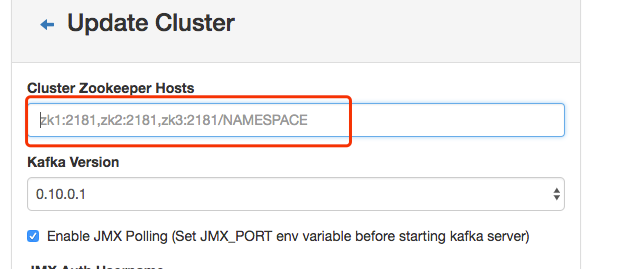
In my case, I have 3 zk nodes. When I entered "Cluster Zookeeper Hosts" with slb address or a one zk node's ip address, I got this error. Finally, I entered all the 3 zk nodes' ip addresses, then it worked. Suggest entering some zk addresses not only one.
Notice: "Cluster Zookeeper Hosts" shows a tip with "zk1:2181,zk2:2181,zk3:2181/NAMESPACE", but actually it is "zk1:2181/NAMESPACE,zk2:2181/NAMESPACE,zk3:2181/NAMESPACE". If you enter "zk1:2181,zk2:2181,zk3:2181/NAMESPACE" format, you will get this error too.
 wuxingdexian
on 24 May 2018
wuxingdexian
on 24 May 2018
@wuxingdexian interesting. This was helpful with what version of the application?
JarenGlover
on 13 Jun 2018
I also have the same issue it looks like Kafka-manager also needs all Kafka brokers to connect if it not reachable it will throw the error in the logs and in the console. Once I added the brokers in the firewall, all started working like charm.
I wasted a lot of time in debugging this issue, it was the firewall issue for me, So every time when we add new brokers we need to make sure Kafka manager should connect to that brokers.
 timusri
on 17 Jul 2018
timusri
on 17 Jul 2018
If your kafka manager run at your zk host, for web config Cluster Zookeeper Hosts, use localhost:2181 instead of ip:2181.
That works for me.
 autocyz
on 14 Jun 2019
autocyz
on 14 Jun 2019
Related issues
 jmax01
·
4Comments
jmax01
·
4Comments
 Angryrou
·
4Comments
Angryrou
·
4Comments
 PiotrBB
·
6Comments
PiotrBB
·
6Comments
 rudrasharma
·
6Comments
rudrasharma
·
6Comments
 Jonathan-Wei
·
3Comments
Jonathan-Wei
·
3Comments
Most helpful comment
I committed a pull request https://github.com/yahoo/kafka-manager/pull/456.
No problem occurred during my testing when no longer use Future[PartitionOffsetCapture] to get topic offsets.